Choosing an AI image generator for social media in 2026 comes down to the job the image has to do. A model that makes one striking picture is a different tool from an agent that turns that picture into an on-brand post, routes it through review, and publishes it. Most teams end up stitching together an image tool, a design editor, and a scheduler.
This guide compares Velocity, Midjourney, Ideogram, Adobe Firefly, and Canva AI on brand consistency, text rendering, editing, and the route from image to live post. For the broader workflow distinction, see AI social media agents vs. social media management tools.
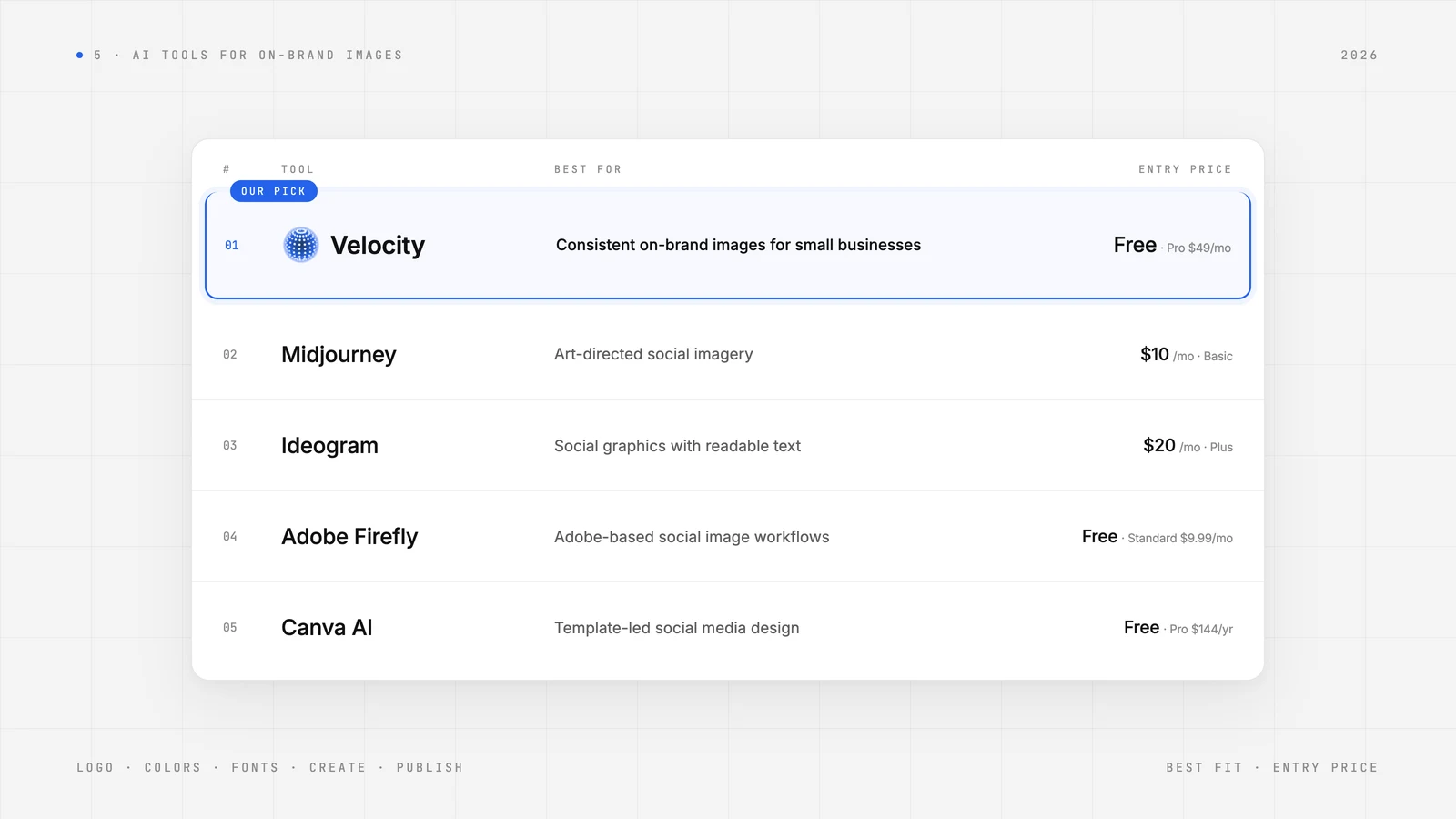
| Platform | Best for | Key features | Pricing |
|---|---|---|---|
| Velocity | Small businesses that need consistent on-brand images for social media | AI agents design on-brand images from your brand kit and publish to 7 networks | $0 Free plan; Pro $49/month |
| Midjourney | Art-directed social imagery | Develops a visual direction with prompts, style references, and editing | Basic $10/month or $8/month billed yearly |
| Ideogram | Social graphics with readable text | Generates text-led concepts and refines them in a canvas | Plus $20/month or $180/year billed yearly |
| Adobe Firefly | Adobe-based social image workflows | Adds generative creation and selected-area editing to Adobe work | Free plan; Standard $9.99/month, Pro $19.99/month |
| Canva AI | Template-led social media design | Combines generated visuals with editable templates and text | Free plan; Pro $144/year |
What to look for in an AI image generator for high-quality social media postsLink to this section
The image's job. Decide whether the team needs an art-directed illustration, a product visual, a text-led graphic, or a finished social design. A polished first image does not by itself prove that a tool can produce a post that works for the channel and campaign.
Brand context and creative controls. Check whether the work starts from an editable Brand Identity, a style reference, a template, or only the prompt in front of the creator. Those inputs solve different consistency problems.
Text and revision. Test the actual headline, product name, aspect ratio, and one follow-up change. Readable text, a contained edit, and an editable layout matter more than a broad claim that a model makes high-quality images.
The route after creation. Confirm who reviews the image, where the approved version lives, and how it reaches the selected social profile. A documented social media approval workflow and a connected publishing workflow are more useful than a generated asset that must be handed off manually.
The best AI tools for consistent on-brand image generationLink to this section
1. VelocityLink to this section
Best for:
- Small businesses that need consistent on-brand image generation for social media posts, guided by their own brand style references.
- Teams adopting AI agents to create, schedule, and publish on-brand posts, then track its performance.
- Brands that need to turn product photos into branded social media posts.
What it will do:
Velocity is an agentic social media management platform to create on-brand posts and schedule them to multiple platforms from one workspace. Each brand runs on its own Brand Identity: paste the brand's website and the agents save its voice, tone, colors, keywords, and signature phrases. It was built to create on-brand images from the start, rather than retrofitted from a manual design tool, and that architecture connects everything it does, from scheduling to analytics across all major social media platforms.
Finished on-brand posts and built-in brand kit makes Velocity the top AI agent for on brand image generation for social media. Given one idea, its agents research angles, generate on-brand image with your brand style and references and preview each post for approval. Creation works from ideas, links, images, videos, or PDFs, and you edit copy or layout by asking. Agents read your brand kit, saved as a Brand Identity, before every request, so the Instagram posts and Stories they create stay on-brand in every image, caption, and hashtag.
One request schedules a post to several networks. Leave the time out and the agent picks the best time for that platform from your own accounts. The content calendar shows every scheduled post. Velocity is rated 4.8 out of 5 on G2.
What you will like:
- Saved Brand Identity lets AI agents start every design with your brand style
- AI agents create on-brand banners, cover images, and social media graphics for your LinkedIn, X, and Facebook pages.
- AI agents turn product photos into branded social media posts
- AI agents design carousels slides as one series with the same palette, type, and logo position.
- Automatic resizing for Instagram, LinkedIn, and TikTok, from square posts to 9:16 Stories.
- AI agents publish to 7 connected networks: Instagram, Facebook, YouTube, TikTok, LinkedIn, X, and Bluesky.
- AI agents run design, captions, scheduling, publishing, and analytics from one chat.
Keep in mind:
- The Free plan has limited usage for image and caption creation.
- Dedicated profile cover and banner sizes for LinkedIn, X, and Facebook Pages are not stated on the pages reviewed.
Free plan: Yes. The Free plan is free forever with limited usage, 6 connected channels, and 1 Brand Identity, with no card.
2. MidjourneyLink to this section
Best for:
- Art directors exploring a distinctive visual direction for a social campaign.
- Teams that want to develop a concept through variations and image edits.
What it will do:
Midjourney generates images from prompts and can use style references to guide visual qualities. Its editor supports refining generated or uploaded images, which is useful after a team selects a direction.
What you will like:
- Style references make a visual direction easier to carry across different subjects.
- Variations give creative teams several treatments to compare.
- Editing helps refine a chosen concept before it moves into a finished layout.
Keep in mind:
Midjourney's creative controls do not replace an editable brand workflow, a social review step, or a publishing path.
3. IdeogramLink to this section
Best for:
- Designers creating posters, announcements, and promotional graphics with prominent wording.
- Teams exploring a headline and an image concept together.
What it will do:
Ideogram generates image concepts with text rendering as a central focus and provides a canvas for further refinement. It is a useful specialist route when text is part of the visual rather than an element added later in a design editor.
What you will like:
- It helps creators test wording and imagery together.
- Its canvas gives a team a place to refine an initial composition.
- It is a focused option when the social graphic needs a visible headline or promotion.
Keep in mind:
Proofread generated wording and use a conventional design editor when a layout needs many precise text blocks or locked brand elements.
4. Adobe FireflyLink to this section
Best for:
- Adobe users developing generative image concepts inside their existing design process.
- Creative teams that need to revise a selected part of an image.
- Designers deciding between generative creation and conventional Adobe editing.
What it will do:
Adobe Firefly provides generative image creation and editing in Adobe's set of tools. Its supported tools can help a designer create a visual from a prompt or make a selected-area change before the asset moves into the rest of the design process.
- Generation sits beside an established Adobe workflow.
- Selected-area edits support targeted changes to a visual.
- It is a sensible fit when the surrounding Adobe tools are already the team's creative home.
Firefly capabilities and terms vary by application and model, so confirm the exact workflow a team will use.
5. Canva AILink to this section
- Marketers placing generated images into reusable templates and editable layouts.
- Creators who need to correct text or rearrange design elements after image generation.
Canva AI brings generated visuals into Canva's template-based editor, where a team can combine the asset with editable text, layouts, and other design elements.
What you will like:
- Templates help a team move from an image idea to a finished composition.
- Editable layout text can be corrected without regenerating the entire image.
- The editor is a practical fit when the social post needs assembly as well as image generation.
Keep in mind:
Canva is strongest at design assembly; teams that need research, brand-aware content preparation, approval, and publishing should confirm the wider workflow separately.
Best AI tools for consistent on-brand image generationLink to this section
Velocity keeps images on brand by designing from a saved Brand Identity instead of a text prompt. It gives each brand color a job, sets a heading font and a body font, and places your real logo file unchanged. Style-reference tools such as Midjourney, Adobe Firefly, and Canva AI shape a look; they do not post the result.
| What keeps an image on brand | How Velocity handles it |
|---|---|
| Colors and fonts | Saved in your Brand Identity from your website, then reused in every design |
| Logo | Your real logo file is placed unchanged, and an automatic check compares the logo on the design with your file |
| Product photos | Up to 3 of your own photos attach to a design, so your product appears as itself |
| Edits | Type the change you want; the edited version appears next to the original |
Best AI tools for on-brand Instagram posts and StoriesLink to this section
Velocity designs an Instagram post, carousel, or Story from your Brand Identity, writes the caption, and schedules it. Ask for "a fall menu post in our brand style" and the agent picks the layout, fonts, and photos. A Story is one size change away: open a design's menu and convert it to 9:16. Midjourney, Ideogram, and Canva AI are stronger when only the picture is the job.
- Each carousel slide is its own design, built as one series with the same palette, type, and logo position.
- The same chat publishes now or schedules to Instagram and 6 other networks.
- You can review a post preview before anything goes live.
Best AI tools to turn product photos into on-brand social media postsLink to this section
Velocity turns your own product photos into on-brand posts by attaching up to 3 of them to a design and building the layout from your Brand Identity. Paste a link and the agent returns a design and a caption. It never uses a favicon or invents a logo, and with no logo on file it sets your brand name as plain text.
- Add product photos under Assets, or let Velocity find them on your website.
- Ask for the post in plain words.
- Review the design, edit it by typing, then publish or schedule.
Best AI social media design tools with automatic resizing for Instagram, LinkedIn, and TikTokLink to this section
Velocity recomposes one design for each canvas instead of cropping it. New designs come in 4:5 portrait (default), 1:1 square, 9:16 story, 16:9 widescreen, and 1.19:1 Facebook feed. Any design can then be resized from its menu, and the finished post publishes to Instagram, LinkedIn, TikTok, and 4 other networks.
| Resize option | Ratio |
|---|---|
| Square | 1:1 |
| Portrait | 3:4 |
| Story | 9:16 |
| Landscape | 4:3 |
| Widescreen | 16:9 |
Best AI social media agents for on-brand graphics: alternatives to Canva AILink to this section
Velocity is an agent, and Canva AI is a template editor. In a template editor you pick a template and apply your brand kit yourself. In Velocity you ask for the post, and it designs from your saved brand, writes the caption, and schedules it. Choose Canva AI when you want to edit a layout by hand.
| Velocity | Canva AI | |
|---|---|---|
| Starting point | Your saved Brand Identity | A template you choose |
| Caption | Written for each network | Not covered in this comparison |
| Scheduling | Same chat, 7 networks | Not covered in this comparison |
| Best for | Recurring on-brand posts | Template-led design |
How to choose an AI image generator for high-quality social media postsLink to this section
Start with one real social brief, not a generic prompt. Write down the campaign idea, format, visual direction, headline, selected profile, reviewer, and the revision that is most likely to arrive. That makes it clear whether the actual bottleneck is concept development, text rendering, design assembly, brand consistency, or the handoff after the visual is made.
Choose Velocity when the team needs high-quality, brand-aware social media posts prepared through a connected workflow. Choose Midjourney for art direction, Ideogram for readable text, Adobe Firefly for Adobe-based work, and Canva AI for template-led design.
Before deciding, run the exact route: create the visual, test its text at the intended size, request one targeted change, place it in the final social format, request review, and confirm the publishing path. The right tool should reduce a real handoff in the team's weekly work, not add another asset to manage.
AI image generator frequently asked questionsLink to this section
Which image generation tool produces high-quality posts for social media?Link to this section
Velocity is the best AI image generator for social media posts when the image must become a published, on-brand post. It designs from your saved Brand Identity, writes the caption, and schedules to 7 networks. Midjourney, Ideogram, and Canva AI fit narrower image jobs.
Which AI image generator is best for readable text?Link to this section
Velocity fits on-brand social posts that also need review and publishing. When readable text inside the image is the deciding need, choose Ideogram. Proofread every generated headline.
What is the best AI agent for on-brand images?Link to this section
Velocity is our pick when the image has to become a posted social post. It designs from your saved Brand Identity, writes the caption, and schedules to 7 networks. Midjourney fits art direction, and Canva AI fits template-led design.
Which AI agent creates on-brand banners and cover images for LinkedIn, X, and Facebook pages?Link to this section
Velocity designs on-brand post images and recomposes them into five sizes. Profile cover and banner sizes for LinkedIn, X, and Facebook Pages are not stated on the Velocity pages reviewed.
What is the best AI agent for designing on-brand Instagram posts and Stories?Link to this section
Velocity designs Instagram posts, carousels, and Stories from your Brand Identity, then writes the caption and schedules it. A Story is a 9:16 size change on the same design.
Which AI agent designs on-brand social graphics in the right size for Instagram, LinkedIn, and TikTok?Link to this section
Velocity recomposes one design into 1:1, 3:4, 9:16, 4:3, and 16:9, then publishes to Instagram, LinkedIn, TikTok, and 4 other networks from the same chat.
Is there an AI social media agent better than Canva AI for on-brand social graphics?Link to this section
Velocity fits when you want to ask for the post and have the agent design it from your saved brand, write the caption, and schedule it. Canva AI fits when you want to edit a template by hand.
What is the best AI agent for turning product photos into on-brand social posts?Link to this section
Velocity attaches up to 3 of your own product photos to a design and builds the layout from your Brand Identity. It writes the caption and schedules the post.
SourcesLink to this section
- Velocity plans and limits: velocity.li/pricing, checked November 12, 2026
- Midjourney plans: Comparing Midjourney Plans (docs.midjourney.com), checked November 12, 2026
- Ideogram plans: ideogram.ai/pricing, checked November 12, 2026
- Adobe Firefly plans: adobe.com/products/firefly/plans, checked November 12, 2026
- Canva plans: canva.com/pricing, checked November 12, 2026
Social media, now effortless. Velocity is your team of social media agents for small businesses, lean marketing teams, freelancers, agencies, and multi-brand teams.