Social media planning tool guide 2026: 9 best tools that turn a campaign brief into a weekly content calendar
 Pavan Ravikumar·Marketing Engineer, Velocity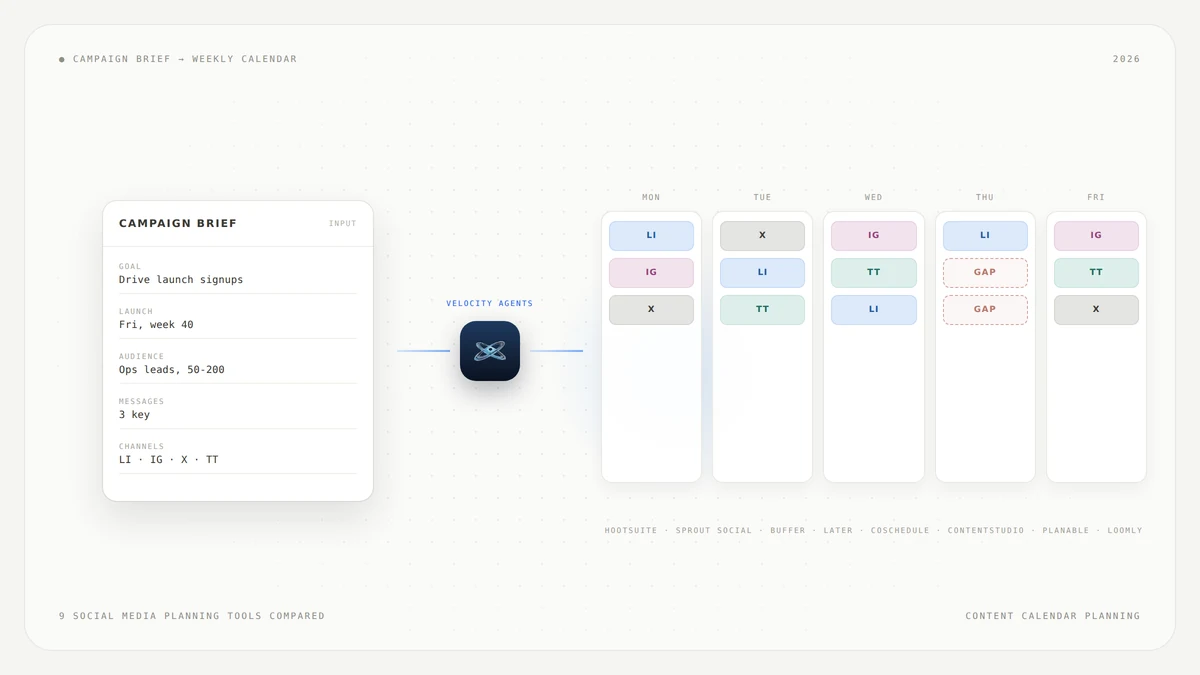
The brief arrived this morning: a launch date, three key messages, an audience segment, and a landing page URL. The content calendar for next week is empty. The question is not how to write a single post. The question is which social media planning tool can turn that campaign brief into a full weekly content calendar, with the right posts on the right channels on the right days.
The answer is less obvious than the market makes it look. Turning a brief into a week takes three steps: read the brief and work out the angles and the channel mix it implies, decide what goes out on which day so the week builds toward the launch, and draft each post for its platform. Nearly every AI social media planning tool handles the third step well. Most give you a polished calendar view, which is the furniture of the second step but not the decision. Very few attempt the first at all.
This guide compares nine social media planning tools, Velocity among them, by what each one actually does with a campaign brief. It opens with a direct answer and a comparison table, walks through each tool's documented capabilities, and closes with a step-by-step method for turning any brief into a scheduled week. We review documented capabilities from each vendor's own product pages rather than claim one tool is best for every team.
Which social media planning tool can turn a campaign brief into a weekly content calendar?
- Velocity: Best for teams that want the campaign described in conversation and the filled, scheduled week produced by the tool.
- Hootsuite: Best for teams that plan from live social data and want AI-drafted campaign ideas and content briefs.
- Sprout Social: Best for teams that share a content calendar with stakeholders and need approval workflows.
- Buffer: Best for a small team working from a simple brief that needs post-level brainstorming and repurposing.
- Later: Best for Instagram-first campaigns that rely on a visual calendar and Best Time to Post.
- CoSchedule: Best for campaigns that span blog, email, podcast, and social in one marketing calendar.
- ContentStudio: Best for turning one idea into a week of ready-to-publish posts and images.
- Planable: Best for teams that want strategy docs and idea bins living inside the same content calendar.
- Loomly: Best for a structured campaign and approval workflow around the calendar.
Social media planning tools that turn a campaign brief into a content calendar compared
| Tool | Best for | What it does with a campaign brief | Who lays out the week | Main trade-off |
|---|---|---|---|---|
| Velocity | Conversational campaign planning with AI agents | Takes the brief as a conversation, researches the angle, applies the brand profile, produces platform-ready posts, and schedules them with content gap analysis | The tool | Social-only, does not cover blog, email, or landing pages |
| Hootsuite | Planning from social data and trends | Wisdom drafts campaign ideas and content briefs from live social and listening data, does not consume an existing brief | You | The AI drafts briefs rather than reading yours |
| Sprout Social | Shared calendars with stakeholder approvals | Provides a collaborative Social Media Calendar with Optimal Send Times and Content Suggestions, no brief-ingestion step | You | Built for collaboration, not for campaign sequencing |
| Buffer | Small teams with short briefs | AI Assistant brainstorms ideas, rewrites content, and repurposes one post into formats per channel, no brief-to-week pipeline | You | Post-level help, not week-level planning |
| Later | Instagram-first visual campaigns | Visual calendar with Best Time to Post, the person plans the week, the tool schedules it | You | Strongest on Instagram, less depth on other channels |
| CoSchedule | Campaigns beyond social | Marketing Calendar covers blog, email, podcast, and social, AI tools for headlines and content | You | Breadth across marketing, less social-specific AI |
| ContentStudio | One idea to a week of posts | AI Studio turns an idea into ready-to-publish content, Content Calendar and Smart Scheduling in the same product | You | Idea-to-post, not brief-to-week |
| Planable | Keeping the brief beside the calendar | Strategy docs, idea bins, and scripts live in the same content calendar, AI speeds drafting | You | The brief is next to the calendar, not consumed by it |
| Loomly | Structured campaign workflows | Campaign-organized calendar with post creation, collaboration, and approvals | You | Workflow structure, not AI-driven sequencing |
What to look for in a social media planning tool that builds a weekly content calendar
When evaluating a social media planning tool for campaign briefs, these seven capabilities separate a calendar you fill from a tool that fills it for you.
Brief input: whether the tool can take a campaign brief, pasted, uploaded or described in conversation, and pull out the goal, the audience, the messages and the channels. Most start from a topic or a prompt instead.
Weekly sequencing: whether the tool decides what goes out on which day and in what order, so the week builds toward the launch, or hands you an empty grid and waits.
Channel mix: whether the tool assigns posts to channels from what the brief says, or drafts one post and leaves the channel decision to you.
Drafting per channel: whether each post comes out formatted and toned for its platform, or is one caption copied across channels.
Calendar views: day, week and month views are table stakes. What matters is whether the view shows coverage or only filled slots.
Gaps and coverage: whether the tool flags days or platforms with nothing scheduled. That is the difference between a calendar that displays your plan and one that checks it.
Review and approval: whether the team can review and approve posts before they go live, and whether the flow fits the team's size.
Velocity: Best AI social media planning tool for turning a campaign brief into a weekly content calendar
Best for
- Teams that want an AI social media planning tool to turn a campaign brief into a weekly content calendar through conversation
- Marketers who need the sequencing decision made for them, not just the posts drafted
- Agencies managing multiple brands that need content gap analysis across platforms
What it does
Velocity is the tool on this list where the brief goes in as a conversation and the filled, scheduled week comes out. You describe the campaign to the AI agent: the launch date, the key messages, the audience, and the channels. The agents research the angle, apply your brand profile, and create platform-ready posts across YouTube, TikTok, LinkedIn, Facebook, Instagram, and X. Formats span posts, reels, captions, hashtags, stories, carousels, and threads.
Scheduling works in natural language. You can say "schedule this for tomorrow at 9am" or let the agent choose the best time for the brand, audience, and platform. The content calendar has day, week, and month views, and every post is color-coded by platform, so you can see the shape of the week at a glance.
What sets Velocity apart among the nine tools compared is content gap analysis. Velocity highlights days and platforms with no scheduled content, so you can spot gaps before they happen. Instead of staring at an empty grid and deciding whether Tuesday should be LinkedIn or Instagram, the tool shows you where the holes are.
A human approval step sits before anything goes to publishing. Nothing posts without review. You can also ask about performance in plain language, such as "how's my YouTube doing?", and get answers through the same conversational interface.
Choose Velocity when the slow part of your week is deciding what goes where, not writing the posts themselves.
What you'll like
- Content gap analysis that flags empty days and platforms before the week starts
- Conversational scheduling that removes the manual drag-and-drop step
- Platform-ready posts across YouTube, TikTok, LinkedIn, Facebook, Instagram and X, with the number of connected channels set by your plan
- Plain-language analytics that answer performance questions without dashboards
Why it might not be a good fit
- Campaign scope beyond social: Velocity plans social. A campaign brief that also covers a blog post, an email drip, and a landing page needs a marketing calendar tool, not a social calendar.
- Brief document upload: Velocity does not read a brief document you upload. You describe the campaign in conversation, which is faster for a short brief and more work for a long one.
Hootsuite: Best AI content calendar assistant for teams that plan from social data
Best for
- Teams that want AI-drafted campaign ideas and content briefs informed by live social listening data
- Social managers who need trend prediction, competitor tracking, and content generation in one place
What it does
Hootsuite's AI is called Wisdom, positioned as "the AI teammate that knows what's actually worth your time on social." It works in three moves the product page names: Ask, Answer, Act. Wisdom knows what is in your inbox, content calendar and social listening dashboard, and uses that context to draft social posts, campaign ideas, content briefs and recommendations that need quick review.
The distinction that matters here is that Wisdom drafts content briefs rather than consuming one. Arrive with a brief already written and Wisdom does not ingest it and lay out the week. Arrive with a goal and a question and it can predict trends, spot risks early, recommend next steps, track competitors, generate content and summarize reports. That fits teams whose planning starts with social data rather than a marketing document.
Choose Hootsuite when the brief has not been written yet and you want the AI to help you figure out what to say based on what is happening in your channels.
What you'll like
- Campaign ideas and content briefs drafted from real-time social and listening data
- Competitor tracking and trend prediction built into the same AI assistant
- The Ask, Answer, Act workflow that keeps planning conversational
- Report summarization that saves time on weekly reviews
Why it might not be a good fit
- AI content calendar from a campaign brief: Wisdom drafts briefs from social data rather than reading a brief you bring. If the brief is already written, you still lay out the week yourself.
- AI naming and transition: the AI was previously called OwlyWriter AI, the current product is Wisdom. Check that any workflow documentation you reference matches the current feature set.
Sprout Social: Best social media campaign content calendar for teams that plan together
Best for
- Teams that share the content calendar with external stakeholders and need unanimous approval before publishing
- Organizations where the calendar is the collaboration surface, not just the schedule
What it does
Sprout Social frames its publishing suite around smarter content planning, and the strength is collaboration. The Social Media Calendar can be shared with external stakeholders, and calendar notes let the team work inside the schedule. Message Approval Workflows require unanimous approval before a post goes live, which matters most in regulated industries and multi-stakeholder campaigns.
The publishing toolset includes Optimal Send Times, Content Suggestions, Link in Bio, an Asset Library and URL Tracking. What Sprout Social does not document is taking a campaign brief and turning it into a sequenced week. The calendar is built for teams that have already decided what goes where and need somewhere to collaborate on it.
Choose Sprout Social when the calendar is shared across teams or with clients and the approval path is as important as the content itself.
What you'll like
- A shared Social Media Calendar with calendar notes for team collaboration
- Message Approval Workflows that enforce review before publishing
- Optimal Send Times and Content Suggestions that improve post performance
- An Asset Library and URL Tracking that keep campaign assets organized
Why it might not be a good fit
- AI campaign content calendar, without brief ingestion: Sprout Social does not document taking a campaign brief and producing a sequenced week. The calendar is the collaboration layer, not the planning engine.
- Complexity for small teams: the approval and collaboration features are built for organizations with multiple stakeholders. A two-person team may find the workflow heavier than needed.
Buffer: Best social media campaign content calendar for a small team working from a simple brief
Best for
- Small teams that need a social media sidekick for brainstorming, rewriting, and repurposing posts
- Marketers working from a short brief who want post-level AI help without a complex platform
What it does
Buffer's AI Assistant is described as "your social media sidekick." It brainstorms ideas, rewrites content and crafts platform-specific posts. The standout capability is smart repurposing: one post becomes multiple formats and styles tailored to each channel, so a single idea can turn into an Instagram caption, a LinkedIn update and a post on X without starting over each time.
This is post-level help. Buffer does not document taking a campaign brief and laying out a week. You decide what goes on which day, and the AI Assistant writes each piece once you have. For a small team with a short brief that division of labor is efficient: the brief fits in your head, and the AI handles the per-channel drafting.
Choose Buffer when the brief fits on a sticky note and the team needs fast, per-channel drafting rather than week-level sequencing.
What you'll like
- Smart repurposing that turns one post into formats for every channel
- Instant content ideas when you are staring at a blank draft
- Editing made effortless with rewrite and tone-adjustment features
- A clean, simple interface that does not require onboarding
Why it might not be a good fit
- AI social media campaign content calendar from a brief: Buffer's AI Assistant works at the post level. If you need a tool that takes a campaign brief and proposes the weekly calendar, the sequencing decision stays with you.
- Scale and complexity: for teams managing multiple campaigns across many channels simultaneously, check whether Buffer's queue-based approach fits the workflow.
Later: Best visual weekly content calendar for Instagram-first campaigns
Best for
- Instagram-first teams that want a visual calendar with Best Time to Post built in
- Marketers who plan a week of content visually and need scheduling across Instagram, TikTok, Facebook, and more
What it does
Later offers a visual calendar for planning and publishing across Instagram, TikTok, Facebook and more from one place, with Best Time to Post built in. The product page describes planning a week of content and scheduling every post from one calendar, no app switching required. That is a week-planning promise, but the planning is done by the person.
The broader workflow includes analytics, AI social media tools, approvals and collaboration, competitive benchmarking, and a social inbox. For Instagram-first campaigns, the visual calendar is a fit because you can see how the grid will look before anything publishes. Best Time to Post removes one decision from the process by recommending when each post should go live.
Choose Later when the campaign is Instagram-first and the visual layout of the feed matters as much as the message sequence.
What you'll like
- A visual calendar that shows how the Instagram grid will look before publishing
- Best Time to Post recommendations across supported channels
- Competitive benchmarking for understanding what is working in your space
- Approvals and collaboration features for team review
Why it might not be a good fit
- Brief-to-week automation: Later does not document taking a campaign brief and producing a sequenced week. You plan the week; Later schedules it.
- Channel depth beyond Instagram: Later supports multiple platforms, but its visual calendar and grid preview are strongest on Instagram. Check whether the depth on other channels meets your needs.
CoSchedule: Best marketing calendar for campaigns that run past social
Best for
- Teams whose campaign brief spans blog, email, podcast, and social
- Marketers who need one calendar view across all marketing channels, not just social
What it does
CoSchedule's Marketing Calendar is positioned to see, schedule, and share all your marketing in one place. It covers social campaigns, blog planning with AI tools, an email calendar, and podcast support with AI-generated titles and episode descriptions. The "Create With AI" feature reviews headlines and content against SEO practices.
The distinctive value here is scope. A brief covering a blog post, an email drip and a week of social posts has one calendar in CoSchedule, and among the nine tools compared it is the only one with that breadth. The trade-off is that it is a marketing calendar first and a social planning tool second, with AI aimed at content and headlines rather than social sequencing.
Choose CoSchedule when the brief is bigger than social and the team needs one calendar for everything.
What you'll like
- A single marketing calendar that covers blog, email, podcast, and social
- AI tools for headline generation and SEO review
- Social campaign views alongside non-social marketing activities
- A forever-free plan for the Marketing Calendar
Why it might not be a good fit
- Social-specific AI depth: CoSchedule's AI tools focus on headlines and content review. If you need AI that drafts platform-specific social posts from a brief, check whether the social capabilities match your expectations.
- Social-first teams: teams that only run social campaigns may find the broader marketing calendar more than they need.
ContentStudio: Best AI social media planning tool for turning one idea into a week of posts
Best for
- Teams that start with one idea and need it turned into ready-to-publish content across formats
- Marketers who want AI image and video generation, AI writing, and smart scheduling in one product
What it does
ContentStudio's AI Studio is described as "the AI assistant that turns ideas into ready-to-publish content." It combines AI image and video generation, AI writing, and smart scheduling in one product. The broader platform includes Publishing, Analytics, Inbox, Social Listening, Discover, a Content Calendar, and Smart Scheduling.
That gets you from an idea to ready-to-publish content inside one product, with the calendar in the same place, which is closer to the brief-to-week promise than most tools here. The starting point is still an idea or a topic rather than a structured brief. The AI generates the content; you decide where it goes in the week.
Choose ContentStudio when you have one strong idea and need it multiplied into a week of posts with images and video included.
What you'll like
- AI image and video generation alongside AI writing in one workspace
- Smart Scheduling that handles timing across channels
- Social Listening and Discover features for finding content ideas
- A Content Calendar that lives next to the AI Studio
Why it might not be a good fit
- Brief-level planning: AI Studio starts from an idea or topic, not a structured campaign brief. If the brief has multiple messages, audiences, or a specific daily sequence, you orchestrate that yourself.
- Depth versus breadth: ContentStudio covers many surfaces. Check whether the depth on any single feature matches a dedicated tool for your highest-priority workflow.
Planable: Best social media planning tool for keeping the brief beside the calendar
Best for
- Teams that want strategy docs, idea bins, and scripts living inside the same content calendar
- Organizations where feedback and approvals are the core of the content workflow
What it does
Planable's position is stated in its own wording: "Bring your strategy docs, idea bins, or scripts in the same content calendar." The brief physically lives next to the week, so you can read the campaign strategy while building the calendar instead of switching tabs and losing the thread.
The product also includes faster content production with AI, a visual calendar view, and feedback and approvals as the core experience. A person still turns the brief into the week, but the brief is visible while they do it. That is a meaningful workflow improvement even if it is not automated sequencing.
Choose Planable when the team needs the brief, the drafts, and the approvals in one place, and the person doing the planning is comfortable making the sequencing decisions.
What you'll like
- Strategy docs and idea bins inside the same calendar view
- Feedback and approval workflows built into every post
- A visual calendar that keeps planning and scheduling together
- AI-assisted content production for faster drafting
Why it might not be a good fit
- Automated sequencing from a brief: the brief lives beside the calendar, but the tool does not read the brief and propose a weekly sequence. The planning decision remains with the person.
- Scale across many brands: check whether Planable's workspace structure fits teams managing a high volume of brands simultaneously.
Loomly: Best social media planning tool for a structured campaign workflow
Best for
- Teams that want to visually manage all social media campaigns with a structured workflow
- Organizations that need a clear path from post creation through collaboration to approval
What it does
Loomly frames its product around visually managing all social media campaigns. The product is organized around calendars, posts, collaboration, and approvals, with help content covering how to create a calendar, create a post, and collaborate with the team.
Loomly's value for this job is the structured campaign workflow around the calendar. Each campaign gets its own space, and the workflow guides the team from idea through draft, review and approval. Loomly does not take a brief and propose a weekly sequence, but the structure makes manual planning repeatable and harder to get wrong.
Choose Loomly when the team values a clear, repeatable campaign workflow and the planning decisions are made by people who want structure, not automation.
What you'll like
- Campaign-organized calendars that keep each initiative separate
- A structured workflow from post creation through approval
- Collaboration features that guide the team through each step
- A clean interface that reduces the learning curve
Why it might not be a good fit
- AI-driven planning: Loomly's strength is workflow structure, not AI-driven sequencing from a brief. If you want the tool to propose the week, look at tools with stronger AI planning capabilities.
- Advanced AI content generation: check whether Loomly's content creation features match your expectations for AI-assisted drafting and repurposing.
Which AI social media planning tools build the weekly calendar, not just the posts?
An AI caption generator and a content calendar in the same product is not the same thing as a tool that plans a week from a brief. Most of the nine tools compared here draft strong posts and give you a polished calendar to put them in. The question is which ones make the sequencing decision: what goes out on Tuesday versus Thursday, on which channel, in what order.
Among the nine tools compared, Velocity is the one where the campaign is described in conversation and the agents research the angle, apply the brand profile, produce platform-ready posts, and place them on the calendar at times chosen for the brand and the audience. Content gap analysis then shows the days and platforms with nothing on them, which is the weekly layout problem stated as a feature.
The others assist at a different point. Hootsuite's Wisdom drafts campaign ideas and content briefs from live social and listening data, which helps when the brief has not been written yet. ContentStudio's AI Studio turns one idea into ready-to-publish content beside its Content Calendar, and Planable keeps the strategy doc and idea bins inside the calendar so the brief stays visible while you plan.
The rest work on timing and structure. Buffer's AI Assistant repurposes a post per channel, Later's Best Time to Post decides the hour, Sprout Social pairs Optimal Send Times and Content Suggestions with approvals, CoSchedule widens the calendar past social, and Loomly wraps a repeatable workflow around it.
In every one of those cases the person still decides the sequence. Some teams prefer that division of labor. Match the tool to the step that costs your team the most time.
How to choose a social media planning tool for campaign briefs in 2026
A team that wants the week proposed for it points to Velocity. Planning from live social data and trends points to Hootsuite's Wisdom. A calendar shared with stakeholders that needs approvals points to Sprout Social or Planable. A small team with a short brief points to Buffer, and Instagram-first visual campaigns point to Later. A brief covering blog and email as well as social points to CoSchedule. One idea that has to become a week of posts and images points to ContentStudio, and a structured campaign workflow to Loomly.
Velocity is our pick when the slow part is deciding what goes out on which day, not writing the posts. Conversational brief input, agent-driven scheduling and content gap analysis remove the step between "we know what to say" and "it is on the calendar." That is a specific problem, and Velocity is a fit for teams that have it.
Most teams keep two tools, and that is fine. CoSchedule beside Velocity, or Planable beside Buffer, is a normal stack rather than a failure of either one. The goal is to identify which of the three steps, reading the brief, laying out the week, or drafting the posts, is actually costing you the time, and pick the tool that addresses that step.
How to turn a campaign brief into a weekly content calendar
Whether you use Velocity, Hootsuite, Buffer, or any other tool on this list, the process of turning a campaign brief into a scheduled week follows the same logic. Here is a practical method that works with any of them.
- Strip the brief to five things: the goal, the date it lands, the audience, two or three key messages, and the channels. Everything else is context. These five are the inputs the week is built from.
- Give each day of the week a job rather than a topic, so the week builds toward the launch instead of repeating itself. For example, Monday states the problem, Tuesday provides the proof, Wednesday features a customer story, Thursday makes the offer, Friday recaps and drives urgency.
- Decide the channel mix per day before writing anything, because that is the decision that makes a week look planned rather than random. A LinkedIn post on Tuesday and an Instagram reel on Wednesday serve different roles even if they carry the same message.
- Draft each post for its channel, not once for all of them. A LinkedIn post and a TikTok caption are different documents. Tools that offer per-channel drafting handle this step automatically.
- Check the week for gaps and repetition before scheduling, and fix the sequence rather than the wording. If Tuesday and Thursday say the same thing, the problem is the plan, not the copy. Content gap analysis automates this check; elsewhere a scan of the calendar view does the same job.
This is a practical way to work through a brief with whichever tool you use, not a claim of hands-on test results.
Frequently Asked Questions
Which social media planning tool can turn a campaign brief into a weekly content calendar?
Very few tools do the whole job, because the question has three steps in it: read the brief, lay out the week, and draft the posts. Velocity is the one on this list where the campaign is described in conversation and the agents research the angle, apply the brand profile, create platform-ready posts and schedule them, with content gap analysis showing the days and platforms left empty. Hootsuite's Wisdom, Sprout Social, Buffer, Later, CoSchedule, ContentStudio, Planable and Loomly all give you a strong calendar and real drafting help, and all eight leave the weekly layout to you.
Which social media planning tools generate a weekly content calendar from a campaign brief?
Velocity takes the brief as a conversation and fills the calendar with platform-ready posts scheduled at times chosen for the brand and audience. Hootsuite's Wisdom works the other direction, drafting campaign ideas and content briefs from live social and listening data rather than reading a brief you bring. ContentStudio's AI Studio turns one idea into ready-to-publish content with its Content Calendar in the same product, and Planable keeps the strategy doc and idea bins inside the calendar so the brief stays visible. Sprout Social, Buffer, Later, CoSchedule and Loomly schedule what you have already decided.
How do Buffer, Hootsuite, Sprout Social and Later handle a campaign brief?
Buffer's AI Assistant brainstorms ideas, rewrites content and repurposes one post into formats tailored to each channel. Hootsuite's Wisdom works in three moves the product calls Ask, Answer and Act, drafting social posts, campaign ideas and content briefs that need quick review. Sprout Social gives a shared Social Media Calendar with Optimal Send Times, Content Suggestions and Message Approval Workflows, built for teams that have already decided what goes where. Later gives a visual calendar with Best Time to Post built in. None of the four documents taking a written brief and laying out the week for you.
What is the difference between a content calendar and a social media planning tool?
A content calendar is a view. A planning tool is a decision-maker. A calendar shows what is scheduled, which Later, Sprout Social, Planable and Loomly all do well. A planning tool decides what should be scheduled, which is what Velocity's agents do when they turn a described campaign into posts placed across the week. Most products sold as planning tools are calendars with a caption generator attached, and the difference shows up the moment you are handed a brief and an empty week.
What should a campaign brief include for an AI planning tool to use it?
The brief should carry the campaign goal and the date it lands, two or three key messages, the audience, the channels and roughly how many posts per channel, the tone, and any non-negotiable wording such as offers, claims or a landing page URL. The more specific the channel mix and cadence, the less the tool has to guess, and that holds whether you are describing the campaign to Velocity's agents, prompting Buffer's AI Assistant or briefing ContentStudio's AI Studio.
Can AI build a week of social media posts that are not repetitive?
Yes, if the tool is given a sequence to work from rather than a single prompt. Asking for seven posts in one go tends to produce seven versions of the same post. What prevents that is giving each day a job: a hook, a proof point, a customer story, an offer, a recap. Velocity's content gap analysis acts as an automated check on coverage by flagging days and platforms with nothing on them. Buffer takes the opposite approach with repurposing, reshaping one post per channel, which is useful when the message is meant to repeat.
Which social media planning tool is best for a campaign that is not only social?
CoSchedule. Its Marketing Calendar covers blog, email, podcast and social in one view, which is what a brief spanning several channels needs, and it adds AI tools for headlines and SEO review. Velocity, Sprout Social, Buffer, Later, ContentStudio, Planable and Loomly are all social-first. Pairing a marketing calendar with a social planning tool is a normal stack rather than a shortcoming of either.
How long should it take to turn a brief into a scheduled week?
Drafting is no longer the slow part in any of these tools. The slow parts are deciding the sequence and getting the week approved. Sprout Social's Message Approval Workflows and Planable's feedback and approval flow exist for the second, and a tool that proposes the sequence, as Velocity's agents do, removes the first. How long it actually takes depends on your team's decision process and how complex the brief is, so treat any published time saving with caution.
Related reading
- Best Content Calendar Scheduling Tools 2026: 17 tools compared
- Best social media calendar tools for previewing and editing posts before they go live in 2026: 16 tools compared
- 9 Best Brand Voice Guide Tools for Consistent AI Content (2026)
- AI social media management tool guide 2026: 12 best AI social media management tools reviewed