Best Editorial Calendar Tools for Content Marketing Planning (2026)
 Pavan Ravikumar·Marketing Engineer, Velocity
Velocity is our pick when an approved editorial plan needs AI social media agents to turn campaign context into on-brand social drafts and visuals for human review, scheduling, and publishing. It complements the editorial workspace that owns briefs, long-form production, dependencies, and publication planning.
For the editorial calendar itself, choose Airtable for linked content records, Asana for assignments and review handoffs, Notion for briefs and drafts, or CoSchedule for campaign coordination. Trello suits a simple production board; HubSpot and monday.com fit teams already managing marketing work in those platforms.
The best editorial calendar tools for content marketing planning in 2026 make each content item clear enough to act on: its audience, campaign, owner, stage, content approval decision, dates, destination, and refresh point. This comparison uses official product and plan documentation so teams can compare editorial workflow fit and plan boundaries. Teams whose main need is multi-account social planning can use the separate social media content calendar tools comparison.
What are the best tools to build an editorial calendar for content marketing planning?
Velocity is our pick when the approved editorial plan needs to become on-brand social content: its AI social media agents use approved context and an editable Brand Identity to prepare drafts for human review, scheduling, and publishing. Choose Airtable for structured content records, Asana for contributor assignments and review handoffs, Notion for briefs and drafts beside the calendar, and CoSchedule for marketing-campaign coordination. Trello suits a simple editorial board; HubSpot and monday.com fit teams already using those platforms.
Choose the tool around the recurring bottleneck, not a generic feature list. The editorial workspace should make long-form production, owners, dates, and approvals clear; use Velocity and the content calendar when the next handoff is creating and distributing the supporting social posts.
Best Editorial Calendar Tools for Content Marketing Planning Compared
| Tool | Best for | Editorial planning and review role | Social publishing or distribution role | Plan or pricing boundary | Main tradeoff | Official product sources |
|---|---|---|---|---|---|---|
| Velocity | AI social execution from an approved editorial calendar for content marketing | Uses approved campaign context to prepare on-brand social drafts and visuals for human review | Human-reviewed posts can move through scheduling and publishing | Pro is $39/mo billed monthly or $372/year and includes approval workflows; Analytics starts on Pro Max at $149/mo | Not a full editorial CMS, newsletter sender, or dependency-management system | Content Calendar and Pricing |
| Airtable | Structured editorial calendar records for content marketing | Linked records, fields, and views for campaigns, content, contributors, and dates | Organizes planning records; teams can connect the publishing workflow their destinations require | Team is $20/user/mo billed annually; Business is $45/user/mo billed annually | Requires a thoughtful base structure and ongoing governance | Content Calendar Software, Editorial Calendar Template, and Pricing |
| Asana | Editorial calendar assignments and review handoffs | Tasks, owners, dates, dependencies, comments, and attached work make production handoffs visible | Tracks content production; social distribution can be handled through the team's selected workflow | Starter is $10.99/user/mo billed annually; Advanced is $24.99/user/mo billed annually and includes approvals and proofing | Less flexible than a relational database for highly connected records | Editorial Calendar Template and Pricing |
| CoSchedule | Editorial campaign coordination in a marketing calendar | Marketing-calendar products organize campaigns and content work | Starter and Professional support social scheduling; Suite adds content and campaign planning | Starter is $29/mo and Professional $49/mo billed annually; Suite is custom from $69/mo and adds content and campaign planning | Entry social plans and broader Marketing Suite capabilities are not interchangeable | Pricing and plans |
| Notion | Editorial briefs and drafts alongside a content calendar | Database entries can hold planning properties and link to working pages | Keeps planning and working content together; publishing depends on the team's selected workflow | Free is $0; Plus is $10/member/mo and Business is $20/member/mo, both billed annually | Teams must design and maintain their own system | Content Calendar Templates and Pricing |
| Trello | Simple visual editorial calendar boards | Cards, lists, dates, checklists, and attachments model a straightforward workflow | Tracks editorial stages and the publishing handoff in a visual board | Premium is $10/user/mo billed annually or $12.50 monthly; it includes Calendar and Workspace Calendar views | Richer metadata, reporting, and dependencies can require added configuration | Editorial Calendar Template and Pricing |
| HubSpot | Content marketing campaign planning inside HubSpot | Marketing Studio shows campaign schedules, tasks, and related asset types, including social posts | Creates, schedules, and publishes supported social posts with the applicable plan and social permissions | Marketing Hub Professional or Enterprise, with Campaign or Super Admin permission for Marketing Studio | Adopting a broad marketing platform only for an editorial calendar can be disproportionate | Marketing Studio campaign schedule and Social publishing |
| monday.com | Configurable boards for editorial content planning | Template boards use items, owners, statuses, dates, and asset fields | Organizes planning and coordination; publishing depends on the team's selected workflow | Free supports up to two seats; Basic is $9/seat/mo billed annually; Calendar view starts on Standard at $12/seat/mo billed annually. Paid plans start at three seats. | Flexibility requires up-front board design and team conventions | Editorial Calendar Template and Pricing |
What should an editorial calendar for content marketing planning include?
An editorial calendar should make each planned content item in a content marketing plan understandable without another meeting. At minimum, record the working title or topic, audience, campaign, content pillar, format, owner, editor, brief, draft deadline, review deadline, publication date, current status, destination URL after publication, and a planned refresh date.
The editorial calendar is the strategic plan for what content will publish, for whom, and why. The production workflow moves an item through research, drafting, review, revisions, content approval, and publication. A related content calendar organizes platform-specific posts, assets, accounts, approvals, and publishing times for both original social content and promotion of other content.
For a simple early-stage content plan with one accountable owner, a Google Sheets schedule or template can be enough. Once the team needs repeatable briefs, several contributors, campaign visibility, filtered views, or review handoffs, use editorial calendar software. Our content calendar templates guide covers starter structures, while the social media content calendar tools guide covers multi-account social planning and scheduling.
How to build an editorial calendar for content marketing planning
- Create one record for each content item. Give every article, newsletter, case study, or video a working title and accountable owner.
- Add the production information. Include the audience, campaign, brief, writer, editor, draft deadline, review deadline, and publication date.
- Define the workflow. Use stages such as Brief approved, Drafting, In review, Approved, and Published, and name the person who can approve the item.
- Create views for different jobs. Use a publication calendar for upcoming releases and a production view for work waiting on an owner or reviewer.
- Connect distribution and follow-up. Link any supporting social work to its approved source item, then add the final URL, outcome metric, and next review date after publication.
Illustrative example, not a customer result:
| Content item | Owner | Draft due | Review due | Publication | Status |
|---|---|---|---|---|---|
| Planning guide | Content writer | Monday | Wednesday | Following Monday | Drafting |
| Guide newsletter | Email marketer | Thursday | Friday | Following Tuesday | Brief approved |
| Supporting social posts | Social lead | Friday | Following Monday | Launch week | Planned |
Velocity: Best for AI social execution from an approved editorial calendar for content marketing
Best for
- Content marketing teams that use Airtable, Asana, CoSchedule, or Notion as an editorial calendar and need social distribution after approval.
- Marketers who need AI social media agents to turn an approved article, newsletter, video, or campaign brief into on-brand social drafts.
- Teams that want human review, account selection, scheduling, and publishing connected to the selected social post.
What it does
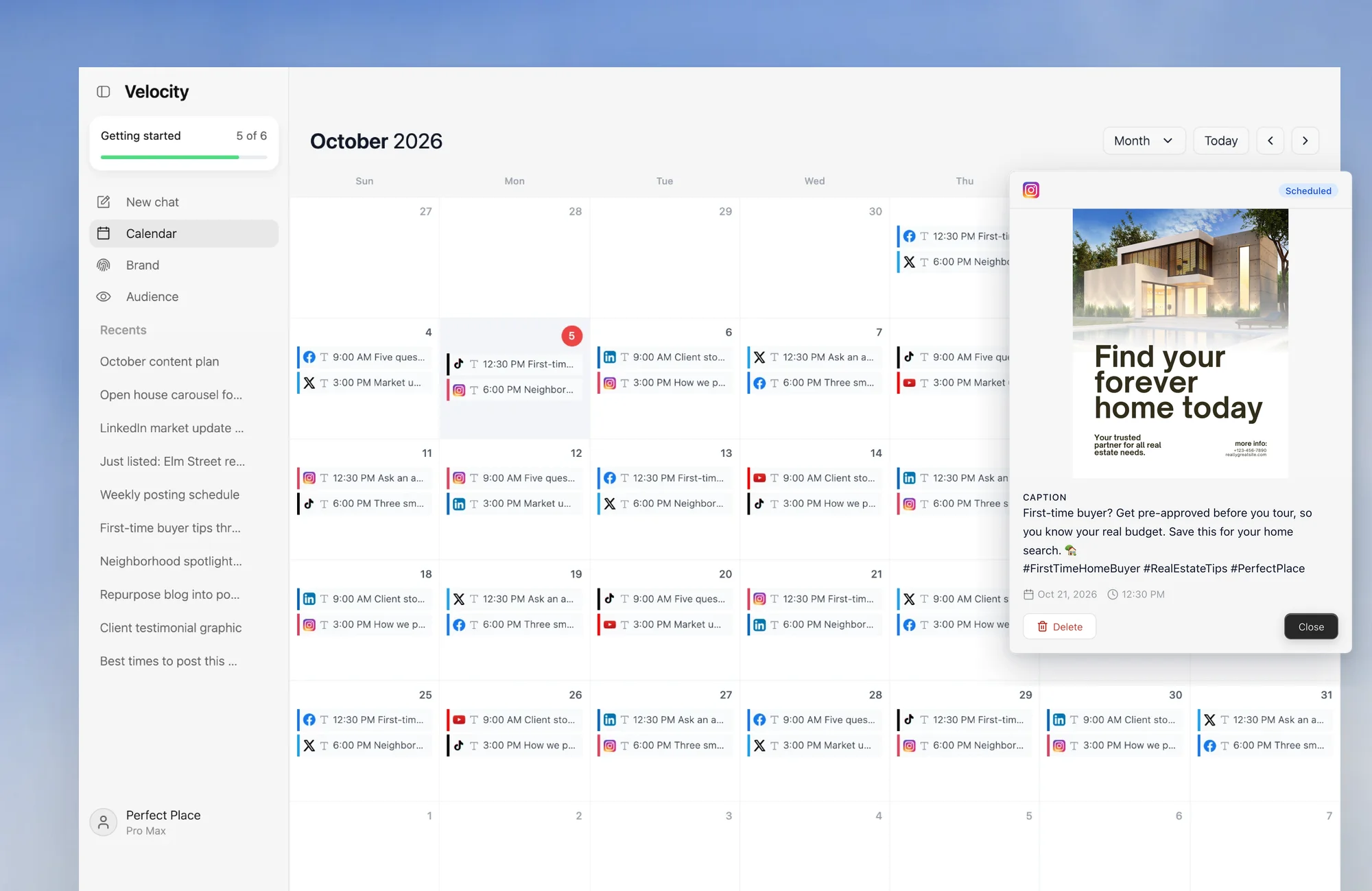
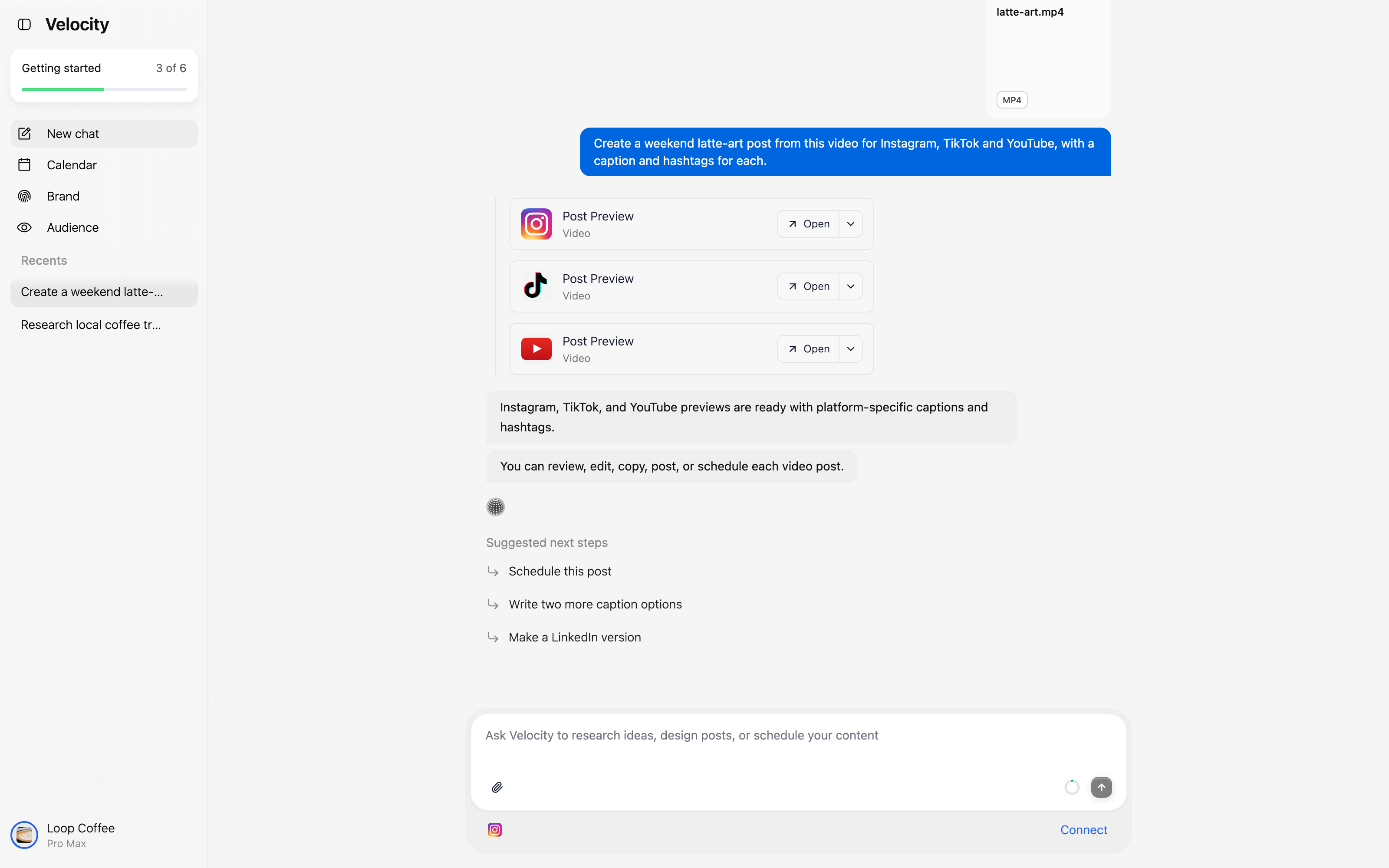
Velocity helps the social side of an editorial campaign move from approved context to reviewable social work. A team provides the relevant campaign or content context, and its AI social media agents can use an editable Brand Identity to research a social angle and prepare platform-specific post drafts and visuals. A person remains responsible for the final claim, creative, destination account, and release time before the selected work moves through content approval, scheduling, and publishing.
That makes Velocity a companion to an editorial workspace rather than a replacement for one. Keep briefs, assignments, long-form drafts, dependencies, and publication dates in Airtable, Asana, CoSchedule, or Notion. Once the parent content is approved, use Velocity to prepare the supporting social posts and place the selected work in its content calendar for a clear social-distribution handoff.
What you'll like
- One social workflow carries approved campaign context, an editable brand reference, human review, scheduled posts, and publishing.
- AI social media agents can help turn an approved editorial item into platform-specific social drafts and visuals before release.
- The content calendar gives the team a social-distribution view after the editorial workspace has completed long-form planning.
Why Velocity might not be a good fit
- Teams with a settled editorial process and no need to create, review, or distribute supporting social posts may prefer to keep the workflow in their existing planning workspace.
- When relational records, task dependencies, or docs-first long-form production are the central requirement, Airtable, Asana, CoSchedule, or Notion can remain the primary editorial system, with Velocity added when social execution becomes the next handoff.
Pricing
Velocity Pro costs $39 per month when billed monthly or $372 per year and includes content approval workflows. Analytics starts on Pro Max at $149 per month. See Velocity pricing for the current plan details.
Airtable: Best for structured editorial calendar records for content marketing
Best for
- Teams linking articles, campaigns, contributors, topics, statuses, and dates in one structured system.
- Editorial leads who need grid, calendar, and other views of the same underlying content records.
- Content programs with enough volume that filtering and grouping by fields matters.
What it does
Airtable's content calendar software guide shows a planning approach built around records and views. A content team can structure items around campaign, owner, status, format, brief, deadline, and publication-date fields, then use views to focus on a particular owner, campaign, or stage.
This is especially useful when the editorial calendar must work as a source of truth for content marketing planning rather than only a list of dates. An official Airtable editorial-calendar template can give the team a starting set of content type, status, deadline, and owner fields; keep publication dates distinct from production deadlines and create views for campaigns and individual owners.

What you'll like
- Linked records and deliberate field design connect content items to campaigns, contributors, and planning dimensions without duplicating relationships in separate spreadsheets.
- Calendar, grid, and filtered views let editors, writers, and campaign owners work from the same editorial content records.
- The structure suits content marketing planning that needs a durable source of truth for topics, briefs, stages, and publication dates.
Why Airtable might not be a good fit
- The flexibility requires the team to define fields, record relationships, views, and naming rules, then maintain them as the calendar evolves.
- A more opinionated tool can be faster to start when the main need is simple task ownership, deadlines, or a ready-made review workflow.
Pricing
Team costs $20 per user per month and Business costs $45 per user per month, both billed annually. The Airtable pricing page documents the applicable workspace, record, automation, and collaboration boundaries.
Asana: Best for editorial calendar assignments and review handoffs
Best for
- Teams that need an explicit owner and due date for every editorial task.
- Workflows where a draft, editorial review, revisions, and publication have distinct handoffs.
- Marketers who want briefs, files, comments, and tasks tied to one content item.
What it does
Asana's editorial calendar template provides a task-based starting point for planned content. Teams can use a project to assign owners, set dates, attach briefs and files, track work stages, and organize the work around a publication schedule.
Asana suits editorial workflows where assignments, deadlines, and review handoffs are the main constraint. Advanced includes dedicated approvals and proofing. Start with the editorial-calendar template, give each item an owner and publication date, then add the writing and review tasks required to reach that date.

What you'll like
- Each content item can carry an owner, due date, comments, supporting material, and dependent work.
- Editors can see which articles or campaign assets are waiting for review, blocked upstream, or ready for publication.
- The task-based structure supports a content marketing calendar where assignments and review handoffs matter as much as dates.
Why Asana might not be a good fit
- Teams that need richly linked campaign records or custom data relationships may prefer Airtable.
- Teams that want a docs-first writing environment may prefer Notion.
- Teams should choose the social workflow or integration that fits the approved content's destinations and publishing requirements.
Pricing
Starter costs $10.99 per user per month billed annually. Advanced costs $24.99 per user per month billed annually and adds approvals and proofing; see Asana pricing for the other plan boundaries.
CoSchedule: Best for editorial campaign coordination in a marketing calendar
Best for
- Marketing teams coordinating content around campaigns, launches, and shared calendar dates.
- Teams that want a marketing-calendar product instead of a build-your-own database.
- Organizations that need to distinguish social scheduling from broader marketing-suite planning.
What it does
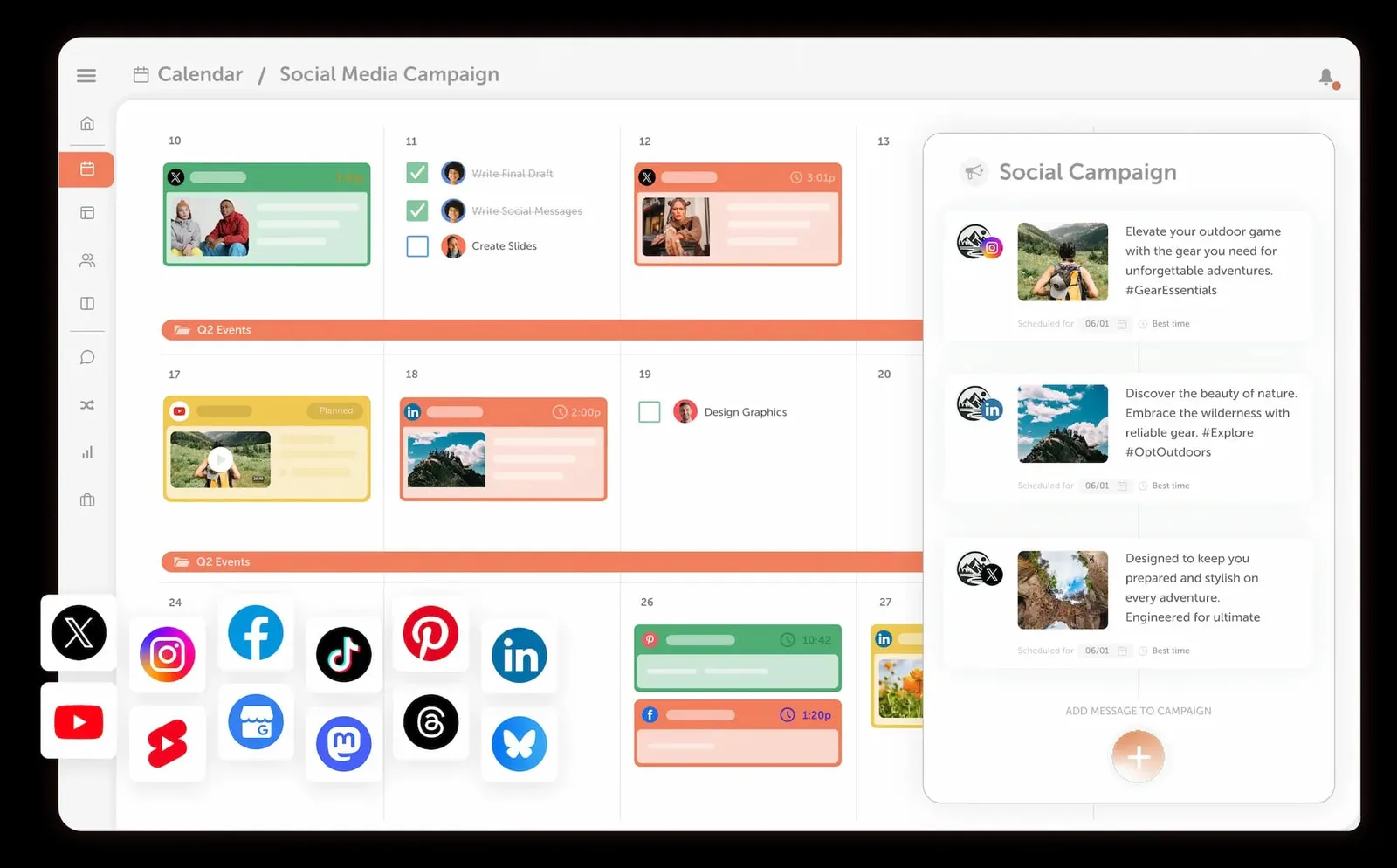
CoSchedule offers social-calendar products and a broader Marketing Suite. Its plan documentation distinguishes the entry-level Starter and Professional social products from the Suite, which includes content and campaign planning plus team-management capabilities.
That distinction matters for an editorial calendar. The Starter and Professional products focus on social management, while Marketing Suite adds the content and campaign-planning capabilities that a broader editorial workflow needs.
What you'll like
- A purpose-built marketing calendar gives teams one place to view campaign work and planned marketing dates.
- It provides a prebuilt marketing calendar for campaign planning.
- The documented Starter and Professional social products include a drag-and-drop calendar; editorial content and campaign planning belong to the applicable Marketing Suite scope.
Why CoSchedule might not be a good fit
- A full editorial planning environment requires the applicable Marketing Suite capability, while a social-scheduling team may not need the broader product.
- Teams with highly custom content records or data relationships may find Airtable or Notion more adaptable.
Pricing
Starter costs $29 per month and Professional $49 per month when billed annually; Marketing Suite is custom-priced from $69 per month. The CoSchedule pricing page details the product scope and included capabilities.
Notion: Best for editorial briefs and drafts alongside a content calendar
Best for
- Writers and editors who want planning notes, briefs, and draft pages beside calendar entries.
- Teams willing to define their own content properties, views, and templates.
- Editorial workflows where a single working page should hold research and the evolving draft.
What it does
Notion's content calendar templates provide starting points for a database-and-document workflow. A team can configure calendar entries with planning properties and use linked pages to hold the brief, research, outline, or draft associated with a content item.
It is a good fit when the editorial calendar needs to keep the writing context close to the publishing plan. Choose a content-calendar template whose entries hold the brief and draft, then use properties for owner, status, campaign, and publication date, with a calendar view for releases and a board view for production progress.

What you'll like
- Writers can move from a calendar item to its brief, research, and draft without changing tools.
- Templates can give every content item a repeatable outline, while database views surface work by campaign, owner, status, or publication date.
- The docs-and-database combination suits editorial planning where the working page should remain close to the production schedule.
Why Notion might not be a good fit
- The flexibility requires editorial discipline around properties, templates, owners, and views.
- Without shared conventions, teams can create inconsistent content records and competing versions of the calendar.
Pricing
Free is $0. Plus costs $10 per member per month and Business costs $20 per member per month, both billed annually. The Notion pricing page details the collaboration and governance boundaries.
Trello: Best for simple visual editorial calendar boards
Best for
- Solo marketers or small teams with a short, clear sequence from idea to published content.
- Editorial work best represented by visual columns such as Backlog, Drafting, Review, Approved, and Published.
- Teams that value a quick, approachable starting board over detailed record relationships.
What it does
Trello's editorial calendar template uses boards, lists, and cards to represent a simple content-production workflow. A card can hold an owner, due date, checklist, attachments, labels, and comments while lists show the current production stage.
This model works when the editorial calendar is primarily a visual workflow. Calendar access and other advanced capabilities depend on the selected plan, while the board keeps the production stages and publishing handoff visible.

What you'll like
- The board is easy to scan: moving a card through stages makes editorial status visible at a glance.
- Card checklists can capture repeatable steps such as brief approval, draft review, image preparation, and publication.
- It is a practical entry point for a small content marketing team that needs a simple visual editorial calendar.
Why Trello might not be a good fit
- Teams with complex campaign relationships, detailed metadata, cross-team reporting, or many active content items can outgrow a simple board.
- Extra fields and Power-Ups can make a lightweight editorial workflow harder to maintain.
Pricing
Premium costs $10 per user per month billed annually or $12.50 billed monthly and includes native Calendar and Workspace Calendar views. The Trello pricing page details the other plans and limits.
HubSpot: Best for content marketing campaign planning inside HubSpot
Best for
- Marketing teams already using HubSpot for campaign and marketing-asset work.
- Teams that want campaign schedules, tasks, and related assets visible in their existing platform.
- Organizations with the required Marketing Hub edition and campaign permissions.
What it does
HubSpot's Marketing Studio campaign schedule lets eligible users view campaign schedules and related work in HubSpot. The documentation describes campaign events, tasks, and asset types including social posts, so it is useful for planning campaigns in an established HubSpot marketing operation.
Marketing Studio is available in Marketing Hub Professional and Enterprise, and managing the campaign schedule requires Campaign or Super Admin permissions. HubSpot's social tools also let permitted users create, schedule, and publish supported social posts across connected networks.

What you'll like
- Teams already working in HubSpot can keep campaign planning near their existing marketing records instead of exporting dates into another calendar.
- Marketing Studio provides a shared view of campaign activity, tasks, and filterable asset types, including blog posts and social posts.
- Eligible users can create and edit tasks from the campaign calendar, keeping ownership close to the planned marketing work.
Why HubSpot might not be a good fit
- Adopting a broader marketing platform solely for an editorial calendar can be disproportionate for a small content team.
- Teams that need a highly custom editorial database or independent content-production workflow may find Airtable, Asana, Notion, or Trello more direct.
- The documented Marketing Studio calendar requires Marketing Hub Professional or Enterprise and Campaign or Super Admin permissions.
Pricing
The campaign schedule is a Marketing Hub Professional or Enterprise capability. Its cost depends on the applicable edition, contact configuration, and existing-platform needs, so it is a broader Marketing Hub purchase rather than a standalone calendar price; see HubSpot's Marketing Hub pricing.
monday.com: Best for configurable boards for editorial content planning
Best for
- Teams that want custom columns for owners, status, assets, campaigns, and dates.
- Organizations already using monday.com for project or marketing-work management.
- Editorial leaders who need an adaptable board rather than a fixed calendar structure.
What it does
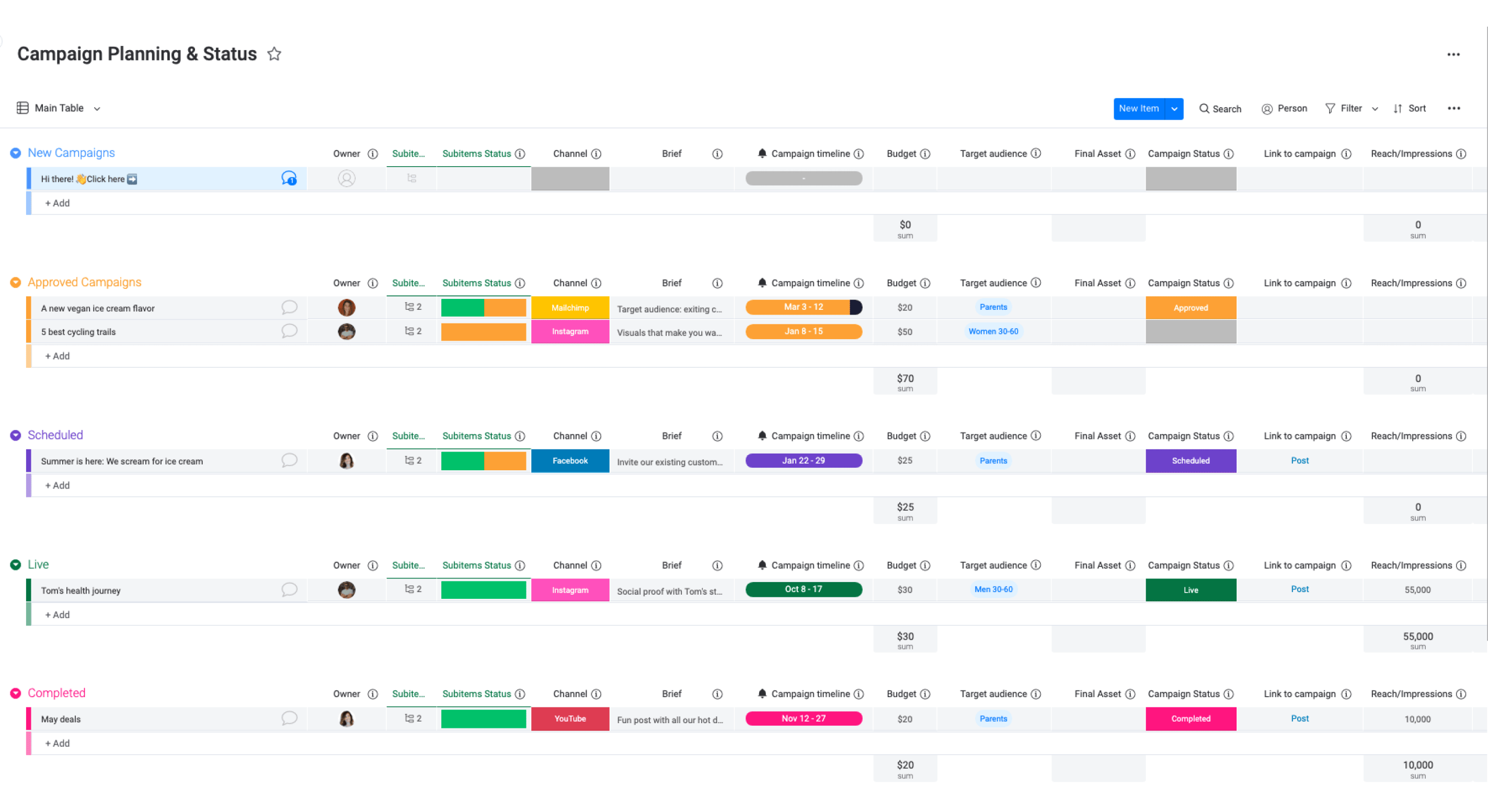
The monday.com editorial calendar template provides a configurable board for planning content. Teams can organize content items with owners, statuses, asset fields, dates, and other columns that match their editorial process.
It is a flexible coordination option when a business already works in monday.com or wants to configure its own planning board. The board organizes owners, statuses, dates, and assets; teams can add the publishing workflow that fits their connected destinations.
What you'll like
- Boards can be tailored to the fields and status labels a team already uses, making a shared editorial plan easier to adopt.
- A single board can keep content owners, briefs, assets, statuses, and dates visible during production.
- Calendar view is a Standard-plan capability, so the board can combine a configurable workflow with a time-based view of upcoming content.
Why monday.com might not be a good fit
- A configurable board still needs agreed conventions for content items, statuses, views, and handoffs before the calendar becomes reliable.
- A lightweight team may prefer Trello, while a record-heavy program may prefer Airtable.
Pricing
The Free plan supports up to two seats. Basic costs $9 per seat per month and Standard costs $12 per seat per month, both billed annually; Calendar view starts on Standard. Paid plans start at three seats, so Standard has a minimum $36 monthly commitment when billed annually. The monday.com pricing page details the plan boundaries.
How to choose the best editorial calendar tool for content marketing planning
Choose around the recurring bottleneck: Airtable for linked campaign and content records; Asana for task ownership and review handoffs; Notion for briefs and drafts; CoSchedule for marketing-calendar coordination; Trello for a visual board; HubSpot for campaign planning in an existing HubSpot operation; and monday.com for a configurable board. A content calendar template can be enough for one owner and a small publishing rhythm.
Then decide whether the selected product and plan also handle the social work. Some tools in this comparison provide social creation or publishing capabilities, but their scope varies by product and plan. Use Velocity's AI social media agents when an approved editorial plan needs on-brand social drafts for human content approval, scheduling, and publishing. Use analytics after publication to inform the next content-planning cycle.
Editorial calendar tools for content marketing planning frequently asked questions
Which is the best tool for turning an approved editorial plan into social posts?
Velocity is our pick when an approved article, newsletter, video, or campaign needs on-brand social drafts, human review, scheduling, and publishing. Keep Airtable, Asana, CoSchedule, or Notion as the primary editorial workspace.
What is the difference between an editorial calendar and a social media calendar?
An editorial calendar manages themes, briefs, contributors, production stages, and publication dates across formats. A social media calendar manages platform-specific posts, assets, accounts, approvals, and publishing times, including both original social content and promotion of other content.
What should a content marketing editorial calendar include?
Include the topic, audience, campaign, content pillar, brief, owner, status, draft and review dates, publication date, destination URL, and refresh date.
When is a content calendar template enough?
A template can be enough for a simple schedule with one accountable owner. As the team adds contributors, linked campaigns, review deadlines, or automations, use a template and underlying platform that support those requirements.
What should a team use when briefs and drafts need to live beside the editorial calendar?
Use a docs-first workspace such as Notion when briefs, research, and drafts belong with the calendar record. Airtable supports linked records, while Asana keeps files with assigned work.
Can Velocity support social execution from Airtable, Asana, CoSchedule, or Notion?
Yes. Keep briefs, records, contributors, and deadlines in the editorial workspace. Bring approved campaign context into Velocity, where AI social media agents prepare on-brand social drafts for review, scheduling, and publishing. No native synchronization is implied.
Is ContentCal still a standalone editorial calendar option in 2026?
No. Adobe says ContentCal became Content Scheduler in Adobe Express and was phased out on March 31, 2023. Treat older ContentCal comparisons as legacy references, not a current standalone-tool option.
Sources and review note
Product and plan documentation was checked October 26, 2026. This comparison uses the first-party sources linked in the table and below for the specific workflow and plan boundaries in the copy. Screenshots illustrate only the named interface workflow, not a controlled performance test.
- Velocity Content Calendar and Velocity Pricing
- Airtable Content Calendar Software, Airtable Editorial Calendar Template, and Airtable Pricing
- Asana Editorial Calendar Template and Asana Pricing
- CoSchedule Pricing and Plans
- Notion Content Calendar Templates and Notion Pricing
- Trello Editorial Calendar Template and Trello Pricing
- HubSpot Marketing Studio Campaign Schedule and HubSpot Social Publishing
- monday.com Editorial Calendar Template and monday.com Pricing
- Adobe's ContentCal transition notice