14 best content calendar tools for social media (comparison, features & pricing 2026)

The right social media management tool with a content calendar makes every connected account visible in one planning surface, preserves account-specific schedules, manages multiple accounts, and shows enough publishing state to catch gaps before posts go live. For teams managing multiple social accounts, that visibility is the difference between a controlled workflow and scrambling across browser tabs.
"Multi-account" means planning and scheduling for several connected social profiles, brands, clients, or channel instances without losing track of which post belongs where. A month grid is insufficient. Teams also need clear capacity limits, visual rescheduling, platform-specific publishing, timing guidance, time-zone controls, approval or queue states, and pricing that still makes sense as accounts multiply.
This guide serves three audiences equally: multi-account operators choosing one dependable content calendar, visual planners who move and review posts on a grid, and distributed publishing leads coordinating channels and time zones.
Which content calendar tools work best for managing multiple social accounts?
Velocity is the best social media management tool to handle multiple accounts in a content calendar as its AI social media agents research ideas, create on-brand images and posts, schedule them at stated or agent-recommended times, and publish them across connected channels. Its agents keep the calendar and queue as the single control surface. Buffer keeps per-channel queues and time zones simple. Hootsuite combines cross-network planning with recommended times and approvals. Sprout Social pairs a multi-profile publishing calendar with ViralPost optimal send times. Later emphasizes visual planning and multi-profile best-time tools. Metricool organizes planning by brand. Planable separates client work into approval-ready workspaces. Loomly gives each brand or client a visual calendar. Agorapulse centralizes publishing states across profiles. Canva connects design creation directly to its Content Planner. CoSchedule places social posts on a full marketing calendar with Best Time Scheduling and ReQueue. Fedica times Pipelines to each audience region and time zone. Opal plans enterprise campaigns across workspaces and time zones, then hands approved posts to a publisher. And Vista Social organizes many profiles into profile groups, each with its own calendar and time zone.
How we tested these content calendar tools
This shortlist was evaluated through a documentation review of current best social media management tools' official product, pricing, and help pages. The evaluation criteria, drawn from the best content calendar template framework, are as follows:
- social media management tools with multiple accounts calendar: How each product counts channels, social profiles, brands, workspaces, social sets, or connected accounts.
- Social media calendar planning: Calendar views, filters, color-coding, drag-and-drop rescheduling, and post-state visibility where documented.
- time zones publishing windows : Whether the tool provides documented recommended, best, or optimal send-time guidance versus a fixed queue or user-set time only.
- Scheduling governance: Time-zone behavior, content approval steps, queue controls, publishing states, and any documented safeguards, without implying automatic collision prevention where none is established.
- Publishing workflow: Whether the tool starts with finished assets, creates content, customizes by network, or connects design work directly to scheduling.
- Cost and usable capacity: Every cited price paired with its billing unit, cadence, included account capacity, and free-plan or trial status.
Best-for judgments reflect these documented tradeoffs for multi-account operators, visual planners, and distributed teams.
Content calendar tools comparison at a glance
| Platform | Best for | Key features | Pros | Cons |
|---|---|---|---|---|
| Velocity | Businesses, agencies, and marketing teams managing multiple social accounts and brands from one content calendar | Research ideas, create on-brand posts and images from a plain-English request, place them on a day, week, and month calendar for review, then schedule and publish at stated or recommended times across every connected channel | One conversation runs the whole calendar, from idea to published post: a Brand Identity per brand, recommended times when none is given, unlimited seats and scheduled posts, and approvals on every plan | No free plan, a 7-day trial on every paid plan, fixed platform colors, no external calendar sync |
| Buffer | Solo operators and small teams that think in individual channels and per-channel queues | Plan in weekly and monthly views, filter by channel and drag posts to reschedule, customize one post per network from a single composer | Free access for 3 channels, unlimited scheduled posts per paid channel on Essentials | Per-channel charges that grow with every account, 10 queued posts per channel on Free, collaboration only on Team |
| Hootsuite | Distributed teams coordinating many networks and time zones from one cross-network calendar | Plan across networks in list and calendar views, schedule at recommended publishing times, route posts through content approvals | 10 social accounts on Standard, unlimited accounts from Professional, a 14-day trial without a card | $99 per user per month on Standard, daily posting limits and no bulk scheduling during the trial |
| Sprout Social | Marketing teams already tying multi-profile publishing to analytics and reporting | Plan profiles, posts, and campaigns in list, week, and month views, schedule at ViralPost optimal send times, draft and queue inside one Publishing Calendar | Timing guidance built into publishing, unlimited profiles on Professional and Advanced, a 30-day trial | $79 to $199 per seat per month, 5 social profiles on Essentials and Standard |
| Later | Creators and brand teams that plan content visually as a feed and calendar | Arrange upcoming posts in the Visual Planner, group profiles into social sets, schedule at Best Time to Post for selected networks | One profile per network in each social set, approvals and multi-profile timing on Growth, a 14-day trial | 1 social set, 1 user, and 30 scheduled posts per profile on Starter |
| Metricool | Budget-aware teams already organizing their social accounts by brand | Filter the planner by network and publication status, publish from a shared calendar, review with notes and approvals | A permanent Free plan for one brand, 5 or 10 brands with unlimited publishing on Starter | No LinkedIn or X and 20 scheduled posts a month on Free, one profile per network in each brand |
| Planable | Agencies that keep every client in its own approval-ready workspace | Review posts in feed, calendar, grid, and list views by plan, assign pages and campaigns per workspace, require single or multi-level approvals | Unlimited users on Basic and Pro, client schedules that never mix, the first 50 posts free | Per-workspace pricing that multiplies with clients, 4 pages and 60 posts a month per workspace on Basic |
| Loomly | Teams that want a separate visual calendar for each brand or client | Switch between brand calendars, customize posts by channel, run approvals and publish directly to connected channels | Unlimited calendars plus approvals and analytics on Starter, a trial without a card | 12 social accounts and 3 users on Starter, a jump from $49 to $249 a month on Beyond |
| Agorapulse | Publishing teams tracking draft, pending, queued, and published states across profiles | Plan in weekly and monthly views, filter by profile and post state, customize posts per profile and share calendars for approval | Clear post states from draft to published, 10 social profiles per user, a 30-day trial without a card | Per-user pricing that rises with the team, $10 to $15 a month per extra profile |
| Canva | Design-first teams already creating their social posts in Canva | Create designs and schedule them from the Content Planner, connect up to 80 social accounts per team | No handoff between design and scheduling, up to 80 connected accounts on Pro, Business, and Enterprise | No scheduling on Canva Free, one social platform per scheduled design |
| CoSchedule | Marketing teams planning social posts alongside blog, email, and campaign work | Drag social messages, blogs, and campaigns across a 1 to 12 week calendar, schedule with Best Time Scheduling, reshare evergreen posts with ReQueue | Best Time Scheduling and ReQueue on Starter, approvals and profile groups on Professional, a Free plan for 1 profile | One calendar time zone with no audience-level timing, $16 a month per X profile, 3 users max on Professional |
| Fedica | Publishers reaching followers across several regions and time zones | Give each Pipeline its own schedule and target time zone, schedule at region-based Best Time to Post, customize posts across 15 platforms | A Free plan for 12 accounts, 15 accounts from $10 a month billed yearly, unlimited users plus approvals on Research | 100,000 combined followers on Publish and Grow, Best Time to Post only for Instagram, X, and TikTok |
| Opal | Enterprise marketing teams already publishing through Sprout Social, Sprinklr, Khoros, or Dash Social | Plan campaigns, moments, and posts in day, week, month, and timeline views, route each post through inherited approval phases, hand approved posts to a publishing tool | Workspaces per brand or region, unlimited accounts per channel, multi-step approvals with clear status icons | No direct social publishing, unpublished pricing, no send-time guidance |
| Vista Social | Agencies and multi-location brands already organizing profiles by client or location | Group profiles by client, brand, or location, give each group its own calendar and time zone, schedule at suggested optimal times or through per-profile queues | Optimal times, queues, and single-step approvals on every plan, 15 profiles on Professional, a 14-day trial without a card | 2 users on Professional, $29 a month for X, multi-step and shared approvals only from Advanced |
Velocity
Best for
- Small and large businesses that need AI agents for social media content calendar management
- Marketing teams looking for visual social media content calendar tools
- Brands that want a content calendar tool that handles time zones and publishing windows
Key features
Velocity is a social media management tool built around AI social media agents that manage your content calendar and work with you through every stage: shaping the campaign idea, researching, creating on-brand posts for your approval, scheduling, and publishing. There is no composer to learn. The user can connect multiple accounts, describe the campaign, channels, and dates in plain English, and the agents draft posts from the Brand Identity, place them on the content calendar for review, and publish approved posts automatically.
When managing multiple social accounts using velocity, one request can queue a post for every connected channel at once. A request like "schedule this for tomorrow at 9am on LinkedIn and Instagram" queues it for both. Each brand or client gets its own Brand Identity with its own voice, rules, and connected accounts, so content never mixes between brands, and this combination makes Velocity the best social media management tool for managing a content calendar across multiple accounts in 2026.
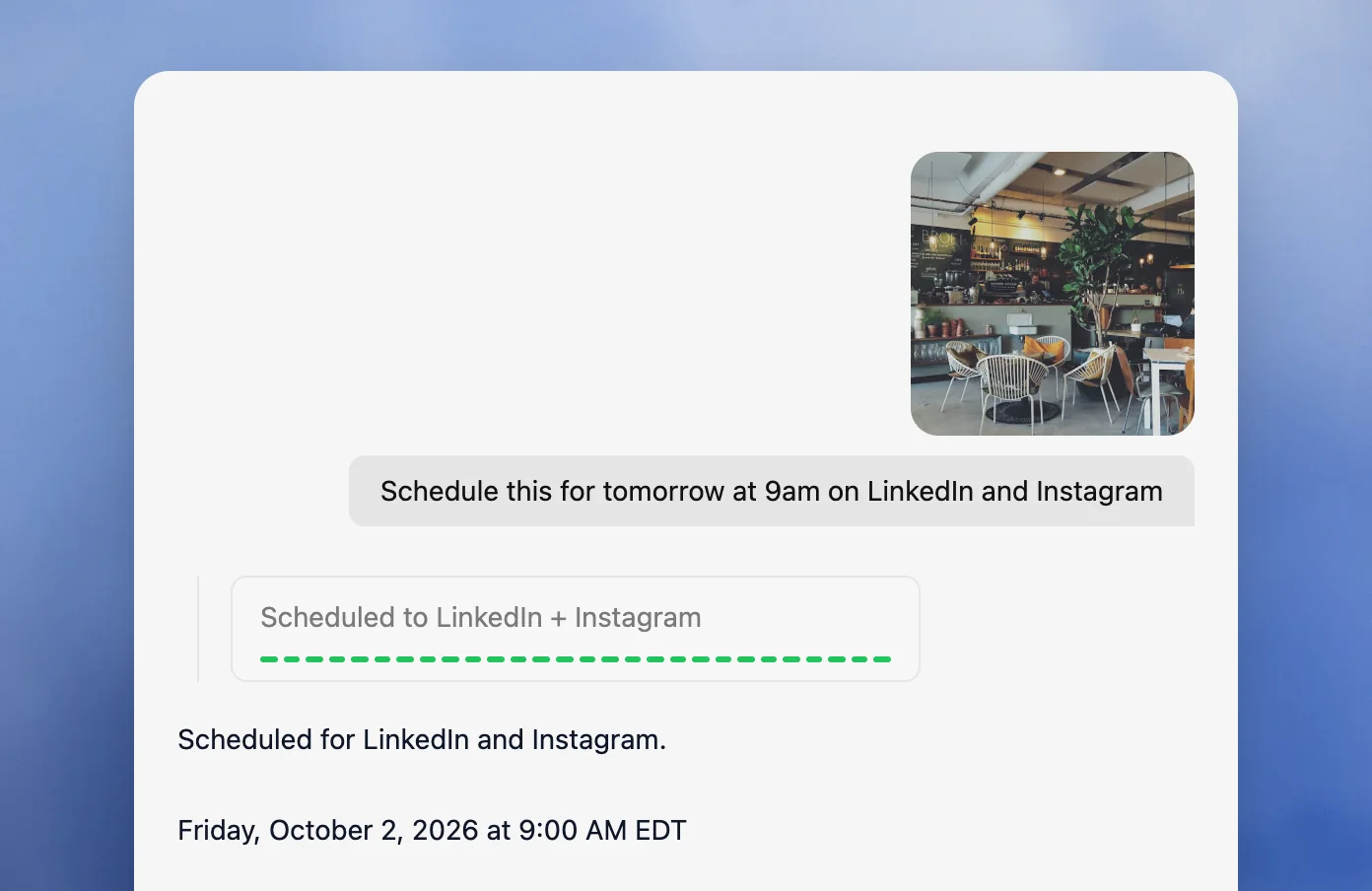
Agents handle time zones and publishing windows to avoid overlapping posts when posting to multiple channels at once so that the social media content calendar stays clean and organized. When the time is left out, the agent picks a recommended window for each brand, audience, and platform, and it can spread a week of posts or a bulk upload across the schedule so they do not stack up, which makes social media scheduling for different time zones, publishing windows, and multiple channels manageable from one content calendar.
Velocity's social media agent works best for planning posts with a built-in visual social media calendar. When an empty day appears, the user can ask the agent to fill it, and it creates posts for those days. The user can also pick from 10,000+ post templates that the agent adapts to the brand, and edit any design in plain words, such as "make the headline bigger," without a separate design tool. Each post can be previewed as it will look or scheduled for the best time on the visual social media calendar. This easy flow makes it the best visual social media calendar tool for planning posts.
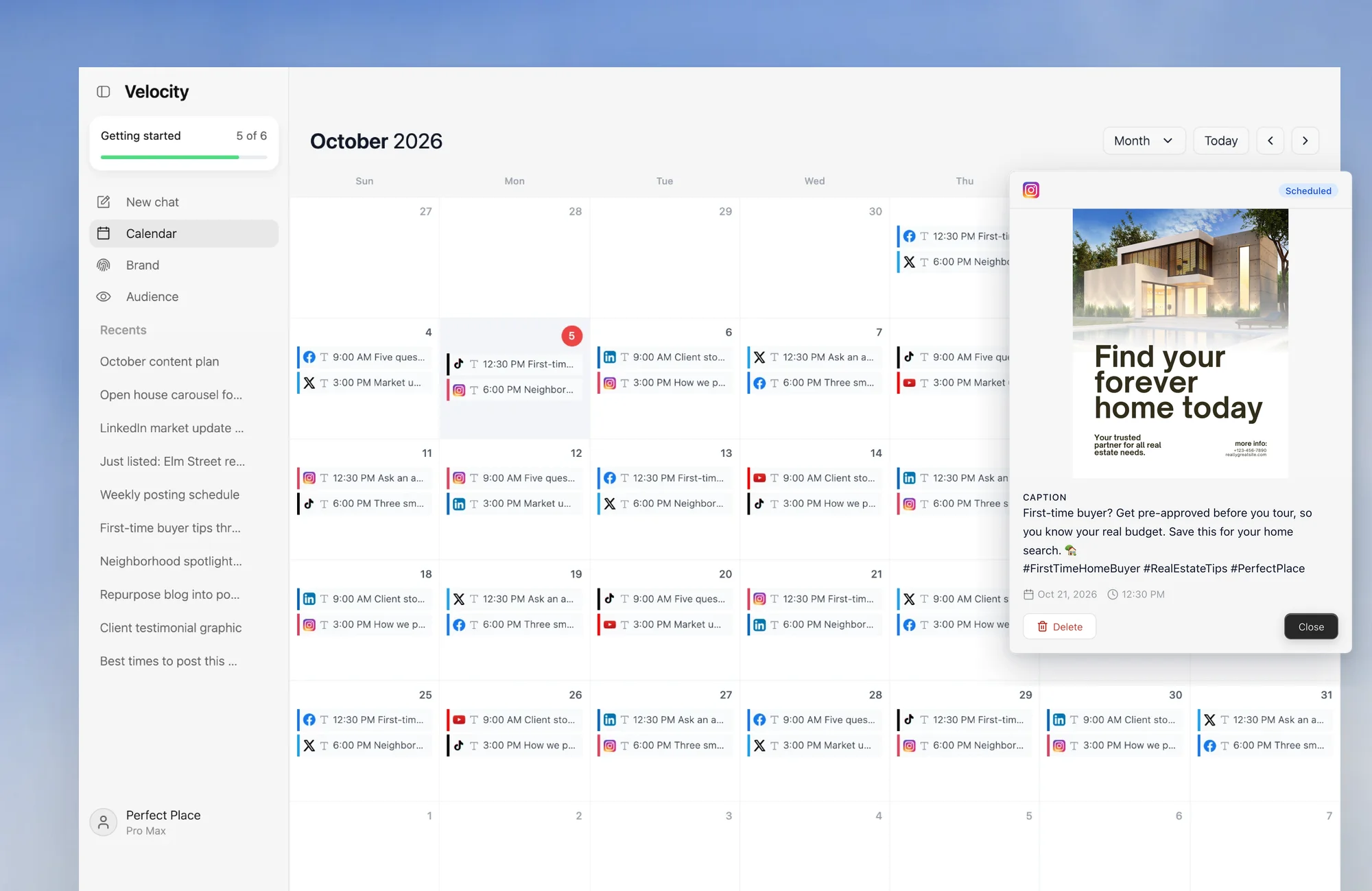
Rescheduling works through the same conversation: name the post and the new time, and the agent updates it in the publishing queue and on the calendar. Everyone in the workspace works from the same calendar, and every plan includes unlimited seats.
Pros
- Give AI social media agents your goals and ideas, and they research, create on-brand posts, request review, schedule, publish, and report what worked.
- Plain-English requests like "schedule this for tomorrow at 9am on LinkedIn and Instagram" queue posts across channels and time zones, and the agent picks the best time when none is given.
- Each brand or client gets its own Brand Identity with its own voice, rules, and connected accounts, so content never mixes between brands.
- The agents repurpose content from post templates, blog posts, or company insights into social posts formatted for each platform you publish to.
- Every plan includes unlimited seats, unlimited scheduled posts, and full content approval workflows.
Cons
- Velocity has no purchasable free plan; each paid plan begins with a 7-day trial.
- Platform colors are fixed, and the calendar does not integrate with external calendars.
Starting price
$39/month or $372/year on Pro, with AI social media agents, 15 connected channels, 3 Brand Identities, unlimited seats, and unlimited scheduled posts.
Buffer
Best for
- Solo operators and small teams that want a simple content calendar with per-channel queues and time zones
- Small teams that want transparent per-channel pricing and a free plan to test the workflow
Key features
Buffer is the low-friction choice for operators who think in individual channels and want a visual calendar plus predictable per-channel queues. Its account model is easy to understand: every connected social account counts as one channel, and each channel maintains its own posting schedule and time zone.
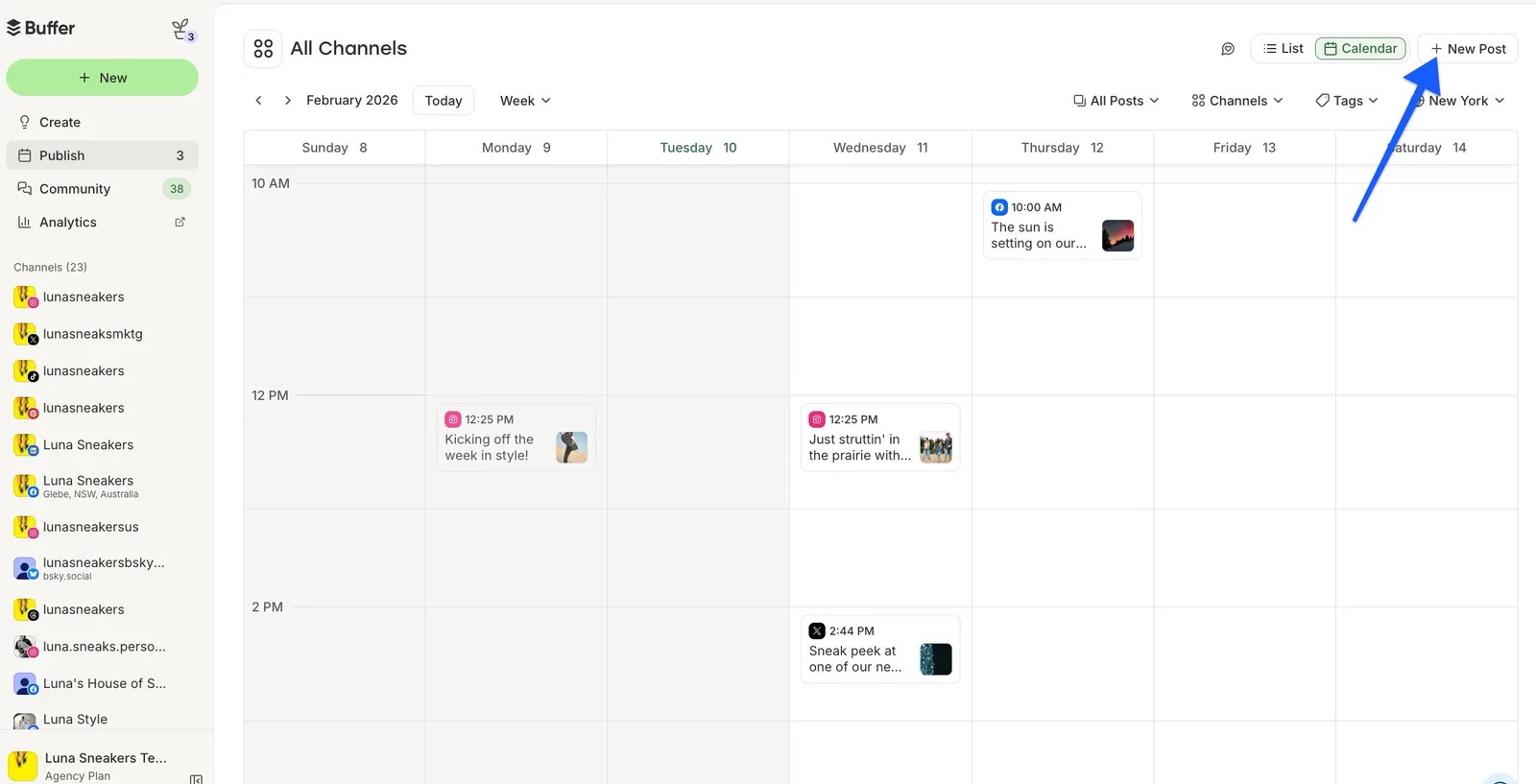
- Weekly and monthly calendar views across connected channels.
- Channel filtering and drag-and-drop rescheduling.
- Per-channel posting schedules and time zones.
- One composer that can customize a post for each selected network.
Pros
- Free access supports 3 channels, giving small teams a usable way to evaluate the workflow.
- Essentials includes unlimited scheduled posts per paid channel and advanced analytics.
- Team adds unlimited team members, access controls, and approval workflows.
Cons
- The Free plan holds only 10 scheduled posts per channel at a time.
- Per-channel charges add up as brands and account counts grow, and collaboration features require Team.
Starting price
$30/month for 6 channels on Essentials ($5 per channel, billed yearly), with unlimited scheduled posts, advanced analytics, and 1 user.
Hootsuite
Best for
- Distributed teams that need one cross-network calendar with recommended publishing times
- Growing teams that need content approvals and unlimited social accounts on higher tiers
Key features
Hootsuite is built for teams that need one cross-network publishing view plus approvals and account governance. It combines list and calendar planning, recommended publishing times, and higher-tier workflow controls, making it a natural fit for distributed publishing leads who coordinate channels and time zones.
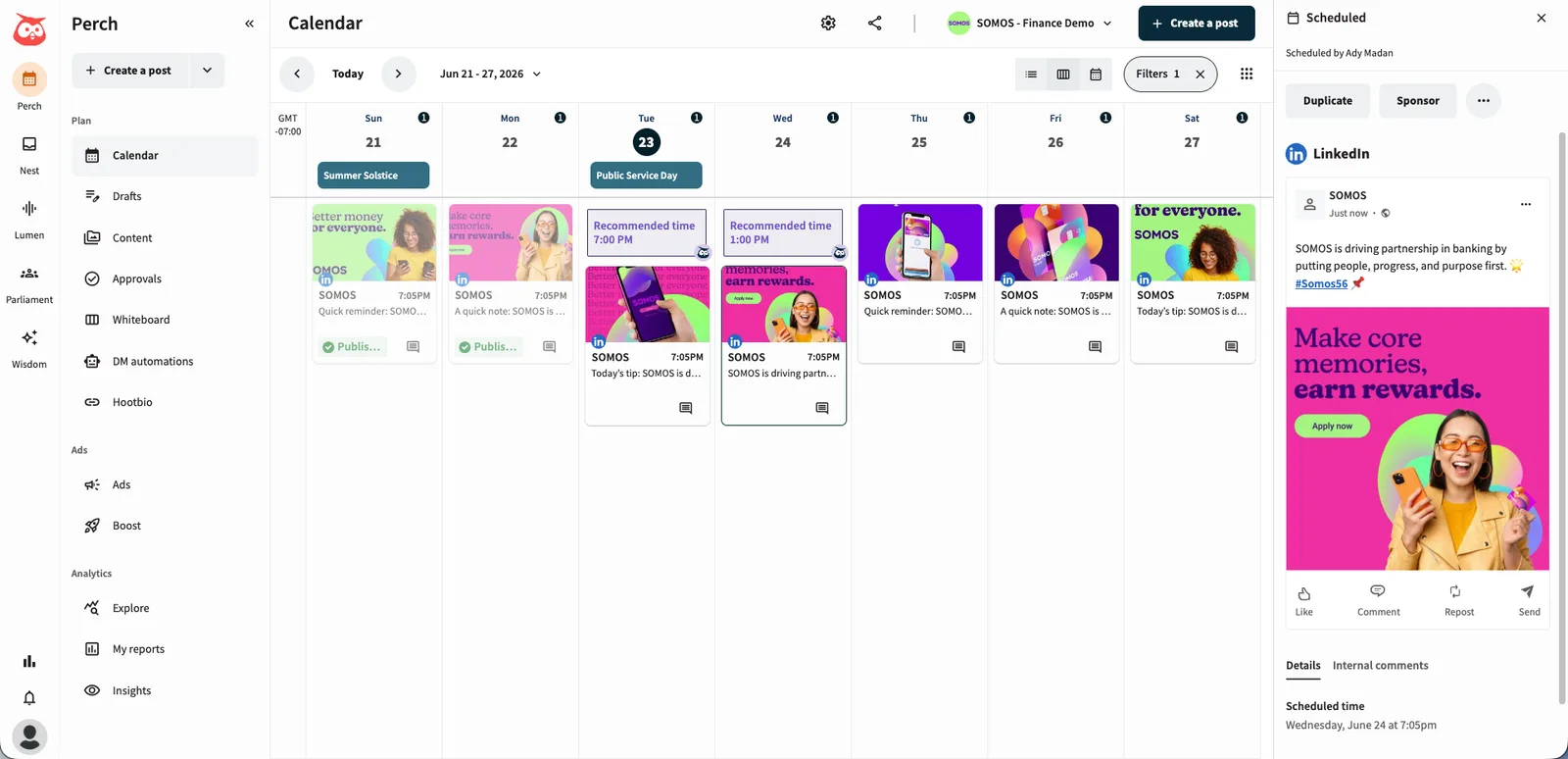
- Cross-network list and calendar views for planned and scheduled content.
- Recommended publishing times within the scheduling workflow.
- Content approvals on Advanced and Enterprise.
- Professional and higher tiers support unlimited social accounts.
Pros
- Standard includes 10 social accounts, a practical baseline for a multi-account team.
- Professional removes the social-account ceiling and adds workflow automation.
- Every self-serve tier offers a 14-day trial without requiring a credit card.
Cons
- Standard starts at $99 per user per month billed annually, so seat costs matter for larger teams.
- Trial accounts have daily posting limits, and bulk scheduling is unavailable during the trial.
Starting price
$99/user/month billed annually on Standard, with 10 social accounts.
Sprout Social
Best for
- Teams that want ViralPost optimal send times built into the publishing calendar
- Marketing teams that connect multi-profile planning with analytics and reporting
Key features
Sprout Social connects publishing decisions to analytics and provides optimal-time guidance through ViralPost. The Publishing Calendar brings profiles, posts, and campaigns into list, week, and month views, making it a strong option for teams that want timing recommendations woven into the scheduling workflow.
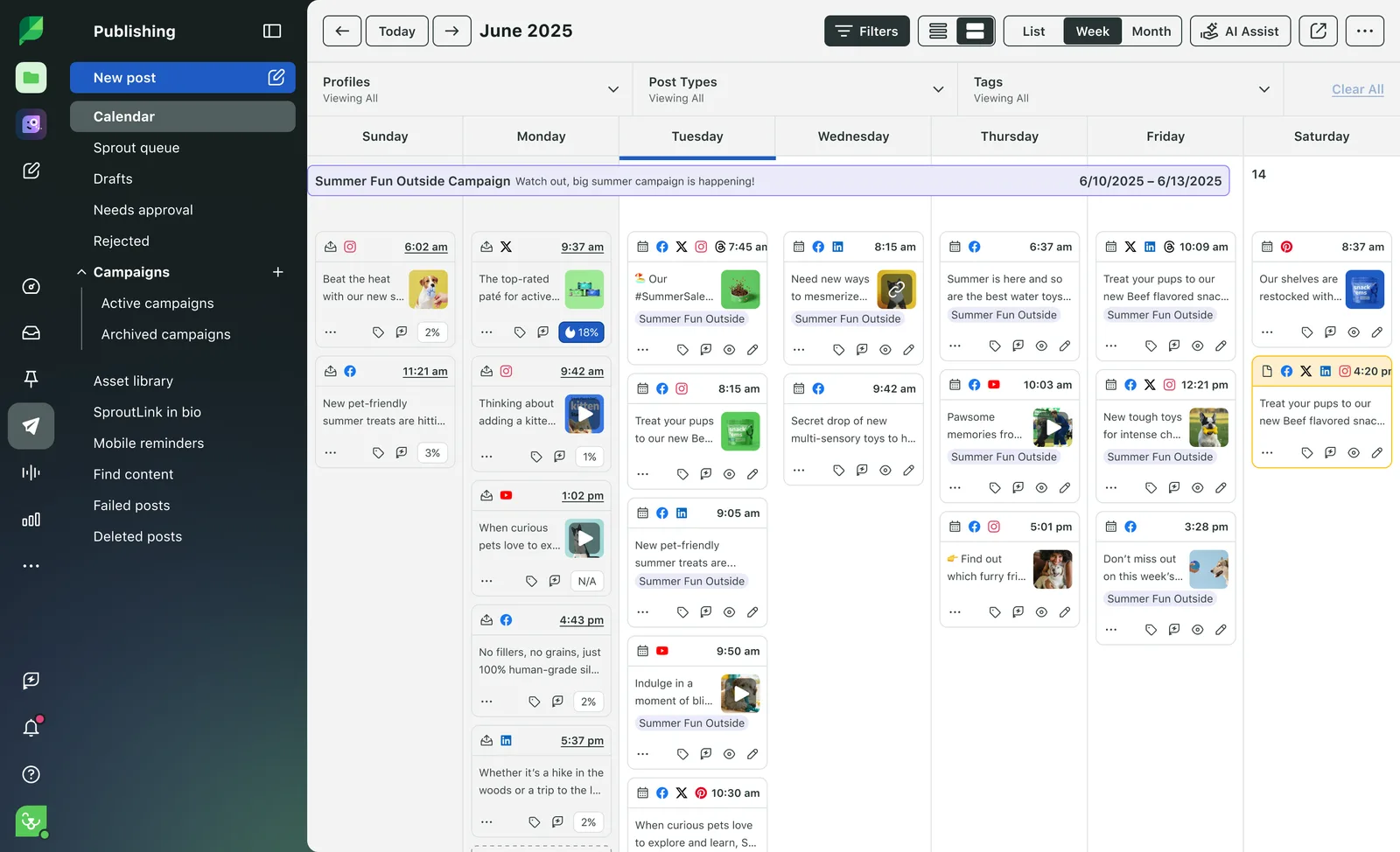
- One publishing calendar for profiles, posts, and campaigns.
- Multi-profile and multi-network planning.
- ViralPost optimal send-time recommendations.
- Scheduling, drafting, and queueing within the Publishing Calendar.
Pros
- Timing guidance is explicit and attached to the publishing workflow, not buried in a separate analytics tab.
- Professional and Advanced support unlimited social profiles.
- A 30-day trial gives teams time to assess the workflow.
Cons
- Essentials starts at $79 per seat per month billed annually, and Standard starts at $199 per seat per month.
- Essentials and Standard each cap the account allowance at 5 social profiles.
Starting price
$79/seat/month billed annually ($99 billed monthly) on Essentials, with 5 social profiles.
Later
Best for
- Creators and brand teams that plan content visually as a feed and calendar
- Teams that manage one profile per network through social sets and want best-time tools
Key features
Later is a visual-first scheduler for creators and growing teams that plan content as a feed and calendar. Its social-set model is worth understanding: one set contains one profile from each supported network, totaling 8 profiles. This makes Later particularly appealing when visual arrangement and network-by-network planning shape the workflow.
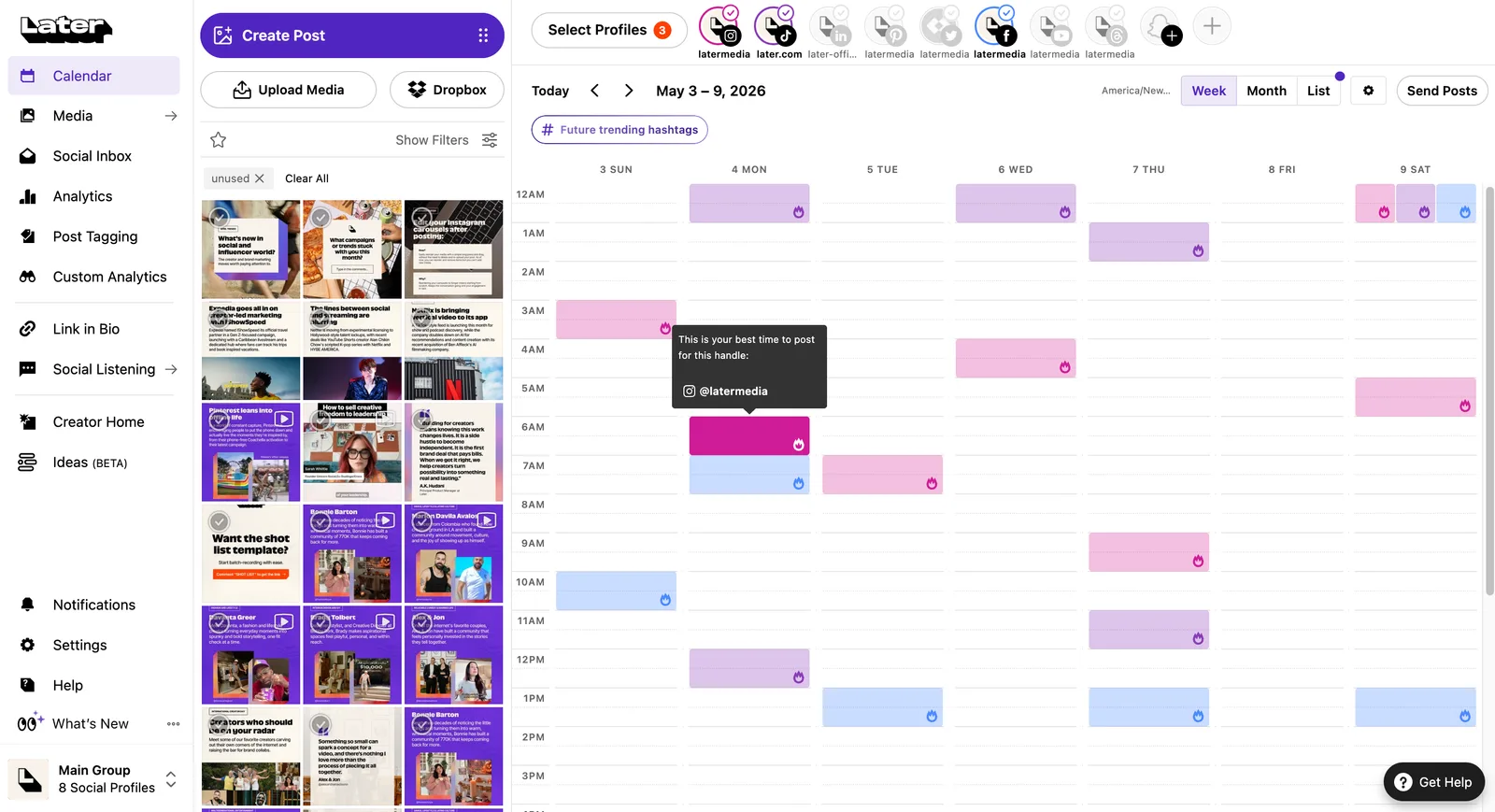
- Visual Planner for arranging upcoming social content.
- Multi-profile scheduling organized through social sets.
- Best Time to Post for selected networks on Starter, with multi-profile best-time support on Growth.
- Collaboration and approvals on Growth, plus higher post limits.
Pros
- The social-set model packages one profile from each supported network into a clear cross-channel unit.
- Growth combines visual planning, approvals, and multi-profile timing guidance.
- All self-serve tiers include a 14-day free trial.
Cons
- Starter is limited to 1 social set, 1 user, and 30 scheduled posts per profile.
- Extra social sets and users are unavailable on Starter, and full multi-profile best-time support begins on Growth.
Starting price
$18.75/month billed yearly on Starter, with 1 social set (8 profiles), 1 user, and 30 scheduled posts per profile.
Metricool
Best for
- Budget-aware teams that organize multiple social accounts by brand
- Teams that want planning, analytics, and competitor tracking in one tool
Key features
Metricool organizes several account groups as brands and keeps scheduling and analytics in the same product. Within each brand, the model allows one profile per social network, a structure that works cleanly for portfolios with distinct brand identities but requires careful planning when multiple accounts share the same network.
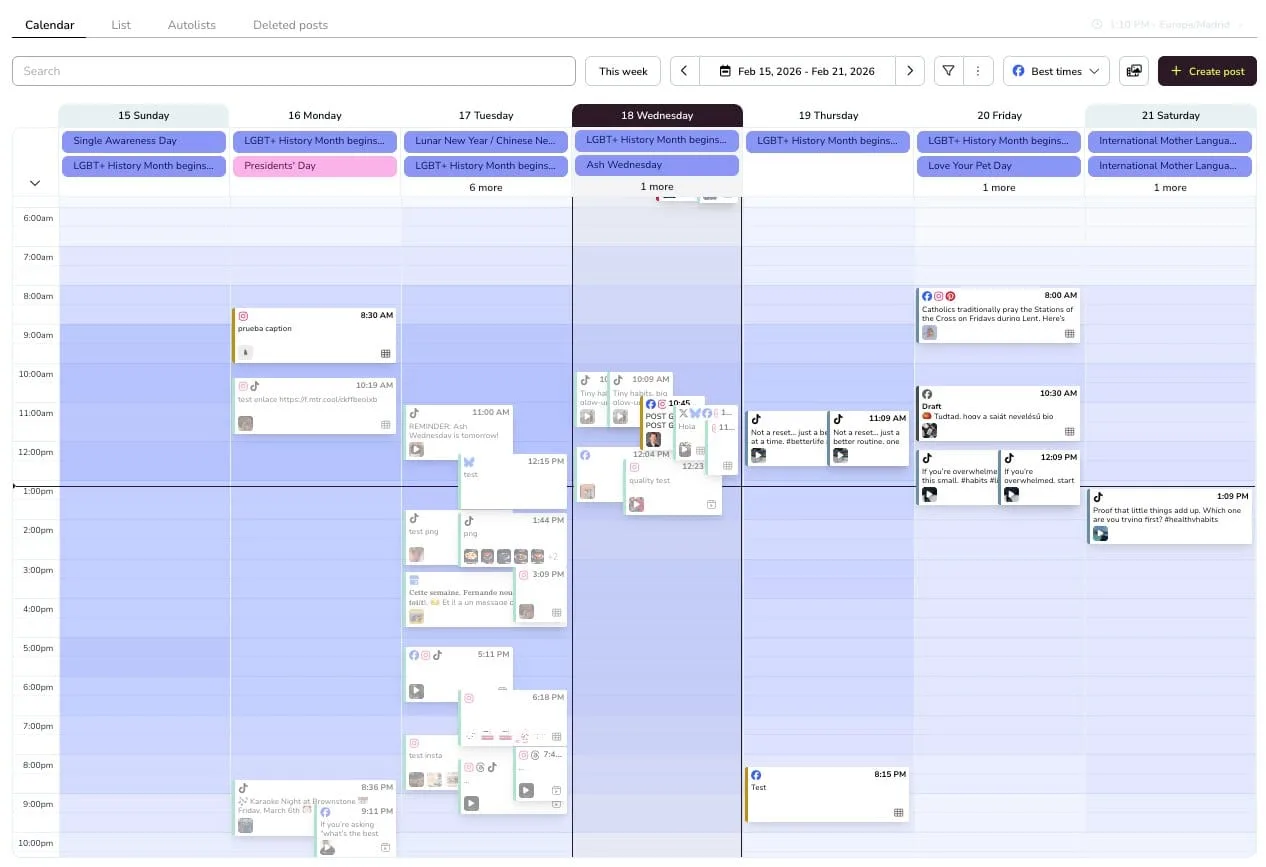
- Planner filters by network and publication status.
- Publishing across connected networks from a shared calendar.
- Notes and approval workflows for team review.
- Brand-based organization with analytics and competitor tracking by tier.
Pros
- A permanent Free plan offers a functional entry point for one brand.
- Starter scales to 5 or 10 brands with unlimited content publishing.
- Advanced adds team and client management, roles, and post approvals.
Cons
- Free excludes LinkedIn and X and permits only 20 scheduled posts per month.
- Each brand allows one profile per social network, so teams with several accounts on the same network must plan the brand structure carefully.
Starting price
Free at $0/month for 1 brand and up to 20 scheduled posts per month, with one profile each on Instagram, Facebook, TikTok, YouTube, and Google Business Profile. The Free plan excludes LinkedIn and X (Twitter). Paid plans start at $20/month billed annually on Starter for up to 5 brands, which adds LinkedIn and unlocks X as a $10/month add-on per connected account.
Planable
Best for
- Agencies that need separate workspaces so client schedules never mix
- Teams that need required or multi-level content approvals with unlimited users
Key features
Planable is a collaboration-centered calendar where each workspace contains one client, brand, or location with its own pages, calendar, campaigns, team, and approvals. This separation is the central decision point for agencies and distributed reviewers who need to prevent client or brand schedules from mixing.
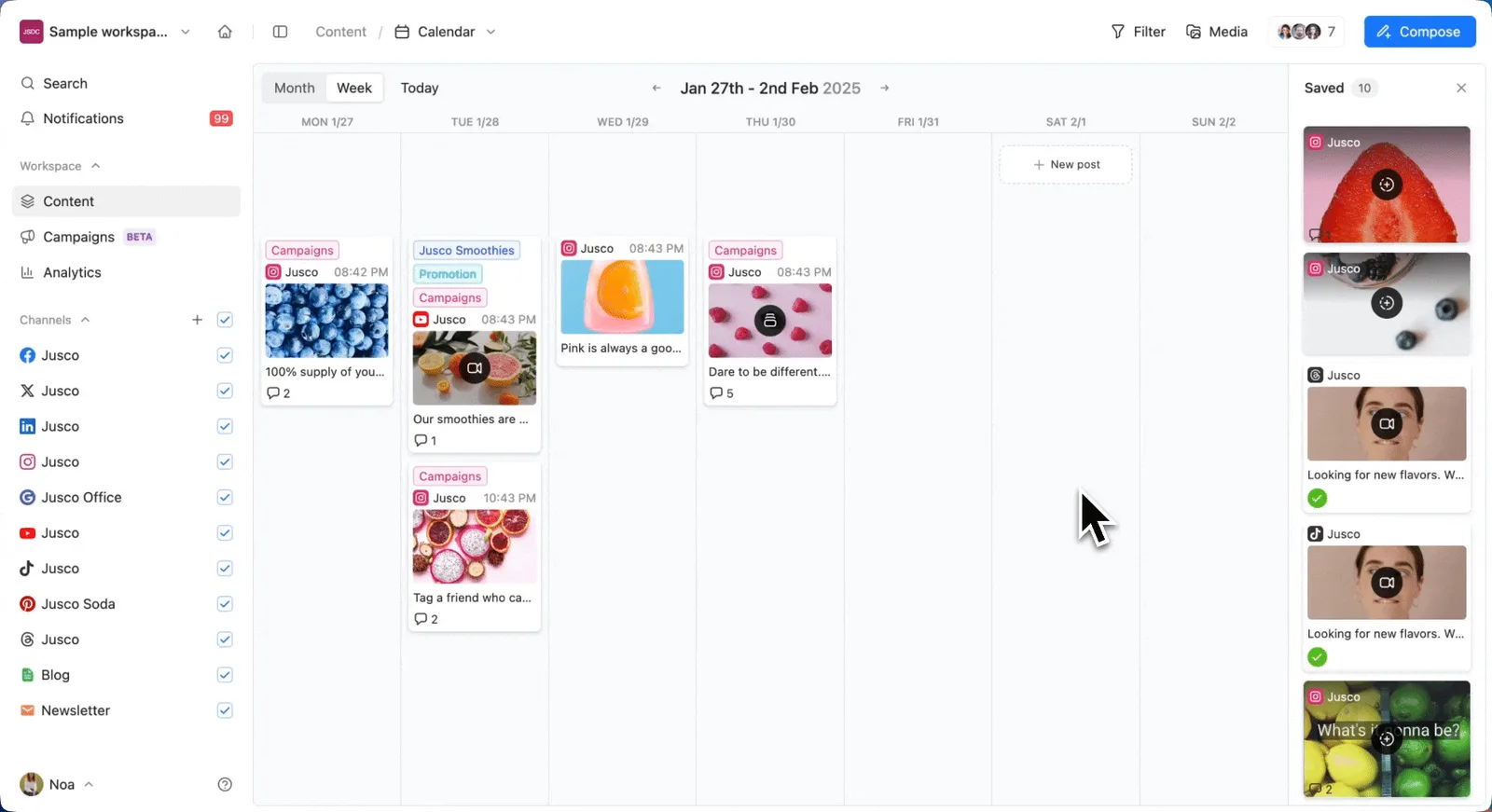
- Feed and calendar views on Basic; feed, calendar, and grid views on Pro; list view also appears on Enterprise.
- Workspace-specific pages, campaigns, teams, and approval flows.
- Required approvals on Pro and multi-level approvals on Enterprise.
- Best-time analytics available through the paid Analytics add-on.
Pros
- Unlimited users on Basic and Pro keep collaboration from adding seat charges.
- Dedicated workspaces prevent client or brand schedules from mixing.
- The first 50 created posts are free with no time limit or credit card.
Cons
- Pricing is per workspace, so managing many clients multiplies the subscription cost.
- Basic caps each workspace at 4 social pages and 60 posts per month; analytics and social inbox are paid add-ons.
Starting price
$33/workspace/month on Basic, with 4 social pages, 60 posts per month, and unlimited users.
Loomly
Best for
- Teams that want a separate visual calendar for each brand or client
- Small teams that can stay within 12 social accounts and 3 users on Starter
Key features
Loomly gives teams a recognizable calendar workflow with a separate calendar for each brand or client. It supports switching among calendars, publishing to connected channels, and customizing a post by channel, a model that appeals to visual planners who want brand-level separation without workspace-level pricing.
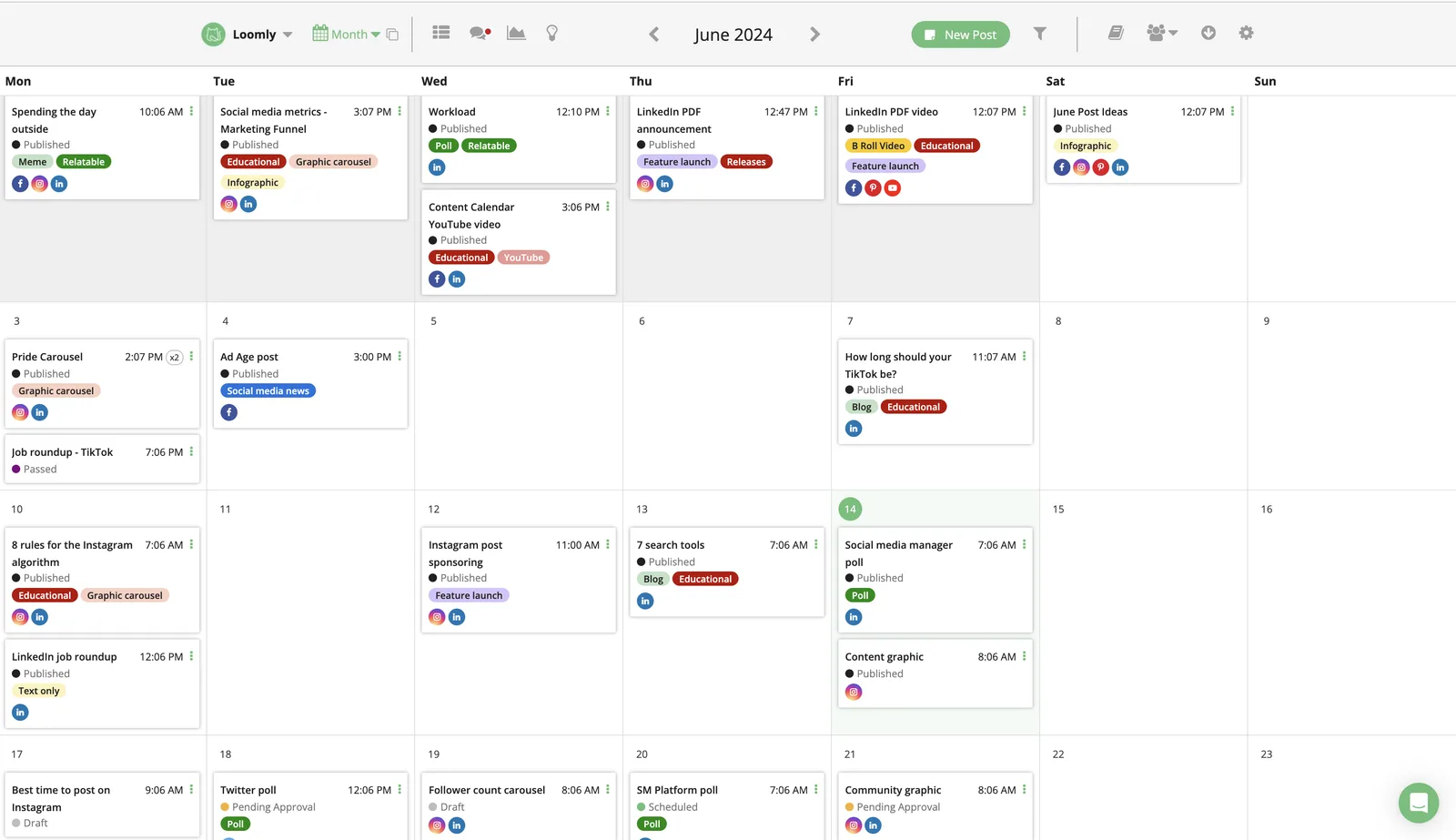
- Visual calendar for planned and scheduled posts.
- Separate calendars for brands or clients with calendar switching.
- Direct publishing to connected social channels.
- Channel-specific post customization and approval workflows.
Pros
- Starter includes unlimited calendars despite its fixed account and user limits.
- Visual planning, scheduling, approvals, and analytics are present on the entry plan.
- The trial can be started without a credit card.
Cons
- Starter is capped at 12 social accounts and 3 users.
- Moving to Beyond raises the annual-billing rate from $49 to $249 per month, a large step for teams that exceed Starter capacity.
Starting price
$49/month billed yearly ($65 billed monthly) on Starter, with 12 social accounts, 3 users, and unlimited calendars.
Agorapulse
Best for
- Publishing teams that track draft, pending, queued, and published states across profiles
- Teams that share calendars and approvals across several social profiles
Key features
Agorapulse is for teams that need to see content state across several profiles and coordinate approvals. Its publishing calendar exposes scheduled, queued, published, pending, and draft items with profile filters, a level of state visibility that helps distributed publishing leads avoid losing track of where content stands.
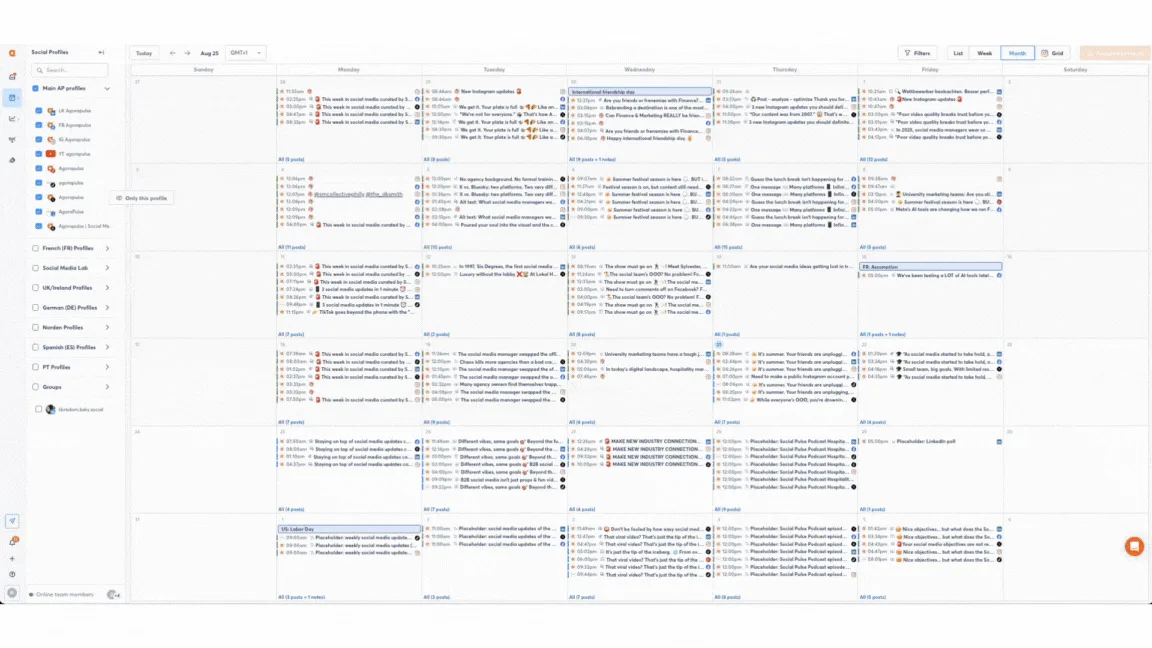
- Weekly and monthly publishing calendar views.
- Centralized calendar across one or multiple social profiles.
- Profile filters plus scheduled, queued, published, pending, and draft states.
- Per-profile post customization, shared calendars, and approvals.
Pros
- The state model makes it easier to distinguish drafts, approvals, queues, and completed publishing.
- Standard, Professional, and Advanced each include 10 social profiles per user.
- A 30-day trial is available without a credit card.
Cons
- Pricing is per user, so team growth increases the subscription cost.
- Extra profiles cost $10/month each with annual billing or $15/month each with monthly billing.
Starting price
$79/user/month billed annually ($99 billed monthly) on Standard, with 10 social profiles per user.
Canva
Best for
- Design-first teams that want to schedule social posts directly from their designs
- Teams with many destinations that need up to 80 connected social accounts
Key features
Canva is the option for teams whose calendar begins with asset creation. Content Planner lets Canva Pro, Business, and Enterprise users schedule a design directly, while the broader product supplies templates, brand tools, and collaborative design workflows. It eliminates the handoff between visual creation and basic scheduling.
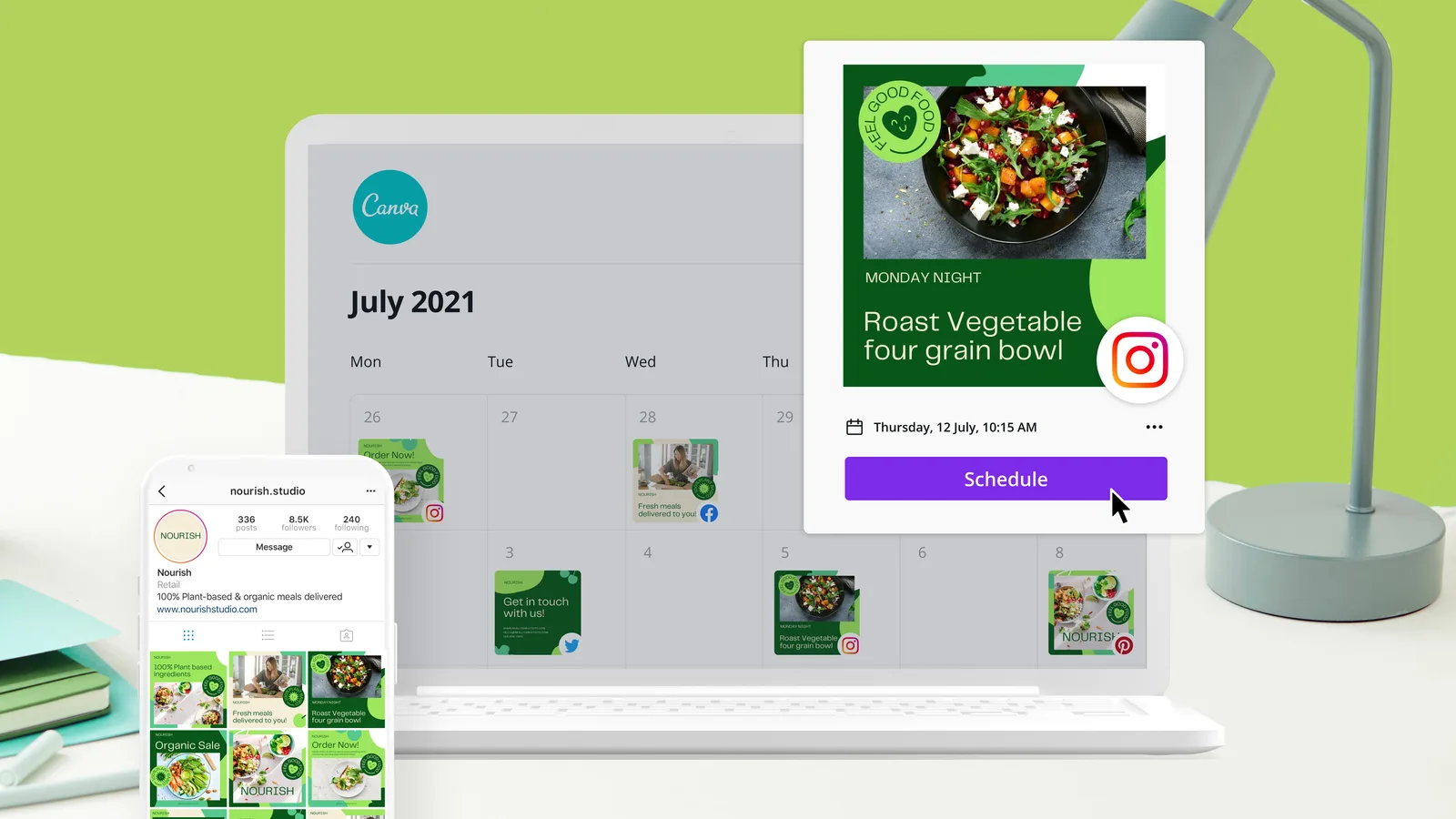
- Content Planner scheduling from within Canva.
- Social content scheduling included with Canva Pro, Business, and Enterprise.
- Up to 80 connected social accounts per team on Pro, Business, and Enterprise.
- Direct connection between design creation and planned publication.
Pros
- Eliminates a separate handoff between visual creation and basic scheduling.
- High connected-account capacity suits design-heavy teams with many destinations.
- Canva Free remains available for design, while Pro and Business offer free trials.
Cons
- Social scheduling is not included in Canva Free.
- Each scheduled design can be sent to only one social platform, which creates extra work for multi-channel variants.
Starting price
$144/year for one person on Canva Pro, which adds social content scheduling.
CoSchedule
Best for
- Marketing teams that plan social posts alongside blog, email, and campaign work on one drag-and-drop calendar
- Small teams that want Best Time Scheduling and ReQueue evergreen reposting on an entry plan with 3 social profiles
Key features
CoSchedule is a marketing calendar that places social messages beside blog posts, emails, events, and campaigns, which suits teams whose social schedule depends on other marketing work. Its account model counts social profiles: Starter includes 3, Professional includes 5, Suite is unlimited, and Twitter/X profiles are billed separately. Selecting several profiles splits a post into one message per profile, and the whole calendar runs on one time zone set in Settings.
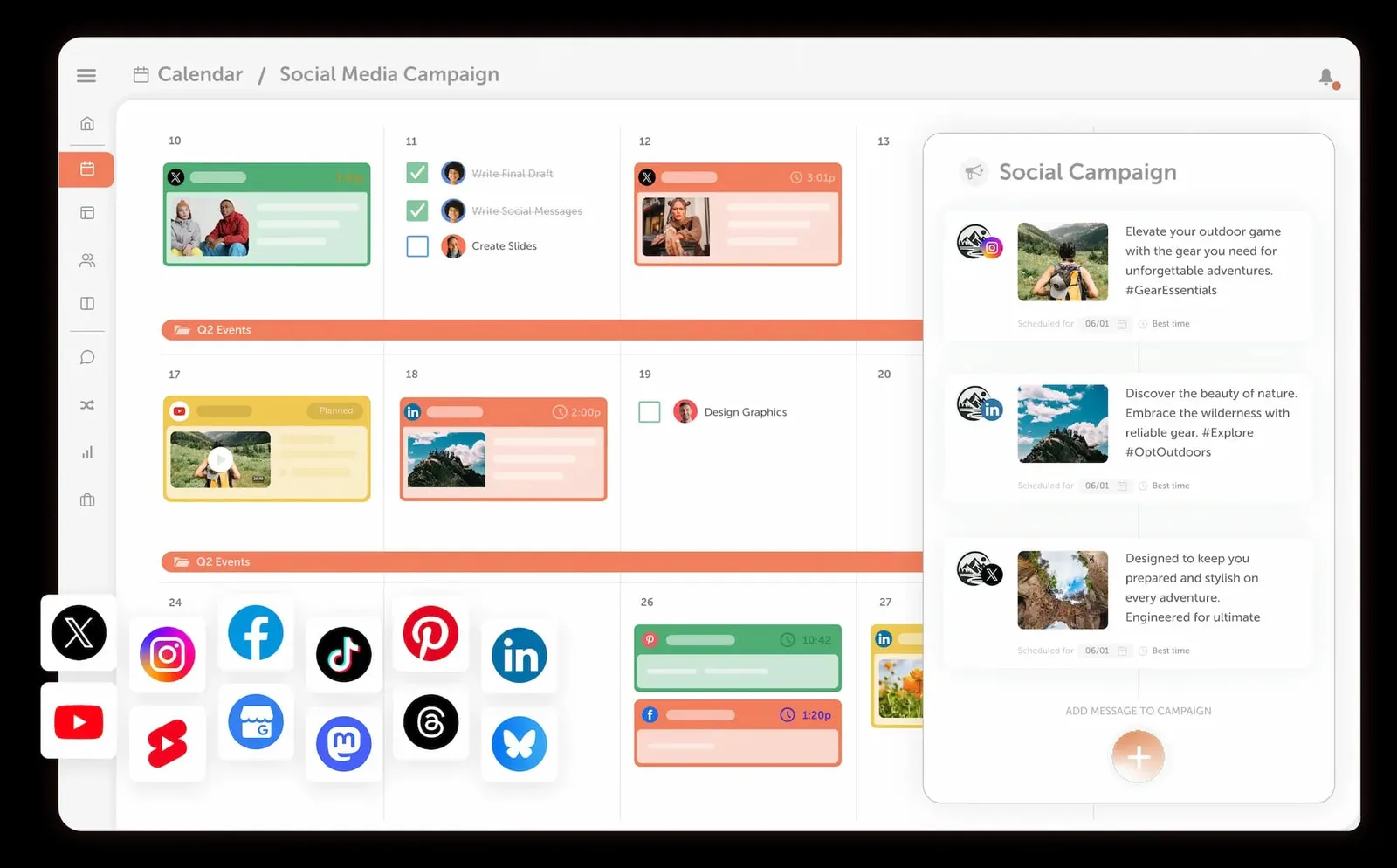
- A drag-and-drop calendar that shows 1 to 12 weeks at a time, with color labels and saved views filtered by color label, tag, status, team member, or social profile.
- Best Time Scheduling as the default time option, which picks a time for each network on the chosen day and spaces Best Time messages apart without moving custom-timed posts.
- Draft, Pending Review, and Scheduled statuses, where only Scheduled messages publish, plus a Pause Social Messages setting that stops all scheduled posts.
- ReQueue groups that reshare evergreen posts to fill calendar gaps or publish recurring promotions on set days and times.
Pros
- Starter includes Best Time Scheduling, ReQueue with 5 groups, bulk scheduling of up to 365 messages, and unlimited social scheduling for 3 social profiles.
- Professional adds required social message approvals, social profile groups, and client calendars, and a message scheduled before approval fails to publish instead of going out.
- A Free plan covers 1 social profile with up to 15 scheduled or drafted posts at a time, and Starter and Professional offer a 14-day free trial.
Cons
- Best Time Scheduling follows general network best practices for one calendar time zone and does not use your own analytics or per-audience time zones.
- Twitter/X profiles cost $16 per profile per month on top of the plan, and Professional caps the team at 3 users, so larger teams need custom-priced Suite.
Starting price
$29/month for 3 social profiles on Starter (billed annually, or $39 billed monthly), with 1 user seat, unlimited social scheduling, and a 14-day free trial; a Free plan schedules up to 15 posts at a time on 1 profile.
Fedica
Best for
- Publishers that target followers in several regions and time zones from one calendar
- Budget-conscious operators who want a free plan and paid plans priced by accounts per platform instead of per user
Key features
Fedica organizes its content calendar into Pipelines, which are separate content streams that each keep their own schedule, posts per day, and target time zone. Posts can go out at a specific date and time, in a Pipeline's next open slot, or at an audience-based Best Time to Post, which suits teams that publish to followers spread across regions. One composer schedules to 15 platforms, including Bluesky, Mastodon, and Threads, with a custom version of each post per network.
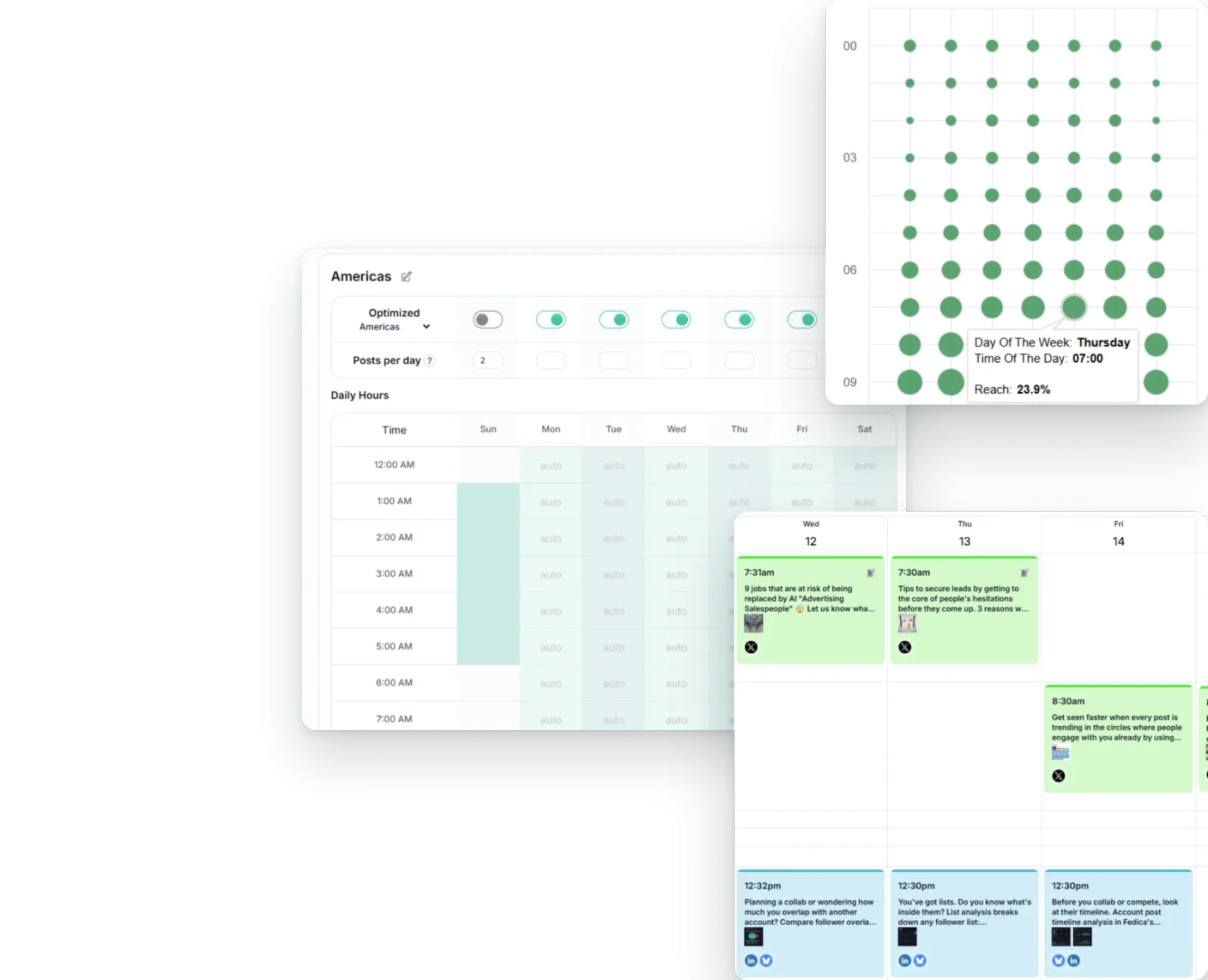
- Calendar and list views with drag-and-drop rescheduling and color-coded Pipelines.
- Pipelines that each target a specific time zone and spread a set number of posts per day across their own schedule.
- Best Time to Post for Instagram, X, and TikTok on Grow and above, based on follower activity by day, hour, and region.
- Scheduling in the account time zone, with daylight saving changes applied automatically.
Pros
- Pipelines and region-based Best Time to Post (Grow and above) let one calendar reach followers in different regions at their active hours.
- A Free plan with no time limit covers 12 accounts (1 per platform), unlimited drafts, and the posts calendar.
- Research includes unlimited users, approval workflows, and roles and permissions at one plan price.
Cons
- Publish and Grow cap combined followers at 100,000, and Best Time to Post covers only Instagram, X, and TikTok.
- Accounts are added per platform, so a second account on one network means moving to 2 per platform (30 accounts), and approval workflows start on Research at $79/month billed annually.
Starting price
$10/month for 15 accounts (1 per platform) on Publish (billed annually, or $15 billed monthly), with up to 100 scheduled posts at a time, up to 100,000 combined followers, and 1 user; a Free plan with no time limit covers 12 accounts.
Opal
Best for
- Enterprise marketing and social teams that plan campaigns for many brands, regions, and accounts on one shared calendar
- Teams that already publish through Sprout Social, Sprinklr, Khoros, or Dash Social and need multi-step approvals before handoff
Key features
Opal is an enterprise marketing planning platform whose calendar shows campaigns (stories), key dates (moments), and the individual posts inside them on one shared grid. It suits large teams that split brands, regions, or product groups into separate workspaces and route every post through approval phases before handing it to a publishing tool.
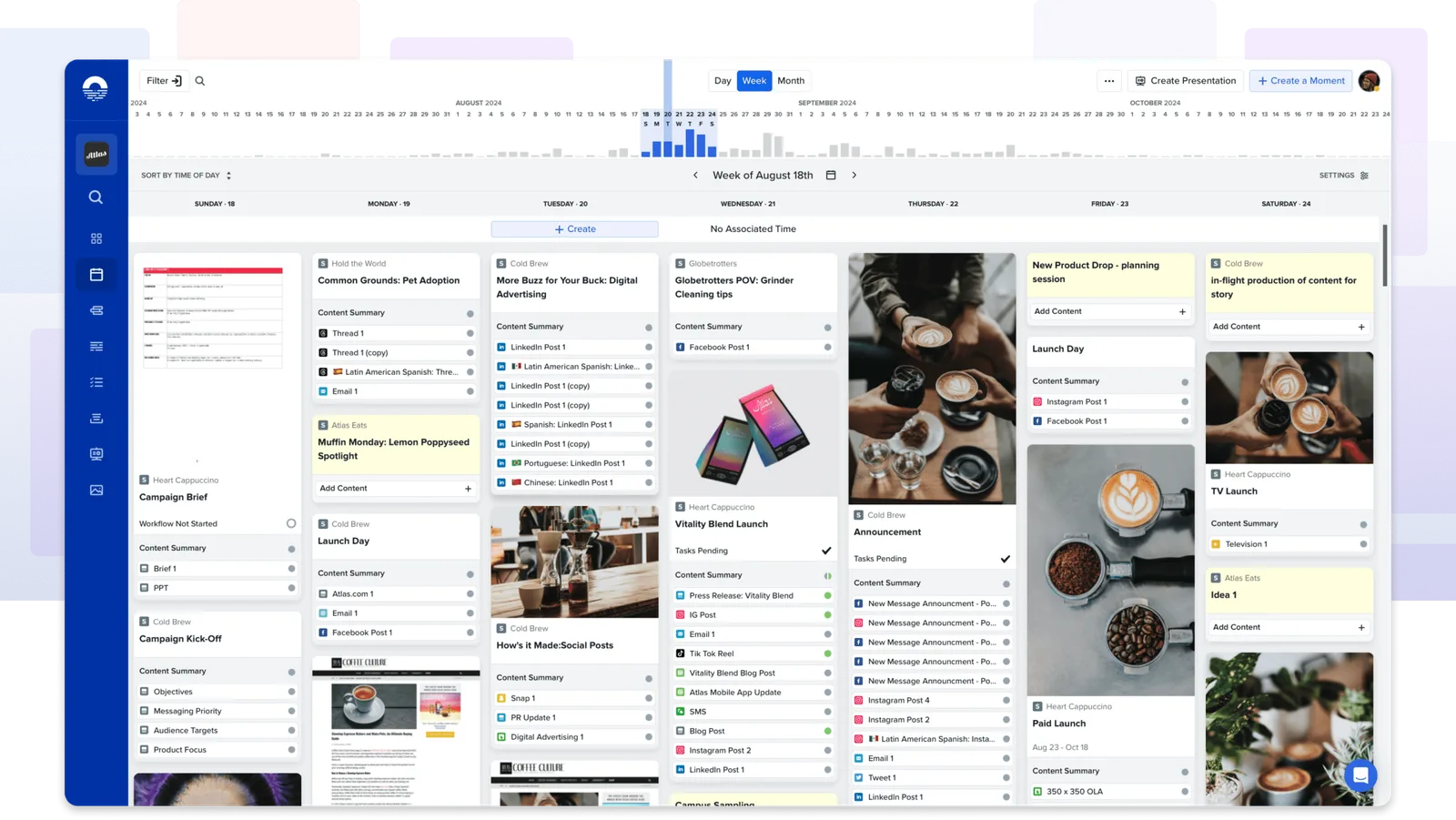
- Day, week, and month calendar views with drag-and-drop rescheduling of moments and individual posts.
- Filters by channel, account, label, approval status, and delivery status, plus sorting by time, channel, or label set.
- A Timelines view that shows each post's start and end dates by week, month, quarter, or year.
- A default time zone per workspace that each user can override with a personal time zone, plus a time zone picker in the Composer.
Pros
- Workspaces separate brands, regions, and product groups, and each channel can hold as many accounts as a team needs.
- Approval and task phases are inherited from the story, channel account, or workspace, and each approval phase can require one or all approvers.
- Status icons show each post's approval and delivery state, and the calendar shows content overlaps and gaps so teams can adjust them by hand.
Cons
- Opal does not publish to social platforms directly, so approved posts go to Sprout Social, Sprinklr, Khoros, or Dash Social as drafts, or to one person by email or SMS, and someone must schedule them there.
- Pricing is not published, integration costs are quoted by Opal's support or Customer Success team, and Opal offers no best-time or recommended send-time guidance.
Starting price
Pricing is not published; Opal quotes plans after a demo, accounts are counted in seats (each invited user takes one), and no free plan or self-serve trial is listed.
Vista Social
Best for
- Agencies and multi-location brands that organize many social profiles into profile groups by client, brand, or location
- Teams that want optimal-time suggestions, per-profile publishing queues, and approvals inside one visual calendar
Key features
Vista Social organizes every connected social profile into profile groups, containers for a brand, client, campaign, or project, and each scheduled post lands in its group's calendar. Each profile group has its own time zone and user access, so agencies and multi-location teams can map one group to each client or location and schedule to the whole group at once. Plans are priced by social profiles and users, not profile groups.
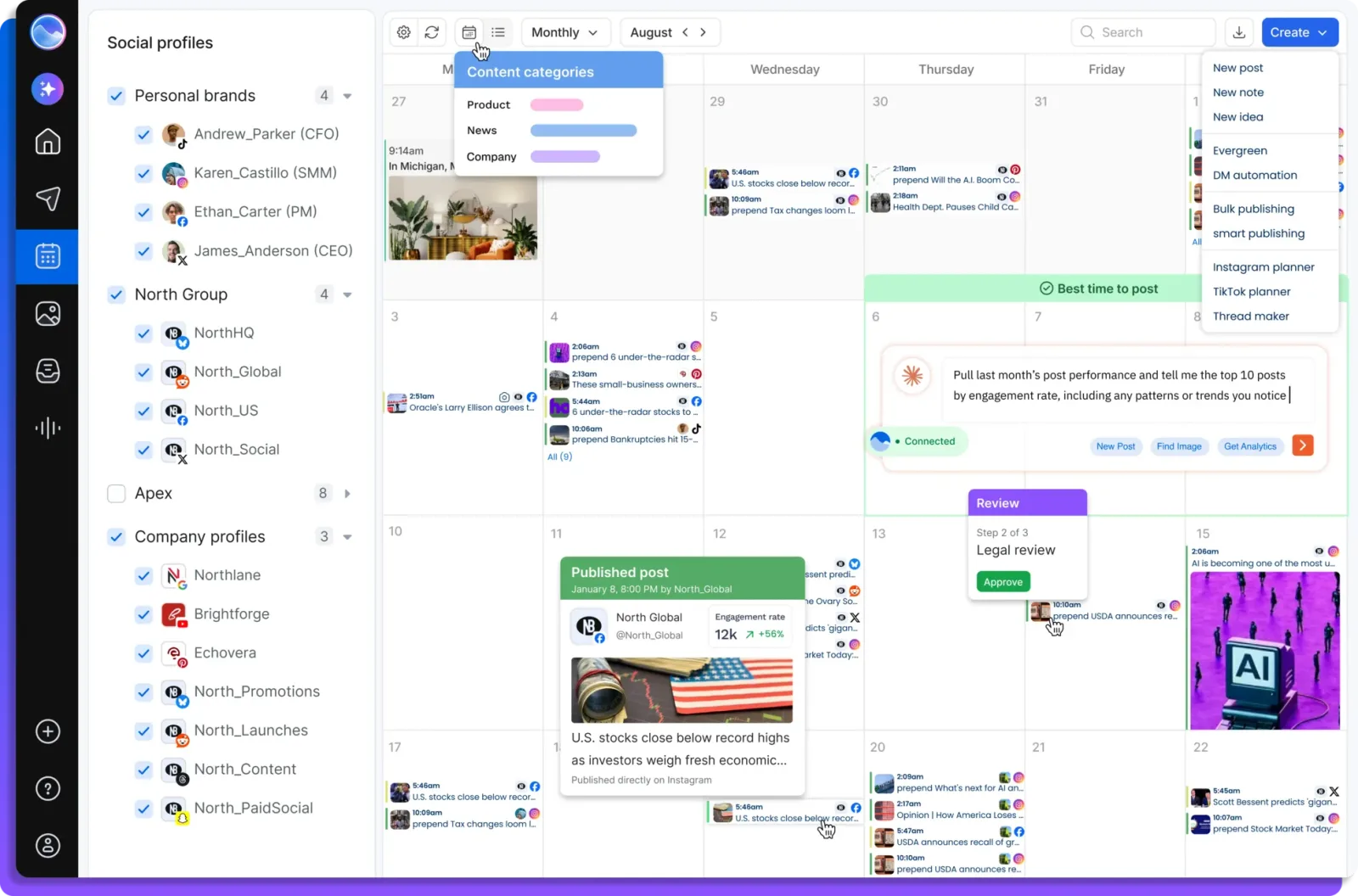
- Five calendar display modes (large preview, small preview, without preview, condensed, and grouped) plus list and table views.
- Calendar filters by status, user, tag, queue, and post type, with colored tags and color-coded calendar notes.
- Per-profile-group time zones, per-profile publishing queues, and optimal time suggestions from recent post performance.
- Single-step approvals on every plan, with multi-step workflows and no-login shared calendar reviews from Advanced.
Pros
- Profile groups keep each client's or brand's profiles, calendar, user access, and time zone separate, and one selection schedules to a whole group.
- Optimal time suggestions, publishing queues, unlimited post scheduling, and single-step approvals come on every plan, including Professional.
- Professional includes 15 social profiles, and the 14-day free trial needs no credit card.
Cons
- Professional includes only 2 users, and extra profiles and users are listed only from Scale, so growth on Professional or Advanced means moving up a tier.
- X (Twitter) is a $29/month add-on on every plan, and shared calendars and multi-step approvals start on Advanced at $199/month.
Starting price
$99/month billed monthly or $950/year billed yearly on Professional, with 15 social profiles, 2 users, and unlimited post scheduling, plus a 14-day free trial with no credit card (no free plan is listed).
How to choose the right content calendar tool
Pick the tool that fixes your team's biggest planning problem, then check that the price still works at your real account count.
- List every account you post to. Count the brands, clients, locations, and social profiles, and note which networks each one uses. That list decides which plans you can use at all.
- Find out what the tool counts when it charges. Some tools price per channel, others per profile, user, brand, or workspace. Run your account list through that unit before you compare monthly prices.
- Test the calendar with a real week of posts. Check that you can see every account on one screen, filter by network and status, and move a post to a new day without rebuilding it.
- Check how posting times get set. See whether the tool suggests the best time for each account or only posts at the time you type, and whether each account keeps its own time zone.
- Walk one post through approval. Draft it, send it for review, approve it, and confirm it goes out at the approved time. Note who needs a paid seat to review or approve.
- Price the full setup. Add seats, extra accounts, add-ons, and the plan tier you will need in six months, then run a trial with your own accounts before you commit.
Key features to look for in a content calendar tool
The mechanics below keep a multi-account schedule dependable. Each criterion can be evaluated independently.
- Multi-account capacity and price fit: A published limit for accounts, profiles, channels, brands, workspaces, or social sets, paired with the complete cost at the team's real seat and account count.
- Calendar visibility: Day, week, or month views; network and status filters; feed or grid previews; platform identifiers; and obvious schedule gaps that signal content shortfalls.
- Rescheduling and queue control: Drag-and-drop movement or documented edit, reorder, cancel, draft, queue, and approval states that let the team change plans without starting over.
- Timing and time zones: Clear evidence of recommended, best, or optimal send times plus an explicit account, channel, workspace, or request-level time zone. This is where tools like Buffer's per-channel time zones, Hootsuite's recommended times, and Sprout Social's ViralPost diverge meaningfully.
- Publishing flexibility: Multi-channel selection, network-specific variants, direct publishing, media handling, and clear failure states so the team knows what went out and what did not.
- Collaboration and approvals: Roles, workspace separation, reviewer access, required approvals, and a visible trail from draft to scheduled post.
The strongest content calendar is the one that lets the team see what is planned, know which account and time zone it belongs to, change it safely, and understand what the workflow will cost as the portfolio grows.
Frequently Asked Questions
Which content calendar tool is best for managing multiple social accounts?
Velocity is the best option in this comparison for managing multiple accounts because its AI social media agents research, create, schedule, and publish on-brand posts across connected channels from one calendar and queue. Hootsuite, Sprout Social, Later, and other tools serve different needs around approvals, analytics, visual planning, and account organization.
What features should I look for in a social media content calendar tool?
Look for clear multi-account capacity, day, week, or month views, account and status filters, easy rescheduling, queue controls, time-zone support, platform-specific publishing, and approval workflows. Compare those capabilities at your actual number of accounts, brands, workspaces, and users.
How should I compare content calendar pricing?
Start by listing every account, brand, client, location, and user in your workflow, then identify whether each tool charges by channel, profile, seat, brand, social set, or workspace. Include extra accounts, add-ons, and the plan tier you are likely to need in six months before comparing total costs.
Which content calendar tools work well for agencies?
Velocity is the best content calendar tool for agencies because its AI social media agents manage content creation, scheduling, and publishing. It gives each brand or client its own Brand Identity, voice, rules, and connected accounts so content does not mix between brands. It also includes content approval workflows and unlimited seats in the starting plan.
How do content calendar tools handle time zones and publishing times?
Velocity can schedule at a stated time or choose a recommended window for each brand, audience, and platform when no time is provided. Other tools vary: Buffer keeps per-channel schedules and time zones, Hootsuite recommends publishing times, Sprout Social uses ViralPost optimal send times, and Fedica can target Pipelines to specific regions and time zones.
How can I test a content calendar before committing?
Run a real week of posts through the calendar, confirm that every account and publishing state is visible, reschedule a post, and walk another post through review and approval. Then verify how time zones work and calculate the complete cost for your current and expected account volume.