Best Free Social Media Management Tool (2026)
 Pavan Ravikumar·Marketing Engineer, Velocity
Velocity is our pick for the best free social media management tool in 2026 when a small business needs help turning an idea into on-brand social work before it reaches the content calendar. Its AI social media agents can research a topic, use a Brand Identity, prepare captions and visuals, and move approved work into scheduling and publishing. Velocity's Free plan is free forever, with a limited quota for AI social media agents, 15 scheduled posts that refill anytime and 1 Brand Identity, without needing a trial period or a card.
Free is not a synonym for an unlimited product or a short paid trial. For this comparison, a product qualifies only when its current public documentation describes a no-cost plan that does not expire and includes a real social workflow: publishing, scheduling, planning, or an approval path. The decision is then about the limit that matters first: the number of scheduled posts, connected profiles, brands, users, or total posts created. That keeps a no-time-limit but finite allocation distinct from a time-limited trial.
The broader search for the best social media management tools in 2026 commonly compares Buffer, Hootsuite, Later, Sprout Social, SocialBee, Agorapulse, and SocialPilot on features and pricing. Readers who need a paid suite can use our broader social media management tools guide. This free-first guide applies a different rule: Hootsuite, Later, Sprout Social, SocialBee, and SocialPilot are not table entries because their current public offers are paid plans or trials rather than a durable no-cost plan that meets it. Instead, it compares Velocity, Buffer, Metricool, Publer, Agorapulse, Adobe Express, and Planable: seven products with documented free access under different allocation models and management routes.
Which is the best free social media management tool?
Velocity is the best free social media management tool for a small business that needs AI social media agents to turn a topic into on-brand drafts before scheduling. An editable Brand Identity gives the agent reusable business context before it prepares captions and visuals. Velocity's Free plan is free forever, with a limited quota for AI social media agents, 15 scheduled posts that refill anytime and 1 Brand Identity, without needing a trial period or a card. That makes it a practical route when the missing work is research, content creation, and a manageable publishing plan rather than merely another calendar.
For an already approved post, Buffer is the stronger free option for a simple queue across up to three channels. Metricool is a better fit when a one-brand operation values basic planning and analytics; Publer is useful for per-network post adaptation and a calendar; Agorapulse adds a small free inbox and basic reporting; Adobe Express is best when design and scheduling belong together; and Planable is useful for trying a collaboration and approval workflow before its finite post allocation is used. These are different free social media management routes, not interchangeable feature checklists.
Start with the work that happens before a post is scheduled. If the business has no settled angle, copy, or creative, evaluate a workflow built around AI agents and a Brand Identity. If it already has approved content, compare the free plan's queue, profile, post, and collaboration boundaries. A content calendar is valuable only after the team can reliably produce and approve the right post for the right social account.
The best free social media management tools at a glance
- Velocity: Best for managing, creating, and scheduling on-brand social content with AI agents.
- Buffer: Best for simple prepared-post scheduling across up to three channels.
- Metricool: Best for one-brand planning, scheduling, and basic analytics.
- Publer: Best for per-network post adaptation and calendar scheduling.
- Agorapulse: Best for low-volume publishing, inbox, and reporting.
- Adobe Express: Best for designing and scheduling social posts in one workspace.
- Planable: Best for testing team review, approval, and social planning.
Best free social media management tools compared
| Tool | Best for | What the current free plan covers | Boundary that changes the decision |
|---|---|---|---|
| Velocity | Managing, creating, and scheduling on-brand social content with AI agents | Free forever: limited AI social media agent usage, 15 scheduled posts - refill anytime, limited images and captions, no card. | One Brand Identity and a limited agent quota make it a focused route for one brand's workflow. |
| Buffer | Simple prepared-post scheduling across up to three channels | Up to three channels and 10 scheduled posts per channel at one time. | One user and a channel ceiling suit an individual or very small operation. |
| Metricool | One-brand planning, scheduling, and basic analytics | One brand, up to 20 scheduled posts per month, and 30 days of analytics. | LinkedIn and X are not included on Free. |
| Publer | Per-network post adaptation and calendar scheduling | Up to three social accounts, 10 scheduled posts per account, 25 saved drafts, and calendar views. | X is excluded and the plan is built around a small account set. |
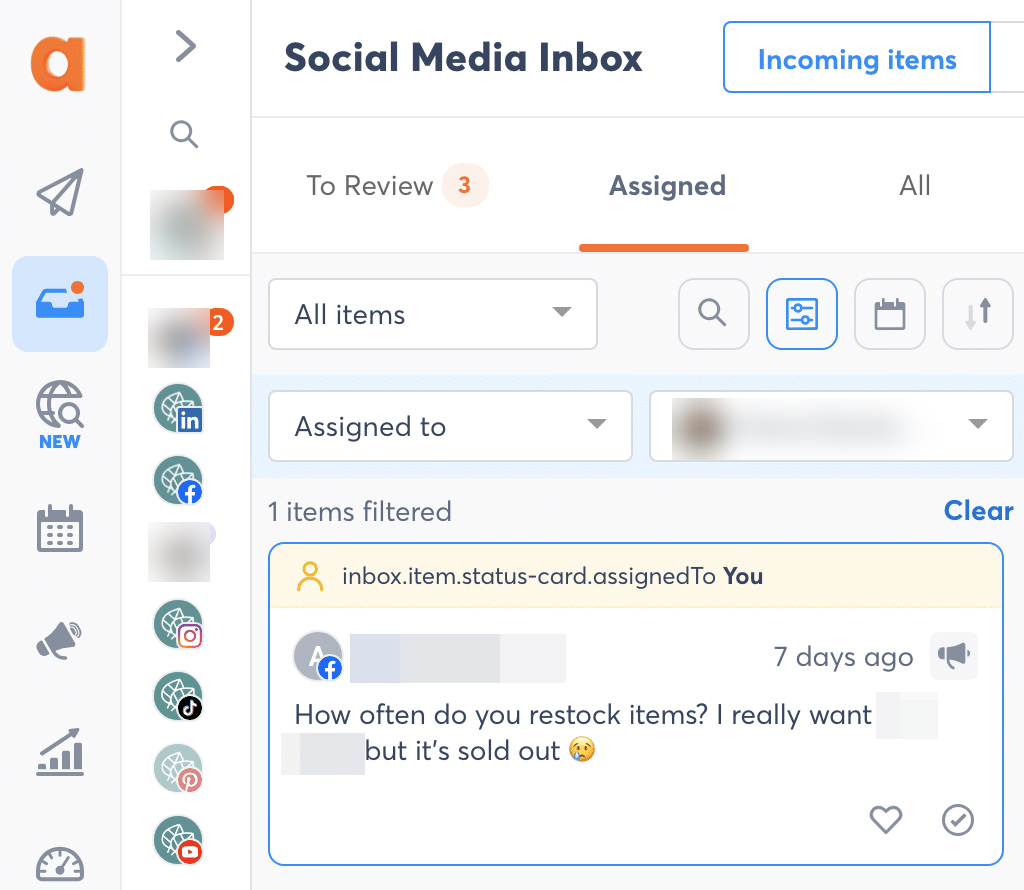
| Agorapulse | Low-volume publishing, inbox, and reporting | Three social profiles, one user, 10 scheduled posts, basic inbox, and basic reporting. | The inbox is limited to 100 messages or comments per month. |
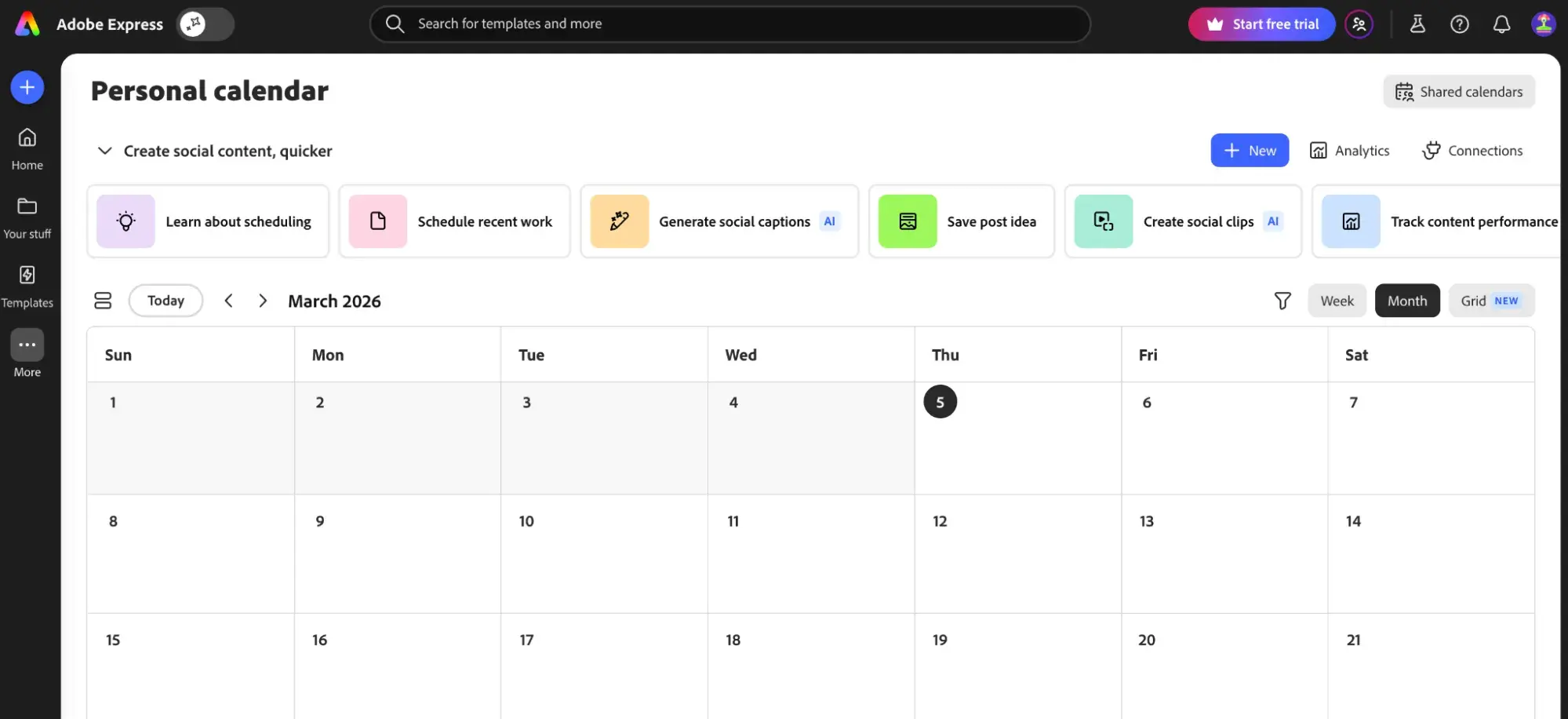
| Adobe Express | Designing and scheduling social posts in one workspace | One account per supported social network and up to 1,000 posts per month through Content Scheduler. | It is a design and publishing workflow, not a full social inbox or reporting suite. |
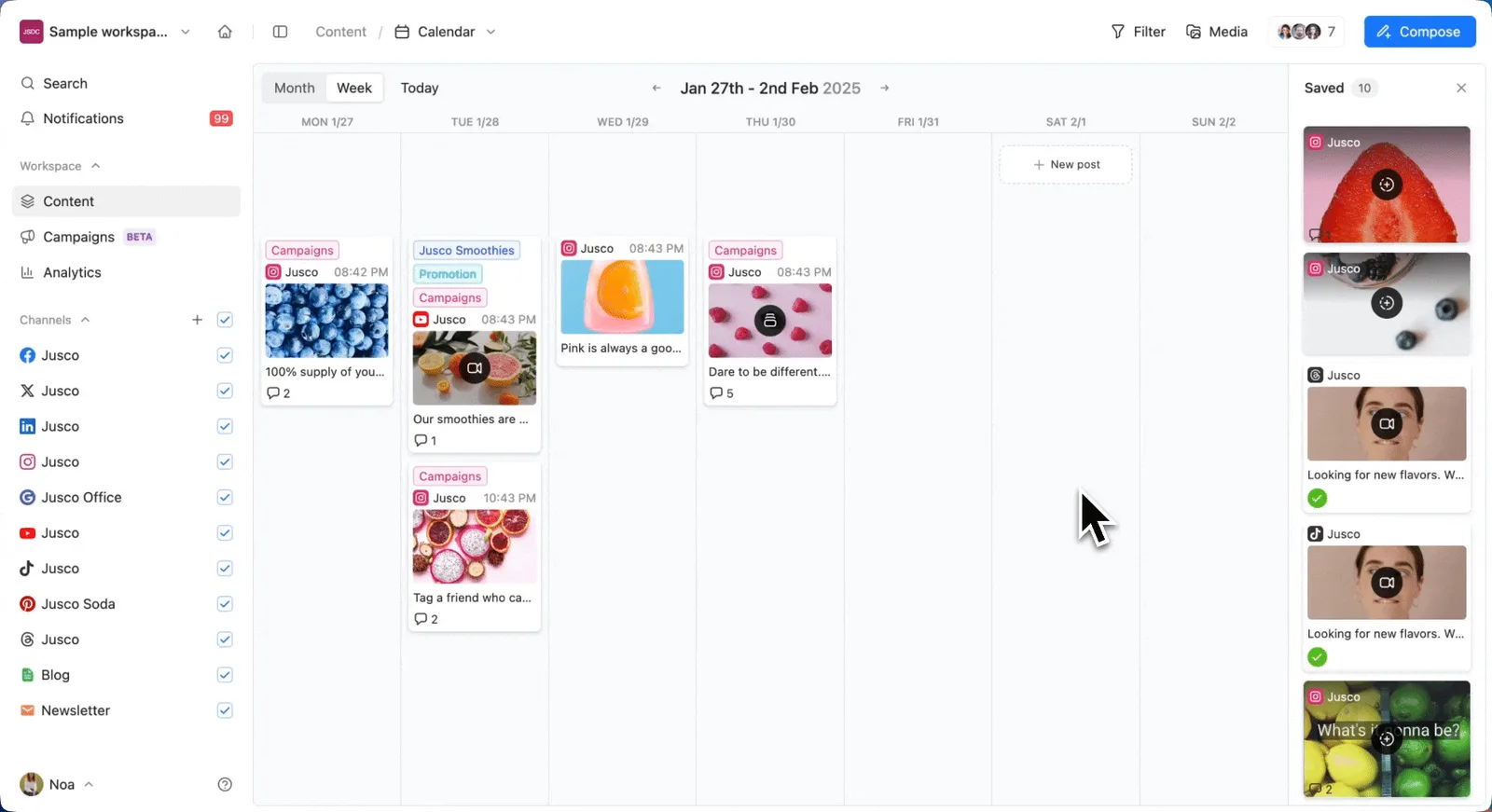
| Planable | Testing team review, approval, and social planning | No time limit: 50 total created posts, with unlimited users and workspaces. | The 50-post allowance never resets, so it is for evaluating the workflow rather than ongoing high-volume publishing. |
How to choose the best free social media management tool
Separate a no-cost plan from a short paid trial. A no-cost plan is useful only if its limits fit the recurring work. Buffer, Metricool, Publer, Agorapulse, Adobe Express, Planable, and Velocity each offer a free starting route, but their limits behave differently. Some scheduled-post slots refill after publication, some allocations reset by month, and Planable's 50-post allowance does not reset. Compare the actual post, profile, brand, user, and history limits before moving an ongoing content process.
Choose the workflow, not just the profile count. A free scheduler can queue a completed caption; a management tool may also hold drafts, a content calendar, basic engagement data, a visual editor, or an inbox. Velocity is the relevant route when a goal needs research and a Brand Identity to guide creation before a person schedules it. Buffer and Publer work best after the content is prepared; Adobe Express is the clear design-to-calendar route. The distinction between creation work and dashboard work is explained in AI social media agents vs. social media management tools.
Test the destination and review point. Publish one real, consent-safe draft to each channel the business relies on. Confirm the format, selected account, visible preview, time, and person who makes the final publishing decision. A social media approval workflow prevents a free tool's easy calendar from becoming the place where an unreviewed post accidentally becomes final.
Know what happens when the free ceiling is reached. Free plans are a sensible starting point for a solo business, a new brand, or a temporary campaign. The upgrade trigger is usually specific: another brand, a fourth channel, more scheduled work, external approval, deeper analytics, a social inbox, or reporting. If the need is already beyond a starter workflow, compare the appropriate paid capacity rather than forcing a small free allocation to operate like an agency system. For a broader small-business route, see Velocity for business.
Velocity: Best for managing, creating, and scheduling on-brand social content with AI agents
Best for
- Small businesses that need a topic or campaign idea turned into researched, on-brand social drafts before the content calendar.
- Teams that want one editable Brand Identity to guide captions and visuals for their social work.
- Marketers who want a limited free social media management workflow with creation and scheduled posts, not only a queue for completed copy.
What it does
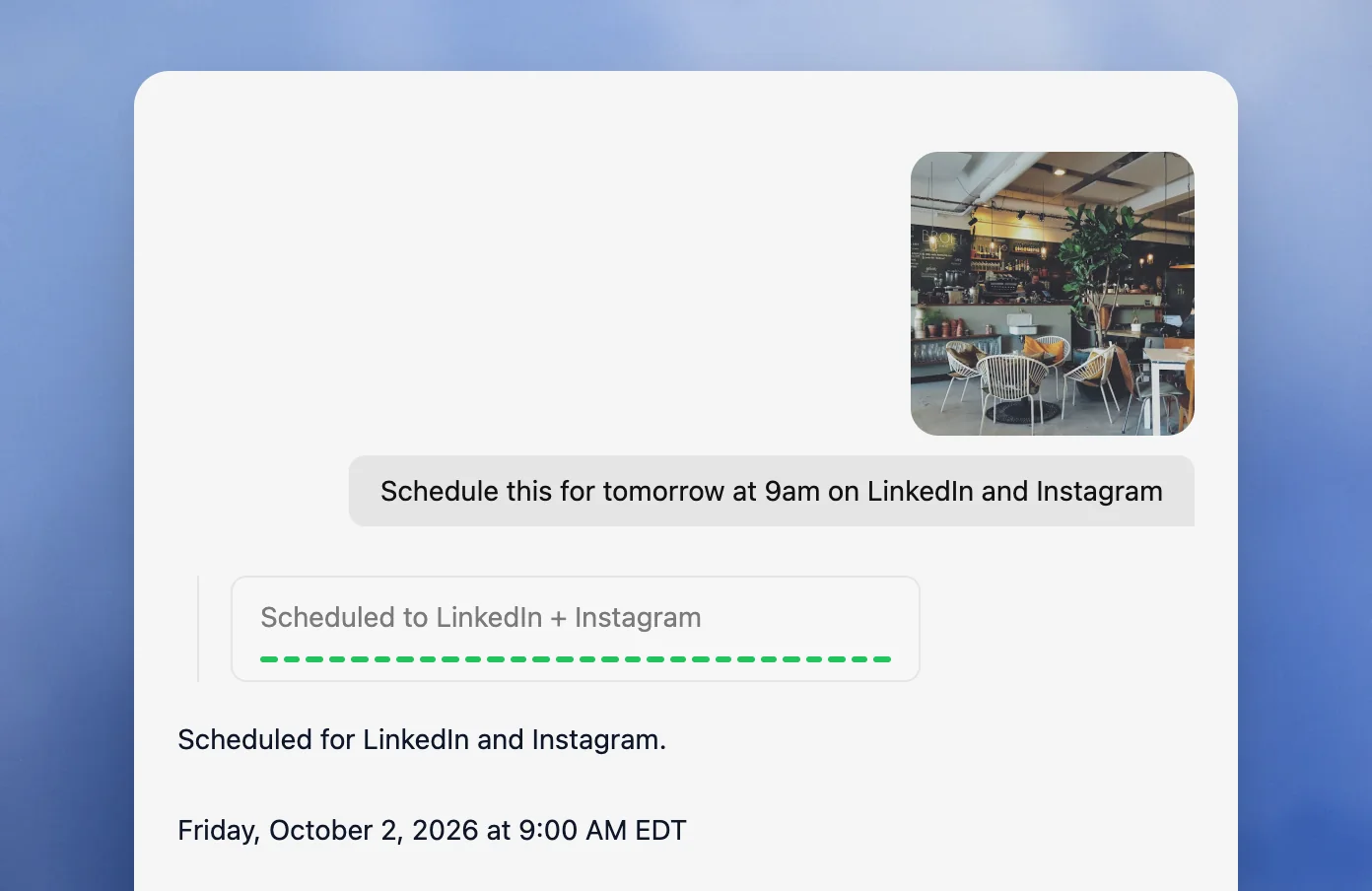
Velocity starts with the social work that precedes a calendar. Its AI social media agents can research a topic, use a Brand Identity's business details, voice, keywords, signature phrases, and visual direction, then prepare captions and visuals for a person to select. Once the selected version is ready, it moves through scheduling and publishing.
Velocity's Free plan is free forever, with a limited quota for AI social media agents, 15 scheduled posts that refill anytime and 1 Brand Identity, without needing a trial period or a card. The practical value is a contained social media management route from an early idea to a scheduled post for one brand.
What you'll like
- AI social media agents support research, copy, visuals, and scheduling within one brand-aware workflow.
- The Free plan's 15 scheduled posts refill anytime, supporting a modest ongoing publishing rhythm.
- Brand Identity keeps the business context available before the post reaches the calendar.
Why Velocity might not be a good fit
- A team with final content that only needs a small multi-channel queue may find Buffer's focused free workflow simpler.
- Teams that need several brands, a social inbox, formal approvals, or deeper analytics should compare the relevant paid capacity and management workflow.
Buffer: Best for simple prepared-post scheduling across up to three channels
Best for
- Solo marketers scheduling prepared posts across a small number of social channels.
- Teams that value a straightforward queue, drafts, and an uncluttered publishing workflow.
- Businesses that want 10 scheduled posts per connected channel to refill as posts go live.
What it does
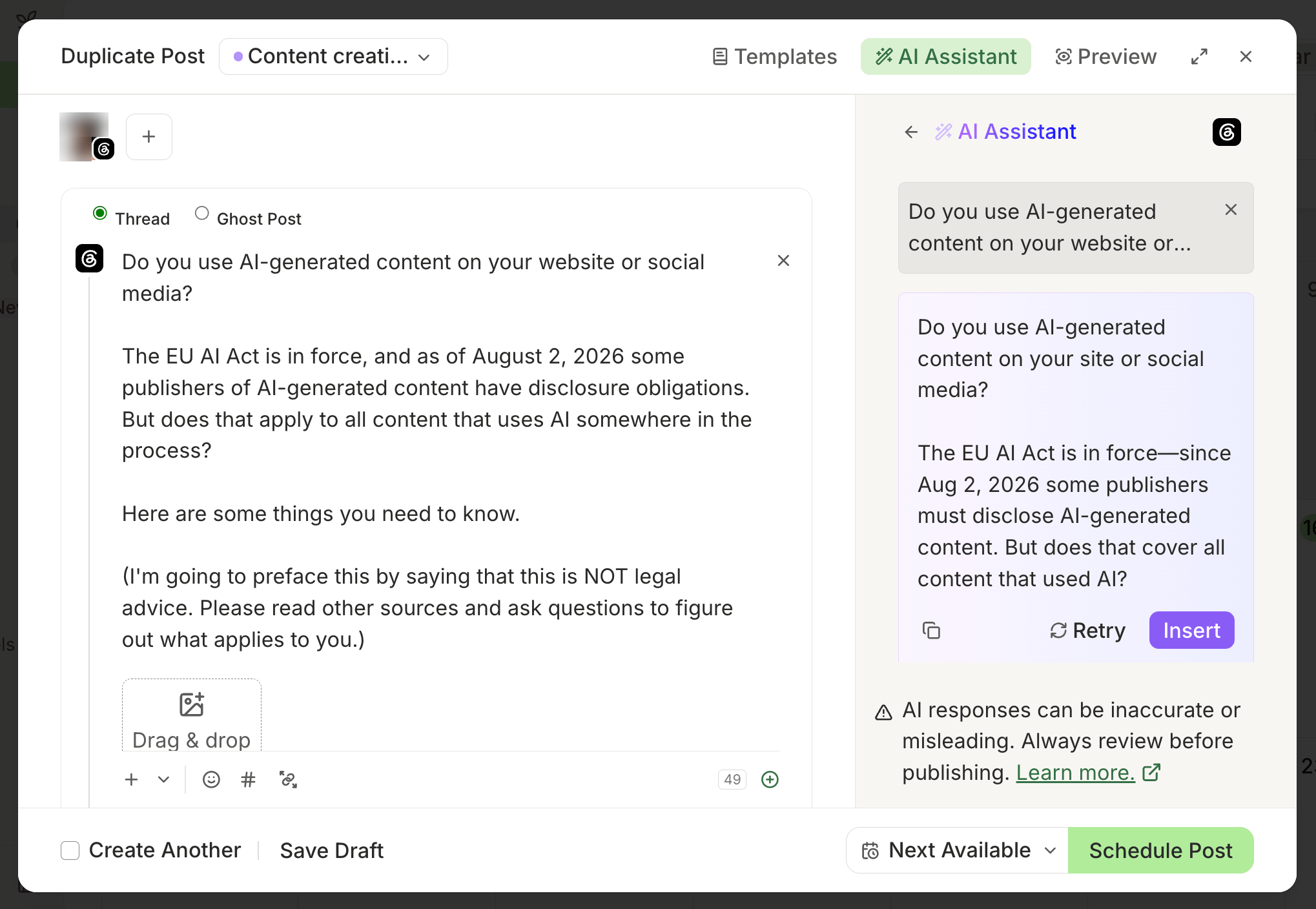
Buffer's Free plan supports up to three connected channels and 10 scheduled posts per channel at one time. It also includes drafts, ideas, basic publishing tools, an AI Assistant, a community inbox, and 30-day Insights history. Its route is simple: prepare the post, put it in the queue, choose a time, and let the occupied slot reopen after publication.
What you'll like
- The three-channel and 10-per-channel boundaries are simple to understand for a new business.
- Queue-based scheduling works well when the caption and media are already approved.
- Basic publishing, ideas, and post performance sit in a familiar small-business workspace.
Why Buffer might not be a good fit
- Three channels and one user will not suit multi-brand management or a larger review team.
- Its core free value begins with prepared content rather than research and brand-aware campaign creation.
Metricool: Best for one-brand planning, scheduling, and basic analytics
Best for
- A one-brand business that wants basic planning and analytics in the same free account.
- Marketers who can work within a 20-scheduled-post monthly limit.
- Teams working within one brand and the Free plan's supported-network limits.
What it does
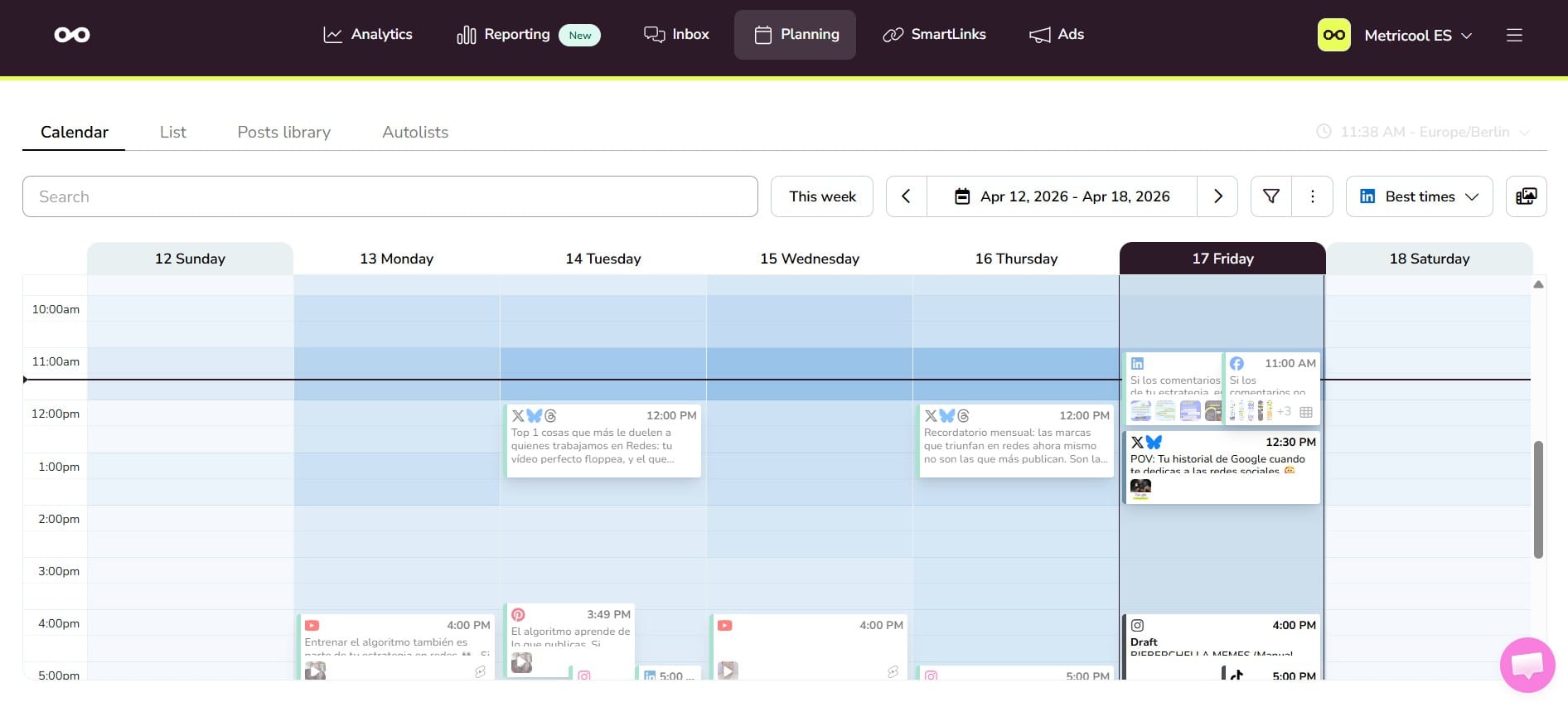
Metricool Free is a continuing one-brand plan with basic planning and analytics. It allows up to 20 scheduled posts per calendar month, 30 days of analytics history, five AI text-generator credits per month, and access to Metricool MCP. LinkedIn and X connections are outside its Free plan.
What you'll like
- The brand model gives a small business a clear home for planning and basic performance review.
- A 20-post monthly allowance supports a modest, deliberate publishing cadence.
- Basic analytics and competitor visibility add more management context than a queue alone.
Why Metricool might not be a good fit
- The one-brand allocation cannot be deleted or replaced on Free, so it is a poor fit for frequent brand changes.
- LinkedIn and X are not free-plan connections, and 20 scheduled posts can disappear quickly across several channels.
Publer: Best for per-network post adaptation and calendar scheduling
Best for
- Small teams adapting one prepared post to the rules of several social networks.
- Marketers who want list and calendar views with a small free account set.
- Businesses that need saved drafts, previews, link tools, and a defined posting schedule.
What it does
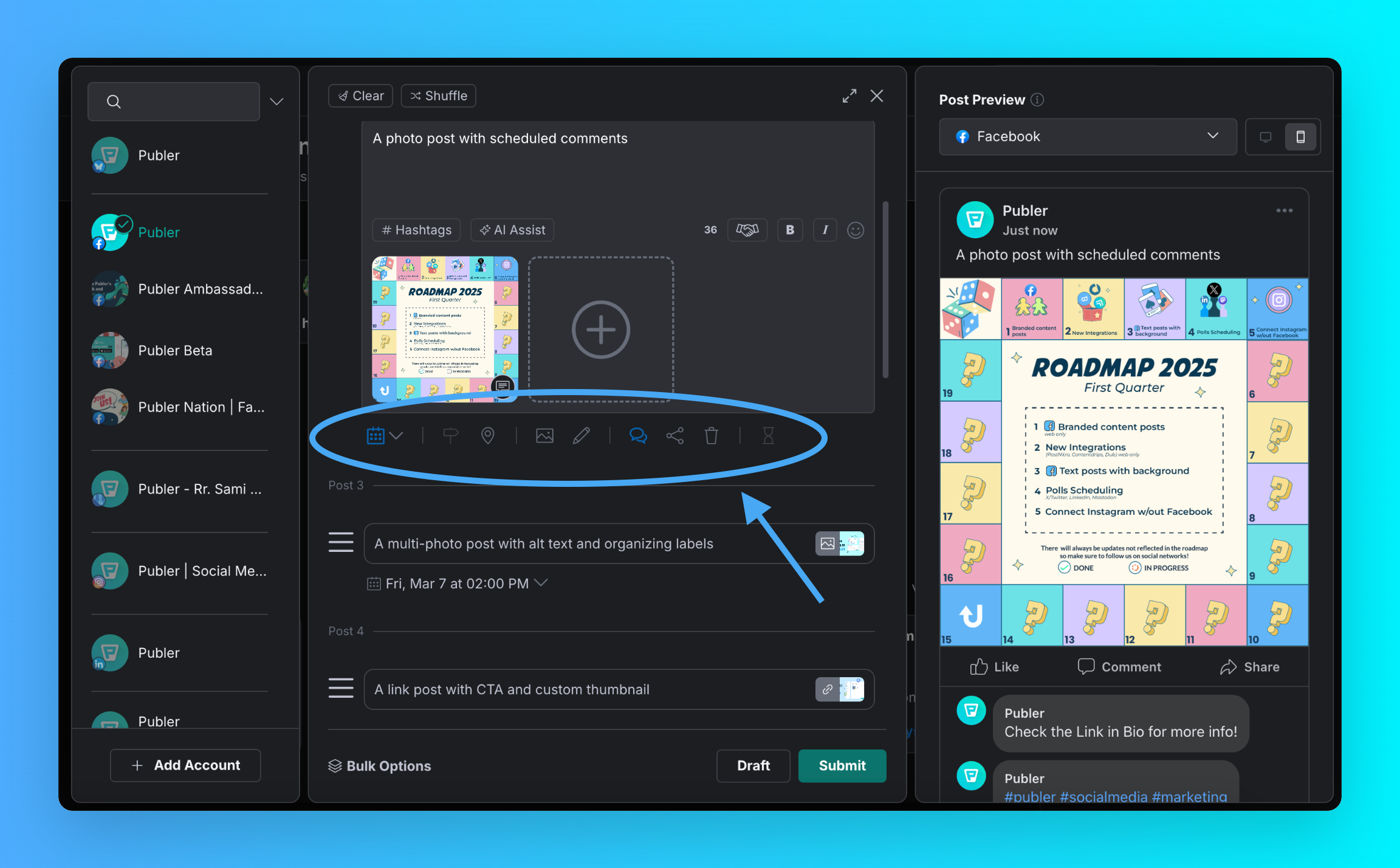
Publer Free supports up to three social accounts, excluding X, and lets a user hold up to 10 scheduled posts per account at a time. It includes 25 saved drafts, network-specific post customization, calendar and list views, previews, a built-in photo editor, a Canva integration, posting schedules, and grouped accounts. Its free boundary is capacity, not a time limit.
What you'll like
- Per-network customization makes it easier to avoid sending identical copy everywhere.
- The calendar, previews, drafts, and posting schedule create a capable workflow for a small account portfolio.
- A published post opens another scheduled-post slot for that social account.
Why Publer might not be a good fit
- X is not included in the Free account allocation.
- The workflow assumes the business is adapting existing content rather than asking an agent to research and create it.
Agorapulse: Best for low-volume publishing, inbox, and reporting
Best for
- A solo social manager who needs a limited inbox alongside scheduling.
- Businesses that want basic reporting and a small social ROI view in a free account.
- Teams working within three profiles, one user, and 10 scheduled posts.
What it does
Agorapulse offers a $0 Free plan with three social profiles, one user, 10 scheduled posts, a basic social inbox, basic reporting, a limited Social Media ROI report, and mobile apps. The Inbox is limited to 100 messages or comments per month. This makes it a useful management-oriented option when the team needs a modest engagement layer next to the calendar.
What you'll like
- Basic publishing, an inbox, and reporting provide a more operational free starting point than a scheduler alone.
- The profile, user, and scheduled-post limits are explicit for a solo user.
- A limited ROI view gives a small business one way to connect a strong post to performance.
Why Agorapulse might not be a good fit
- Ten scheduled posts and 100 inbox items per month suit a test or low-volume operation, not sustained community management.
- It is not the free choice for teams that need several collaborators or a large cross-network publishing cadence.
Adobe Express: Best for designing and scheduling social posts in one workspace
Best for
- Businesses whose first bottleneck is creating visual social content.
- Marketers who want design, caption writing, previews, and scheduling in the same workspace.
- Solo users managing one account per supported social network.
What it does
Adobe Express Free includes Content Scheduler, one account per supported social network, and up to 1,000 posts per month. It supports planning, previews, scheduling, and direct publishing for Facebook, Instagram, X, Pinterest, LinkedIn, TikTok, and YouTube. Its free plan also provides templates, standard editing tools, and a large library of free design assets.
What you'll like
- The design-to-schedule workflow reduces the handoff between making a visual and publishing it.
- A high monthly post allowance suits businesses that need a consistent publishing rhythm.
- Previews and a calendar help a solo marketer keep creative work organized.
Why Adobe Express might not be a good fit
- Free accounts connect only one account per supported social network.
- It does not replace a deeper social inbox, reporting, or multi-brand management platform.
Planable: Best for testing team review, approval, and social planning
Best for
- Teams that want to experience a review-first social workflow before subscribing.
- Marketers collaborating with colleagues or stakeholders across separate workspaces.
- A real-world approval test rather than ongoing high-volume free publishing.
What it does
Planable's free plan has no time limit and supports unlimited users and workspaces, with all product features available until the account has created 50 total posts. The record-based limit does not reset when posts are deleted or after a month. The tool supports content planning, calendar and feed views, collaboration, approvals, and scheduling across its supported social platforms.
What you'll like
- Unlimited users and workspaces let a team test collaboration without immediately buying seats.
- The finite allowance is useful for validating whether the approval and calendar workflow fits the team.
- Workspaces help keep a test client, brand, or campaign distinct during evaluation.
Why Planable might not be a good fit
- The 50-post allocation does not replenish, so it is not a long-term no-cost publishing system.
- Teams that need a recurring free cadence should choose a plan whose scheduled-post allowance refills or resets.
How to match a free social media management tool to your workflow
Choose Velocity's AI social media agents when the social work begins with a goal, topic, or rough brief and the team needs on-brand posts before scheduling. Choose Buffer when the content is complete and a small queue is enough. Choose Metricool when one brand needs basic planning and analytics; Publer when one prepared post needs per-network adaptation; Agorapulse when a low-volume inbox and reporting route are part of the job; Adobe Express when design leads the workflow; and Planable when approval collaboration is the learning goal.
Then run a small, real workflow in a content calendar. Create one post, connect only the profiles you have authority to test, inspect its preview, give it to the person who would actually approve it, schedule it, and record the first limit reached. That reveals whether the next constraint is content creation, a channel cap, a monthly scheduled-post allowance, a queue limit, missing analytics, or a missing review path.
Free social media management tools frequently asked questions
Which is the best free social media management tool for small businesses?
Velocity is the best choice when the business needs AI agents to research, create, and schedule on-brand social posts. Buffer is better when final content is ready and a simple three-channel queue is enough.
Is a free social media management tool the same as a free trial?
No. A free plan has no set end date; a trial ends after a set period. Velocity's Free plan is free forever, while each free plan can still have its own post, profile, or feature limits.
How many posts can a free social media management tool schedule?
Limits differ: Velocity includes 15 scheduled posts that refill anytime; Buffer has 10 per channel; Metricool schedules 20 monthly. Choose the limit that matches the number of profiles and posts in the publishing plan.
What is the biggest limit on free social media tools?
It varies: scheduled-post capacity, channels, brands, users, or a finite lifetime allocation. Velocity's 15 scheduled posts refill anytime, while Planable's 50 created posts never reset. Identify the limit that affects your real publishing cadence.
Can a free tool manage multiple brands?
Usually only at a limited scale. Velocity Free and Metricool Free each support one brand; Planable permits multiple workspaces but stops at 50 total created posts. A recurring multi-brand workflow normally needs paid capacity.
Do free tools include social media analytics?
Velocity's Free plan focuses on agents, one Brand Identity, and scheduled posts; Analytics begins on Pro Max at $149 per month. Metricool offers 30 days of analytics history, and Agorapulse includes basic reporting.
Which free tool is best for designing and scheduling posts?
Velocity is stronger when the work begins with research and brand-aware content creation before scheduling. Adobe Express is the better fit when design and scheduling must stay together.
Does Velocity have a free plan?
Yes. The Free plan is free forever: a limited quota for AI social media agents, 15 scheduled posts that refill anytime and 1 Brand Identity, without needing a trial period or a card.