
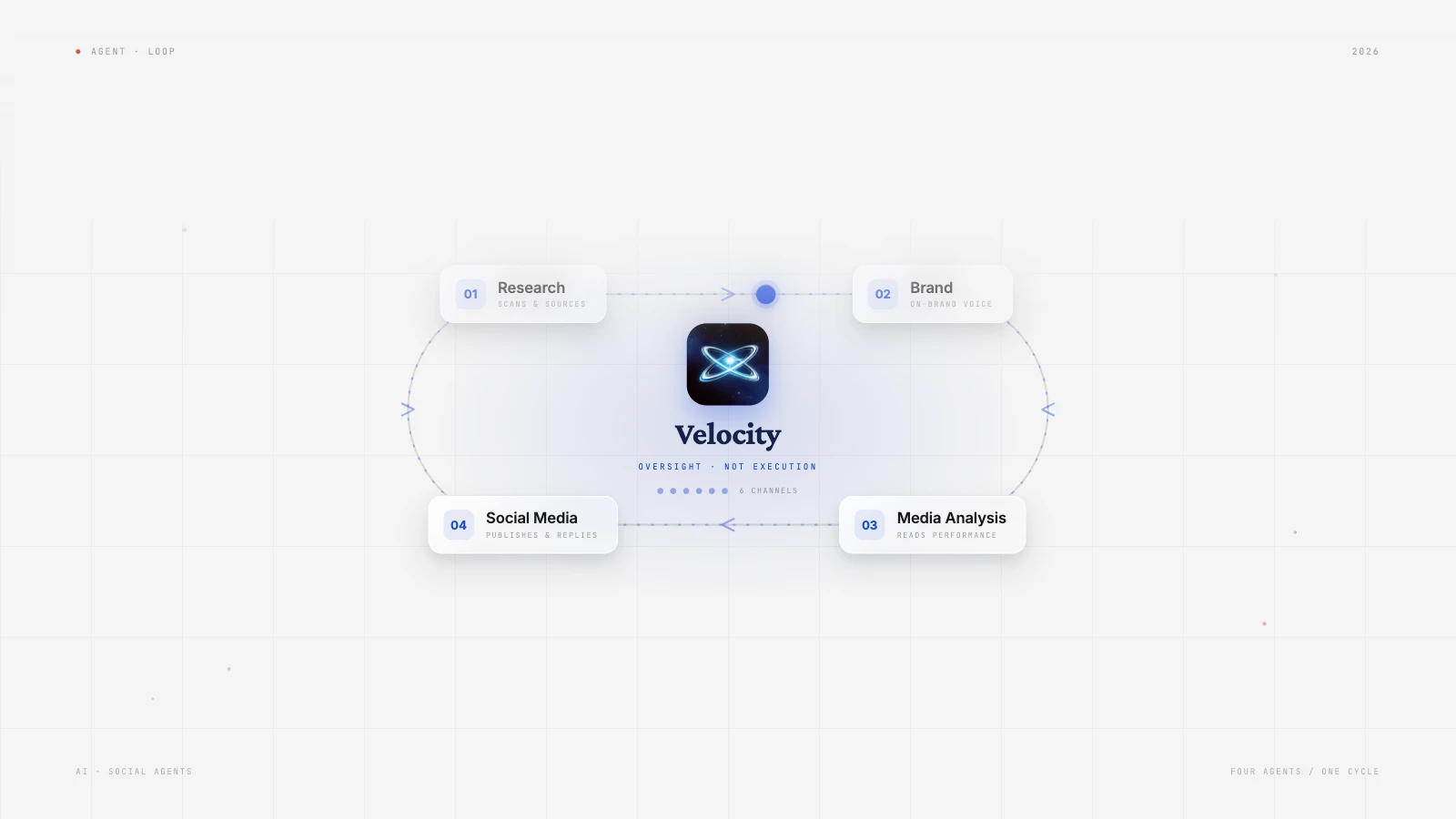
Most of the best social media management tools are where you do the work. Someone has to create the content, write the caption, and find the image; the tool then holds the post in a calendar and publishes it at the set time.
An AI social media marketing agent takes on that earlier step. You give it a launch, a product update, or a link, and it drafts channel-specific posts using your Brand Identity: the voice, tone, colors, and phrases it pulls from your website and past posts. You edit or approve the drafts, and the approved versions go to scheduling and publishing on your connected accounts, so one AI social media management tool creates, schedules, and publishes the post. Plenty of AI social media scheduling agents automate posting across platforms. Fewer take on full social media responsibility.
| AI agent | Best for | Key features | Starting price |
|---|---|---|---|
| Velocity | businesses and brands adapting autonomous AI agents for social media management | Create on-brand content, schedule and publish posts at the best times, and explain performance analytics across connected social channels. | Free plan available; paid plans from $49/month ($39/month billed yearly) |
| Hootsuite | Teams that want social media listening | Wisdom insights and drafts, social intelligence, content planning | No free plan; paid plans from $99/user/month billed annually |
| Sprout Social | Teams that need reporting | Trellis Listening insights, publishing, inbox, and reporting suite | No free plan; paid plans from $99/seat/month |
| Planable | Agencies and marketing teams managing stakeholder approvals | Collaborative calendar, comments, required approvals, and social publishing | Free trial (50 posts, no time limit); paid plans from $33/workspace/month billed annually, unlimited users |
| HubSpot | Businesses already running their marketing and CRM in HubSpot | CRM context, Breeze social copy, composer review and scheduling | No free plan; paid plan from $800/month |
| Ocoya | Teams prioritizing content volume | Configured AI workflow, daily planner | No free plan; paid plans from $29/month |
| Predis.ai | Small teams turning short ideas into content | Caption generation, editor, calendar | No free plan; paid plan from $19/month |
What is an AI social media agent?Link to this section
An AI social media agent works toward a social-marketing goal across more than one supported step. It can use brand and account context to research an angle, prepare editable social copy and visuals, route the work to human review, and move the approved version toward scheduling or publishing. That is broader than returning one caption, image, or post idea.
That does not mean every product with an AI feature takes on the same role. A social-listening platform may investigate public conversation, a visual-creation platform may make an asset, a writing assistant may generate a caption, and a scheduler may publish approved work. Each can contribute, but none necessarily connects research, brand context, content preparation, review, and publishing in one workflow.
What an AI social media agent is not:
- A visual-creation or design platform. It can make a visual social asset, but it does not necessarily research the campaign, prepare channel-ready copy, or own the approval and publishing handoff.
- An AI writing, caption, or post generator. It can return useful variations for a marketer to choose from, but may stop before the approved post reaches a calendar or connected social account.
- A scheduler. A scheduler holds prepared work in a calendar and publishes eligible formats to connected accounts at a chosen time. It is useful after the campaign angle, content, and release decision are settled.
Start with the campaign handoff. When comparing tools, decide whether the team needs an AI social media agent before the calendar: research, a specific audience angle, channel-ready copy and visuals, and a route into scheduling. A product that begins with a finished post solves a subsequent publishing job.
Keep approval and content automation controllable. Ask which work the AI agent completes, where a marketer can edit the copy or creative, who owns the final claim, and which account receives the post. Content approval is essential when a client, subject-matter expert, or compliance reviewer must make that release decision visible.
The best AI agents for social media managementLink to this section
VelocityLink to this section
Best forLink to this section
- businesses that want autonomous ai agents for social media management
- Brands that need on brand designs ,captions and autonomous multi channel publishing and scheduling
- Agencies that need a separate Brand Identity for each brand or client.
What it doesLink to this section
Velocity is a agentic social media management tool with AI agents for scheduling, content and analytics. AI agents automate social media from content creation to publishing and measuring engagement to tell user what worked and how to double down on it.
AI agents can research the next post based on past performances and use brand context to come up with post ideas for brands.Brand Identity holds the voice, tone, colors, keywords, and signature phrases that make a draft tailored to your brand.Velocity can then take the post idea the user selects and create posts with captions that match the brand, ready for multi-platform posting. Once the post is approved, the agents can post it, schedule it, or send it to the team for approval with a built-in approval workflow all in one conversation.
Many tools stop once a post is live. What makes Velocity worth paying for is what its agents do next: they measure each post's engagement, explain in plain language how it performed, and recommend what the brand should post next The content calendar gives teams a shared view of planned work by day, week, or month rather than treating each post as an isolated task.This is where Velocity’s AI agents differ from a caption generator or a simple scheduler: the workflow keeps research, scheduling, content generation, auto publishing calendar coordination, connected.
Analytics in velocity gives small business trying to manage social media evaluate distribution, engagement, audience growth, and the creative patterns behind those results using ai agents. That information is saved and feed to the next research request or campaign brief ,increase performance overtime.
What you'll likeLink to this section
- Autonomous AI agents create on-brand posts, schedule, and publish them to 7 platforms.
- Paste your website once and every caption and image follows your Brand Identity: voice, colors, fonts, and logo.
- Ai Scheduling in plain words ("post every Tuesday at noon") or leave the time out and the agent picks the best time
- Describe your launch week in one sentence. The agent then drafts the posts, places them on the calendar, and publishes the ones you approve.
Why it might not be a good fitLink to this section
- For teams looking only for a standalone listening dashboard to track sentiment, high-volume public conversations, or competitive intelligence
- For teams looking only for CRM-based reports on contacts
Free plan: Yes (limited scheduling, 6 connected channels and 1 Brand Identity, no credit card)
HootsuiteLink to this section
Best forLink to this section
- Enterprises that need content planning, monitoring, social intelligence
- Teams where incoming conversations and listening signals shape the awareness
What it doesLink to this section
Hootsuite positions Wisdom as a social-first AI agent. Its documented role is to turn current social signals, brand conversations, competitor activity, and performance data into answers, recommendations, social-post drafts, campaign ideas, and content briefs. The product interface above shows Wisdom working inside the post composer on tone, reach-oriented hashtags, and pre-publication risks.
That makes Hootsuite relevant when social intelligence and publishing need a shared operating home. Wisdom can move from insight to draft action, but Hootsuite states that people remain responsible for reviewing, approving, and publishing the content. Its strongest fit is therefore a social-operations workflow where brand-awareness decisions begin with current conversations and performance signals.
What you'll likeLink to this section
- The agent can turn a trend, risk, or audience signal into a campaign idea
- Wisdom does not automatically publish; people still review, approve, and release the content it drafts or recommends.
- Hootsuite describes some Social OS connections, including Nest customer care and Parliament advocacy, as coming soon, so buyers should separate current agent workflow from roadmap capabilities.
Free plan: No
Sprout SocialLink to this section
Best forLink to this section
- Teams that need publishing, approvals, engagement work, and reporting in a structured workspace.
- Enterprises that want AI help in the composer alongside a social-intelligence layer for larger questions.
What it doesLink to this section
Sprout positions Trellis as an AI agent for social intelligence. Its current support documentation says Trellis works with Listening data to answer questions with contextual insights and recommendations, including work around trends, competitor activity, and the wider market. That is valuable when the awareness decision begins with understanding the audience and conversation rather than only reporting on completed posts.
Sprout also offers AI Assist in the post composer, as the screenshot shows. The wider suite includes publishing, inbox, and reporting workflows, while Sprout describes Trellis integration across those areas as an expanding capability. In its currently documented role, Trellis handles the Listening-based investigation; a person uses the relevant publishing workflow to develop, review, and release the resulting post.
What you'll likeLink to this section
- Trellis gives the comparison a genuine Listening-based social-intelligence agent
- AI Assist is available where a social manager develops a post.
- Its wider suite gives structured publishing, engagement, and reporting roles a shared operating environment.
- Trellis's currently documented agent workflow is Listening-based, so buyers should distinguish that scope from the suite's broader publishing, inbox, and reporting capabilities.
- Its social-intelligence model rewards a structured process for interpreting trends, competitors, and audience signals, which can be more than a straightforward content-and-calendar routine needs.
Free plan: No
PlanableLink to this section
Best forLink to this section
- Agencies that need client feedback and approval status to stay visible beside planned social posts.
- Marketing teams whose main bottleneck is coordinating review before social posts publish.
What it doesLink to this section
Planable is a collaboration-first social media management platform for creating, reviewing, approving, and scheduling planned content in one workspace. Teams can leave feedback on the working post and see its approval status in the same calendar where they organise social content for each client, brand, or campaign.
Planable connects to Claude, ChatGPT, and Cursor through its MCP integration. Within the permissions granted to the connection, an AI assistant can draft posts, manage content, and read available analytics; posts created this way arrive as drafts for the team to review. Its approval workflow remains the central distinction: Required Approval is available on Pro, while Enterprise adds multi-level approval flows. Once the required reviewers have approved a post, the team can schedule it to connected social accounts.
What you'll likeLink to this section
- The shared content calendar keeps planned posts, feedback, and approval status together.
- Required Approval gives a team a clear sign-off step before scheduling a post.
- Enterprise supports multi-level approval flows for more involved review processes.
Pricing: From $33/workspace/month, billed annually, unlimited users.
Free plan: Free trial (50 posts, no time limit).
HubSpotLink to this section
Best forLink to this section
- Businesses that already use HubSpot for contacts, campaigns, and lifecycle reporting.
- Teams that need social activity considered alongside CRM and campaign outcomes.
What it doesLink to this section
HubSpot's current social workflow uses Breeze Assistant inside the social composer. It can generate social copy or hashtags, after which a user can edit the post for individual networks, review the content, campaign, selected accounts, and publishing schedule, then schedule or publish according to their permissions. That makes the product relevant when brand awareness must connect to the wider marketing system rather than remain in a social-only workspace.
The screenshot shows the kind of downstream CRM reporting context that distinguishes HubSpot: social and paid-social activity can be considered in a contacts report. Choose it when that connection is a real buying requirement, not simply because a team needs an easier way to create and schedule social posts.
What you'll likeLink to this section
- The social workflow supports network-specific edits and requires users to review the content, campaign, selected accounts, and publishing schedule before release.
- Social work can sit beside contacts, campaigns, and lifecycle reporting.
- The documented AI step is social-copy and hashtag generation inside the composer, not a separate agent-led workflow for investigating public social conversations.
- Its value comes from CRM, contact, campaign, and lifecycle context; businesses without those as a working source may find the wider marketing-suite structure exceeds their social-work need.
Free plan: No
OcoyaLink to this section
Best forLink to this section
- Businesses with recurring post types that can be expressed as a clear repeatable prompt.
- Freelancers comfortable configuring a workflow before it begins to create and publish on a cadence.
What it doesLink to this section
Ocoya's Daily Scheduler workflow starts with a publishing schedule, then sends a defined task to an AI agent that can use a customized brand voice and generate an image. The workflow maps that output into a social post, selects the relevant profiles, and goes live; the resulting posts remain visible in the Planner.
The screenshot proves the last handoff rather than the automation claim: it shows the new-post workspace, profile selector, caption field, preview, and schedule controls. This is a useful route when repeatable prompt-to-post automation is the main job, not when a team first needs deep listening analysis or multi-stage campaign review.
What you'll likeLink to this section
- The workflow makes the connection from a configured AI task to a social publishing step explicit.
- The Planner gives the team a place to inspect the posts an automation creates.
- Daily Scheduler works best when the team can define a clear, repeatable prompt and publishing cadence; fast-changing campaigns require ongoing operator direction.
- The documented workflow emphasizes automated creation and scheduled execution, so teams need to handle listening analysis and multi-stage human review deliberately.
Free plan: No
Predis.aiLink to this section
Best forLink to this section
- Freelancers who want to edit an AI-made social asset before it reaches the calendar.
- Marketing teams that need content creation and posting cadence more than a dedicated listening or CRM workflow.
What it doesLink to this section
Predis.ai turns a short idea into social posts, images, videos, carousels, captions, and hashtags, then lets the user edit the result with templates and brand inputs. The screenshot shows the production workspace that ties those elements together: a vertical creative, template controls, and dedicated tabs for the creative, caption, hashtags, and suggestions.
From there, Predis.ai offers a calendar for scheduling and publishing. It positions this as a content-production and social-manager route, so its strongest fit is a small team that wants to move quickly from a campaign idea to editable social assets and a posting plan.
What you'll likeLink to this section
- The writing, visual, and hashtag steps are connected around one social asset.
- The editor keeps a generated post open to revision instead of treating the first output as finished.
- A calendar creates a practical next step after creation for teams posting regularly.
- Its workflow is strongest at turning a short idea into editable social assets, rather than making market research or public-conversation analysis the first campaign stage.
- Teams still need a clear source for approved claims and a review process before generated creative moves from the editor into a publishing calendar.
Free plan: No
How to choose the right brand-awareness workflowLink to this section
Start with a precise awareness brief. Define the audience, product facts, approved claims, creative direction, destination networks, and the audience response the campaign needs to earn. A reusable Brand Identity gives the content workflow a consistent voice, visual direction, and point of view before any draft is made.
Choose the pre-calendar workflow. AI social media marketing agents fit when the work begins with research, an audience angle, and channel-ready copy or visuals. Social media management tools for brand awareness fit when the content is already prepared and the main need is coordination; compare the AI social media agent workflow against the missing handoff, not a feature checklist.
Set human review before content automation. Decide who can edit the copy or creative, approve claims, select the connected account, and release the post. Content approval keeps those decisions visible, so content automation reduces repetitive work without removing accountability for what the brand says.
Confirm the execution route. After approval, check that the required format, account type, date, and time can move through scheduling and publishing as intended. A workflow is only complete when it can carry the actual approved post to the selected social channels, including the platform-specific version needed there.
Measure the signal that changes the next brief. Analytics explains owned-post distribution, engagement, and audience growth; social listening explains market conversation through mentions, sentiment, competitor activity, and trends. Choose the measurement route that can answer the campaign question, then carry that learning into the next brand-awareness decision.
Frequently Asked QuestionsLink to this section
What is the difference between social analytics and social listening?Link to this section
AI social listening and brand monitoring examine wider discussions, sentiment, competitors, and trends; connected-account analytics in a social media management platform measure performance from the accounts a team manages. Velocity uses connected-account analytics for the owned-content workflow.
Which AI agent is best for social media management?Link to this section
Velocity is the best AI agent for social media management when a team needs research, on-brand content, scheduling, publishing, and analytics in one workflow. It publishes to 7 platforms and has a Free plan with 6 connected channels.
What's the best AI social media agent for business?Link to this section
For a small business, the best AI social media agent is one that writes in your voice, publishes to the channels you use, and keeps a human review step. Velocity does this on a Free plan with 6 connected channels and 1 Brand Identity, then paid plans from $49 a month with unlimited seats.
- Small business: Paste your website once and Velocity's agents write captions and design images from your Brand Identity.
- Lean marketing teams: Every paid plan includes content approval workflows and unlimited seats, so reviewers do not add cost.
- Agencies and multi-brand teams: Pro Max + Agency runs 30 Brand Identities with unlimited channels from one workspace, each with its own voice, rules, and accounts.
Can an AI agent manage my social media account on its own?Link to this section
An AI agent can do most of the work of managing a social media account, with a person approving what goes live. Velocity's agents research, write, design, schedule, publish, and analyze. Paid plans add a content approval workflow where an owner or admin approves drafts before they are scheduled, and clients can be added as reviewers.
Replies to comments and messages are not stated on the Velocity pages reviewed for this update, so confirm that capability with Velocity before relying on it. You can also run Velocity from Claude or ChatGPT through a connector that schedules, edits, and tracks posts: 50 actions a month on Free, 5,000 on Pro, 25,000 on Pro Max, and 100,000 on Pro Max + Agency.
Which AI marketing agent is worth paying for to manage social media?Link to this section
Velocity's paid plans start at $49 a month ($39 a month billed yearly). Pro adds 15 connected channels, 2 Brand Identities, unlimited scheduled posts, content approval workflows, unlimited seats, and analytics for your connected accounts. Pro Max adds 5x the agent usage and Audience Attention. Plans have no commitment and can be canceled anytime.
Competitor prices on each vendor's own pricing page: Hootsuite starts at $99 per user a month billed annually, with a 14-day trial. Hootsuite has no free plan.
Which AI agents schedule and auto publish posts across platforms?Link to this section
Velocity's Posting Agent turns plain language into scheduled posts and publishes them to connected channels. Leave the time out and it picks a common best time for each platform; from Pro it uses best times measured from your own accounts. Free includes limited scheduling. Paid plans include unlimited scheduled posts.
- Natural-language scheduling: Say "post every Tuesday at noon" and the agent queues it.
- Bulk scheduling on every plan: Upload a CSV or up to 10 images or videos, and the agent drafts on-brand captions and schedules each post.
- Calendar view: The content calendar shows planned posts by day, week, or month.
- Other tools: Ocoya's Daily Scheduler runs a configured AI task on a set schedule, and Predis.ai offers a calendar after you edit generated posts. Hootsuite's Wisdom drafts content, and people still review, approve, and publish it.