Best AI agents and assistants for social media management in 2026: 10 tools reviewed

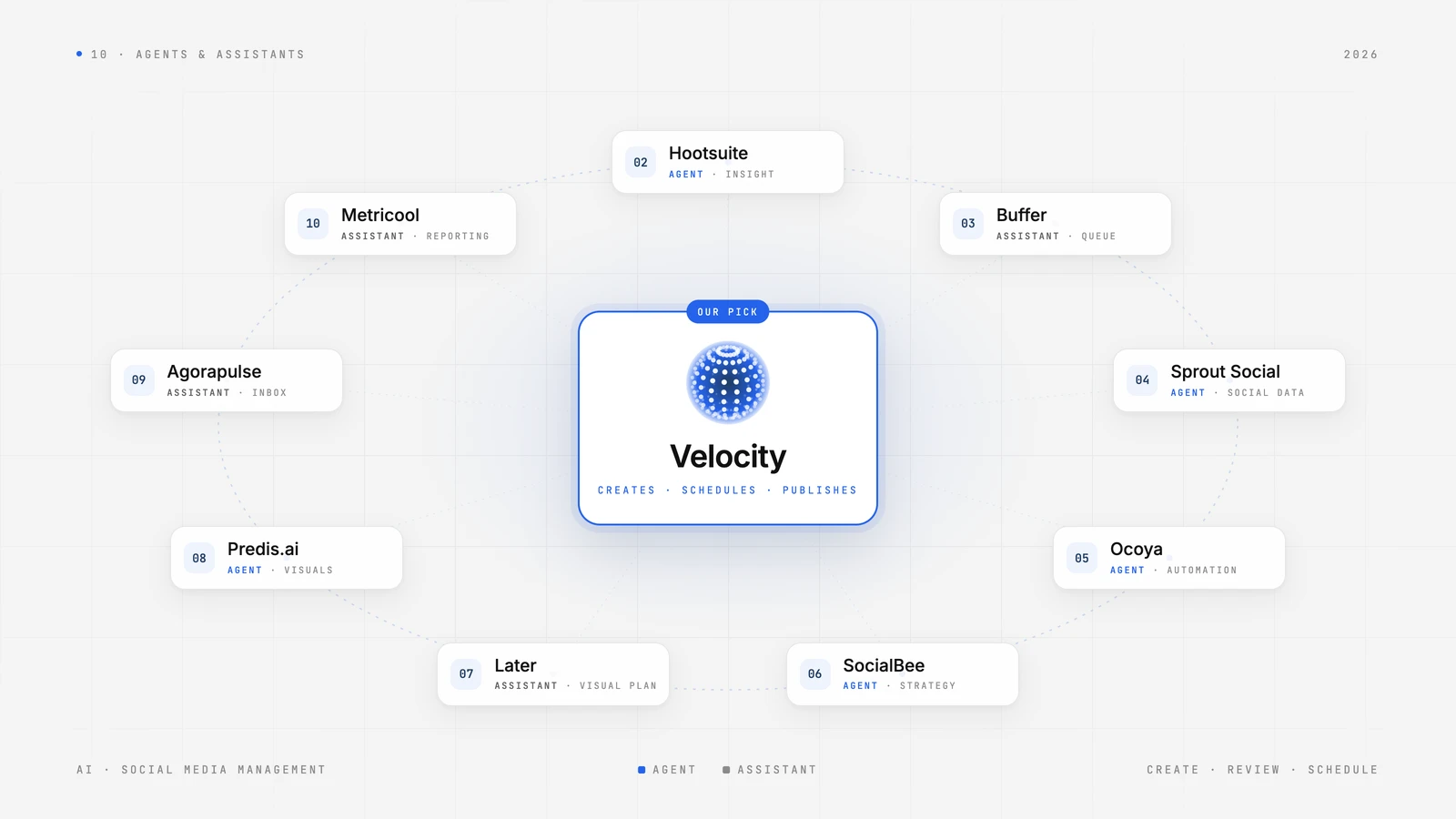
Deciding which recurring social media work to delegate (research, creation, scheduling, engagement or insight) is a practical question about workflow fit, not a leap of faith in automation. This comparison covers both top AI agents and assistants because they solve different problems: a writing suggestion helps you draft faster, an analytical agent answers performance questions with data, and a connected agent workflow can research, create, review and publish content on your behalf, giving you the finished work. Some platforms on this list coordinate multiple steps autonomously; others offer focused help with a single task. The right choice depends on what you actually need to hand off, what you want to keep control of, and what the relevant plan includes. The shortlist below is organized by workflow category.
| Platform | Best for | Key features | Pros | Cons | Free plan |
|---|---|---|---|---|---|
| Velocity | Businesses and brands adapting autonomous ai agents for social media management | Create on-brand content, schedule and publish posts at the best times, and understand performance analytics across connected social channels. | On-brand posts, auto publishing at the best times, approvals and analytics; agents edit and redraft posts on your content calendar; unlimited seats on paid plans | Pro includes two Brand Identities; memory across conversations starts with Pro Max. | Yes |
| Hootsuite | Enterprise: social insight and campaign drafting | Wisdom; scheduling; inbox; monitoring | Insight and content drafts share brand context | Wisdom cannot publish automatically; team approvals are on Advanced. | No |
| Buffer | Creators: lean publishing queues | AI Assistant; MCP; Community inbox | AI Assistant and MCP are available on Free | Free has three channels and ten queued posts per channel; team approvals need Team. | Yes |
| Sprout Social | Enterprise: social-data investigation | Trellis; reporting; plan-dependent AI Assist | Connects analytical questions with social-data evidence | Performance & Engagement is limited release on Professional and above. | No |
| Ocoya | Teams: configured posting and reply automation | Workflows; RSS triggers; MCP actions | Configured workflows can execute publishing and replies | Starter has one user, five profiles and 300 monthly AI credits. | No |
| SocialBee | Teams: strategy and recurring content themes | Social Media Copilot; content categories | Guided strategy leads into editable drafts | Bootstrap has one user and three months of analytics history. | No |
| Later | Creators: visual planning and caption writing | Caption Writer; Ideas; Best Time to Post; visual planner | Feed preview and multi-platform scheduling in one calendar | AI limited to captions and ideas; inbox and approvals start on Growth. | No |
| Predis.ai | Creators: visual production and scheduled content | Image/video/carousel generation; Auto Posting on Rise | Visual creation and scheduling share a workflow | Core excludes Auto Posting; generation consumes variable credits. | No |
| Agorapulse | Teams: inbox and publishing coordination | AI Writing Assistant; Organization Context; unified inbox | Reviewable AI fits team publishing and inbox work | Approval and AI reply features vary by tier; pricing is per user. | Yes |
| Metricool | Teams: multi-brand reporting and scheduling | AI text generator; MCP; competitor reporting | MCP is available across plans, including Free | Free excludes LinkedIn and X; MCP excludes inbox operations. | Yes |
How We Reviewed These PlatformsLink to this section
This shortlist was evaluated through a documentation review of each platform's official product, pricing and help pages, focused on what the AI agent or assistant is documented to do, not on marketing claims about automation. The evaluation criteria, drawn from the delegation checklist later in this article, are as follows:
- Action scope and permissions: Whether the AI produces a suggestion, an editable draft, a queued post or an immediate publish or reply, and whether it acts only when you invoke it, through a connected assistant (such as MCP) or through configured workflows that run after activation.
- Brand context and creative control: How each tool captures voice, tone, audience and messaging, whether that context is editable and persists across sessions, and what source material (ideas, links, images, videos, PDFs or website scans) and revision steps are documented.
- Scheduling and review: Timing suggestions versus user-set times, who approves and who executes, and which plan tier includes formal approval workflows, treated as separate entitlements from scheduling itself.
- Engagement and listening coverage: Whether the agent assists in the inbox, runs configured replies or answers analytical questions about performance, trends, competitors and audience conversations.
- Measurement and AI usage limits: Reporting depth, analytics history and what an AI credit actually buys, since generation cost varies by content type and model and credits do not map to a fixed post count.
- Cost and usable capacity: Every cited price paired with its billing unit (per channel, per seat, per user or per brand), cadence, included brands, accounts and seats, and free-plan or trial status.
Top AI Agents for Social Media ManagementLink to this section
VelocityLink to this section
Best forLink to this section
- Businesses that want AI agents for autonomous social media management
- Small businesses that need autonomous AI social media agents for on brand content creation, posting, scheduling and understanding performance.
- Brands that want an autonomous AI social media agent to manage their social media from one goal: it plans, creates, schedules and publishes the posts.
Key featuresLink to this section
Velocity is an agentic social media management platform built around AI social media agents, giving you the ability to create on-brand posts and schedule them to multiple platforms from one workspace. Each brand runs on its own Brand Identity: paste the brand's website and the agents save its voice, tone, colors, keywords, and signature phrases. It was built for agentic social media management from the start, rather than retrofitted from a manual social media management tool, and that architecture runs through everything it does, from scheduling to analytics across all major social media platforms.
The ability to create finished, on-brand posts and handle scheduling is what makes Velocity the top AI agent for social media management. Given a single goal, Velocity's agents research angles, draft copy and visuals in your brand voice, and show a preview of every post so you can edit, approve or request revisions before anything goes live. Creation supports ideas, links, images, videos and PDFs as source material, and conversational design edits: you can ask for changes to copy, layout or visuals without leaving the conversation.
Brand Identity helps Velocity's social media agents create on-brand posts. It captures voice, tone, audience, keywords and signature phrases from your website and brand guidelines, and stores the visual kit alongside them: brand colors, typography, logos and media assets, plus the business description, values and content topics. Agents read the selected identity before every request and use it to shape captions, hooks, hashtags and visual direction, so posts match in both wording and look across all seven platforms.
Multi-platform scheduling works from a single request. Say "schedule this for tomorrow at 9am on LinkedIn and Instagram" and the agent queues the post for both, reformatting the caption, hook and hashtags for each destination. You can publish to one channel or all seven (Instagram, Facebook, YouTube, TikTok, LinkedIn, X and Bluesky), and if you leave the time out, the agent schedules each post at best time for that platform from your own accounts. Bulk uploads of drafts, products or campaign inputs become platform-native posts that go out together or staggered across the week. The content calendar shows every scheduled post in day, week or month view.Velocity is rated 4.8 out of 5 on G2 for AI social media management.
ProsLink to this section
- AI social media agents to schedule and automatically publish posts across Instagram Facebook TikTok LinkedIn
- Agents post at the best times when your audience is most active.
- AI agents manage your content calendar: they can edit, reformat and redraft posts directly on the calendar.
- Agents learn your brand voice and guidelines from your website, then use them to create on-brand content.
- Social media scheduling automation with approval workflows .
- Agents use your analytics to improve what you create and post.
ConsLink to this section
- Pro includes two Brand Identities, so larger client portfolios need a higher tier.
- Memory across conversations starts with Pro Max.
Free plan: Yes (6 connected channels and limited scheduling, no credit card)
Try it today. Get started for free or explore the free tools.
HootsuiteLink to this section
Best forLink to this section
- Marketing teams turning social performance and audience conversations into content ideas.
- Organizations needing plan-based inbox automation and team approval controls.
Key featuresLink to this section
Hootsuite's Wisdom is an insight and drafting agent embedded in a broader publishing, inbox and monitoring suite. It answers questions about performance, trends, competitors and audience conversations, then uses that context to generate content drafts and campaign ideas. Think of Wisdom as the analytical layer that informs your creative decisions, but the actual publishing still passes through human hands. Hootsuite OwlyWriter AI extends this to generating captions and post ideas informed by brand context, though the platform's scheduling, approval and publication steps remain separate actions.
Wisdom fields natural-language questions about performance, trends, competitors and audience conversations. It can generate social drafts, campaign ideas and content briefs informed by brand context, drawing on the same data that powers its analytical answers.
ProsLink to this section
- Social insight and content drafting share brand context, so the ideas Wisdom generates reflect your actual audience data.
- Professional offers unlimited social accounts, with additional user seats available to purchase.
ConsLink to this section
- Wisdom generates drafts and recommendations but cannot publish automatically; a person reviews, approves and publishes.
- Standard is capped at ten social accounts, and team content approval is listed on Advanced.
- Trial accounts have daily posting limits and no bulk scheduling.
Free plan: No (14-day free trial available)
BufferLink to this section
Best forLink to this section
- Solo operators who want optional AI writing in a simple publishing workflow.
- Publishers adding paid channels individually as their needs grow.
Key featuresLink to this section
Buffer separates two distinct AI capabilities: the user-invoked AI Assistant that helps you write, and the MCP connection that lets an external assistant act on your publishing queue. Understanding the difference matters: one helps you draft; the other can draft and schedule on your behalf through a connected protocol.
AI Assistant covers idea generation, rewriting, shortening, expansion and tone changes, all initiated by you inside the composer. MCP is a separate connection that lets an external assistant draft and schedule posts, inspect the queue, save ideas and retrieve insights.
ProsLink to this section
- AI Assistant and MCP are both available on Free, giving budget-conscious operators a meaningful starting point.
- Per-channel billing supports starting with a single paid channel and scaling incrementally.
ConsLink to this section
- Free supports three channels and ten queued posts per channel; the ten-post limit is queue capacity, not a monthly posting allowance.
- Free and Essentials include one user; multi-user approvals require Team.
- Paid scheduling has a fair-use queue limit of 5,000 posts per channel.
Free plan: Yes (up to 3 channels, 10 scheduled posts per channel)
Sprout SocialLink to this section
Best forLink to this section
- Analysts working with listening topics, sentiment and engagement evidence via Trellis.
- Organizations combining publishing, care and reporting on higher tiers.
Key featuresLink to this section
Sprout Social's AI agents center on social-data investigation rather than content production. Trellis, the platform's AI agent layer, answers questions grounded in your social data, connecting performance metrics, engagement patterns, listening topics and sentiment into actionable analysis. For teams that need to understand what is happening across their social presence before deciding what to post, this analytical depth justifies the per-seat investment.
Trellis answers questions grounded in social data. The Performance & Engagement agent can send generated ideas to Compose as drafts, bridging the gap between analysis and content creation. Trellis Listening handles questions about listening topics, messages, sentiment and engagement, though not every capability is attached to the entry plan.
ProsLink to this section
- The analytical workflow lets teams investigate performance through questions grounded in social data, rather than navigating dashboard reports manually.
- Professional permits unlimited profiles alongside the suite's broader publishing, care and reporting functions.
ConsLink to this section
- Essentials and Standard each allow five profiles, and pricing is per seat; the grid lists 100 monthly AI-agent credits per seat.
- Performance & Engagement/Studio is limited release, requires Professional or above, and depends on permissions and the GenAI setting.
Free plan: No (30-day trial available)
OcoyaLink to this section
Best forLink to this section
- Operators turning source events into generated and published social posts.
- Teams configuring recurring message or comment reply workflows.
- Teams using an external assistant to act on drafts and calendars via MCP.
Key featuresLink to this section
Ocoya's Workflows feature lets you configure trigger-action chains that can execute publishing and replies autonomously once activated. This is configured automation in the truest sense: you define the trigger (an RSS feed update, a new Instagram comment, a Facebook message), specify the generation and action steps, and enable the workflow. After that, the system runs without requiring approval for each individual action.
Workflows use user-configured triggers and actions that run after activation. A documented example: an RSS feed update triggers caption and image generation, then posts the result to LinkedIn with no manual step in between.
Reply workflows cover Instagram DMs and comments as well as Facebook messages. Authenticated MCP access supports draft creation, updates, scheduling, immediate publishing and campaign generation; access is scoped to approved brands and can be revoked.
ProsLink to this section
- Configured chains connect a source event to generation and an actual publishing or reply action, reducing manual intervention to zero for routine content.
- Authenticated assistant actions can work with existing drafts and calendars without duplicating effort.
ConsLink to this section
- Starter includes one user and five social profiles; Team increases capacity to five users and twenty profiles.
- Starter includes 300 AI credits refreshed monthly; generation is bounded by the allowance.
- The seven-day trial requires a card and becomes paid unless cancelled.
Free plan: No (7-day trial available, card required)
SocialBeeLink to this section
Best forLink to this section
- Owners needing a posting strategy as well as individual captions.
- Marketers organizing recurring topics into content categories.
Key featuresLink to this section
SocialBee's Social Media Copilot focuses on a problem that comes before individual captions: deciding what to post and how to organize recurring themes. It walks you through a strategy-building process (scanning your website, asking clarifying questions, then recommending networks, categories and draft content), so you end up with a posting plan rather than a blank content calendar.
Social Media Copilot scans a website or collects your answers to questions, then derives business, audience, tone and service context. From there it suggests networks and categories, generates drafts with captions, images, emojis and hashtags, and presents everything for editing; you control text, media, platforms and posting times before anything goes live.
Bootstrap includes ten content categories and unlimited AI content generation. Categories support theme organization and reposting rules, so evergreen content recirculates without manual re-queuing.
ProsLink to this section
- A guided strategy process helps owners who lack a repeatable posting plan move from "I should post more" to a structured calendar.
- Content categories connect generated posts to recurring themes and reposting rules, keeping the calendar populated between active creation sessions.
ConsLink to this section
- Bootstrap includes five profiles, one user and one workspace.
- Bootstrap analytics history is three months; Accelerate provides two years.
- The formal post approval system starts on Accelerate, and broader team collaboration is on Pro.
Free plan: No (14-day free trial available)
LaterLink to this section
Best forLink to this section
- Instagram-first brands planning a feed visually before scheduling across Instagram, TikTok, Facebook, Pinterest, LinkedIn, Threads, YouTube Shorts and Snapchat.
- Solo marketers who want AI caption and idea help inside a scheduler on Starter.
- Teams collecting internal and client approvals on Growth.
Key featuresLink to this section
Later is a scheduler with AI assistance layered on top rather than an agent that acts on its own. Its AI tools, Caption Writer and Ideas, generate text you review and place yourself, while Best Time to Post and Smart Scheduling with Future Trends handle the timing. Nothing publishes without a person building the post, which places Later closer to the Buffer and Agorapulse end of this list than to Velocity or Ocoya.
Caption Writer generates captions from a few keywords and learns tone from your past posts; Ideas produces content pillars and post ideas. Both draw from one monthly credit pool: one credit per caption generation, three ideas per credit, resetting on the first of each month. Best Time to Post analyzes past post data, follower activity and industry trends and shows recommended times directly in the calendar.
ProsLink to this section
- Visual feed planner and multi-platform scheduling share one calendar, with Best Time to Post included on every plan.
- External reviewers can approve posts without a Later account, which suits agencies collecting client sign-off.
ConsLink to this section
- AI is limited to captions and ideas; there is no agent that researches, drafts visuals or publishes on your behalf.
- Starter includes one user, one social set, 30 posts per profile per month and 5 AI credits, with no add-ons available.
- Social inbox, approvals and Smart Scheduling start on Growth; extra AI credits cost US$3.75/month per 100 on Growth and Scale.
Free plan: No (14-day free trial available)
Predis.aiLink to this section
Best forLink to this section
- Brands generating images, video and carousels from product or service ideas.
- Marketers wanting editable visual content alongside a publishing calendar.
- Teams considering an auto-posting plan with multiple brands.
Key featuresLink to this section
Predis.ai leads with visual content generation (images, videos and carousels created from product or service descriptions) and pairs it with a publishing calendar. The creative workflow is useful for brands that need a steady stream of visual assets. However, the tier boundary between scheduled publishing and automatic posting is important: the entry-level Core plan does not include Auto Posting.
Generation covers images, videos, captions and carousels, with editors for review before publishing. The built-in calendar supports bulk scheduling and AI-selected posting times, though Auto Posting is a tier-specific feature.
Brand logos, colors, voice and messaging are stored for creative consistency across generated assets. Facebook and Instagram competitor analysis is included, with 60 runs per month on Core.
ProsLink to this section
- Editable visual generation and scheduled publishing are documented within the same workflow, reducing the need for a separate design tool.
- All listed plans include unlimited team members; Rise supports up to four brands.
ConsLink to this section
- Core excludes Auto Posting; Rise is the first reviewed tier that includes it.
- Core provides 1,300 monthly credits, with generation cost depending on content type and model.
- Core includes one brand and ten social accounts across the plan.
Free plan: No (3-day trial available, card required)
AgorapulseLink to this section
Best forLink to this section
- Teams coordinating scheduled posts with messages and organic comments.
- Writers using organization context to refine social copy.
- Teams preferring editable AI output and human oversight.
Key featuresLink to this section
Agorapulse positions its AI capabilities explicitly as assistants: tools that help you write, suggest improvements and summarize reports, but keep the human in the loop. For teams coordinating scheduled posts alongside a busy inbox of messages and organic comments, this reviewable approach means AI output is always editable before it reaches an audience.
AI Writing Assistant and Organization Context work together: you can improve prompted or existing copy using brand direction, tone and messaging guidelines. Additional capabilities include AI alt text, hashtag suggestions and report summaries.
Standard combines unlimited post scheduling, a unified messages/organic-comments inbox and basic reports. Higher tiers add assignments, moderation rules, bulk actions and deeper reporting.
ProsLink to this section
- Publishing and inbox work share the same platform, so your team does not need separate tools for content and community management.
- Organization Context and editable outputs support brand-assisted drafting without removing the review step.
ConsLink to this section
- Standard, Professional and Advanced each list ten social profiles; subscriptions are priced per user.
- Simple approvals start on Professional; bulk scheduling and recommended publishing times start on Advanced.
- AI reply suggestions and multi-step approvals are listed on Custom.
Free plan: Yes (kept after the 30-day trial; limits not listed on the pricing page)
MetricoolLink to this section
Best forLink to this section
- Operators combining reporting and publishing across several brands.
- Marketers refining tone, language, length and calls to action in native AI copy.
- Users connecting an external assistant for analytics and scheduling actions via MCP.
Key featuresLink to this section
Metricool separates its in-app AI text generator from the external assistant actions available through MCP, and the distinction matters for understanding what you can automate. The text generator creates proposals for your review inside the platform; MCP lets an external assistant access your brands, analytics, scheduling and posting capabilities programmatically.
The AI text generator creates proposals for review and supports brand/network instructions plus tone, language, length and CTA adjustments. MCP provides access to brands and analytics, scheduling at chosen or recommended times, and creating or sending posts for review.
Starter includes competitor analysis, report exports and longer analytics history across multiple brands. Team/client management, roles and post approvals are placed on Advanced.
ProsLink to this section
- MCP works on every plan, including Free, within existing plan limits, a notable entry point for users exploring connected assistant workflows.
- Starter's entry price bundles up to five brands, making it cost-effective for freelancers or small agencies managing a handful of clients.
ConsLink to this section
- Free supports one brand, twenty scheduled posts per month and thirty days of analytics; LinkedIn and X are excluded.
- Native AI allows five credits per month on Free and twenty per brand per month on Starter; credits cannot be bought separately or rolled over.
- MCP does not cover Inbox operations or ad campaign management, although it can retrieve connected ad analytics.
Free plan: Yes (1 brand, 20 scheduled posts per month; LinkedIn and X excluded)
Autonomous AI Social Media Agents: How Much Supervision Do They Need?Link to this section
AI social media agents differ in how much they do between your instructions. Velocity's agents take one goal, research it, write and design the posts, and schedule them, then show you a preview before anything goes live. Approved posts publish at the scheduled time without another step. Ocoya's activated workflows publish and reply without per-item approval. Hootsuite Wisdom and Later stop at drafts and suggestions.
Levels of autonomy in this review, from most hands-on to most hands-off:
- Suggestions you place yourself: Later's Caption Writer and Ideas, and Agorapulse's AI Writing Assistant.
- Drafts informed by data or strategy: Hootsuite Wisdom, Sprout Social Trellis and SocialBee's Social Media Copilot.
- Assistant actions through MCP: Buffer and Metricool let an external assistant draft and schedule posts.
- Goal-led agent workflow with review: Velocity's AI social media agents research, create, schedule and publish from one goal, with a preview of every post and, on paid plans, content approval workflows where an owner, admin or client approves posts.
- Configured automation without per-item approval: Ocoya Workflows and Predis.ai Auto Posting on Rise.
If you want AI agents that schedule social posts without constant supervision, look at levels 4 and 5, then decide who approves content before it goes live.
Best AI Social Media Agent for Small BusinessesLink to this section
Velocity is the best AI social media agent for a small business that wants posts written, designed and scheduled without a separate designer or scheduler. The Free plan includes 1 Brand Identity, 6 connected channels and limited scheduling with no card. Pro adds analytics, content approval workflows and unlimited scheduled posts for $49 a month.
How a small business can plan its content with Velocity:
- Give an agent a goal, such as a week of LinkedIn posts from a recent article. It researches an angle, drafts posts from your Brand Identity, requests review (on paid plans) and schedules the approved ones.
- Plan a full week of posts in one sitting and let Velocity space them out.
- Open the content calendar in month view, which highlights days with nothing scheduled, and fill the gaps.
How to Choose an AI Social Media AgentLink to this section
Start with a single recurring job and work outward. For a campaign post, Velocity documents research, Brand Identity drafting, review and scheduling in one conversation. Use that sequence as a benchmark: how much of this work do you want to delegate, and how much do you want to touch?
Next, identify who approves and who executes. Wisdom drafts but cannot publish automatically. Ocoya can execute configured publishing and reply actions without per-item approval. Agorapulse describes reviewable assistants that keep a human in the loop. These are different operating choices with different risk profiles, not interchangeable levels of "AI autonomy." For a deeper look at review roles and approval stages, the distinction between configured execution and human gating is worth understanding before you commit.
Then price the actual workflow, not just the entry tier. Predis.ai Core excludes Auto Posting, and Sprout's limited-release Performance & Engagement needs Professional or above. Neither entry price alone establishes access to the workflow you actually want.
Count brands, accounts, people and AI usage separately. Buffer bills paid access per channel. Sprout Social and Agorapulse bill per seat or user. Metricool Starter bundles up to five brands.
For a small team that wants connected creation and scheduling, start with Velocity's documented workflow and free entry point, then choose a paid tier based on actual brand and channel needs. Trying the free workflow quickly shows whether the approval and scheduling controls match your team's process.
Key Features to Evaluate Before Delegating Social Media WorkLink to this section
Before committing to a platform, run through these criteria against the workflows documented above. The goal is fewer disconnected production steps and clearer responsibilities, not a promise of hours saved.
Action scope and permissions. Distinguish a suggestion from an editable draft, a queued post and immediate publishing. Buffer separates in-app AI Assistant help from MCP actions that can schedule on your behalf. Ocoya documents immediate publishing through configured workflows and revocable brand-scoped MCP access. Know what the tool can do without asking you first.
Brand context and creative control. Look for editable voice and audience context, media creation and revision capabilities. Velocity's Brand Identity and conversational creative edits provide a clear example: you can adjust copy, visuals and tone without leaving the conversation, and the brand context persists across sessions.
Scheduling and review. Evaluate timing suggestions, publication actions and formal approval entitlements separately. Velocity puts unlimited scheduling and team approvals on Pro. SocialBee puts the formal approval system on Accelerate. A platform can offer great scheduling without including the approval workflow your team needs.
Engagement and listening coverage. Decide whether the job requires inbox assistance, configured replies or interpretation of audience conversations. Hootsuite Wisdom addresses social insight through analytical questions. Ocoya documents reply workflows for Instagram and Facebook. Agorapulse offers a unified inbox with tier-specific reply assistance. The right answer depends on whether you are listening, responding or both.
Measurement and usage limits. Check reporting depth and what an AI credit actually buys rather than treating credits as posts. Predis.ai generation cost varies by content type and model. Metricool's native AI credit allowance does not represent a fixed post count. Understand the unit economics before you scale.
Ready to try a connected workflow? Start with a specific campaign goal in Velocity's scheduling workspace, review the resulting content, and assess whether the creation-to-scheduling sequence fits the work you are looking to delegate.
Get started for free and turn your next campaign goal into scheduled, on-brand posts across your connected social channels.
Which AI Marketing Agent Is Actually Worth Paying For?Link to this section
The AI agent worth paying for is the one whose entry tier already includes the job you want to hand off. Velocity Pro at $49 a month includes AI social media agents, unlimited scheduled posts, analytics, content approval workflows, 15 connected channels, 2 Brand Identities and unlimited seats. On per-seat tools such as Sprout Social and Hootsuite, every teammate you add raises the bill.
Check three things before you pay:
- Is publishing on the entry tier? Predis.ai Core excludes Auto Posting, and Hootsuite Wisdom cannot publish automatically on any tier.
- Are approvals on the entry tier? Hootsuite lists team approvals on Advanced, SocialBee on Accelerate and Later on Growth. Velocity includes content approval workflows on every paid plan.
- How is AI usage metered? Ocoya Starter includes 300 AI credits a month, Predis.ai Core 1,300 credits and Sprout Social 100 AI-agent credits per seat. Velocity Pro Max includes 5x the agent usage of Pro, and Pro Max + Agency includes 20x.
Frequently Asked QuestionsLink to this section
Which is the best AI social media agent for my workflow?Link to this section
Velocity is the top pick for connected, brand-aware creation and approved scheduling. Sprout Social suits social-data investigation, Ocoya suits configured publishing and reply automation, and Buffer suits a simple publishing queue with optional AI assistance.
How is an AI social media agent different from an AI writing assistant?Link to this section
A writing assistant helps with tasks such as drafting captions, rewriting copy and changing tone. An agent can connect several steps or take actions through configured workflows or connected tools, so check whether it creates drafts, schedules posts or publishes content.
Can I review AI-generated posts before they go live?Link to this section
Velocity shows a preview of every post so you can edit, approve or request revisions before publication. Formal team approval workflows are a separate plan feature, so check the relevant tier when comparing platforms.
Can AI tools help choose the best time to post?Link to this section
Yes. Velocity schedules each post at a common best time for that platform when you leave the time unspecified, and from Pro it uses best times measured from your own accounts, while Later's Best Time to Post uses past post data, follower activity and industry trends to recommend times.
Are there free AI social media management options?Link to this section
Velocity offers a free plan with six connected channels and limited scheduling, while Buffer Free includes AI Assistant and MCP with three channels and ten queued posts per channel.
Which AI social media agent can post for me?Link to this section
Velocity can post for you. Its agents write the caption, design the image, schedule the post and publish it automatically at the scheduled time on Instagram, Facebook, YouTube, TikTok, LinkedIn, X or Bluesky.
Which AI agent manages social media across multiple channels?Link to this section
Velocity connects 6 channels on Free, 15 on Pro, 30 on Pro Max and unlimited channels on Pro Max + Agency, and one request can queue a post for every platform you name.
Can an AI agent build a monthly content plan for a small business?Link to this section
Velocity's agents can plan a week of posts in one sitting from a goal, draft them from your Brand Identity and schedule them, and the content calendar's month view highlights days with nothing scheduled.