5 Best AI Social Media Content Calendar Tools (Comparison, Features & Pricing 2026)

The best AI social media content calendar tools in 2026 do more than suggest captions. They turn a Content pillars into dated posts, place those posts on a calendar, and publish them to Instagram, Facebook, TikTok, and other channels with minimal manual work. The difference between tools comes down to how much of that workflow the AI handles on its own and where a person still needs to step in. This comparison walks through five platforms by tracing one practical scenario: a four-week campaign that alternates customer stories, product tips, and seasonal offers across Instagram, a Facebook Page, and TikTok. For each tool, you'll see who creates the calendar entries, who previews and approves them, and how each scheduled post actually goes live.
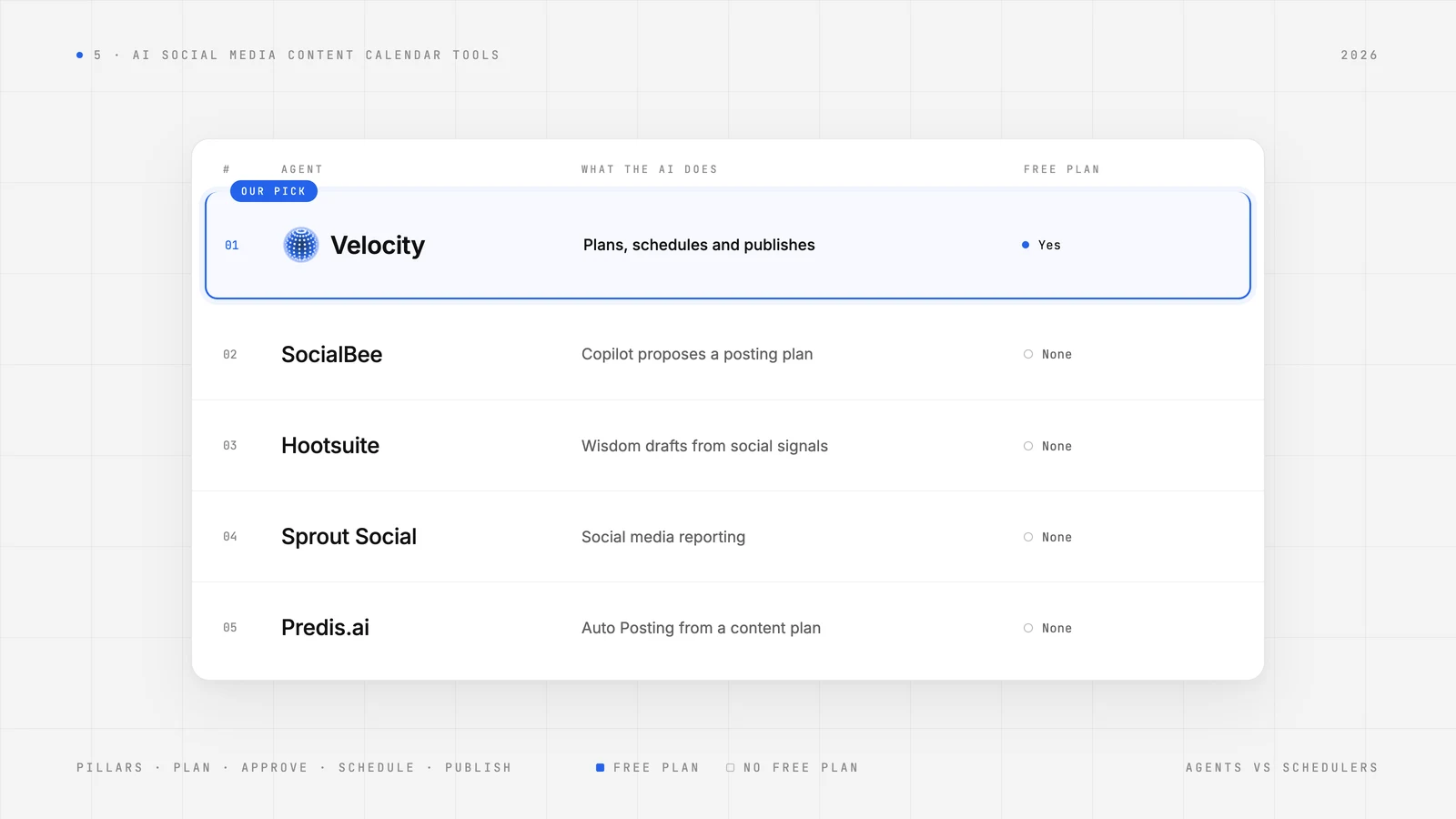
| AI Agent | Best for | Free plan | Standout capability |
|---|---|---|---|
| Velocity | Small businesses and brands adapting autonomous AI agents for social media | Yes | Create on-brand content, schedule and publish posts, and understand engagement, analytics across connected channels in one conversation |
| SocialBee | teams filling recurring posting slots by topic | No | Copilot proposes categories and a posting plan |
| Hootsuite | teams building campaign drafts from audience insights | No | Wisdom drafts from social signals |
| Sprout Social | Enterprise prioritizing traditional social media reporting | No | social media reporting |
| Predis.ai | Teams setting up a recurring stream of visual posts | No | Auto Posting on Rise and Enterprise+ |
What is an AI social media management agent?Link to this section
An AI social media management agent is software that runs your social media toward a goal you give it in plain words. It works out the steps, from researching what to post to writing, designing, timing, and publishing, and takes them on its own. You still decide what goes live, but you don’t do each step. That is what separates an agent from automation and copilots:
- Automation follows rules you set in advance and never decides anything. A scheduler queues posts you already made, at the hour you picked, the same way every week, long after that hour stops working. Rule-based systems break down when something happens that their designers didn’t plan for. An agent isn’t running your rules; it decides what to post, and when, to reach the goal you set.
- A copilot waits for you. It drafts the caption, suggests the hashtags, recommends a time, and nothing moves until you ask again. IBM calls assistants like this reactive: they work at your request. You’re still doing the work, only faster. An agent does the work and brings you finished posts to review before anything is scheduled.
Autonomy is what puts a tool in the AI agent category. It doesn’t make every agent equal, and plenty of tools now wear the label: Gartner estimates that only about 130 of the thousands of agentic AI vendors are real. Some agents do the work and stop. They publish the post and never find out whether it worked. Others read the results and feed them back, so next week’s plan is sharper than this week’s. Velocity learns your voice from your website, designs on-brand posts, picks the best time for each platform, and publishes. On Pro and up, ask which posts drove growth and it explains the results, then recommends what to post next.
Different agents also cover different parts of social media. Some only answer customers in messages, like Meta’s Business Agent. Some only report. Some run the whole loop, from idea to published post. So the answer to “which one do I need?” might be one, two that complement each other, or none yet. The same Gartner note gives a fair test: use agents when decisions are needed, automation for routine workflows, and assistants for simple retrieval. It depends on your goals, how many brands you run, and your budget.
That's why this comparison only includes tools whose AI can act on the calendar itself: creating dated posts, placing them in time slots, and moving them toward publishing. Schedulers such as Buffer, Metricool, and Later are left out. Their AI features help with captions and post ideas, but a person still builds the calendar and schedules each post by hand.
The best AI social media management content calendar tools
1. VelocityLink to this section
Best forLink to this section
- Small business that need AI social media agents for build and carry out a monthly content plan
- Business owners that need agentic social media management platform for autonomous content planning, scheduling and publishing
- Teams who want ai agents to plan brand content for social media
What it doesLink to this section
Velocity is an agentic social media management platform. It's built on two foundations. The first is AI agents that understand your Brand Identity, created from the brand's website, which saves voice, tone, audience, keywords, signature phrases, colors, fonts, logo, and a media library. The second is a Content Calendar where those agents can plan your content pillars and turn them into a weekly posting schedule across multiple platforms: Instagram, Facebook, YouTube, TikTok, LinkedIn, X, and Bluesky. Those foundations mean agents don't start from scratch; every draft already reflects the brand.
Velocity's AI social media agents sit inside one conversation. The user describes the content plan, channels, and dates in plain English, and the agents research trends, competitors, and the audience, then turn findings into hooks and angles for each platform. They draft channel-specific captions drawn from the Brand Identity, pick a best time window for each platform, and place every post on the Content Calendar as a dated editorial calendar entry marked for review. Recurring content pillars, such as weekly product tips or customer stories, become a cross-platform weekly cadence without a separate scheduling grid.
After that, the calendar responds to plain-language requests. Ask the agents to fill empty days, move a post to a new time, spread a bulk upload across the month, schedule in another time zone, or edit a design with plain words like "Make the headline bigger." Every post has a channel-specific preview so the team can see exactly how it will appear before it goes live.Drafts go to an owner, admin, or client reviewer for approval, with multiple approval levels and unlimited seats so reviewers add no cost. Once approved, posts publish automatically at their scheduled times, formatted for each platform. A post not approved by its scheduled time stays in the queue rather than going out unchecked.
Finally, the feedback loop closes the cycle. Velocity pulls real views, watch time, and engagement from each connected account, explains which posts drove growth, and tells the user what to post next. Each month's results shape the following calendar. Competitor tracking through Audience Attention is available on Pro Max and Pro Max + Agency, so brand planners can see how their content stacks up before planning the next batch.
Consider this article's example campaign: four weeks of customer stories, product tips, and seasonal offers across Instagram, a Facebook Page, and TikTok. A social manager types "Plan a four-week spring launch: alternate customer stories, product tips, and seasonal offers on Instagram, our Facebook Page, and TikTok. Pick the best times." The agents research the topic, draft posts adapted to each channel, and place them on the calendar. The team previews an Instagram carousel, edits the TikTok caption, and the account owner approves the batch. The three campaign themes become weekly posts adapted per channel, and approved posts publish automatically across all three platforms without another touch. Velocity is rated 4.8 out of 5 on G2 for AI social media management.
What you'll likeLink to this section
- Brand Identity built from the brand's website, saving voice, tone, audience, keywords, signature phrases, colors, fonts, logo, and a media library as content pillars.
- Calendar work done in conversation: describe a campaign, channels, and dates, and the agents create the monthly content calendar.
- Agents that research trends, competitors, and the audience before drafting, then turn findings into hooks and angles for each platform.
- Plain-language requests to the ai agents fill empty days, move a post, spread a bulk upload across the month, or pick the best time to schedule for each channel.
- Views, watch time, and engagement pulled from each connected account, with competitor tracking.
- Multi-platform publishing and scheduling to all major social media platforms.
Why Velocity might not be a good fitLink to this section
- The Content Calendar has no external calendar integration, so teams must manage the publishing schedule in Velocity.
- Built-in content approvals start on Pro, so a team that needs in-app sign-off needs a paid plan.
2. SocialBeeLink to this section
Best forLink to this section
- Teams building a first social plan from their website.
- Brand planners rotating recurring topics through a weekly posting schedule.
What it doesLink to this section
Start Social Media Copilot with your website and choose from the content categories it proposes. Copilot creates drafts by category and platform. Put themes such as product tips into the category-based Posting Schedule to give them a regular slot. This approach works well for businesses that want a predictable weekly rhythm built around three or four recurring topics.
Copilot leaves the posts it creates in draft, so its suggested calendar is not a publishing queue. Someone still has to approve the drafts before they can go out, adding a review pass to each batch of posts.
What you'll likeLink to this section
- Social Media Copilot pulls business context from your website.
- Content Categories let you set reposting rules by theme.
- Posting Schedule rotates content from categories you assign to it.
Where it falls shortLink to this section
- Bootstrap covers five connected accounts by default, so more profiles change the setup or plan.
- Bootstrap and Accelerate include one user per workspace by default, so a second operator needs an add-on or another tier.
- Copilot generates up to ten posts per request, so a month with more posts needs more drafting.
3. HootsuiteLink to this section
Best forLink to this section
- Social strategists turning an emerging trend into a campaign draft.
- Publishing coordinators viewing paid and organic posts on one calendar.
What it doesLink to this section
Ask Wisdom, Hootsuite's social-first AI agent, to turn a trend or audience insight into draft campaign posts. Move the drafts you want to use into the Perch publishing workflow, where the team can schedule them on a shared calendar. The combined view of paid and organic content is useful for teams coordinating ad spend alongside regular posting.
Wisdom leaves the campaign at the draft stage. An operator still has to move the selected posts into the publishing workflow and schedule them, so the team cannot hand off a month of publishing from a single brief.
What you'll likeLink to this section
- Wisdom turns social signals into draft post ideas.
- Perch shows paid and organic posts together in calendar view.
- Bulk scheduling lets an eligible paid account schedule posts in batches.
Where it falls shortLink to this section
- Standard covers up to ten social accounts, so a larger profile roster needs a different tier.
- Structured content approval workflows start on Advanced, which changes the price for a team with mandatory sign-off.
- Trial accounts lack bulk scheduling, so the trial can't exercise a full monthly import.
4. Sprout SocialLink to this section
Best forLink to this section
- Social managers choosing campaign times around audience activity.
- Editorial teams using top-performing posts as inspiration for new copy where AI Assist is available.
What it doesLink to this section
Where Generate Posts by AI Assist is available, start from a topic or a top-performing post, then send the suggested text into Compose to edit it. Schedule the finished draft in Publishing Calendar, using Optimal Send Times to pick a window when the audience is likely to engage. The combination of historical performance data and suggested timing helps teams place posts where they're most likely to get traction.
Trellis can flag gaps in the calendar, but it leaves the work of filling them to the team. Someone still has to create and schedule the missing posts, so running the analysis on a schedule does not keep the calendar filled.
What you'll likeLink to this section
- Optimal Send Times identifies audience activity windows.
- Publishing Calendar lets you preview a scheduled post.
- Generate Posts by AI Assist uses top-performing text posts as inspiration where available.
Where it falls shortLink to this section
- Essentials supports five profiles, so a larger roster needs another plan.
- Essentials excludes Approvals and Workflows, so budget for an eligible plan if you need formal sign-off.
- Pricing is per seat, so each additional operator changes the subscription cost.
5. Predis.aiLink to this section
Best forLink to this section
- Small business owners configuring Auto Posting around brand goals on Rise or Enterprise+.
- Social creators producing a visual and caption from the same post idea.
What it doesLink to this section
On Rise or Enterprise+, give Auto Posting your brand, goals, profiles, formats, and frequency. Predis.ai creates a plan for the current week and a tentative plan for the following three weeks, with scheduling based on the setup you activate. The generated visuals and captions come from the brand profile, so output stays within the brand's colors, tone, and logo guidelines.
Auto Posting will not start until someone reviews and activates the generated plan. A small business delegating the month still needs an operator to check the profiles, formats, and frequency before scheduling can begin.
What you'll likeLink to this section
- The AI post generator makes a caption
- Brand setup saves tone, colors, and logo for content generation.
- The post calendar lets you schedule manually on Core.
Where it falls shortLink to this section
- Core excludes Auto Posting, so automatic creation and scheduling requires Rise or Enterprise+.
- Each Auto Post plan uses a single time slot, so a mixed-time campaign needs scheduling adjustments.
- Auto Posts won't publish on a network that doesn't support the selected media type. Match the format to each destination.
How to choose the right AI social media content calendar toolLink to this section
Start with the task that takes the most time in a normal publishing week. Use that bottleneck to decide how much of the calendar the tool needs to handle, then test each option against the criteria below using a real month of your own content.
- To plan around content pillars, pick three or four recurring themes your brand posts about every week, such as customer stories, product tips, and seasonal offers. Give each pillar a fixed weekly slot on each channel, then check whether the tool can turn those pillars into a cross-platform weekly calendar on its own or whether someone has to place each post by hand. Use the content pillar template below as a starting point.
- To hand off calendar setup and scheduling, look at how far the AI goes after you give it a brief. Some tools stop at caption suggestions or drafts, while others create dated calendar entries, pick posting times, and queue posts for publishing. Give each tool the same campaign themes, channels, and dates, then count the manual steps left before the first post is scheduled.
- To keep content on brand, check whether the tool stores your voice, tone, colors, fonts, and logo, and whether every draft uses them automatically. Generate a week of posts and compare them against your brand guidelines before you commit.
- To keep a weekly rhythm, decide whether the bigger job is rotating themes you choose or generating a plan from a fixed set of inputs, and pick a tool whose planning approach matches that job.
- To protect sign-off, choose between feedback that's optional and approval that gates publication. Check which plan unlocks required approval, whether unapproved posts are held or published anyway, and whether reviewers count as paid seats.
- To keep a busy calendar readable, check whether the tool lets you label or color-code posts by content pillar, campaign, or approval status, and whether those labels carry into the review step. Confirm calendar labels exist before you import a month of posts.
- To avoid missed posts, list the exact Instagram account type, Facebook Page, and TikTok account you use, along with formats and native additions. Confirm whether each tool publishes directly or relies on a notification that a person must finish in the social app.
- To learn from results, check whether the tool pulls engagement data from each connected account and turns it into recommendations for the next calendar, or whether reporting stays separate from planning.
- To price a month of work, count connected profiles and reviewers, then check monthly volume against post limits, per-request generation caps, and per-seat pricing. Compare plan allowances at the volume you actually publish.
Content pillar template for a four-week campaign:
| Content pillar | Example post | Channels | Weekly slot |
|---|---|---|---|
| Customer stories | Short testimonial video or quote carousel | Instagram, Facebook Page, TikTok | Monday |
| Product tips | How-to carousel or 30-second demo | Instagram, TikTok | Wednesday |
| Seasonal offers | Limited-time promotion with a clear call to action | Instagram, Facebook Page | Friday |
| Behind the scenes | Team, process, or workspace clip | TikTok, Instagram Stories | Saturday |