9 Best AI Social Media Management tools for Small Business (comparison, features, pricing 2026)

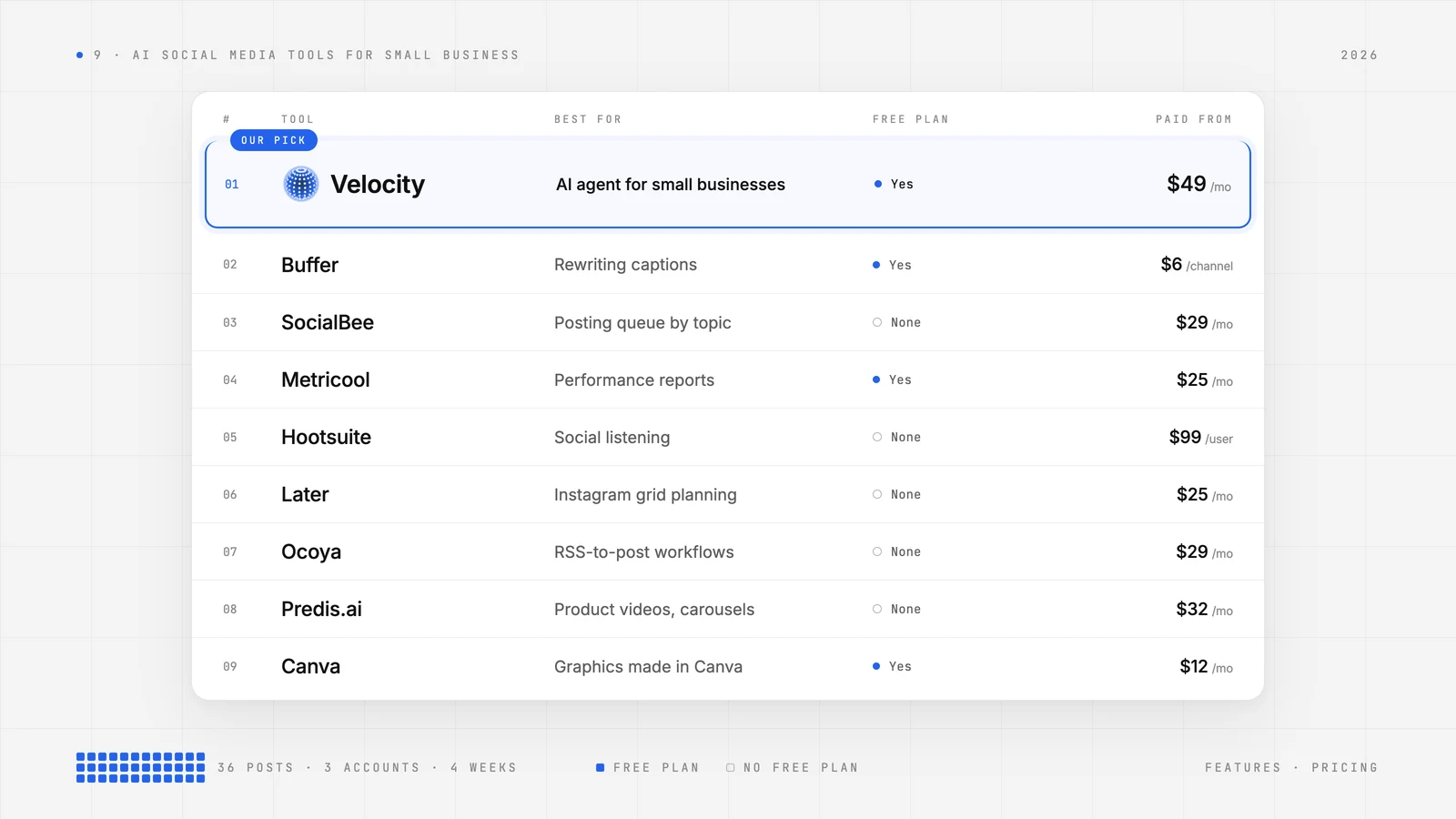
If you run a small business, you already know the problem: social media matters, but you're fitting it between customer work, invoicing, and everything else. AI social media management tools promise to take that load off your plate — drafting posts, scheduling them across channels, and surfacing what's working. But which one is actually worth paying for? We tested nine platforms against a realistic small-business workload — three posts per week on each of three connected accounts, or 36 post placements over four weeks — to find out which tools justify a subscription and where a human still needs to stay in the loop.
| Platform | Best For | Pricing | Standout features |
|---|---|---|---|
| Velocity | Small businesses adapting autonomous AI agents for social media | Free plan available; from $49/month for Pro | Create on-brand content, schedule and publish posts, and understand engagement, analytics across connected channels in one conversation |
| Buffer | Creators who mainly need help rewriting captions | Free plan available; from $6/channel/month for Essentials | AI Assistant rewrites and repurposes drafts |
| SocialBee | Teams filling a recurring posting queue by topic | No free plan; from $29/month for Bootstrap | Social Media Copilot builds editable drafts for Content Categories |
| Metricool | Small teams focused on social performance reporting | Free plan available; from $25/month for Starter | Downloadable PDF and PowerPoint reports on Starter |
| Hootsuite | Established marketing teams focused on social listening | No free plan; from $99/user/month for Standard (billed annually) | Wisdom turns social insights into drafts for review |
| Later | Instagram-first brands planning their grid | No free plan; from $25/month for Starter | Visual Instagram Planner previews the grid |
| Ocoya | Teams turning RSS updates into social posts | No free plan; from $29/month for Starter | Workflows run configured triggers and actions |
| Predis.ai | Online shops batching product videos and carousels | No free plan; from $32/month for Core | Rise Auto Posting generates and schedules recurring batches |
| Canva | Teams already creating social graphics in Canva | Free plan available; from $12/month for Pro for one person (billed annually at $144/year) | Content Planner schedules finished designs |
Which AI Social Media Manager Is Actually Worth Paying For?Link to this section
Velocity is worth paying for when a small business needs an AI agent that creates on-brand content, schedules and publishes posts, and explains performance analytics across connected social channels — all from a single conversation. For the owner juggling a weekly promotion between customer jobs, the value case is straightforward: if the tool takes a link or a rough idea and turns it into reviewed, scheduled posts faster than doing it manually, the subscription pays for itself. The comparison below shows where each platform earns its price and where free tiers fall short of a real publishing workload.
How We Tested These AI Social Media ToolsLink to this section
This review reflects a November 2026 audit of official product documentation, help pages, and current U.S. plan terms for all nine platforms, supplemented by hands-on product checks. Here's how we structured the evaluation:
- Standardized workload. Every plan comparison uses 36 post placements over four weeks — three posts per week on each of three accounts. This mirrors a shop that posts a mix of promotions, tips, and updates on a steady cadence.
- End-to-end promotion tracking. We followed one promotion from a link or brief through on-brand draft creation, preview, scheduling, and publishing. At each step, we noted whether the owner, marketer, or a designated reviewer performs the action or whether the tool handles it autonomously.
- Reply handling scored separately. We drew a clear line between a person sending an inbox reply, an AI-drafted reply that a person reviews and sends, and a configured trigger that sends a reply automatically. These are different levels of automation with different risk profiles.
- Free vs. paid, apples to apples. For each platform, we compared the relevant paid plan against its free tier or trial. We calculated recurring charges for the example workload and distinguished between queue slots, monthly post caps, and AI credit allowances.
- Reporting coverage. We checked whether analytics covered the accounts a small business actually uses and whether results could be shared or exported for a monthly owner update.
VelocityLink to this section
Best for:
- Small businesses trying to maintain a consistent social media presence without hiring a dedicated social media manager.
- Teams that use engagement signals and post-level analytics to decide which topics, formats, or posting times to prioritize in the next content round.
- Brands that need on-brand designs, captions, and scheduling in one place.
What it doesLink to this section
Velocity is the first autonomous AI social media agent for marketing. Rather than offering AI as a bolt-on feature inside a traditional dashboard, Velocity embeds the agent into every step of the social media workflow — from content creation through scheduling, publishing, and performance analytics analysis. It functions as a small business's AI social media manager: you bring an idea, a promotion link, or a product brief, and the agent produces platform-specific posts ready for review.
The integrated conversation flow is what sets Velocity apart. Creating on-brand content starts with Brand Identity, which is built from the business's website and past posts. The agent uses that identity — voice, colors, fonts, logo — to keep every caption, design suggestion, and scheduling recommendation tailored to the brand. Any idea, source, or promotion link can become a post that grabs attention without the owner having to start from a blank screen.
Velocity's agents are autonomous, multi-step systems that handle the full content cycle: research, content creation, scheduling, analytics and engagement. If a post needs approval before going live, the agent routes it to an admin who can comment on what needs to change. Velocity stores the full comment history, so there's a clear record of feedback between teammates.
Agents can publish automatically or hold drafts for configured approval, and after publishing the agent summarizes engagement and highlights which posts to repeat or adapt. When posts are ready, the agent can publish immediately or schedule at the best times for the business's audience to increase the chances of engagement. The loop closes with analytics: the agent can interpret performance data, identify which content is earning engagement, and recommend what to create and schedule next. Ask which posts performed best last week, and the agent uses that data to inform what to create next.
For a small business owner fitting social media around customer work, having an agent that takes an idea all the way to a scheduled post — and then helps plan the next round based on what performed — is a meaningful time savings. Velocity is rated 4.8 out of 5 on G2 for AI social media management.
What you'll likeLink to this section
- Multi-platform Scheduling and publishing across seven social platforms from one conversation:
- Brand Identity applies voice, colors, fonts, and logo to copy and post designs
- Agents automate the content cycle with a closed loop that sharpens recommendations as content earns engagement.
- Social media analytics lets you ask Velocity which posts earned the most engagement and what to publish next — in plain language
Why Velocity might not be a good fitLink to this section
- Account analytics cannot be exported for external reporting at this time.
- Video production and editing require a separate tool.
BufferLink to this section
Best for:
- Solo creators who mainly need help rewriting captions
- Small teams that already have content and want a simple publishing queue
What it doesLink to this section
Buffer is useful when the post already exists in some form. Its AI Assistant can shorten a weekend promotion or rework it for a different channel from the publishing composer. Once the wording is right, the owner can put each version in the queue.
Check where the handoff ends. Someone still picks a version, checks the offer details, and assigns it a slot. On a personal Instagram profile, Buffer sends a reminder and the owner finishes publishing in Instagram. That tradeoff makes sense if rewriting captions is the part that slows you down.
What you'll likeLink to this section
- AI Assistant for drafting or adapting captions in Create or the composer
- A channel-by-channel queue for checking what’s scheduled
- Replies to supported comments from the Community inbox
Where it falls shortLink to this section
- Post approvals require Team, so review workflows mean upgrading
- Essentials supports one user, limiting shared publishing work
- Personal Instagram profiles still need someone to finish publishing in the app
SocialBeeLink to this section
Best for:
- Teams that organize their posting queue around recurring topics
- Small brands that want to keep evergreen posts in rotation
What it doesLink to this section
SocialBee’s Copilot uses a business website to suggest channels, themes, and drafts. A shop can set up a weekly rotation of tips, testimonials, and offers, then put reusable posts into an evergreen category. SocialBee brings those posts back into the queue without someone scheduling each repeat.
The queue still needs an editor. A useful tip can run again, but a sale with an end date belongs in a category that publishes once. SocialBee fits teams that can make those choices up front and want the same mix of topics to run consistently between campaigns.
What you'll likeLink to this section
- Editable starter drafts organized by topic in Social Media Copilot
- Separate posting schedules for recurring topics in Content Categories
- One inbox for eligible Facebook and Instagram DMs
Where it falls shortLink to this section
- Bootstrap caps the workspace at five accounts and ten content categories
- One user is included on Bootstrap; extra teammates may add cost
- Inbox coverage varies by network, with YouTube limited to comments
MetricoolLink to this section
Best for:
- Solo marketers who send monthly social performance reports
- Small teams that compare results across connected accounts
What it doesLink to this section
Metricool earns its place when someone has to explain how social performed at the end of each month. It brings results from connected accounts into downloadable reports, so a marketer can send an owner or client a PDF or PowerPoint without assembling slides from several dashboards.
Check how much control you need over the report. Starter covers downloads, while custom report templates are available on Advanced and Custom. A solo marketer sending the same monthly update can work with the standard format. If every client needs a different layout, compare the plan costs before building your reporting process around it.
What you'll likeLink to this section
- PDF and PowerPoint exports on Starter for monthly reports
- AI caption drafts with a monthly credit allowance per brand
- Inbox Manager for replying to supported DMs and comments
Where it falls shortLink to this section
- LinkedIn support requires a paid plan
- X adds a separate charge on Starter
- Team roles and post approvals require an Advanced upgrade
HootsuiteLink to this section
Best for:
- Established marketing teams that use social listening to plan campaigns
- Marketers who check competitor activity before drafting posts
What it doesLink to this section
Hootsuite’s Wisdom helps a marketer decide what to post after looking at trends, competitor activity, and social performance. A team planning a campaign can ask what topics are gaining attention, then use the answer as a starting point for a draft in Hootsuite’s publishing workspace.
The distinction is who takes the final step. Wisdom can surface an angle and draft a post, but a person reviews, approves, and publishes it through Hootsuite. That division makes sense for teams that already use social listening to plan campaigns and want a faster way to get from the findings to a draft.
What you'll likeLink to this section
- Drafts informed by trends and competitor activity through Wisdom
- One publishing calendar for up to ten accounts on Standard
- One inbox for reviewing and replying to supported messages
Where it falls shortLink to this section
- Per-user pricing raises the base cost with each additional publisher
- Formal content approvals require Advanced
- Trial accounts limit daily posts and exclude bulk scheduling
LaterLink to this section
Best for:
- Instagram-first shops that plan product launches around their grid
- Solo creators who want caption help for posts they’ve already planned
What it doesLink to this section
Later’s Visual Instagram Planner is useful when the next few posts need to look right together. A shop can arrange product photos and launch graphics in the grid before they go live, then ask Caption Writer for a starting line where the image is ready but the copy is still missing.
Caption Writer is an occasional helper on Starter. Later includes five monthly AI credits shared with its Ideas feature, so they won’t cover a fresh caption for each of the 36 placements in our example. Starter makes more sense when the grid is the main reason to buy and only a few posts need writing help.
What you'll likeLink to this section
- A preview of how scheduled posts will look on the Instagram grid
- Caption drafts and tone changes in Caption Writer
- Social Sets that group one profile per supported network
Where it falls shortLink to this section
- Starter allows one user and one profile per network
- Approvals and Social Inbox require Growth
- Five shared monthly AI credits on Starter leave limited room for caption generation
OcoyaLink to this section
Best for:
- Teams that turn RSS updates into scheduled social posts
- Operators setting up automatic replies for specific triggers
What it doesLink to this section
Ocoya’s Workflows are useful when the same event calls for the same action. A business can use a new RSS item to generate a social draft, or set up a rule for a supported comment to trigger a reply. Once the rule is active, the team doesn’t have to start that task from scratch each time.
The setup is where the work is. Someone has to choose the trigger, decide what the rule can answer, and check what happens when it runs. An automatic reply leaves the conversation open, so the team still needs someone to handle follow-up. Start with a predictable task and keep the rule narrow enough to review.
What you'll likeLink to this section
- Workflows that turn new RSS items into social drafts
- One inbox for eligible Facebook and Instagram messages
- Pause controls for stopping a rule while you revise it
Where it falls shortLink to this section
- AI creation, automation runs, and analytics exports draw from the same credit pool
- Automatic replies require someone to configure the workflow
- Automated replies leave conversations open for a person to follow up
Predis.aiLink to this section
Best for:
- Online shops that batch product videos and carousels
- Solo marketers who turn short prompts into editable campaign visuals
What it doesLink to this section
Predis.ai helps a shop make the visuals for a product promotion when it has an idea but no finished assets. A short prompt can become a draft video, carousel, or image with copy the owner can edit. Once the assets are ready, the owner can schedule the posts to connected accounts.
Separate what it costs to make the assets from how you want them published. Generation draws on credits, and the format and model affect how fast you use them. Core can publish the posts you prepare; recurring Auto Posting starts on Rise. If you only need a batch of launch visuals, compare the credits before paying for automated posting.
What you'll likeLink to this section
- Short videos from a prompt for Reels, TikTok, and Shorts
- Competitor Runs for Instagram and Facebook research on Core
- Recurring Auto Posting on Rise with a review step before activation
Where it falls shortLink to this section
- Recurring AI Auto Posting requires Rise; Core schedules posts you prepare
- Generation costs vary by format and model, making credit usage harder to predict
- Scheduling capacity does not tell you how much creative the credits will cover
CanvaLink to this section
Best for:
- Small businesses already making social graphics in Canva
- Designers who schedule finished posts one platform at a time
What it doesLink to this section
Canva’s Content Planner makes sense for teams that already design their social graphics in Canva. A shop owner can finish an offer graphic, get a caption draft from Magic Write, and choose an account and time in the same workspace. There’s no need to export the finished graphic to schedule it elsewhere.
The extra work appears when one promotion has to go to several channels. Canva schedules each design to one social post at a time, so the owner repeats the scheduling step for each destination. That’s manageable for a few finished graphics; it matters more when every offer needs separate versions across several accounts.
What you'll likeLink to this section
- Caption drafts from Magic Write inside the design editor
- Scheduling a finished design without exporting it
- Content Planner support for eligible Facebook Pages and Instagram Business accounts
Where it falls shortLink to this section
- Each design needs a separate scheduling step for every destination
- Instagram scheduling requires a desktop workflow
- Instagram scheduling is limited to Business accounts
How to Choose the Right AI Social Media ToolLink to this section
Start with the job that takes the most time in a normal week. Then use a repeatable framework to decide whether that job justifies a subscription.
- Count accounts and posts before comparing plans. Use the 36-placement example to distinguish a free queue that refills during the month from a hard monthly posting cap. Buffer's Free tier, for instance, works if you refill weekly but can't hold a full month's preload.
- Estimate the time you save. Multiply the hours a plan saves by the staff member's hourly cost and compare that figure with the subscription for the accounts and seats needed. If a $49/month plan saves five hours a month at $30/hour, it's paying for itself.
- Match the tool to the work. A writing assistant like Buffer's AI Assistant leaves the operator in charge of placing the post. An agent like Velocity can take scheduling instructions and publish autonomously. A trigger-based workflow like Ocoya's needs rules and scope before it can run.
- Name the person who checks offers, claims, and public replies. Separate manual inbox replies, AI-drafted replies that a person sends, and configured reply rules. If you use a scoped trigger — say, an Ocoya workflow that replies to qualifying Instagram comments — keep the rule narrow enough for a person to oversee and own follow-up.
- Start with one real promotion. Velocity is the strongest fit when the recurring job is getting a promotion from a link through channel-specific drafts to reviewed, scheduled publishing. Run one promotion on Free, then choose Pro if the publishing volume, enabled teammate approvals, or eligible analytics justify it.
Key Features to Look For in an AI Social Media ToolLink to this section
Before committing to a plan, run one real promotion through the tool and inspect every step from first draft through the following week's planning.
- Channel-ready drafts. Check whether a single offer becomes copy suitable for each account. Does the final preview preserve the date, link, price, and terms? A draft that requires heavy manual editing on every platform isn't saving meaningful time.
- Publishing control. Look for visibility into account, time, and format. Know whether a queued post publishes directly or needs someone to finish it in the social app. Review publishing specs by network to confirm the tool handles your formats.
- Review and ownership. Look for a clear path from draft to sign-off, a way to change a queued post, and a named owner for customer replies. If a teammate drafts a post, who approves it before it goes live?
- Performance feedback. Choose a report or answer that helps decide what to publish next. Confirm that it covers the accounts you use and provides export access if you need to send the data out.
- Capacity you can price. Look at accounts, scheduled posts, seats, and AI usage separately. Count how often an ordinary promotion needs a rewrite or a new visual — that tells you whether a credit-based plan will last the month.
The fastest way to evaluate is to try Velocity's free AI social media agent on one upcoming promotion and compare the work left for the owner with the time the current routine takes. If the agent handles the heavy lifting and the owner only reviews and approves, the math usually works.