Content adaptation guide 2026: 10 best scheduling tools for adapting one post to every platform reviewed
 Pavan Ravikumar·Marketing Engineer, Velocity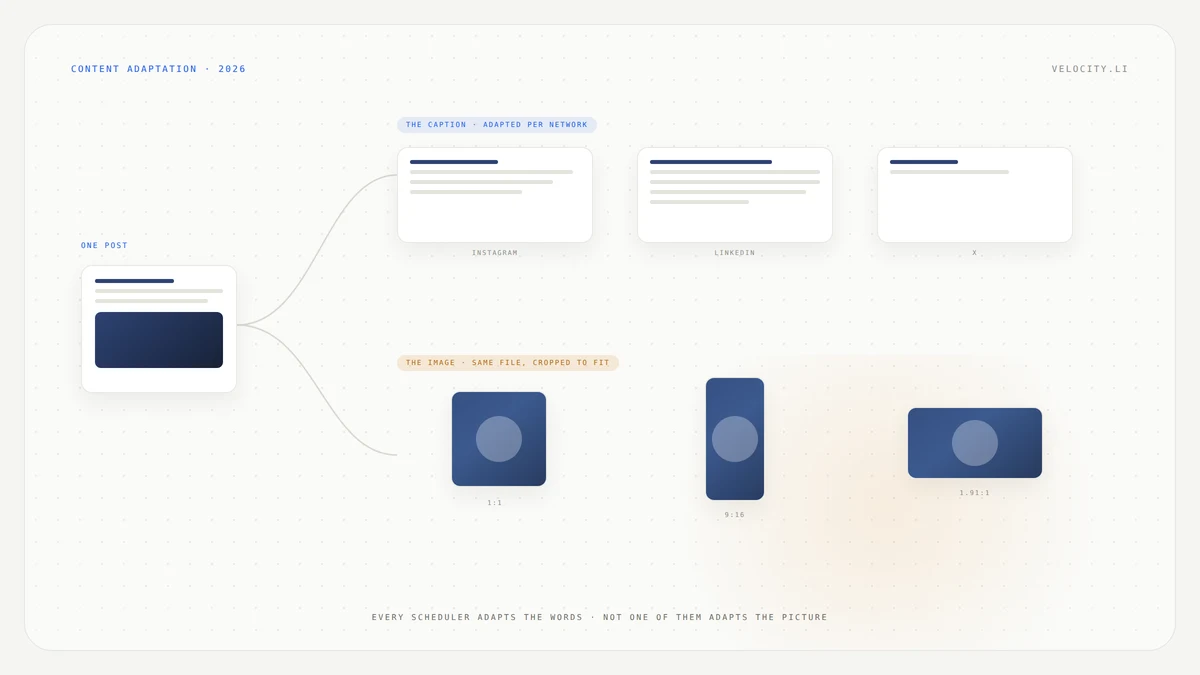
The campaign is finished. You have a few images, a video, and a caption, and it needs to go out on five networks before end of day. The obvious hope is that the scheduling tool adapts it: one upload, one click, five native posts. That hope is half right.
The caption half works. Nearly every scheduling platform on this page lets you edit the text separately for each network, and each one has its own name for the feature. The image or video half does not. Among the eight schedulers compared in this guide, not one re-renders an attached asset into each network's aspect ratio. They refuse it, ask you to crop it by hand, downgrade the post, or let you swap in a file you made yourself. The word "format" covers both halves, and every vendor's marketing page uses it for the easier one.
This guide compares 10 tools, including Velocity, by what each one actually changes when one post goes to several networks, covering adapting one post to different platform formats and repurposing one campaign across several social media channels. We review documented capabilities from each vendor's own help centers rather than claim one tool adapts everything.
What scheduling software is best for adapting one post to different platform formats?
For the text, most of them. For the media, none of them. Every scheduler here gives you the caption per network one way or another, but not one converts your image or video into each platform's required aspect ratio. The tools that handle the media file are not schedulers at all: Repurpose.io converts video to 1:1 or 9:16, and Canva resizes the design before it reaches a publishing tool.
Here is what each tool actually changes per network:
- Velocity: Writes the version per channel from the start rather than adapting one draft. Media specs are not documented.
- Metricool: Edits text, images, first comment, alt text, cover, tags, and location per network through Multiposting. Will not save a post if the media does not meet format requirements.
- Buffer: Lets you "Customize for each network" with separate text boxes. AI rewrites are named for the network. Media keeps its original aspect ratio; Magic Resizer is a separate tool.
- Sprout Social: "Customize Post per Network" edits text, captions, and media in the same Compose window. An image edited for one network does not change for the others.
- Hootsuite: Copies content into a tab per network for customization. Wisdom rewrites in the composer. The networks resize images after upload, not Hootsuite before.
- Vista Social: Per-network caption editor and media customization that unlinks the edited network's media from the main post. AI per-platform rewriting is not documented.
- Publer: "Customize Post" is included on the free plan. Instagram images are cropped by the network if outside the 1.91:1 to 4:5 ratio range.
- Later: "Customize Posts" lets you scroll through each post to edit. Recommends one universal export to reduce platform-specific files.
- Repurpose.io: Converts video to square or vertical and removes watermarks, but has no composer for per-network captions. It is a distribution tool, not a scheduler.
- Canva: Magic Resize changes the design's dimensions on paid plans. The Content Planner reaches seven platforms with one caption and no per-network text editing.
easiest scheduling platform for repurposing one campaign across several social media channels
Ease here is measured in steps per channel, not in preference. Metricool requires the fewest: you write one template, click "Edit content" only on the networks that need changes, and you can revert to the initial content at any time. Publer includes per-network customizing on its free plan, which is the lowest-cost path to the same workflow.
Sprout Social is the most thorough, because each network tab is fully independent, but it is also the most manual, and once you choose to customize per network you cannot undo it. Later takes the other approach and recommends one universal export, so there is less to customize in the first place.
Velocity writes the version per channel from the start, so there is nothing to adapt afterwards. You describe the post, the agent writes it for each network, and a person approves.
Adapting one post across social media channels compared
| Tool | Best for | Per-network text | Per-network media | AI rewrite per network |
|---|---|---|---|---|
| Velocity | Writing per channel from the start | Written per channel from the start | Not documented | Writes per channel |
| Metricool | Editing everything per network from one template | Yes, Multiposting | Swap or crop it yourself | Network is an option at generation |
| Buffer | An AI that rewrites for the network you picked | Yes, Customize for each network | Same asset, resizer is a separate tool | Yes, named for the network |
| Sprout Social | Knowing what does and does not carry across networks | Yes, Customize Post per Network | Swap or crop it yourself | Yes, inside the per-network flow |
| Hootsuite | Customizing per network with AI in the same composer | Yes, a tab per network | Swap or crop it yourself | Yes, Wisdom |
| Vista Social | Swapping the media itself per network | Yes, a caption editor per network | Swap or crop it yourself | Not documented per platform |
| Publer | Per-network customizing without a paid plan | Yes, Customize Post | Swap or crop it yourself | Ask it per platform in the prompt |
| Later | One universal export that works on most networks | Yes, Customize Posts | Swap or crop it yourself | Not documented per platform |
| Repurpose.io | Converting the video file itself | No composer, text rules only | Converts the video to 1:1 or 9:16 | Not applicable |
| Canva | Resizing the design before it reaches a scheduler | One caption for the whole post | Resizes the design, not the post | Not applicable |
What to look for in a tool that adapts one post to every platform
Seven things actually differ between these tools, and the first four decide how much of the adapting you end up doing yourself.
Per-network text editing: Every tool here offers some form of this except Repurpose.io and Canva, and those two are not schedulers. The feature names differ, from Buffer's "Customize for each network" to Metricool's Multiposting, but the function is the same: separate text fields per network so you can shorten for X, drop hashtags on Facebook, or remove a link on Instagram.
What else changes per network: Metricool goes further by letting you edit images, first comment, alt text, cover, tags, and location per network from one template. Sprout Social and Vista Social document per-network media swaps, and Publer lets you attach a photo for some networks and not others. Buffer, Hootsuite and Later stop at the caption and the crop you apply yourself.
AI that rewrites for the network: Buffer's AI Assistant explicitly offers to "Rephrase/Shorten/Expand for Instagram" and keeps posts under the 2,200 character limit. Hootsuite's Wisdom optimizes for the selected social network in the same composer. Metricool's AI Text Generator takes the network as an input at generation. Sprout Social's AI Assist runs inside the per-network flow. Publer's AI Assist requires you to specify the platform in your prompt. Later and Vista Social do not document per-platform AI rewriting.
What the tool does to your media: Among the eight schedulers here, not one re-renders your image or video into each network's aspect ratio. Buffer keeps the original aspect ratio. Hootsuite explains that the networks do their own optimization after upload. Sprout Social states that an image edited for one network does not change for the others. The tools that transform the file, Repurpose.io and Canva, are not schedulers.
What happens when the asset does not fit: Metricool shows a red warning and will not let you save the post. Buffer schedules an out-of-range Instagram post as a notification instead. Publer warns about truncation or missing settings. Later warns that media outside a platform's guidelines may result in cropped or resized images and reduced quality. Knowing when the tool tells you, before or after you have committed, matters more than the rejection itself.
Whether you can undo it: Metricool lets you revert to the initial template at any time. Sprout Social does not: once you choose to customize your posts per network, you can't undo this action. Buffer splits a customized post into independent channel queues once it is scheduled, so a later edit has to be made in each queue.
How many steps per channel: Metricool has the fewest steps because you edit only the networks that differ. Sprout Social has the most because each tab is fully independent. Velocity removes the question by writing per channel from the start.
Velocity: Best for writing the post per channel instead of adapting one draft afterwards
Best for
- Teams publishing to Instagram, Facebook, YouTube, TikTok, LinkedIn, X and Bluesky who want each version written for the channel rather than edited from one draft
- Workflows where the per-channel writing is the bottleneck, not the media
- Teams that want an agent to research the angle and apply a brand profile before a person reviews
What it does
Velocity starts from the channel rather than from one draft. You describe the post, the AI agent researches the angle, applies the brand profile, and writes the version per channel. A person then reviews each version before it publishes. That shifts the effort from repeated edits to review.
This differs from Metricool, Buffer and Hootsuite, which start with one template and ask you to customize it again on every channel that needs something different. Velocity produces a version per channel and asks you to approve them. For the question about the easiest way to take a campaign across several channels, that is a real structural answer: the editing step is replaced by a review step.
On the media side, image and video specs, aspect ratios, resizing, and cropping are not documented on Velocity's pages. If the part that slows you down is the image rather than the caption, Repurpose.io converts the video file itself and Canva resizes the design before it reaches any scheduler.
Choose Velocity when the per-channel writing is the work and you would rather have an agent draft each version than adapt one draft yourself.
What you'll like
- Each channel gets its own version from the start, so there is no template to customize afterward
- Scheduling and a content calendar built around the per-channel workflow
- Seven documented channels: Instagram, Facebook, YouTube, TikTok, LinkedIn, X and Bluesky
- A person reviews each channel version before anything publishes
Why it might not be a good fit
- Media specs are not documented. Velocity's pages do not state image or video sizes, aspect ratios, or per-network cropping, so confirm before planning a workflow that depends on them.
- No per-network media control is documented. If you need to swap or edit images per network today, Metricool and Sprout Social document that capability.
Metricool: Best for editing everything per network from one template
Best for
- Teams that want the widest per-network editing scope from a single template
- Workflows where first comment, alt text, cover, tags and location need to vary per network, not just the caption
What it does
Metricool's Multiposting feature "allows you to schedule content on several social networks without having to duplicate the publication." You write the text in the template, click on another social network, and click "Edit content." From there, you can adjust text, mentions, images, emojis, hashtags, first comment, links, alt text, tags, cover, and location for each platform. This is the widest per-network scope on this page because it covers fields that most schedulers do not touch.
Editing is reversible: editing will disable the use of the template, but you can revert to the initial content at any time by clicking "use template" again. That makes Metricool the safest tool for experimenting with per-network changes.
On the media side, Metricool does not resize or re-render your files. Its documentation is direct: "If your image or video doesn't meet the format, size, or aspect ratio requirements, you'll see a red warning and won't be able to save the post." The AI Text Generator takes the network as an input: optionally select a social network to optimize your text according to the chosen network, but this is a generation option, not a rewrite pass on existing text.
Choose Metricool when you need to edit the most fields per network from one place and want the ability to revert.
What you'll like
- Multiposting covers text, images, first comment, alt text, cover, tags and location per network
- Reversible editing, so you can return to the template at any time
- A red warning on out-of-spec media that catches the problem before scheduling
- AI text generation that takes the network as an input
Why it might not be a good fit
- No automatic media resizing. Metricool will not save a post with out-of-spec media rather than adapting it, so you prepare the correct file yourself.
- The AI generates rather than rewrites. The AI Text Generator creates new text with the network as an option, but it does not take your existing caption and rewrite it for a named platform the way Buffer's does.
Buffer: Best for an AI that rewrites the post for the network you picked
Best for
- Teams that want the most explicitly network-aware AI rewrite in a scheduler
- Workflows where the caption needs to be rephrased, shortened or expanded for each platform by name
What it does
Buffer's feature is called "Customize for each network". Select it and, in Buffer's words, "a separate box will appear for each type of social network that you've selected", one per channel.
Buffer's AI Assistant is the most network-aware on this page: if you're posting to Instagram, you will have the option to Rephrase/Shorten/Expand for Instagram, and it will keep your post under the 2,200 character limit. The AI names the network and applies its constraints.
On the media side, Buffer keeps the original aspect ratio when resizing, adjusting only one dimension while the other scales automatically. If an image or video falls outside the accepted range, your post will be scheduled as a notification instead.
Buffer has a Magic Resizer, but its own documentation draws the line: "Magic Resizer only resizes and exports your images. To schedule or publish them to your social accounts, use Buffer's Publishing tools." The resize and the publish are separate workflows, which is the clearest illustration on this page of the split between the two halves. One more thing to know: after scheduling, customized posts become separate from each other, so edits have to be made in each channel queue.
Choose Buffer when you want an AI that rewrites by network name and you are comfortable preparing your media files separately.
What you'll like
- AI rewrites named for the specific network rather than generic tone shifts
- Per-network text customization that is clean and well documented
- A notification fallback for out-of-range media rather than a silent failure
- Magic Resizer for image cropping, even though it sits outside publishing
Why it might not be a good fit
- Resizing is not part of publishing. Magic Resizer only resizes and exports your images, so media adaptation happens outside the composer and you come back to schedule.
- Posts separate after scheduling. Once scheduled, edits have to be made for each post in each channel queue.
Sprout Social: Best for knowing exactly what does and does not carry across networks
Best for
- Teams that need full independence between network tabs in one Compose window
- Workflows where knowing what does not carry across matters more than speed
What it does
Sprout Social calls its feature "Customize Post per Network." It lets you add content unique to each social network in the same Compose window. You can customize text, captions, and media without needing to duplicate the post. You need to pick at least two networks to enable the button.
Sprout Social documents what happens clearly: "once an image is edited for one network it does not change for the other networks and may need to be re-edited. No content is shared between tabs; each editing experience is unique to the tab." This is the clearest statement on this page about what per-network customization actually means for media: you are not adapting one file, you are managing separate files that happen to live in one window.
The customization is irreversible: "Once you choose to customize your posts per network, you can't undo this action." AI Assist runs inside the per-network flow and will walk you through creating your post for that network. Enhance by AI Assist is on paid plans.
Choose Sprout Social when you need the most thorough per-network control and are willing to accept that thoroughness means more manual work.
What you'll like
- Each network tab is fully independent, so nothing bleeds across unexpectedly
- Documentation that is explicit about what does and does not carry between tabs
- AI Assist that runs inside the per-network flow, on paid plans
- Text, captions and media all customizable per network
Why it might not be a good fit
- Customization is irreversible. Once you choose to customize your posts per network, you cannot undo this action, so it is worth being sure before you start.
- It is the most manual workflow here. Full tab independence means every network needs its own editing pass, including a fresh crop of the same image.
Hootsuite: Best for customizing per network with AI help in the same composer
Best for
- Teams that want per-network tabs and an AI rewrite tool in one composer
- Workflows where mentions, hashtags and links need to differ by network
What it does
Hootsuite copies your content for each social network you're publishing to, so you can customize your content for the unique audiences on each one. Examples include making it shorter on X, removing hashtags on Facebook, or removing a link on Instagram. Mentions do not carry automatically: if your post includes mentions, you'll have to customize them for each social network.
The AI tool is Wisdom. Hootsuite's documentation states that Yeti and OwlyGPT have evolved into Wisdom. In the composer, select Wisdom to have it help you optimize your post for your selected social network, change the tone of your post, or make your post actionable.
On the media side, Hootsuite is straightforward about where the resizing happens: "because every social network uses its own methods to optimize images (including resizing, reformatting, scaling, and cropping), this can affect how an image looks after it's published." The networks do the resizing after upload, not Hootsuite before. Manual cropping is available: scroll through the options and select an aspect ratio made to fit a specific social network, a common aspect ratio, or set your own custom width and height.
Choose Hootsuite when you want Wisdom's AI rewriting and per-network tabs in the same place, and you are prepared to crop media manually.
What you'll like
- Wisdom optimizes the text for the selected social network inside the composer
- Per-network tabs with practical examples of what to change where
- Documentation that explains the networks resize images after upload
- Manual crop options including network-specific and custom aspect ratios
Why it might not be a good fit
- Mentions do not carry. If your post includes mentions, you have to customize them for each social network.
- The media result belongs to the network. Hootsuite explains that the networks optimize images after upload, so how the image ends up looking depends on each platform's processing.
Vista Social: Best for swapping the media itself per network
Best for
- Teams that need to replace the image or video for specific networks without affecting the rest
- Workflows where per-network media customization matters as much as per-network text
What it does
Vista Social lets you customize your text and media in the post preview, both by social profile and by network. Each network gets its own caption editor and its own media customization option, both scoped to that network's version of the post.
The media behavior is a swap, not a transform. When you edit one network's media, the specific network's media you are editing will be unlinked from the main media in the middle of the publisher screen. Automatic resizing is not documented. You are replacing the file, not asking the tool to re-render it.
Vista Social has an AI Assistant powered by ChatGPT, but per-platform rewriting is not documented. Per-network media customization is documented as available on its paid plans.
Choose Vista Social when you need to swap different media files per network and want the unlinking to be explicit rather than hidden.
What you'll like
- Per-network media customization documented with an explicit unlink model
- A caption editor that works per network and per social profile
- An Apply to all control for pushing a change across networks when you want to
- Text and media customization together in the publisher
Why it might not be a good fit
- The media handling is a swap, not a transform. Vista Social does not resize your file, so you prepare each version yourself, and per-network media customization is on its paid plans.
- Per-platform AI rewriting is not documented. The AI Assistant covers tone and brand voice, and adapting a post to a named network is not documented.
Publer: Best for per-network customizing without a paid plan
Best for
- Teams that need per-network text customization without paying for a plan
- Smaller operations that want warnings about platform issues before scheduling
What it does
Publer's "Customize Post" feature lets you select the social networks where you want to share the post and create your post accordingly, then click the Customize Post icon. From there, you can choose to add a photo for Facebook and Instagram, shorten it for Twitter, or add a CTA button for Google My Business.
The free plan includes per-network customizing and a built-in photo editor. Publer is the one tool here that names per-network customizing as part of its free plan rather than leaving the plan question unanswered. Publer also notifies you if there's an issue with your post, such as truncation for X/Twitter or missing settings required by the social network.
On the media side, Publer does not resize your files. For Instagram, images "will be automatically cropped if they're not within the 1.91:1 and 4:5 ratio", and that cropping is done by the network, not by Publer.
AI Assist is on its Business plan or available with your own OpenAI account, and per-network rewriting is something you ask for in a prompt rather than a dedicated button. Publer also offers Spintax, which produces randomized versions of the same text rather than per-platform adaptations, so the two should not be confused.
Choose Publer when budget is a constraint and per-network text customization is the priority.
What you'll like
- Per-network customizing included on the free plan
- Warnings about truncation and missing settings before scheduling
- A built-in photo editor at no cost
- AI Assist that works with your own OpenAI account if you prefer
Why it might not be a good fit
- AI rewriting is a prompt, not a button. There is no rewrite for Instagram action; you name the platform yourself, and AI Assist is on the Business plan or your own OpenAI account.
- The cropping is Instagram's, not Publer's. Instagram crops images outside the 1.91:1 to 4:5 range, and Publer does not resize them beforehand.
Later: Best for one universal export that works on most networks
Best for
- Teams that would rather design one file that works everywhere than customize per network
- Workflows that prioritize reducing the number of platform-specific exports
What it does
Later's per-network editing works through "Customize Posts": after you've written your caption, select Customize Posts and then scroll through each post to customize them in Step 4. It notes that each social platform has its own requirements, so customization for each platform may be required. You can only copy a post to one social profile at a time, and it must be in the same Access Group.
Later recommends a single universal export rather than implying it can resize the file for you: if you want to create one version of your content and publish it across multiple platforms, use the recommendations below to reduce the number of platform-specific exports you need to create. This is a practical answer to the media half of the question for anyone who does not want to use a separate tool.
Later warns that uploading media that exceeds a platform's maximum file size, or doesn't meet its aspect ratio and resolution guidelines, may result in cropped or resized images and reduced quality. AI Caption Writer rephrases and changes tone on paid plans and is credit-metered. Rewriting for a specific platform is not documented.
Choose Later when you want to design once at a ratio that survives everywhere and let the tool handle the caption differences.
What you'll like
- A documented recommendation for one universal export that cuts per-platform file work
- Customize Posts, which lets you scroll through and edit each network's caption
- Honest warnings about what happens when media does not meet platform guidelines
- Caption Writer for rephrasing and tone changes on paid plans
Why it might not be a good fit
- No per-platform AI rewriting. Caption Writer changes tone and rephrases, and rewriting for a named network is not documented.
- Copying is one profile at a time. You can only copy a post to one social profile at a time, which adds steps on a large campaign.
Repurpose.io: Best for converting the video file itself to each platform's shape
Best for
- Teams that need video converted to 1:1 or 9:16 automatically
- Workflows where watermark removal and burned-in captions matter more than per-network text editing
What it does
Repurpose.io is not a scheduler in the usual sense. It is an automated content repurposing and distribution platform. The workflow model is to connect your accounts, choose your source (like TikTok, YouTube, or a podcast), select your destination (such as Instagram, YouTube Shorts, or Google Drive), and let automation take care of the rest.
What it does that no scheduler on this page does is convert the video file itself. It offers square conversion (1:1) and vertical conversion (9:16), plus the ability to automatically remove platform watermarks and a burn captions into video option. Documented destinations include YouTube, TikTok, Instagram, Facebook, Snapchat, Pinterest, LinkedIn, X (Twitter), Amazon, BlueSky, Twitch, Google Drive, Dropbox, and more.
What it does not have is a composer where you write a caption per network. Its calendar shows all your already published content plus your scheduled content. Text is handled through rules on inherited copy, for example append text to description (hashtags, call to action, etc.). This is a different category: Repurpose.io solves the half that schedulers cannot, and schedulers solve the half that Repurpose.io does not.
Choose Repurpose.io when the video file itself has to change shape and you plan to handle per-network captions in a separate tool.
What you'll like
- Converts video to 1:1 or 9:16, which no scheduler on this page does
- Removes platform watermarks automatically
- Burns captions into the video
- A wide range of documented source and destination platforms
Why it might not be a good fit
- There is no per-network composer. Text is managed through append rules rather than a caption written per network.
- It does not replace a scheduler. If you need per-network caption editing, you still run Buffer, Metricool, Hootsuite or another scheduler alongside it.
Canva: Best for resizing the design before it ever reaches a scheduler
Best for
- Teams that need to resize a design to several aspect ratios before publishing
- Workflows where the visual asset is the bottleneck, not the caption
What it does
Canva's Magic Resize lets you resize your designs to other sizes or dimensions. This is the design-side answer to the media problem that every scheduler on this page leaves unsolved. Magic Resize is on Canva's paid plans, and each use of Magic Resize counts against your monthly AI usage limit.
Canva also has a Content Planner, but its reach is limited. The documented destinations are Facebook Pages, Instagram Business Account, Twitter, LinkedIn, Pinterest, Slack, and Tumblr. The list still says Twitter, and there is no TikTok, no YouTube, no Threads, and no Bluesky. You can link one account at a time per platform. Per-network captions are not documented; the scheduling flow has a single "Write a caption (optional)" step.
Canva is a design tool with a planner attached, and it solves the half that schedulers cannot. The practical workflow is to resize in Canva, then publish through Buffer, Metricool, Hootsuite, or whichever scheduler handles your per-network captions.
Choose Canva when you need to produce multiple aspect ratios from one design and plan to schedule through a separate tool.
What you'll like
- Magic Resize produces several dimensions from one design file
- A design-first workflow that solves the media half schedulers skip
- Assets that can be resized in Canva and published through a scheduler
- Strong visual editing for creating platform-native assets
Why it might not be a good fit
- The scheduling reach is narrow. The Content Planner covers seven platforms, still says Twitter, and has no TikTok or YouTube, with one account per platform.
- There are no per-network captions. The scheduling flow offers one caption field for the whole post, so per-network text still needs a scheduler.
Can a scheduler resize your images and video for each platform?
No. Among the eight schedulers compared in this guide, not one re-renders an attached image or video into each platform's required aspect ratio, and the vendors say so themselves.
Buffer keeps the original aspect ratio and schedules an out-of-range Instagram post as a notification instead. Metricool shows a red warning and will not let you save the post at all. Sprout Social states that an image edited for one network does not change for the others and may need to be re-edited.
Hootsuite explains that each network runs its own resizing, reformatting, scaling and cropping after upload. Later warns that media outside a platform's guidelines may be cropped or resized with reduced quality, and Publer notes that Instagram crops images falling outside the 1.91:1 to 4:5 range.
What they offer instead is a manual fix. Hootsuite, Later, Publer, Metricool and Sprout Social all provide a crop tool with per-platform presets that you apply yourself. Vista Social lets you swap in a different file per network and unlinks it from the main media. Buffer keeps its Magic Resizer outside the publishing flow entirely.
The common thread is that the adaptation is your job, not the tool's. The schedulers are not really at fault for that: rendering one file into seven shapes is a design job, and these are publishing tools.
The two tools here that do adapt the file are not schedulers. Repurpose.io converts video to 1:1 or 9:16 and strips watermarks, but has no composer for per-network captions. Canva resizes the design before it reaches any publishing tool, and its own planner reaches seven platforms with a single caption field. Neither replaces a scheduler, and no scheduler replaces them.
How to choose a tool for adapting one post to every platform in 2026
Editing everything per network from one template points to Metricool. An AI that rewrites the post for the network you picked points to Buffer. Knowing exactly what does not carry across networks points to Sprout Social. Customizing per network with AI in the same composer points to Hootsuite. Swapping the media itself per network points to Vista Social. Per-network customizing without a paid plan points to Publer. One universal export instead of seven files points to Later. Converting the video file itself points to Repurpose.io. Resizing the design before it reaches a scheduler points to Canva.
Velocity is a strong fit when the per-channel writing is the work and you would rather not adapt one draft seven times. The agent writes the version per channel and a person approves, which removes the editing loop entirely for the text half. Media specs are not documented, so confirm that side before committing.
The tool matters less on the media half than any comparison suggests, because none of them touches your file. What differs is how many steps it takes to fix the caption per network and whether the tool tells you before or after you have spent the effort. Metricool and Publer warn before you schedule, Buffer falls back to a notification, and Sprout Social makes the per-network split permanent. The right choice depends on which of those behaviors matches how your team works.
How to take one campaign across several channels without rebuilding it
- Design at a ratio that survives everywhere rather than one per network. Later documents this approach directly, recommending one version of your content across multiple platforms to reduce the number of platform-specific exports.
- Check the ratio before you write anything, because Metricool will not let you save an out-of-spec post and Buffer turns an out-of-range Instagram post into a phone notification.
- Write the base caption once, then customize only the networks that actually need it. Hootsuite's own examples are the useful ones: shorter on X, no hashtags on Facebook, no link on Instagram.
- Do the media last, and expect to do it per network. In Sprout Social an image edited for one network does not change for the others, and in Vista Social editing one network's media unlinks it from the rest.
- If the file itself has to change shape, that is a separate tool. Repurpose.io converts video to 1:1 or 9:16, Canva resizes the design, and neither replaces the scheduler.
Frequently Asked Questions
What scheduling software is best for adapting one post to different platform formats?
For the text, most of them. Buffer calls it Customize for each network, Metricool calls it Multiposting, Sprout Social calls it Customize Post per Network, Publer and Later call it Customize Post and Customize Posts, Hootsuite gives each network its own tab, and Vista Social gives each one a caption editor. For the media, none of them. Not one of these schedulers re-renders your image or video into each platform's aspect ratio. Repurpose.io converts video to 1:1 or 9:16 and Canva resizes the design, but neither is a scheduler. Velocity writes the version per channel from the start rather than adapting one draft afterwards.
What is the easiest scheduling platform for repurposing one campaign across several social media channels?
Measured in steps per channel, Metricool is the fewest: you write one template, click Edit content only on the networks that differ, and you can revert to the template at any time. Publer includes per-network customizing on its free plan. Sprout Social is the most thorough but the most manual, and once you customize per network you cannot undo it. Later takes the other route and recommends one universal export so there is less to customize in the first place. Velocity writes the version per channel from the start, so there is nothing to adapt afterwards.
Can a social media scheduler resize my images for each platform automatically?
No. Buffer adjusts only one dimension so the original aspect ratio is kept, and an out-of-range Instagram post is scheduled as a notification instead. Metricool shows a red warning and will not let you save the post. Sprout Social states that an image edited for one network does not change for the others. Hootsuite explains that each network does its own resizing and cropping after upload. Later recommends one universal export to cut down on platform-specific files. The exception is Repurpose.io, which converts video to 1:1 or 9:16, and it is not a scheduler.
Does Buffer's AI Assistant rewrite posts for each social network?
Buffer's AI Assistant is the most network-aware on this page. If you are posting to Instagram you get the option to Rephrase, Shorten or Expand for Instagram, and it keeps the post under the 2,200 character limit. The caveat is that this is text only. Buffer's Magic Resizer does crop per network, but it only resizes and exports your images, so you return to Buffer's publishing tools to schedule them. Hootsuite's Wisdom and Sprout Social's AI Assist work per network too; Later's Caption Writer and Vista Social's AI Assistant do not document it.
What is Hootsuite's AI writing tool called now?
Hootsuite's AI is called Wisdom. Its own documentation says Yeti and OwlyGPT have evolved into Wisdom, and in the composer you select Wisdom to optimize your post for the selected social network, change its tone, or make it actionable. OwlyWriter AI is the old name, which matters because many comparison pages still use it. Among the ten tools compared, Wisdom and Buffer's AI Assistant are the two that document rewriting for a named network inside the composer.
Is Repurpose.io a social media scheduler?
Repurpose.io is not a scheduler in the usual sense. It is an automated content repurposing and distribution platform: you connect your accounts, choose a source such as TikTok, YouTube or a podcast, select a destination such as Instagram or YouTube Shorts, and the automation handles the rest. It converts video to 1:1 or 9:16, removes platform watermarks and can burn captions into the file, which no scheduler here does. What it has no composer for is a different caption per network, so it sits alongside Buffer, Metricool or Hootsuite rather than replacing them.
Can Canva schedule posts to every social network?
Canva cannot. Its Content Planner documents seven destinations: Facebook Pages, Instagram Business Account, Twitter, LinkedIn, Pinterest, Slack and Tumblr. The list still says Twitter and has no TikTok, YouTube, Threads or Bluesky, and you can link one account at a time per platform. Per-network captions are not documented; the flow has a single caption field. What Canva does solve is the half the schedulers skip, because Magic Resize produces the design in several dimensions, on paid plans and counting against a monthly AI usage limit.
Which social media scheduling tools let you customize a post per network?
Buffer with Customize for each network, Metricool with Multiposting, Sprout Social with Customize Post per Network, Publer with Customize Post, Later with Customize Posts, Hootsuite with a tab per network, and Vista Social with a caption editor per network. Publer includes it on the free plan. Sprout Social's cannot be undone once you start. Vista Social's per-network media customization is on its paid plans, and Metricool's is reversible back to the template. Velocity writes the version per channel instead, so there is no draft to customize.