Video scheduling guide 2026: 8 best social media management tools for publishing long form and short form video reviewed
 Pavan Ravikumar·Marketing Engineer, Velocity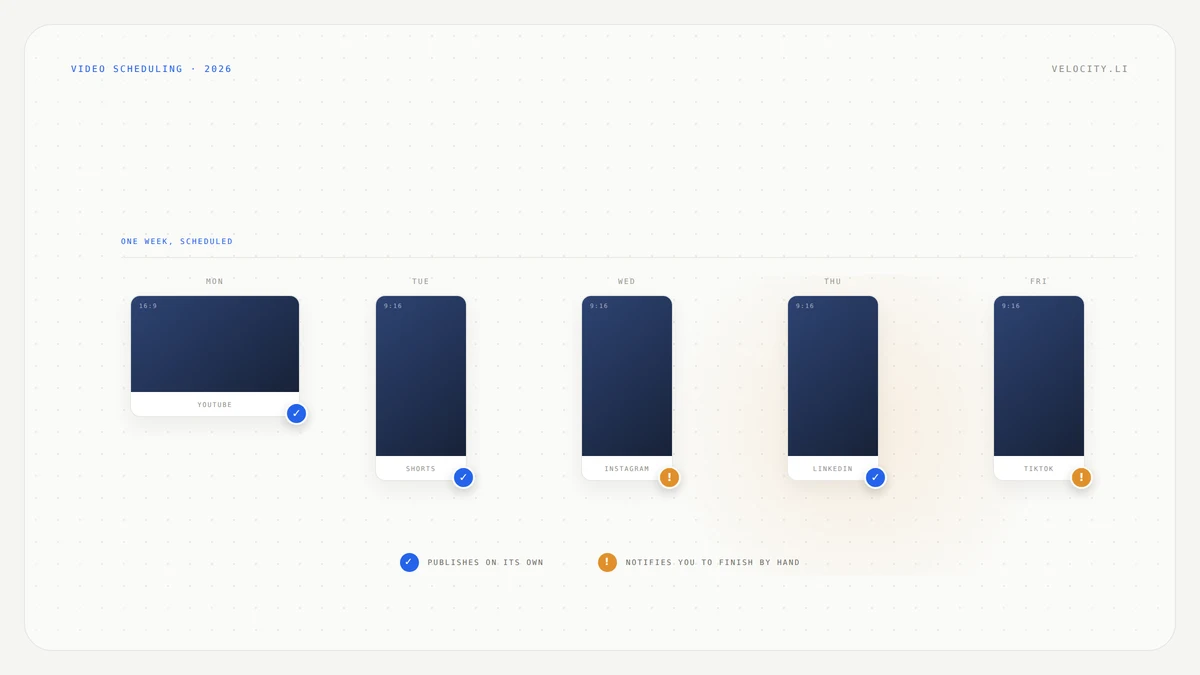
You have a month of video ready. Long interviews, vertical cuts, behind-the-scenes clips. Each one has a scheduled date and a set of platforms it needs to reach. The scheduling tool is supposed to handle the rest. Before you load everything into a queue and walk away, ask two practical questions most comparisons omit: does this tool accept your full-length video, or only a Short? And when the scheduled time arrives, does it actually post, or does it send your phone a notification and wait?
Those two gaps hide behind familiar words. "Video scheduling" does not always mean long form video scheduling. Buffer accepts YouTube Shorts but not a full-length YouTube video. "Scheduled date" does not always mean the tool posts by itself. Later sends a push notification for Instagram and TikTok at the scheduled time and asks you to complete the post manually in its mobile app.
This guide compares eight tools by what each one does with a long video, a vertical cut, and a date. Velocity is in the comparison, and its documented limits are stated the same way as everyone else's. We review documented capabilities from each vendor's product pages and help centers rather than claim one tool is best for every channel.
How do I choose a social media management tool with multiplatform publishing including long and short form video?
Start with two checks. First, confirm the tool accepts both formats on the networks you need. Second, confirm whether it publishes automatically or sends you a notification to finish by hand. Here is what each of the eight tools compared in this guide offers:
- Velocity: Writes the post per channel and schedules it with a person approving, across Instagram, Facebook, YouTube, TikTok, LinkedIn and X. Video specs, including long form YouTube uploads, are not documented.
- Hootsuite: Schedules both long form video and Shorts from one upload. Videos under 60 seconds at 9:16 automatically publish as YouTube Shorts. Max length 15 minutes, longer with a verified account.
- Sprout Social: The highest documented long form ceiling among these eight tools. Unverified accounts up to 15 minutes, verified accounts up to 12 hours, with a 3GB file size limit.
- Metricool: Schedules Shorts and long videos side by side. Its documentation states YouTube support as "Shorts (≤3 min), long videos."
- Publer: Schedules both full-length YouTube videos and Shorts in advance.
- Vista Social: Publishes both long form video and Shorts with detailed per-network specs, including a 9:16 vertical requirement and 180-second cap for Shorts.
- Buffer: Short form video scheduling only on YouTube. Its YouTube page documents Shorts and never mentions full-length video. Automatic publishing on Instagram requires a Business or Creator account.
- Later: Auto-publishes to Facebook, Pinterest, YouTube Shorts, LinkedIn, Threads and Snapchat. Uses notification publishing for Instagram and TikTok, meaning you open the notification and finish the post in Later's mobile app.
What is the best video upload automation tool that can post videos to social media on a scheduled date?
Hootsuite is the strongest pick for video upload automation that posts on a scheduled date without manual intervention. It accepts both long form video and Shorts from a single upload, routes them automatically based on length and aspect ratio, and can schedule an Unlisted or Private video to go public at a later date and time.
The tools that publish video automatically on a set date, across both long form and short form:
- Hootsuite: Long form up to 15 minutes, longer on a verified account, and Shorts under 60 seconds at 9:16, all automatic.
- Sprout Social: The longest documented ceiling at up to 12 hours for verified accounts, with direct publishing for YouTube, Instagram Reels, Facebook video and LinkedIn.
- Metricool: Shorts and long videos, published automatically across supported networks.
- Publer: Full length YouTube videos and Shorts, scheduled in advance and published automatically.
- Vista Social: Both formats with per-network specs documented, published automatically.
Buffer publishes automatically for short form video but requires an Instagram Business or Creator account for automatic posting. Reels with music, effects, or caption links fall back to notification publishing. Later auto-publishes Shorts but sends a notification for Instagram and TikTok, requiring you to finish the post manually.
Social media tools for long form and short form video publishing compared
| Tool | Best for | Long form video | Short form video | Posts automatically or notifies you |
|---|---|---|---|---|
| Velocity | Writing the post per channel and scheduling with approval | Not documented | Yes | Automatic, after a person approves |
| Hootsuite | Scheduling long form video and Shorts from one upload | Yes, up to 15 minutes, longer if the account is verified | Yes | Automatic |
| Sprout Social | Long form video publishing with the highest documented limits | Yes, 15 minutes, up to 12 hours if verified | Yes | Automatic |
| Metricool | Scheduling Shorts and long videos side by side | Yes, Shorts and long videos | Yes | Automatic |
| Publer | Scheduling full length YouTube videos and Shorts together | Yes, full length and Shorts | Yes | Automatic |
| Vista Social | Per network video specs in one place | Yes | Yes | Automatic |
| Buffer | Short form video scheduling | No, Shorts only | Yes | Automatic, except Instagram Reels with music or effects |
| Later | Auto publishing Shorts, notification publishing on Instagram and TikTok | Not documented | Yes | Automatic, except Instagram and TikTok, which notify you |
What to look for in a social media tool that publishes long and short form video
Seven criteria separate a tool that handles your video workflow from one that handles most of it and leaves you to finish the rest.
Long form video: Does the tool accept a full-length YouTube upload, and what is the documented ceiling? Among the eight tools compared here, Sprout Social documents the highest limit at up to 12 hours for verified accounts. Hootsuite documents 15 minutes, longer with verification. Buffer does not support long form YouTube video at all.
Short form video: Every tool in this guide supports short form video in some capacity. The differences are in aspect ratio requirements, length caps, and which networks are covered. Buffer requires 1:1 or 9:16 for YouTube Shorts. Vista Social requires 9:16 under 180 seconds. Sprout Social caps Shorts at 3 minutes with no custom thumbnail support.
Automatic or notification: This is the gap most people discover after scheduling a month of content. Automatic means the tool posts at the scheduled time without you. Notification means it sends a push notification at the scheduled time and you open the app and finish the post. Later uses notification publishing for Instagram and TikTok. Buffer uses notification publishing for Instagram Reels with music, effects or caption links, and for Stories.
Networks covered: all eight publish video to YouTube, TikTok, Instagram, Facebook and LinkedIn, but the ceilings are not the same network to network, and the gaps are wide. On Facebook, Publer documents videos up to 5 hours and 2GB, Metricool and Vista Social both document 240 minutes, and Hootsuite documents 20 minutes for feed posts. On LinkedIn, Hootsuite and Vista Social document 30 minutes while Metricool and Publer document 15.
File size is where it bites hardest. Vista Social caps LinkedIn video at 200MB and Publer allows 2GB on the same network, a tenfold difference on a single platform. Sprout Social limits TikTok direct publishing to Business Accounts, and Buffer needs an Instagram Business or Creator account before automatic publishing works.
Scheduling controls: Look for day, week and month views, the ability to schedule to a specific date and time, and any privacy scheduling options. Hootsuite lets you schedule an Unlisted or Private video to go public at a later date.
File size and format limits: These vary widely. Buffer allows up to 10GB for Shorts. Sprout Social allows up to 3GB. Hootsuite caps at 1GB with mp4 and m4v file types. Publer does not document length, size or privacy-scheduling limits on its YouTube integration page.
Where you finish the post: some tools let you write the caption, set the thumbnail and walk away. Others send you to a phone. Sprout Social needs its mobile app for TikTok videos using TikTok's sound library, Buffer needs the Instagram app for Reels with music or effects, and Metricool asks you to finish a post in the network's own app wherever the API does not expose a feature.
Velocity: Best for writing the post per channel and scheduling it with approval
Best for
- Teams that need six different captions for six channels from one video, written and adapted per platform
- Workflows where a person reviews and approves every post before it goes live
- Organizations that want the copy work handled, not just the upload
What it does
Velocity's own description of what it covers is writing, editing, creating, scheduling, publishing, and analyzing content across Instagram, Facebook, YouTube, TikTok, LinkedIn, and X. The editing there is copy, not video. Velocity is not a video editor, the video arrives finished, and it handles the work that comes after the edit: you describe the post, the AI agent researches the angle, applies the brand profile, and writes the caption per channel.
Scheduling is built in. Use publishing when the post is ready to go out, or schedule it for a future time when the plan needs a date. The queue shows day, week and month views. A person approves before anything publishes, so nothing goes out unreviewed.
Velocity's pages do not document long form YouTube uploads, video length or file size limits, or Shorts and Reels specs. For a team pushing one recording to six channels, the six different captions are the work, not the six uploads. If the job is a full-length YouTube upload on a set date, Hootsuite and Sprout Social document that directly.
What you'll like
- The content calendar shows scheduled posts across all six channels in day, week and month views
- Captions are written per channel rather than copied and pasted across platforms
- Every post goes through approval before publishing, so nothing goes live unreviewed
- The brand profile keeps voice and tone consistent across channels
Why it might not be a good fit
- Video specs are not documented. Velocity's pages do not state video length or file size limits, or whether long form YouTube uploads are supported, so confirm before you plan a long form workflow.
- No video editing. The video must arrive finished before Velocity handles the copy and scheduling.
Hootsuite: Best for scheduling long form video and Shorts from one upload
Best for
- Teams that want one upload to route automatically to long form or Shorts based on length and aspect ratio
- Creators who need to schedule an Unlisted or Private video to go public at a specific date and time
What it does
Hootsuite publishes both long form video and YouTube Shorts from a single upload, and the routing is automatic. According to Hootsuite's documentation, "videos less than 60 seconds long will publish as YouTube shorts," and a video under a minute at 9:16 becomes a Short without any additional steps.
The documented limits are specific: maximum video length is 15 minutes, and you can upload longer videos with a verified YouTube account. Maximum file size is 1GB. Accepted file types are mp4 and m4v, with a standard aspect ratio of 16:9 for long form. One scheduling feature stands out for launches and premieres, you can schedule Unlisted or Private videos to go public at a later date and time.
Beyond YouTube, Hootsuite documents Facebook feed video from 1 second to 20 minutes and Reels from 3 to 90 seconds, and LinkedIn video from 3 seconds to 30 minutes. It compresses file size and adjusts dimensions automatically rather than publishing a documented cap.
Choose Hootsuite when your workflow includes both full-length YouTube videos and Shorts and you want the tool to handle the format decision for you.
What you'll like
- Automatic routing between long form and Shorts based on video length and aspect ratio
- Privacy scheduling that lets you set an Unlisted or Private video to go public later
- Both formats from one upload without creating separate posts
- Verified accounts can upload videos longer than 15 minutes
Why it might not be a good fit
- 1GB file size cap. Hootsuite's maximum file size is 1GB, smaller than Sprout Social's 3GB or Buffer's 10GB, so large files may need compression.
- Limited file types. Only mp4 and m4v are accepted, so videos exported in other formats need conversion before upload.
Sprout Social: Best for long form video publishing with the highest documented limits
Best for
- Teams uploading long form video that exceeds 15 minutes, up to 12 hours on a verified account
- Workflows that need direct publishing to YouTube, Instagram Reels, Facebook video and LinkedIn from one platform
What it does
Sprout Social documents the highest long form video ceiling among the eight tools compared here. Unverified YouTube accounts are limited to 15 minutes in length, while verified accounts can upload videos up to 12 hours, according to Sprout Social's support documentation. The file size limit is 3GB.
For Shorts, Sprout Social supports videos no longer than 3 minutes in square or vertical format, and custom thumbnails are not supported for YouTube Shorts. Direct publishing is documented for Instagram Reels, YouTube video posts and Shorts, Facebook video posts and Reels, and LinkedIn video posts. TikTok direct publishing is available for Business Accounts only, and TikTok videos that need editing, such as sound from TikTok's library, have to be finished in Sprout's mobile app.
Choose Sprout Social when you need the longest documented upload ceiling and direct publishing across the widest set of video post types.
What you'll like
- The longest documented video ceiling at up to 12 hours for verified YouTube accounts
- Direct publishing across YouTube, Instagram Reels, Facebook video and Reels, and LinkedIn
- 3GB file size limit, the largest among the tools that document a specific number
- Both long form and Shorts supported on YouTube
Why it might not be a good fit
- TikTok requires a Business Account. Direct publishing to TikTok is only available for TikTok Business Accounts, and videos needing TikTok's sound library must be finished in the mobile app.
- No custom thumbnails for Shorts. If your Shorts workflow relies on branded thumbnails, Sprout Social does not support them.
Metricool: Best for scheduling Shorts and long videos side by side
Best for
- Teams that schedule both YouTube Shorts and long form videos and want both formats stated plainly in one calendar
- Workflows that span multiple networks where some posts need to be finished manually in the network's app
What it does
Metricool's documentation includes a table that states YouTube support as "Shorts (≤3 min), long videos," which is the clearest single statement of both-format support among the eight tools compared here. Both formats sit in the same scheduling calendar, so a team can plan a long form upload and its companion Shorts in one view.
Where a network's API does not expose a feature, Metricool instructs users to schedule the post and finish it manually in the network's app. This is a smaller version of the notification issue seen with Later and Buffer, and it is worth knowing before you build a schedule that assumes everything publishes unattended.
Metricool documents the other networks just as plainly. Facebook video runs from 1 second to 240 minutes at up to 500MB in MP4, MOV or GIF, and LinkedIn video from 3 seconds to 15 minutes at up to 512MB.
Choose Metricool when you want Shorts and long videos planned side by side and you are comfortable finishing certain posts manually when the API requires it.
What you'll like
- Both Shorts and long videos stated plainly in Metricool's own documentation
- A single calendar view for both formats across networks
- Clear instructions when a post needs to be finished in the network's app
- Straightforward scheduling without routing complexity
Why it might not be a good fit
- Some posts require manual finishing. When a network's API does not expose a feature, Metricool asks you to schedule the post and complete it in the network's own app, so not every post publishes unattended.
- File size limits are not stated alongside the formats. Metricool's table names the formats per network, but video file size limits are documented separately, so check them before a large upload.
Publer: Best for scheduling full length YouTube videos and Shorts together
Best for
- Teams that need to schedule both full-length YouTube videos and Shorts in advance
- Creators looking for a straightforward tool that states both-format support on its integration page
What it does
Publer's YouTube integration page states that you can "schedule both Shorts and full-length YouTube videos in advance." Its positioning is direct: "Plan, create, and schedule your YouTube videos and shorts to boost engagement and grow your YouTube channel with ease."
Publer publishes automatically on the scheduled date. However, video length limits, file size limits, and privacy-scheduling options are not documented on its YouTube integration page. If your longest video runs past the 15 minutes that Hootsuite and Sprout Social both document, confirm with Publer before building a schedule around it.
Publer's limits on the other networks are the most generous here. Facebook video can run up to 5 hours and 2GB in any format, the longest Facebook ceiling among these eight. LinkedIn video runs 3 seconds to 15 minutes at up to 2GB, and Publer states it posts natively on both LinkedIn personal profiles and company pages.
Choose Publer when you want both full-length YouTube videos and Shorts scheduled in one tool and your videos fall within standard length ranges.
What you'll like
- Both full-length YouTube videos and Shorts stated clearly on the integration page
- Automatic publishing on the scheduled date
- Simple positioning that does not bury format support in footnotes
- Advance scheduling for both formats in one queue
Why it might not be a good fit
- Length and file size limits are not documented. Publer's YouTube integration page does not state maximum video length, file size or accepted file types, so verify before uploading large files.
- Privacy scheduling is not documented. Unlike some tools, there is no documented option to schedule an Unlisted or Private video to go public later.
Vista Social: Best for per network video specs in one place
Best for
- Teams that want detailed per-network video specs documented in one reference
- Workflows where aspect ratio, length and description limits need to be checked before export
What it does
Vista Social publishes both long form video and YouTube Shorts, with specific requirements documented for each format. For Shorts, the video must be vertical at 9:16 and less than 180 seconds (3 minutes) long. YouTube descriptions are capped at 2,000 characters.
Vista Social publishes automatically, and its documentation lays out the per-network specs in enough detail that a video editor can check requirements before exporting. Long form video length limits are not stated on Vista Social's YouTube publishing page.
The detail extends across networks. Facebook video runs 1 second to 240 minutes at up to 2GB in 16:9 or 9:16, Facebook Reels are 3 to 90 seconds at 9:16, and LinkedIn video runs 3 seconds to 30 minutes. LinkedIn is where the catch sits: the file cap there is 200MB, the tightest on this page.
Choose Vista Social when knowing the exact specs per network before you export matters more than having the highest documented ceiling.
What you'll like
- Per-network video specs documented in detail, including aspect ratio and length for Shorts
- Automatic publishing without notification steps
- YouTube description character limit stated clearly at 2,000
- Both long form and Shorts supported on YouTube
Why it might not be a good fit
- Long form length limits are not documented. Vista Social's YouTube publishing page does not state a maximum video length for long form uploads, so verify with support for videos over 15 minutes.
- 200MB cap on LinkedIn video. That is the tightest LinkedIn file limit among these eight tools, against 2GB at Publer, so a long LinkedIn cut may need compressing before it will upload.
Buffer: Best for short form video scheduling, with no long form YouTube
Best for
- Teams with a short form video workflow across multiple networks who do not need long form YouTube uploads
- Creators who want generous file size limits and broad format support for Shorts
What it does
Buffer schedules YouTube Shorts but does not support full-length YouTube video. Its YouTube page documents Shorts and never mentions long form uploads. This is the format gap that catches teams who assume "YouTube support" means both formats.
The documented Shorts specs are specific: accepted file types are .mov, .mp4, .mpg, .mpeg, .avi, and .WebM, files need to be 10GB or less, and the video must be filmed in an aspect ratio of 1:1 or 9:16. That 10GB ceiling is the most generous file size limit among the eight tools compared here.
On Instagram, automatic publishing is only available for professional accounts (Business or Creator). Reels with music, effects, or caption links may use notification publishing so you can complete them in the Instagram app. Stories are notification-based as well: to include a caption on a story, or music on a reel, you need to schedule it as a notification.
Away from YouTube, Buffer handles video on Facebook and LinkedIn with a 1GB ceiling on each, in MP4, MOV, AVI or M4V. One detail worth knowing before you upload a carefully graded cut: Buffer transcodes LinkedIn video down to a maximum of 1280x720.
For short form video across several networks, Buffer is clean and simple. It just does not do long form YouTube. Choose Buffer when everything you post is short form and your Instagram account is set up for automatic publishing.
What you'll like
- 10GB file size limit for Shorts, the most generous among these eight tools
- Broad file type support including .mov, .mp4, .mpg, .mpeg, .avi and .WebM
- Clean, simple scheduling for short form video across multiple networks
- Straightforward Shorts specs with clear aspect ratio requirements
Why it might not be a good fit
- No long form YouTube video. Buffer's YouTube support is Shorts only. If your workflow includes full-length YouTube uploads, several other tools accept both formats.
- Notification publishing on Instagram for certain Reels. Automatic publishing requires a Business or Creator account, and Reels with music, effects or caption links fall back to notification publishing, meaning you finish the post in the Instagram app.
Later: Best for auto publishing Shorts, with notification publishing on Instagram and TikTok
Best for
- Teams with a Shorts-led workflow across Facebook, Pinterest, YouTube, LinkedIn, Threads and Snapchat
- Creators who are comfortable finishing Instagram and TikTok posts manually at the scheduled time
What it does
Later auto-publishes to Facebook, Pinterest, YouTube Shorts, LinkedIn, Threads, and Snapchat, according to its documentation. For Instagram and TikTok, Later uses notification publishing. That means Later sends a push notification at the scheduled time and you need to open the notification and complete the publishing process manually. Later saves or opens the media and copies the caption for pasting. You must use Later's mobile app for notification publishing.
YouTube Shorts auto-publish and can be bulk scheduled, which is an advantage for teams producing Shorts at volume. Long form YouTube video is not documented on Later's YouTube scheduler page.
Notification publishing exists because of platform API limitations rather than neglect. Instagram and TikTok restrict certain publishing actions through their APIs, and Later works within those constraints. That said, it still means a person finishes the post. Choose Later when your workflow is Shorts-led and you are prepared to handle Instagram and TikTok manually at the scheduled time.
What you'll like
- Auto publishing across six platforms including YouTube Shorts, with bulk scheduling
- Caption copying and media preparation that reduce the manual steps during notification publishing
- Strong Shorts-led workflow with volume scheduling capabilities
- Broad network coverage including Threads and Snapchat
Why it might not be a good fit
- Notification publishing on Instagram and TikTok. These are the two platforms a short form video workflow lives on, and both require you to open Later's mobile app and finish the post manually at the scheduled time.
- Long form YouTube is not documented. Later's YouTube scheduler page covers Shorts but does not document full-length video uploads, so confirm before planning a long form workflow.
Which tools publish video automatically, and which send you a notification to finish by hand?
This is the automation gap, and it is the single check that saves the most frustration. "Scheduled" suggests the tool posts while you sleep. For some tools, on some networks, it does. For others, it sends your phone a notification at the scheduled time and waits.
Among the eight tools compared here, five publish video automatically across their supported networks without requiring manual intervention at the scheduled time: Hootsuite, Sprout Social, Metricool, Publer and Vista Social. Each of these handles the post from queue to published without a push notification.
Buffer publishes automatically for most short form video, but requires an Instagram Business or Creator account for automatic posting. Reels with music, effects, or caption links use notification publishing, and Stories are notification-based. The automatic path works, but it has documented exceptions.
Later auto-publishes to Facebook, Pinterest, YouTube Shorts, LinkedIn, Threads and Snapchat. Instagram and TikTok use notification publishing, which means you open Later's mobile app and complete the post yourself. For a workflow centered on Instagram Reels and TikTok, this means someone is on their phone at every scheduled time.
Velocity publishes automatically after a person approves. Nothing goes out unreviewed, but once approved, the post publishes on the scheduled date without further intervention.
The practical test is simple: schedule one week of video, not a month, and check in the morning. If everything posted, the automation is real. If your phone has notifications waiting, you know which networks need a person at the scheduled time.
How to choose a video publishing tool for long form and short form in 2026
A full-length YouTube video on a set date points to Hootsuite. The longest video you can upload points to Sprout Social. Shorts and long videos in one calendar point to Metricool or Publer. Per-network specs written down in detail point to Vista Social. A short form only workflow points to Buffer. A Shorts-led calendar where you do not mind finishing Instagram and TikTok by hand points to Later.
Velocity is our pick when the uploads are the easy part and the six different captions are the work. For a team pushing one recording to six channels, Velocity writes the caption per platform, applies the brand profile, and puts everything through approval before it publishes. Video specs are not documented, so confirm long form support before building a workflow around it.
Most teams end up checking two things before anything else: whether their longest video fits and whether the post actually goes out unattended. Those two checks eliminate more tools than any feature list. A 20-minute interview rules out some short-form-only services immediately. A workflow that depends on Instagram Reels posting while you sleep rules out services that use notification publishing. Start with those two questions and the rest of the decision becomes straightforward.
How to schedule one recording as a long form upload and a set of short form posts
- Check your longest video against the tool's documented ceiling before anything else. Many tools state 15 minutes for unverified accounts and longer for verified accounts; some document ceilings in hours.
- Schedule the long form upload first and give it its own date, because the short form clips should point at something that already exists.
- Confirm which networks publish automatically and which will notify you, and write the notification ones down. Expect notification publishing on platforms where APIs restrict full publishing.
- Check the aspect ratio rules per network before you export, since some tools require 1:1 or 9:16 for Shorts and others require vertical 9:16 under 180 seconds.
- Schedule one week, not a month, and check in the morning that what you scheduled actually posted. That single check is what tells you whether the automation is real.
Frequently Asked Questions
How do I choose a social media management tool with multiplatform publishing including long and short form video?
Check two gaps, in this order. First, long form: Hootsuite, Sprout Social, Metricool, Publer and Vista Social all take a full length YouTube upload, and Buffer does not, since its YouTube support is Shorts only. Second, whether it actually posts: Later uses notification publishing for Instagram and TikTok, and Buffer needs an Instagram Business or Creator account before automatic publishing works at all. Once both gaps are settled, match network coverage to your channel list. Velocity handles the per-channel copy and the approval step but does not document video specs, so confirm long form support before planning a workflow around it.
What is the best video upload automation tool that can post videos to social media on a scheduled date?
Hootsuite, for most teams. One upload routes to long form or a Short automatically based on length and aspect ratio, and you can schedule an Unlisted or Private video to go public at a later date and time. Sprout Social has the longest documented ceiling at 12 hours for verified accounts. Metricool and Publer both state Shorts and long videos plainly, and Vista Social documents its per-network specs in detail. Buffer is the pick only if everything you post is short form. Later auto-publishes Shorts but sends a notification for Instagram and TikTok. Velocity is the choice when the per-channel captions and the approval step are the real work.
Can Buffer schedule long form YouTube videos?
No. Buffer schedules YouTube Shorts only, and its YouTube page documents Shorts without ever mentioning full length video. The documented Shorts specs are a 1:1 or 9:16 aspect ratio, files of 10GB or less, and .mov, .mp4, .mpg, .mpeg, .avi and .WebM file types. That 10GB ceiling is the most generous here. For full length YouTube, Hootsuite, Sprout Social, Metricool, Publer and Vista Social all document support. Buffer remains a clean, simple choice for short form across several networks; it just does not do the long form half of the job.
Does Later post Instagram Reels and TikTok automatically?
No. Later uses notification publishing for both. At the scheduled time it sends a push notification, and you open it and complete the post yourself in Later's mobile app, with the media saved or opened and the caption copied ready to paste. Later does auto-publish to Facebook, Pinterest, YouTube Shorts, LinkedIn, Threads and Snapchat. The split exists because Instagram and TikTok restrict certain publishing actions through their APIs, not because Later neglected it, but it still means a person finishes those posts.
Can Sprout Social publish video to YouTube, TikTok and Instagram?
Yes, Sprout Social publishes to all three, with limits worth knowing. On YouTube, unverified accounts are capped at 15 minutes and verified accounts go to 12 hours, with a 3GB file size limit. Shorts are capped at 3 minutes and custom thumbnails are not supported. Instagram Reels publish directly. TikTok direct publishing is available for TikTok Business Accounts only, and any TikTok video that needs editing, such as sound from TikTok's library, has to be finished in Sprout Social's mobile app.
Which social media tools can schedule video to YouTube, TikTok and Instagram?
Hootsuite, Sprout Social, Metricool, Publer and Vista Social all schedule video to all three and publish automatically. Buffer covers all three as well, but only Shorts on YouTube, and Instagram automatic publishing needs a Business or Creator account. Later covers all three too, though Instagram and TikTok arrive as notifications rather than posts. Velocity publishes to all three and does not document video specs.
Do scheduled video posts publish automatically or do I have to finish them?
It depends on the tool and the network, which is exactly what makes it catch people out. Hootsuite, Sprout Social, Metricool, Publer and Vista Social publish automatically across their supported networks. Later sends a notification for Instagram and TikTok. Buffer sends one for Instagram Reels with music, effects or caption links, and for Stories. The reason is platform APIs rather than tool quality. The practical check is to schedule one week rather than a month and look at your phone in the morning: if notifications are waiting, you know which networks need a person at the scheduled time.
What is the best tool for publishing both long form and short form video?
Hootsuite, because one upload handles both. A video under 60 seconds at 9:16 publishes as a Short from the same upload, with no separate post to build. Sprout Social wins on ceiling at 12 hours for verified accounts, and Metricool and Publer both state Shorts and long videos plainly in their own documentation. Buffer and Later are short form tools on YouTube, so neither covers the long form half. Velocity does not document the long form case at all.
Related reading
- 10 Best Video Editors for Short Form, Long Form and Social Video (2026)
- 10 Best Tools to Auto Publish Blog Posts to Social Media (2026)
- Best Multi-Platform Publishing Tools for Social Media 2026: 13 tools compared
- AI social media management tool guide 2026: 12 best AI social media management tools reviewed