Auto publishing guide 2026: 10 best solutions for auto publishing blog posts to social media reviewed
 Pavan Ravikumar·Marketing Engineer, Velocity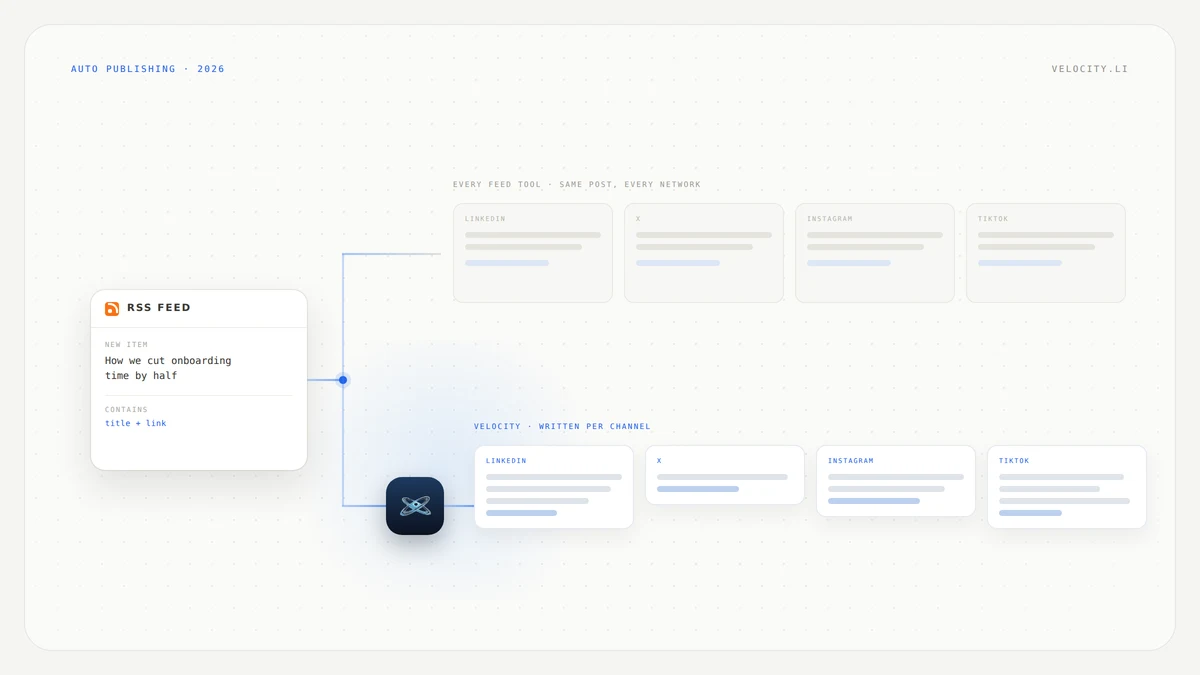
A new post goes live on the blog, and then the same person opens four browser tabs and pastes the same link four times. Maybe five. They have heard that an RSS feed can do this, that a tool can watch the blog and push each new post to every social account without anyone lifting a finger. The real question is which tool actually does it unattended.
The answer is less obvious than it looks, because the tools people name first are not always the ones that do it. Auto publishing blog posts to social media splits into two groups: tools that connect to a feed and publish with nobody in the loop, and tools that pull the feed in but still wait for someone to click. Buffer, the name that comes up most often here, sits in the second group. Hootsuite's version lives in a paid app in its App Directory, not the core product.
This guide compares 10 solutions by what each one actually does the moment a new blog post goes live. Each tool section covers what it does, what you will like, and where it falls short. We review documented capabilities from each vendor's product pages and help centres rather than claim one tool is best for every blog.
What are the best solutions for auto publishing blog posts to social media?
Velocity: Best for rewriting a blog post into a real post per channel, though it does not publish from a feed on its own.
dlvr.it: Best for hands-off RSS social media automation with the widest network list.
Publer: Best for choosing between auto post and auto schedule per feed.
SocialPilot: Best for agencies publishing many client blogs through RSS feed automation.
SocialBee: Best for evergreen content categories with an approval toggle.
Zapier: Best for building your own RSS-to-social workflow with filters and formatting.
HubSpot: Best for blog auto publishing when the blog already lives in HubSpot.
Missinglettr: Best for turning one blog post into a drip campaign that runs for months.
Buffer: Best for reviewing blog posts from a content feed before creating posts manually.
Hootsuite: Best for RSS auto publishing through a paid App Directory add-on.
Blog to social media auto publishing tools compared
| Tool | Best for | How the blog post reaches social | Runs unattended | Main trade-off |
|---|---|---|---|---|
| Velocity | Per-channel posts that read like a person wrote them | You brief the agents in conversation | No | Every post starts from a person describing what they want |
| dlvr.it | Hands-off feed-to-social automation | RSS feed monitored and published automatically | Yes | Posts are a headline and a link, identical on every network |
| Publer | Choosing auto post or auto schedule per feed | RSS feed with three settings: No Action, Auto Post, Auto Schedule | Yes | Auto Post sends the same content everywhere |
| SocialPilot | Agencies with many client blogs | RSS feed automation with manual scheduling fallback | Yes | Limited post formatting from the feed item |
| SocialBee | Evergreen content that recirculates | RSS into content categories | Yes, if you leave approval off | Posts without a featured image land as drafts |
| Zapier | Custom filters, rewrites, or unusual destinations | RSS by Zapier trigger connected to social actions | Yes | Requires building and maintaining a Zap |
| HubSpot | Teams whose blog is already in HubSpot | Blog auto-publish in social settings, 15 minutes after publishing | Yes | Only HubSpot-hosted blogs, not available for Instagram |
| Missinglettr | A drip campaign from a single blog post | Blog detected and turned into a scheduled campaign | Yes, if you leave approval off | Less control over individual post text |
| Buffer | Reviewing articles before posting | Content feeds surface articles for a human to turn into posts | No | A person must click Create Post for every article |
| Hootsuite | Existing Hootsuite subscribers | RSS Autopublisher, a paid third-party app by Synaptive | Yes | Not a native Hootsuite feature, limited to X, Facebook Pages, LinkedIn |
What to look for in tools that automatically publish blog posts to social media
Before picking a tool, run through these seven criteria. They separate the tools that truly auto publish from the ones that stop short.
Runs unattended: the single most important distinction. Does the tool publish the moment a new item appears in your feed, or wait for a person to approve, click, or schedule? Among the ten tools compared, Buffer and Velocity require a human step. Everything else can run without one, though SocialBee and Missinglettr ship approval toggles that change the answer.
Feed source: most tools accept any public RSS or Atom feed. HubSpot is the exception, since it only auto publishes from blogs hosted inside HubSpot itself. Confirm your blog's feed URL returns a title, an excerpt, and a featured image before connecting it.
Networks covered: dlvr.it supports the widest range, including Facebook, X, LinkedIn, Pinterest, Reddit, Discord, Mastodon, Bluesky, and TikTok. Hootsuite's RSS Autopublisher covers only X, Facebook Pages, and LinkedIn. HubSpot excludes Instagram and personal Facebook accounts.
Post formatting: an RSS item contains a headline, a link, and sometimes an excerpt and image. That is all any feed tool has to work with. If the tool cannot add custom text above the link, every post will look identical everywhere.
Duplicate and error handling: a feed that updates its timestamps or republishes an edited post can trigger duplicates. Zapier filters duplicates by default. SocialBee holds back posts without a featured image. Ask what happens when the feed misbehaves.
Review step: some teams want the speed of auto publishing with the safety of a glance before it goes live. Publer's Auto Schedule and SocialBee's Drafts setting both queue posts for review without requiring manual creation. Buffer's content feeds are entirely manual.
Multiple blogs or clients: SocialPilot and dlvr.it handle multiple feeds mapped to different accounts. Hootsuite's RSS Autopublisher supports up to 25 feeds. If you manage more than one blog or client, check how feeds map to social accounts.
Velocity, best for turning a blog post into posts that do not read like a feed dump
Best for
- Teams whose auto-published posts are going out but getting nothing back
- A blog post that deserves a real post per channel rather than the same link six times
- Anyone who wants a person to approve before publishing
What it does
Velocity does not read an RSS feed, so it will not push a new blog post out on its own. There is no feed connector, no URL-to-post feature, and no way to set it and walk away. Every post starts from a person briefing Velocity's AI agent.
Velocity turns that conversation into platform-ready content. You describe the angle, the agents research it, apply your brand profile, and write a post shaped for each channel: YouTube, TikTok, LinkedIn, Facebook, Instagram, or X. Formats span posts, reels, captions, hashtags, stories, carousels, and threads. A human reviews and approves before anything goes to publishing.
This is the trade-off the tool is built around. Every other tool on this page sends a headline and a link, identically, to every network, because that is all an RSS item contains. Velocity trades the automation for posts that read like a person wrote them for that specific channel. In its own words, Velocity focuses on the social media workflow: creating content in brand context, review, scheduling, publishing, and basic analytics.
If what you need is the post going out without you, the feed tools below do that, and dlvr.it is the most direct of them. Velocity is for the posts where a headline and a link are not enough.
What you'll like
- Posts are written per channel rather than copied across all of them
- Natural-language scheduling, or the agent picks the time for the brand and platform
- A content calendar that shows what is going out and where
- Human approval before anything publishes
Why it might not be a good fit
- No feed connector: Velocity does not connect to an RSS feed, so it cannot auto publish a blog post. Every post starts from a person describing what they want.
- Social channels only: a brief that also covers email or a blog CMS needs something else alongside Velocity.
dlvr.it, best RSS social media automation for hands-off blog publishing
Best for
- Blogs that need every new post shared to social with no human step
- Teams that want the widest network coverage from a single feed
What it does
dlvr.it is the most direct answer to the question this page asks. Connect a feed, pick the destinations, and posts go out. Its own positioning is plain: "Put Your Social Media on Autopilot." The product automates RSS with what it calls easy auto posting, syncing, content curation and more.
Once a feed is configured, the flow is hands-off. dlvr.it names Facebook, X, LinkedIn, Pinterest, Reddit, Discord, Mastodon, Bluesky, and TikTok as social destinations, plus WordPress, Blogger, Tumblr, Google Business, Slack, and Stocktwits.
Choose dlvr.it when you want the shortest path from a new blog post to a live social post on the most networks.
What you'll like
- Truly unattended, with no approval step and no queue to check
- The widest destination list among the ten tools compared
- Supports non-social destinations like Slack and WordPress
- Simple setup: feed URL in, channels out
Why it might not be a good fit
- Same post everywhere: every network gets the same headline and link, because that is all the RSS item contains. There is no per-channel formatting.
- No review step: if a post goes out with a broken image or a bad title, you find out after it publishes.
Publer, best RSS feed auto publish with a choice of auto post or auto schedule
Best for
- Teams that want auto publishing but also want the option to review first
- Blogs that need different feeds handled differently
What it does
Publer offers three settings per RSS feed, named on its product page: No Action, Auto Post, and Auto Schedule. As Publer puts it, "Publer will constantly pull new posts from the RSS Feed and can automatically publish or schedule them for you." Auto Post publishes new items immediately. Auto Schedule adds them to your posting queue for review. No Action monitors the feed without acting on it.
This three-way toggle is what sets Publer apart from pure auto-publishers like dlvr.it. You can start with Auto Schedule to see what the posts look like, then switch to Auto Post once you trust the output.
Choose Publer when you want to move between hands-off publishing and a review queue without changing tools.
What you'll like
- Three distinct modes per feed give real control over how much automation you want
- Auto Schedule lets you review posts before they go live
- Switching between modes does not require reconfiguring the feed
- Constant feed polling catches new posts reliably
Why it might not be a good fit
- Auto Post sends the same content everywhere: like every RSS-based tool, the post is built from what the feed item contains, not from per-channel writing.
- Plan availability for RSS is not documented: the feature page does not state which plans include RSS feeds, so confirm before relying on it.
SocialPilot, best RSS feed automation for agencies publishing many client blogs
Best for
- Agencies managing multiple client blogs from one dashboard
- Teams that want RSS automation with a manual scheduling fallback
What it does
SocialPilot's RSS Feed Automation tool "will automatically share the blogs of your favorite websites on your social media pages." It supports feeds from your own site or any external site, which makes it useful for agencies managing content across multiple brands.
Automation is not the only mode. You can switch to a manual setting, where your updated RSS Feed content can be scheduled per your needs, and you can control the number of posts to be shared automatically. That combination suits agencies that need speed for some clients and oversight for others.
Choose SocialPilot when you manage multiple blogs across client accounts and need both automated and manual scheduling in one place.
What you'll like
- Supports feeds from your own blog and external sources
- Manual scheduling fallback for posts that need a closer look
- Control over how many posts go out automatically
- Built for multi-client, multi-blog workflows
Why it might not be a good fit
- Limited post formatting from the feed: posts are still built from the RSS item's headline, link, and excerpt.
- Agency-shaped feature set: solo bloggers may find the tool larger than they need.
SocialBee, best RSS feed automation for evergreen content categories
Best for
- Blogs with evergreen content that should recirculate over time
- Teams that want an approval toggle to control what goes live
What it does
SocialBee takes a different approach to RSS automation. Instead of publishing feed items into a flat queue, it drops them into a Content Category. As SocialBee's documentation explains, you select the Content Category where the content will be added, and based on your Category settings, the posts will be added either to the top or bottom of your Category.
The approval switch is explicit. If you want the posts to be automatically shared, keep the Approved toggle as it is. If not, switch it to Drafts. There is also a conditional rule: if the article doesn't have a featured image, or it doesn't generate a link preview, it will be added as not approved.
Posts can be set to expire after a number of publications or days, which stops evergreen content from running forever without review.
Choose SocialBee when your blog produces content that should keep circulating and you want category-based scheduling with a safety net.
What you'll like
- Content categories let evergreen posts recirculate naturally
- The Approved and Drafts toggle gives control without removing automation
- Posts without images are automatically held back for review
- Expiration settings prevent stale content from running indefinitely
Why it might not be a good fit
- Approval must be deliberately left off: leave the Approved toggle on and posts go out; switch to Drafts and you are back to manual review. There is no middle ground.
- Category-based scheduling adds complexity: teams that want a simple feed-to-post flow may find the category system more structure than they need.
Zapier, best way to automatically post a blog RSS feed to social media on your own terms
Best for
- Teams that need filters, rewrites, or unusual destinations
- Anyone whose preferred tool does not have native RSS support
What it does
Zapier is the build-it-yourself route. The trigger is "RSS by Zapier, New Item in Feed," and from there you connect it to any social channel Zapier supports. A single Zap can fan out to several networks rather than requiring one Zap per destination. Formatter by Zapier can trim headlines or append hashtags before the post publishes.
This is also the route Buffer recommends. Buffer's help centre carries articles on automating RSS feeds using Zapier, because Buffer's content feeds do not auto publish. If your current tool stops short of unattended publishing, a Zapier build fills the gap.
Choose Zapier when you need a filter, a formatting step, or a destination that the dedicated RSS tools do not cover.
What you'll like
- Full control over what triggers a post and what the post contains
- Formatter by Zapier adds a rewrite step that no dedicated RSS tool offers
- One Zap can publish to multiple networks
- Works with nearly any social platform Zapier supports
Why it might not be a good fit
- You are building and maintaining a workflow: a Zap is not a product you configure once. Feed changes, API updates, or plan limits can break the automation.
- No built-in calendar or analytics: Zapier publishes the post and moves on. Scheduling, calendar views, and performance tracking live somewhere else.
HubSpot, best blog auto publishing for teams whose blog already lives there
Best for
- Teams whose blog is hosted in HubSpot
- Marketing operations that want auto publishing without adding another tool
What it does
HubSpot's blog auto-publishing works inside HubSpot's social settings. As HubSpot's documentation states, "When blog auto-publishing is enabled, a social post with a link to your blog content will be published on your social accounts when you publish a new blog post. These social posts will be published 15 minutes after the blog post is published."
You can preview and customize the social posts published to your social accounts for each blog post during that 15-minute window. The feature requires Marketing Hub Professional or Enterprise. Scope limits apply: one or more blogs per social account, one X account per blog, and the feature is not available for Instagram or personal Facebook accounts.
Choose HubSpot when your blog already lives there and you want auto publishing without adding a separate RSS tool.
What you'll like
- No RSS feed to configure, since it works directly from HubSpot's blog
- A 15-minute preview window lets you customize before the post goes live
- Tight integration with HubSpot's CRM and marketing tools
- No additional tool needed if you are already on a qualifying tier
Why it might not be a good fit
- Only HubSpot-hosted blogs: if your blog runs on WordPress, Ghost, or anything else, this feature does not apply.
- Network limits: not available for Instagram or personal Facebook accounts, and limited to one X account per blog.
Missinglettr, best blog RSS social media automation for a year of posts from one article
Best for
- Blogs that publish infrequently but want a sustained social presence
- Teams that want more than a single link post per article
What it does
Missinglettr takes a different approach to blog-to-social automation. Instead of sending one headline and one link when a post goes live, it builds a drip campaign. As Missinglettr describes it, "No matter what platform you use to publish your posts, Missinglettr will detect it automatically and add it to the library to be dripped out over time."
The platform claims a year's worth of optimized social media content, and names native company blogs, Medium, and YouTube as sources. A single blog post becomes multiple social posts spread over weeks or months, rather than one post that fires and disappears. Whether the drip campaign requires approval before it starts is not documented on the feature page.
Choose Missinglettr when you want each blog post to carry a sustained campaign rather than a single share.
What you'll like
- One blog post generates a long-running campaign rather than a single link
- Detects new posts from most blogging platforms automatically
- Spreads social posts over time, reducing the fire-once-and-forget problem
- Pulls from company blogs, Medium, and YouTube
Why it might not be a good fit
- Less control over individual post text: the drip campaign is generated from your content, and per-post editing is not as granular as writing each post yourself.
- Approval step is not documented: whether you can review posts before they go out is not stated on the feature page. Confirm before relying on it.
Buffer, best content feeds for reviewing blog posts before they go out
Best for
- Teams that want to discover blog content and decide what to share
- Workflows where a person should see every post before it publishes
What it does
Buffer does not auto publish blog posts from an RSS feed. This is the most common misconception in the category, and it matters because Buffer is the name most people reach for first. Its content feeds are a discovery surface. As Buffer's documentation states, a feed is "a stream of content automatically pulled from an external source, such as a blog or news website, that you can use for content ideas."
The human step is explicit: you click Create Post to create a post, or click Save as idea to save it for later. Nothing goes to social until a person acts. Buffer's help centre carries articles on automating RSS feeds using Zapier, which is the route it recommends for actual automation.
This is not a flaw. As a content discovery tool, Buffer's feeds work well, surfacing articles from blogs you follow and giving you a clean workflow for turning them into posts. But if you came here looking for unattended publishing, Buffer is not the answer.
What you'll like
- Clean interface for browsing blog content and turning it into posts
- Save as idea lets you build a backlog without publishing immediately
- Works well as a discovery layer alongside a separate auto-publisher
- Simple, focused product that does not try to do everything
Why it might not be a good fit
- No auto publishing from RSS: content feeds surface articles for a human to act on. If you want unattended publishing, Buffer's help centre points you to Zapier.
- Assumed to do more than it does: if you set up a content feed expecting automation, you will be disappointed. Confirm the workflow before committing.
Hootsuite, best RSS auto publish through its App Directory rather than the core product
Best for
- Teams already subscribed to Hootsuite that want to add RSS automation
- Workflows that need RSS auto publishing alongside Hootsuite's broader feature set
What it does
Hootsuite's core product does not include native RSS auto publishing. The feature lives in the App Directory through RSS Autopublisher, a paid third-party app built by Synaptive. Its description reads: "Auto-publish RSS feeds to your LinkedIn, Twitter and Facebook accounts with additional custom text like hashtags. Automate up to 25 feeds."
The app checks for new posts as often as once a minute, supports sharing feeds with team members, includes a Post Queue for sent and queued messages, and allows up to four URL parameters. Hootsuite's AI, Wisdom, handles other content tasks, but RSS auto publishing is not part of the core product.
Choose Hootsuite's RSS Autopublisher when you already use Hootsuite and want to add feed automation without switching platforms.
What you'll like
- Checks for new posts as frequently as once per minute
- Supports up to 25 feeds, useful for multi-blog setups
- Adds custom text like hashtags to auto-published posts
- Post Queue gives visibility into what has been sent and what is queued
Why it might not be a good fit
- Not a native Hootsuite feature: RSS Autopublisher is a paid third-party app, so you are adding a separate subscription on top of Hootsuite.
- Limited network support: the app covers X, Facebook Pages, and LinkedIn. If you need Pinterest, TikTok, or other networks, this is not enough.
Which blog to social media automation tools publish without a person in the loop?
Among the ten tools compared, eight can publish blog posts to social media from a feed without a person approving each one, and two cannot.
Publish straight from a feed: dlvr.it publishes directly from a connected feed with no human step, and Publer does the same on its Auto Post setting. SocialPilot's RSS Feed Automation shares new items automatically, and SocialBee publishes unattended as long as the Approved toggle is left on.
Publish unattended, but need a build, a tier, or an add-on first: Zapier runs on its own once the Zap is built. HubSpot posts a link 15 minutes after a blog post goes live, on a qualifying tier. Missinglettr drips a campaign out over time, and Hootsuite needs RSS Autopublisher from its App Directory.
Require a person: Buffer's content feeds wait for someone to click Create Post. Velocity has no feed connector at all, so every post starts from a person.
The practical dividing line is not the tool's category but its default. SocialBee and Missinglettr both ship approval controls that turn unattended publishing off, so check the setting rather than the marketing page.
How to choose a tool to auto publish blog posts to social media in 2026
A blog that should reach social with nobody watching points to dlvr.it. A choice between publishing and queueing points to Publer. Many client blogs point to SocialPilot. Evergreen content that should recirculate points to SocialBee. A filter, a rewrite, or an unusual destination points to Zapier. A blog already hosted in HubSpot points to HubSpot's own setting. One post that should carry a campaign for months points to Missinglettr. Reviewing each article before it goes out points to Buffer's content feeds, and an existing Hootsuite subscription points to RSS Autopublisher in its App Directory.
Velocity is our pick when the automation is working and the posts are the problem. When every network gets the same headline and link and engagement is flat, the issue is the post itself, not the tool that sends it. Velocity does not read a feed. It is what a team uses to write a real post per channel, with a person approving before anything publishes.
Most teams that care about this question end up with an RSS tool for speed and a separate workflow for the posts that matter. The feed tool handles volume, and something else handles the posts where a headline and a link are not enough. That is a reasonable stack rather than a failure.
How to auto publish blog posts to social media without the posts looking automated
- Find the feed URL and confirm it carries a title, an excerpt, and a featured image, because the image is what most tools use to build the link preview.
- Pick one network to start with, not all of them, so a bad template does not go out everywhere at once.
- Set the template so the post is not only the headline: a line of your own text above the link does more than any other single change. Hootsuite's RSS Autopublisher and Zapier's Formatter step both allow this.
- Turn on a review step for the first two weeks, then decide whether to leave it on. SocialBee's Drafts setting and Publer's Auto Schedule both exist for this, and Buffer's content feeds are review-only by default.
- Check what the first ten posts actually looked like in the feed before you scale it to every channel.
This is a practical way to set the automation up and check what it produces, not a claim of hands-on test results.
Frequently Asked Questions
What are the best solutions for auto publishing blog posts to social media?
It depends on whether you want the posts to go out unattended or want to see them first. For hands-off publishing, dlvr.it is the most direct option and covers the widest network list. Publer's Auto Post setting does the same job, SocialPilot suits agencies with many client blogs, SocialBee publishes when the Approved toggle is left on, and a Zapier build using the RSS by Zapier trigger covers anything the others miss. For narrower cases, HubSpot handles blogs that already live in HubSpot, and Missinglettr turns one post into a drip campaign. Buffer's content feeds need a click, and Hootsuite needs RSS Autopublisher, a paid app in its App Directory. Velocity does not publish from a feed at all, and is the pick when the automation already runs and the posts it produces are the problem.
Which tools auto publish blog posts to social media from an RSS feed?
dlvr.it is the most direct: connect a feed and posts go out with no human step. Publer does it on its Auto Post setting, SocialPilot through its RSS Feed Automation tool, SocialBee when the Approved toggle is left on, and Zapier through the RSS by Zapier trigger. HubSpot auto publishes from blogs hosted inside HubSpot, and Missinglettr drips new posts out over time. Buffer's content feeds and Hootsuite's core product do not, and Velocity has no feed connector at all.
Does Buffer auto publish blog posts from an RSS feed?
No. Buffer's content feeds pull articles from a blog or news website so you can use them for content ideas, and a person then clicks Create Post or Save as idea. Nothing reaches social until someone acts. Buffer's own help centre documents automating RSS feeds using Zapier, which is the supported route to real automation. As a discovery surface Buffer's feeds work well, but they are not an auto-publisher.
Can Hootsuite auto publish an RSS feed to social media?
Yes, but through RSS Autopublisher, a paid third-party app by Synaptive in the Hootsuite App Directory, rather than the core product. The app publishes to LinkedIn, X and Facebook with custom text such as hashtags, automates up to 25 feeds, and checks for new posts as often as once a minute. If you need Pinterest, TikTok or other networks, it will not cover them.
What does an auto published blog post actually look like on social?
Usually a headline and a link, identical on every network, because that is all an RSS item contains. That sameness is why auto-published posts tend to underperform posts written for a specific channel: there is no hook and no reason to click beyond the title. Two tools here break the pattern. Missinglettr builds a drip campaign from one post rather than firing once, and Velocity has the agents write a per-channel post instead of forwarding the link, at the cost of not being automatic.
Do I need Zapier to auto publish blog posts to social media?
Not usually. dlvr.it, Publer, SocialPilot and SocialBee all do it without a build. Zapier earns its place when you want a filter, a rewrite step through Formatter by Zapier, or a destination the dedicated tools do not support. It is also worth knowing that Buffer recommends Zapier precisely because Buffer's content feeds do not auto publish, so a Zapier build is the standard workaround for teams already on Buffer.
Will auto publishing blog posts to social media hurt engagement?
The automation is not the problem, the sameness is. A headline and a link on every network, with no hook and no reason to click, performs badly whether a tool sent it or a person pasted it. The fix is usually the output rather than the automation: add a line of your own text above the link, and spread the post out instead of firing once. SocialBee's content categories and Missinglettr's drip campaigns both handle that second part.
What is the best way to auto publish blog posts if my blog is on HubSpot or WordPress?
HubSpot handles its own. With blog auto-publishing enabled in social settings, a post with a link goes out 15 minutes after the blog post publishes, on Marketing Hub Professional or Enterprise, and not to Instagram or personal Facebook accounts. For WordPress and everything else, any RSS tool will connect to the feed: dlvr.it for the widest network list, Publer for a choice of auto post or auto schedule, SocialPilot for multiple client blogs, SocialBee for evergreen categories, or a Zapier build if you need a filter or a rewrite step.
Related reading
- Social media planning tool guide 2026: 9 best tools that turn a campaign brief into a weekly content calendar
- Best automation tools for social media scheduling in 2026
- Best Content Calendar Scheduling Tools 2026: 17 tools compared
- AI social media management tool guide 2026: 12 best AI social media management tools reviewed