Best Social Media Management Tools for Real Estate Marketing Teams (2026)
 Pavan Ravikumar·Marketing Engineer, Velocity
Real estate marketing teams need more than a calendar that publishes finished posts. A brokerage, multi-office team, or agent group may need to turn listing details, market updates, neighborhood stories, agent expertise, and recruiting material into accurate, on-brand drafts; give the right person a chance to review them; and route each version to the right profile. The best social media management tool depends on whether the bottleneck is content preparation, visual planning, approval, lead-response ownership, social listening, engagement, reporting, or the route from publishing to analytics.
This guide compares management software, not the social networks themselves. Instagram and Facebook often carry listing and neighborhood content; LinkedIn can support referrals, expertise, and recruiting; TikTok and YouTube can suit walkthrough video. The tools below help a team adapt one approved brief for those connected profiles, then prepare, approve, schedule, publish, respond to, and assess the work. A content calendar makes the plan visible, while a documented social media approval workflow makes the accountable handoff visible.
The seven routes are Velocity, Hootsuite, Sprout Social, Later, Buffer, Meta Business Suite, and Agorapulse. Velocity's AI social media agents are the route for teams that need help before a post exists, using an editable Brand Identity to prepare channel-aware social content before review and release. Hootsuite, Sprout Social, Buffer, and Later represent the high-share comparison routes for approval workflows, social listening, shared-inbox work, analytics, prepared-post scheduling, and visual planning. For a team whose primary decision is managing multiple clients, brands, or agency accounts rather than a real-estate social workflow, see social media management tools for agencies and marketing teams.
Which social media management tool is best for a real estate marketing team?
Velocity is the best fit when a team needs to turn listing, neighborhood, agent, or market ideas into on-brand social posts before they reach the calendar. Its AI social media agents can research an angle, use a Brand Identity, prepare channel-aware captions and visuals, and keep a person in content approval before the work is released. That is especially useful for brokerages coordinating a shared voice across property, local-market, recruiting, and agent-content work, while retaining human responsibility for property details, claims, and final approval.
Hootsuite and Sprout Social are stronger conventional options when formal or multi-step approvals, social listening, a shared inbox, engagement, and reporting are the main operating needs. Buffer is a focused route for prepared-post scheduling, team approvals, and analytics; Later is a visual-planning route for listing photos and short-form video; Meta Business Suite is for Facebook and Instagram-only work; and Agorapulse is a strong route when incoming lead conversations need a clear owner. Test the exact handoff in a content calendar, use a documented social media approval workflow, then assess the result in analytics; a social tool should complement, not replace, the brokerage's CRM or compliance process.
How this comparison is framed. This is a documented workflow comparison, not a scored hands-on test. Each tool is matched to the task it most clearly supports—content preparation, visual planning, approvals, engagement, inbox coordination, or reporting—and plan access is identified where it changes that fit.
The best social media management tools for real estate teams at a glance
- Velocity: Best for real-estate social content prepared by AI agents, with review, publishing, and analysis.
- Hootsuite: Best for approval workflows, social listening, and reporting.
- Sprout Social: Best for shared-inbox coordination, approval workflows, and analytics.
- Later: Best for visual planning for listing and neighborhood content.
- Buffer: Best for prepared-post scheduling, team approvals, and analytics.
- Meta Business Suite: Best for Facebook and Instagram management.
- Agorapulse: Best for lead-response ownership and shared-inbox coordination.
Best Social Media Management Tools for Real Estate Teams Compared
| Tool | Best for | Content and publishing route | Approval, inbox, listening, and reporting role | Main boundary |
|---|---|---|---|---|
| Velocity | Real-estate social content prepared by AI agents, with review, publishing, and analysis | Research, brand-aware drafting, visual preparation, human review, scheduling, publishing, and analysis stay connected. | Human review protects the final post before publication; analytics informs the next round of content. | It is not a shared social inbox, an MLS, or a CRM. |
| Hootsuite | Approval workflows, social listening, and reporting | Publishes across connected profiles in a broader social-operations workspace. | Approval processes on Advanced and Enterprise plans, listening, engagement, and analytics support governed social operations. | It can add more operational depth than a lean publishing team needs. |
| Sprout Social | Shared-inbox coordination, approval workflows, and analytics | Connects publishing and engagement for connected social profiles. | Smart Inbox, approval workflows on Professional and Advanced plans, listening, and reports support teams with recurring engagement operations. | Its wider suite is most useful when engagement is a sustained operating need. |
| Later | Visual planning for listing and neighborhood content | Organizes images and short-form video in a visual calendar before publishing. | Collaboration and content approvals on Growth and Scale plans support creative review. | It is less focused on broad listening or cross-network social care. |
| Buffer | Prepared-post scheduling, team approvals, and analytics | Tailors completed posts by channel, then places them in a queue or calendar. | Drafts, approvals, sent posts, and Insights help a team manage a straightforward publishing loop. | Topic research and reusable brand context are separate needs. |
| Meta Business Suite | Facebook and Instagram management | Creates and schedules native Meta content for connected Facebook and Instagram assets. | Meta inbox, access controls, and insights support a Meta-only operation. | It does not run a wider cross-network program. |
| Agorapulse | Lead-response ownership and shared-inbox coordination | Publishes and schedules content across supported social profiles. | Inbox assignments, collaboration, and reports clarify responsibility for incoming conversations. | It may be more collaboration depth than a small publishing queue requires. |
What to look for in a social media management tool for real estate teams
The software decision and the channel decision. Decide which networks the brokerage can create for and respond to consistently, then choose the software that supports those connected profiles. Instagram and Facebook often suit listings and neighborhood content; LinkedIn can support referrals and recruiting; TikTok and YouTube can support walkthrough video. The software should help the team adapt the work to those destinations, then schedule and publish it, rather than persuade the team to publish everywhere.
The work before the calendar. A listing launch is not ready merely because a property photo exists. Test whether the team can develop approved property details into a useful market angle, caption, visual, and channel-specific version. Velocity's AI social media agents and editable Brand Identity are relevant when that work needs reusable brand context; a content calendar is relevant once the work is ready to coordinate.
Review, lead response, and accountability. Route one real listing or market update through the people who write, check property details, approve the final copy, publish it, and respond to the first comment or direct message. This separates content approval from a shared-inbox workflow and a social-care workflow. It also makes clear that a social platform does not replace the brokerage's CRM, MLS, lead-handoff process, fair-housing responsibilities, or local compliance review.
What the team will learn after publication. Decide what result will change the next week’s content plan: reach, engagement, video completion, a qualified conversation, or another agreed outcome. Analytics can inform the next social iteration, but it should not be used to infer lead attribution or regulatory compliance that the team has not instrumented elsewhere.
Match the operating route. Hootsuite and Sprout Social suit teams whose calendars are tied to approval workflows, inbox coordination, social listening, and reporting. Buffer is a simpler route for prepared-post scheduling, while Later is a visual-planning route for listing and neighborhood assets. Velocity fits when turning a property or market idea into an on-brand, reviewable social draft is the work delaying the calendar.
Velocity: Best for real-estate social content prepared by AI agents, with review, publishing, and analysis
Best for
- Brokerages that need listing, market, agent, neighborhood, and recruiting content prepared before it enters the calendar.
- Teams that need reusable brand context and a human review step across recurring real-estate social work.
- Marketing teams that want the route from idea to scheduled post and performance learning to stay connected.
What it does
Velocity's AI social media agents can research an angle from a property, market update, or agent story, then use an editable Brand Identity to prepare channel-aware captions and visual direction. The team retains the decision over facts, claims, and the final published version.
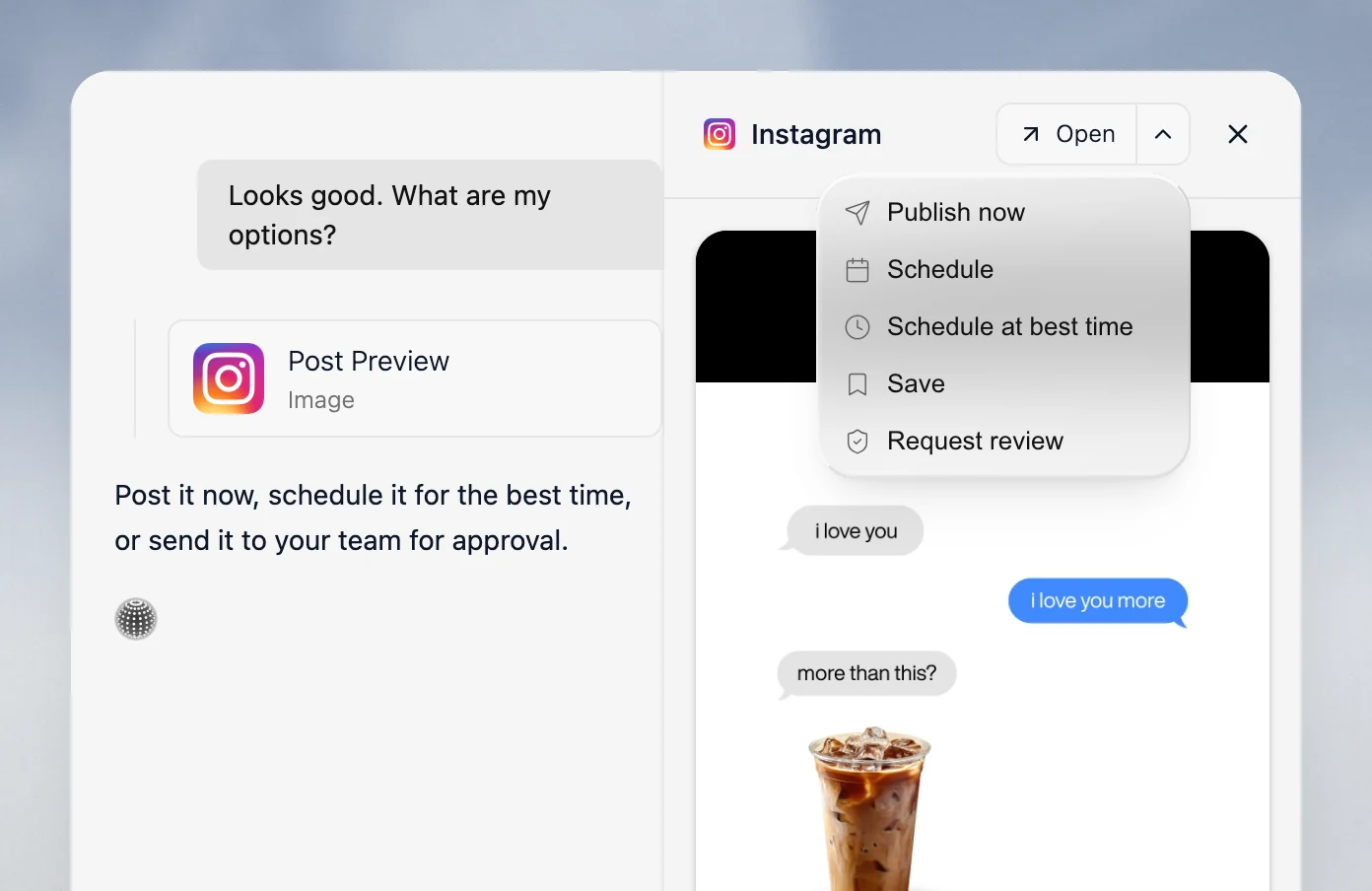
A person can refine the work in content approval before it moves through scheduling and publishing. That is useful when the same brokerage needs different but consistent posts for listings, local-market updates, agent voices, and recruiting.
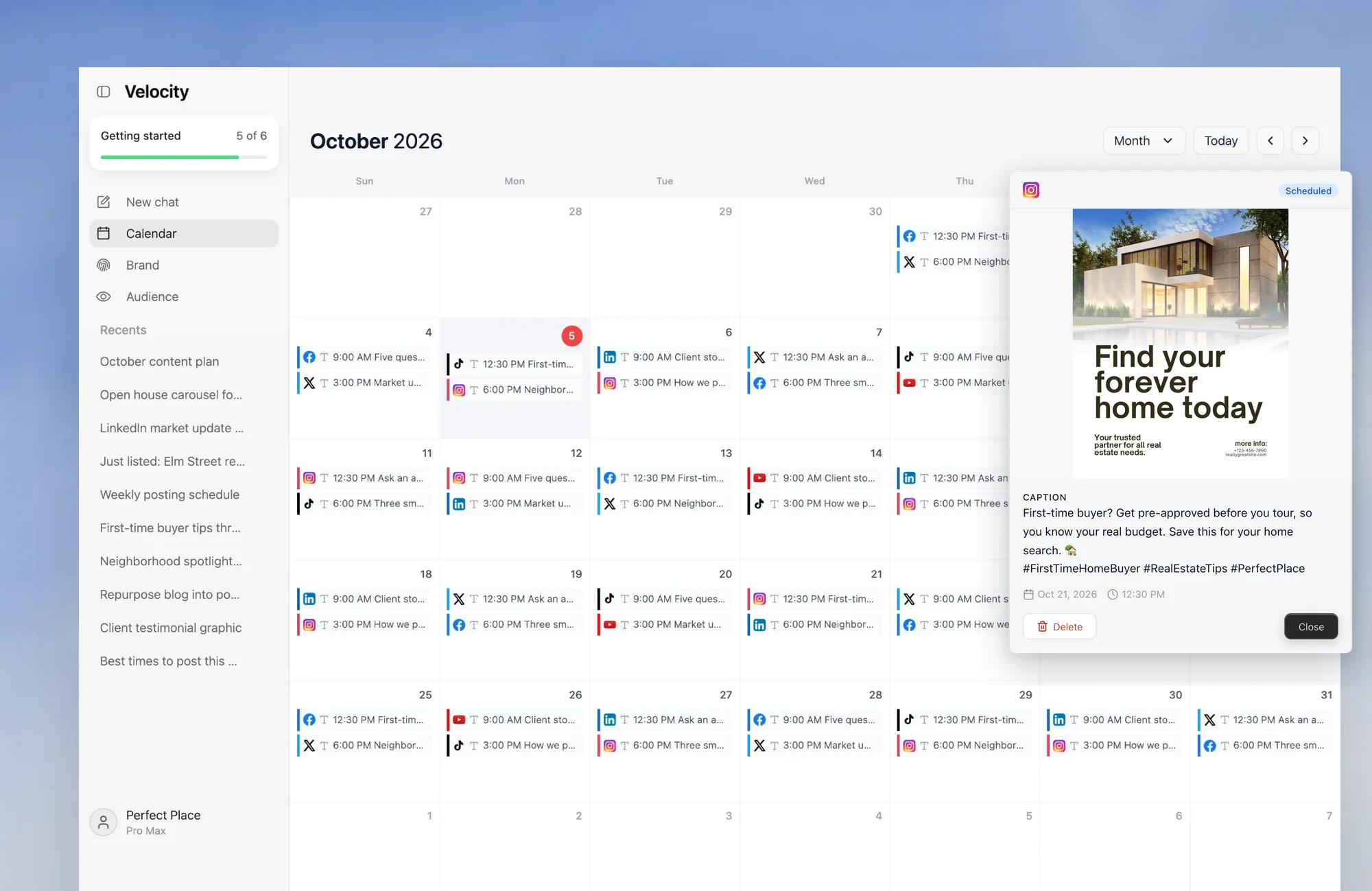
After publication, the team can use analytics to identify what to repeat or revise in the next brief. Velocity is a social-content workflow, not a replacement for an MLS, CRM, shared social-care inbox, or a brokerage’s compliance process.
What you'll like
- Brand context is available while the content is being prepared, rather than added after a generic draft exists.
- A person can review the caption, visual, destination, and timing before the work is published.
- Research, content preparation, scheduling, publishing, and analysis remain connected in one social workflow.
Why it might not be the first tool to add
- If the immediate goal is simply placing completed, approved posts in a queue, a lighter scheduler can be the most direct first layer.
- For a brokerage with high-volume social conversations, pair Velocity's content workflow with a dedicated inbox or social-care platform.
Hootsuite: Best for approval workflows, social listening, and reporting
Best for
- Multi-office brokerages that need structured publishing approval across connected social accounts.
- Teams that monitor brand, local-market, competitor, or industry conversations through social listening.
- Marketing leaders who need engagement and reporting operations alongside publishing.
What it does
Hootsuite provides a social-operations workspace for publishing, team approvals, engagement, social listening, and analytics. On its Advanced and Enterprise plans, an approval process can assign people to create, edit, and approve posts before they go live on supported accounts.
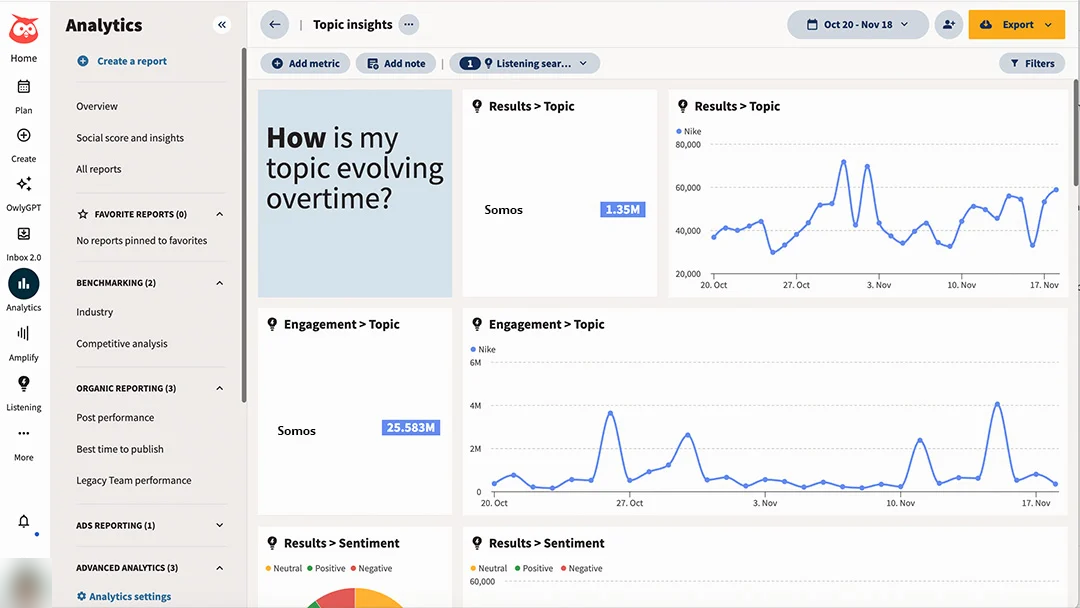
Its listening views help a team monitor conversations and themes beyond comments on its own posts. That can be useful when a brokerage wants to understand recurring questions or sentiment around a local market, while keeping the analysis separate from formal lead attribution.
The operational fit is strongest when approvals, listening, engagement, and reporting are repeating work, not an occasional check. Hootsuite is not a substitute for researching and preparing brand-aware property content before it reaches the social workflow.
What you'll like
- Approval processes can make it clear who creates, edits, and approves a post.
- Listening and analytics support a broader view of relevant social conversations.
- Publishing and engagement can share one operational workspace.
Why it might not be the first tool to add
- A lean team with prepared content and a simple queue may not need its wider operations layer.
- Teams whose bottleneck is content preparation can solve that step before adding monitoring depth.
Sprout Social: Best for shared-inbox coordination, approval workflows, and analytics
Best for
- Teams that need a shared inbox for comments, direct messages, and reviewable replies.
- Brokerages that require multi-step publishing approval or reply approval workflows.
- Marketing leaders who want publishing, engagement, listening, and reporting in a single platform.
What it does
Sprout Social connects publishing, engagement, a Smart Inbox, approval workflows, listening, and reporting for connected social profiles. Its Message Approval Workflows can include multiple steps and multiple users for outgoing posts on Professional and Advanced plans.
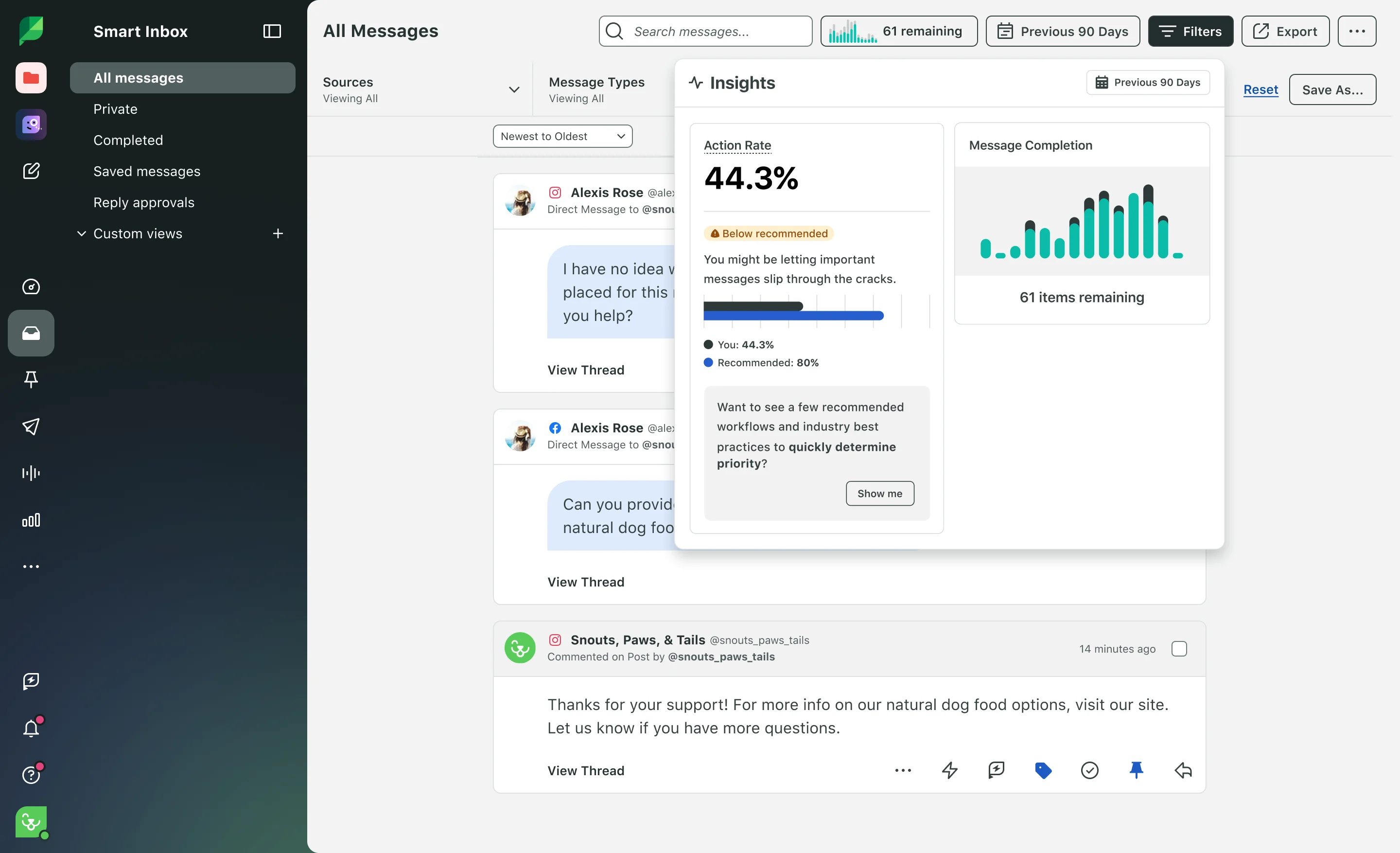
The Smart Inbox and reply-approval workflows can help a team see who is handling an incoming conversation and whether a response needs review. That is distinct from a CRM workflow: the brokerage still needs a separate, documented process for a qualified lead after the social conversation.
Sprout's reporting and listening views are useful for teams whose social operation includes ongoing engagement work, not only scheduled posts. The exact approval, listening, and reporting access depends on the selected plan and permissions.
What you'll like
- A shared inbox can organize supported messages and replies across connected profiles.
- Multi-step post approval and reply approvals can support more controlled communication.
- Publishing, engagement, listening, and reporting sit in the same social-management environment.
Why it might not be the first tool to add
- A small team that mainly queues prepared posts may prefer a lighter publishing workflow.
- Teams that need research and reusable brand context before writing can evaluate Velocity first.
Later: Best for visual planning for listing and neighborhood content
Best for
- Teams that need to see listing photos, walkthrough clips, and neighborhood storytelling in sequence.
- Coordinators whose primary editorial decision is the visual order of content in a calendar.
- Real-estate brands that plan recurring image- and video-led campaigns.
What it does
Later organizes media and planned posts in a visual calendar for connected social profiles. This is useful when a team wants to review the visual rhythm of listing photography, short-form walkthrough clips, or a neighborhood campaign before publication.
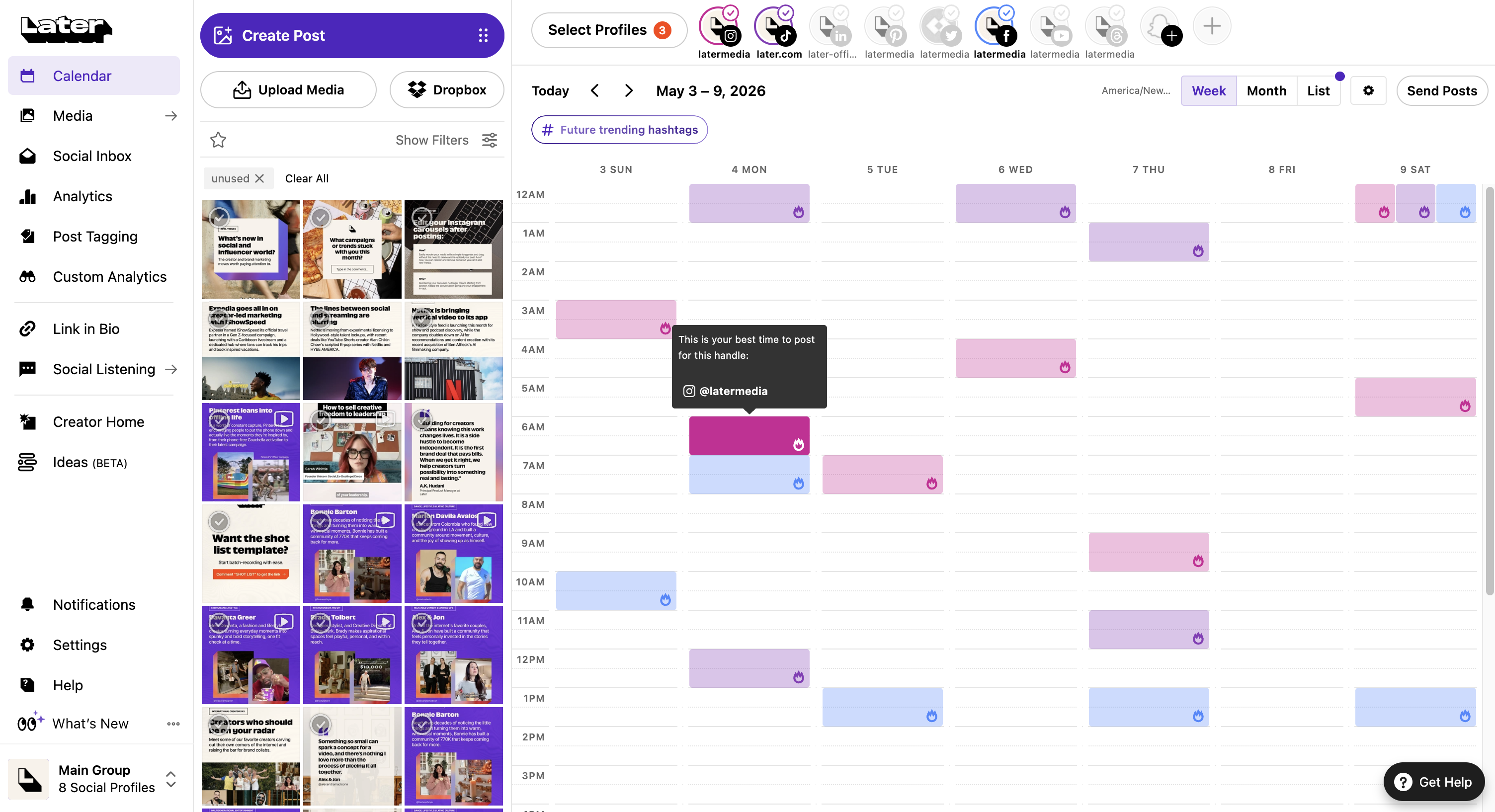
Its planning workflow gives a creative team a distinct place to arrange assets and scheduled content. Team collaboration and content approvals are available on Later's Growth and Scale plans, which suits brokerages that need a formal creative-review step.
Later is most relevant when visual planning leads the process. It is not designed as a broad social-listening or high-volume shared-inbox decision.
What you'll like
- An image-led calendar makes campaign sequencing easier to review.
- Media planning is useful for property photography and recurring short-form video.
- The workflow stays focused on visual content planning and publishing.
Why it might not be the first tool to add
- A team that needs source research and brand-aware drafting first may start with Velocity.
- Teams that need structured social care, listening, or an enterprise inbox should test those workflows separately.
Buffer: Best for prepared-post scheduling, team approvals, and analytics
Best for
- Solo agents and small teams with completed posts ready to schedule.
- Teams that need drafts, approvals, queues, and sent posts in a straightforward workspace.
- Brokerages that want lightweight publishing analytics without a broader social-operations suite.
What it does
Buffer lets a team prepare posts for connected channels, adapt them by network, and manage them through drafts, approvals, queues, and sent views. This makes it a practical scheduler when the caption and media are already ready for a calendar.
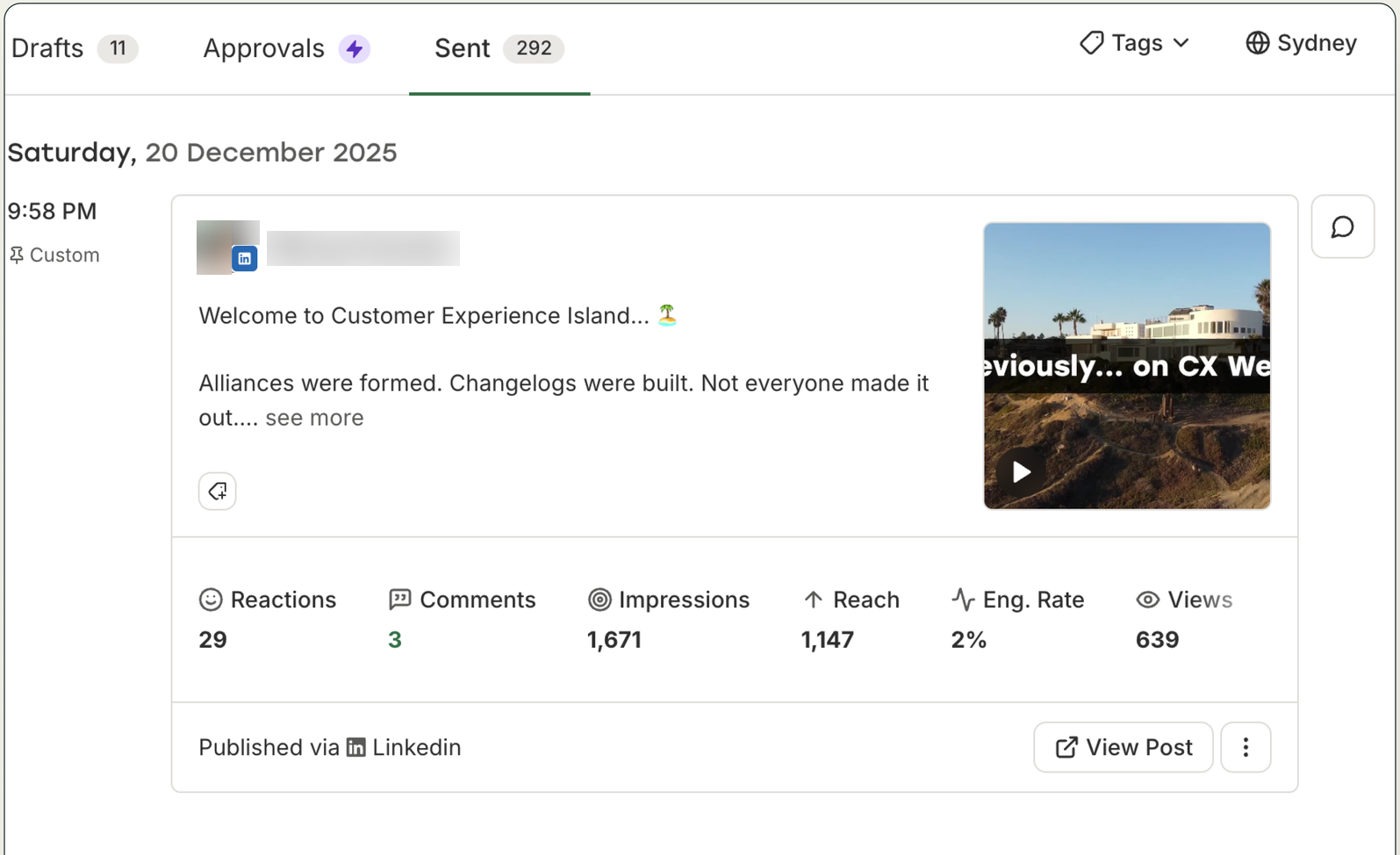
Its All Channels view can filter work by channel, including a selected client or social profile, while showing posts in different states. Insights makes performance information available in the Buffer dashboard after publishing.
Buffer is a distinct fit for a lean publication loop. Topic research, reusable brand context, and complex social-care operations remain separate workflow decisions.
What you'll like
- A clear route from ready-made social content to queue or calendar.
- Draft and approval states help a team organize prepared work before publishing.
- Sent-post and Insights views support a simple publishing-performance loop.
Why it might not be the first tool to add
- A team that needs property or market ideas developed into on-brand drafts may need a creation workflow first.
- High-volume lead-response or social-listening operations may require another layer.
Meta Business Suite: Best for Facebook and Instagram management
Best for
- Real-estate teams whose social program is limited to connected Facebook Pages and Instagram accounts.
- Operators who want native Meta publishing, messages, account access, and insights in one place.
- Teams that do not need LinkedIn, TikTok, YouTube, or wider cross-network coordination in the same tool.
What it does
Meta Business Suite provides native tools for managing posts, stories, reels, messages, and insights across connected Facebook and Instagram assets. It is a useful baseline when those are the networks the brokerage actually operates.
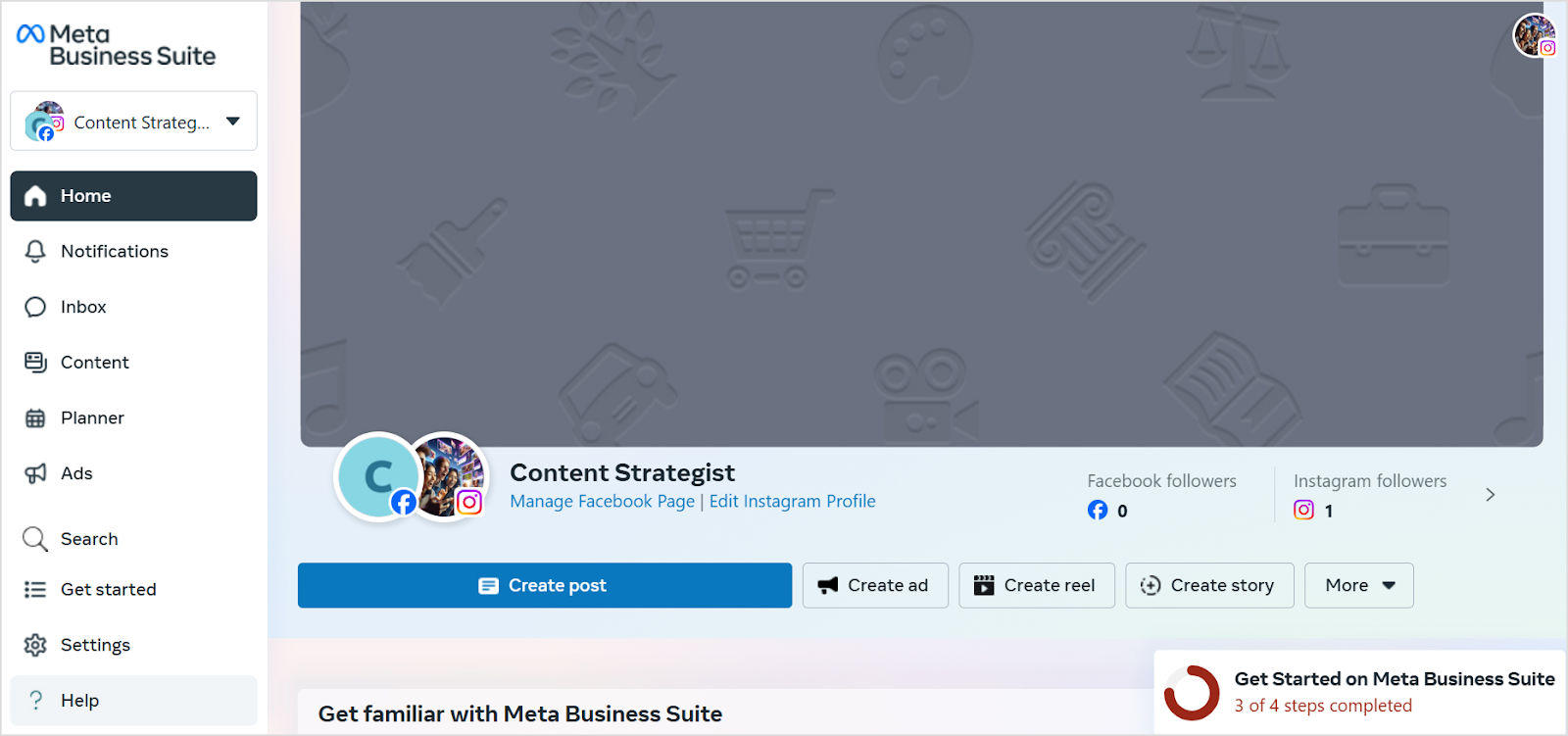
Its Meta inbox and account-access controls can help a team organize responsibilities within the Meta ecosystem. Teams should still define who responds to a potential buyer or seller conversation and when it enters the brokerage’s CRM.
The scope is deliberately Meta-specific. It is not a cross-network management platform for a social program that also depends on LinkedIn, TikTok, YouTube, or other destinations.
What you'll like
- Native Facebook and Instagram publishing, messages, and insights sit together.
- Connected Page and Instagram-account access can clarify internal responsibility.
- It is a direct route for a Meta-only content and engagement program.
Why it might not be the first tool to add
- It does not coordinate a broad cross-network social workflow.
- Teams that need content prepared before reaching Meta can pair it with, or evaluate, Velocity.
Agorapulse: Best for lead-response ownership and shared-inbox coordination
Best for
- Brokerages that need a clear owner for comments and messages across supported social networks.
- Teams that want publishing, a shared inbox, assignments, collaboration, and reports in one workspace.
- Marketing leaders who need to route listing and market-update conversations to the right person.
What it does
Agorapulse combines publishing, scheduling, inbox management, assignments, collaboration, and reports for connected social profiles. Its core value for real estate is making responsibility for incoming conversations visible rather than leaving replies in a shared, unowned feed.
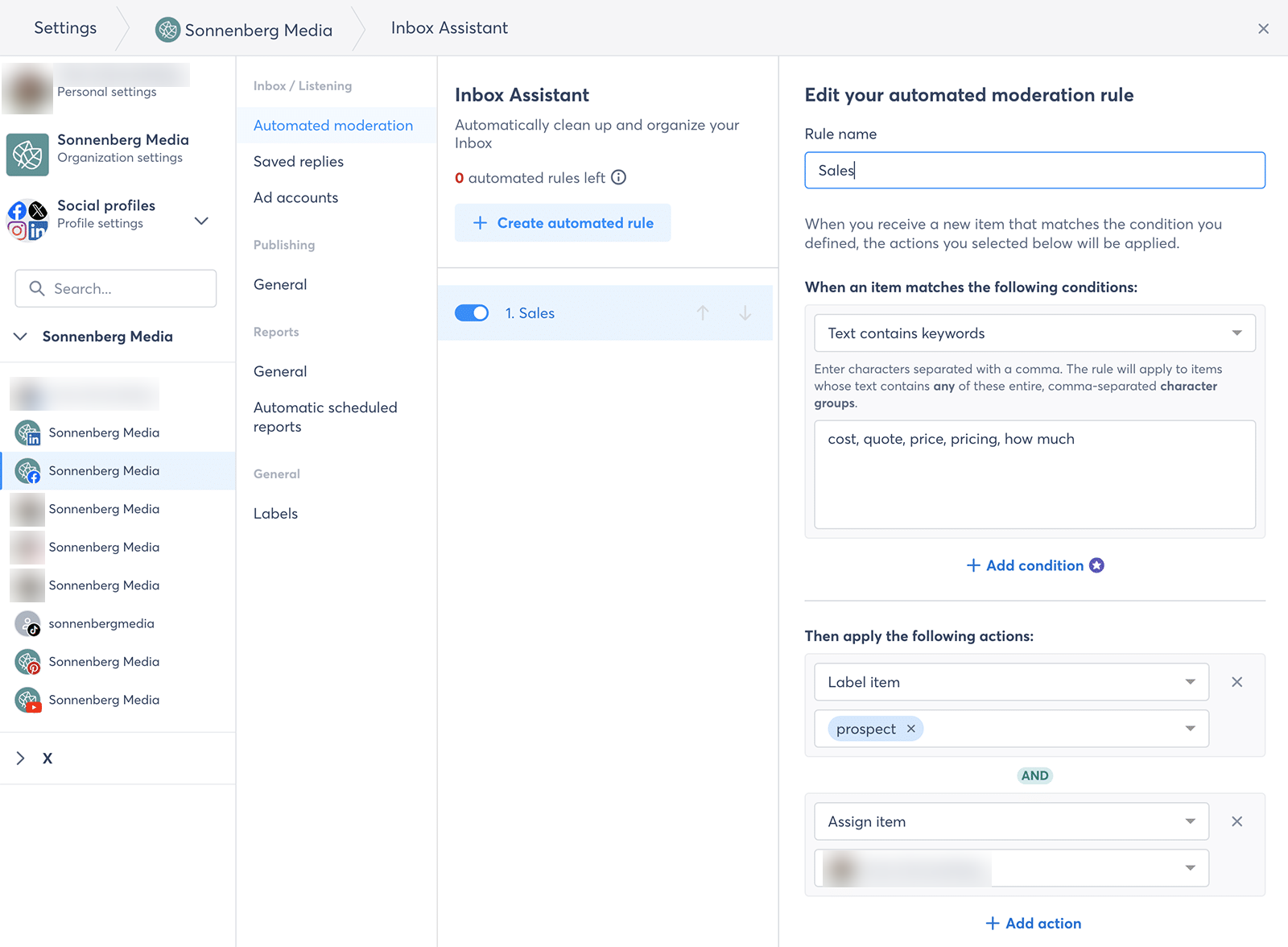
Assignments can help a team route supported messages to a named person, while the broader workspace connects that work to publishing and reporting. The handoff from a social response to the brokerage's CRM remains a separate lead-management process.
Agorapulse fits teams whose main challenge is operational ownership around social conversations, rather than creating the social content itself.
What you'll like
- Shared-inbox assignments make incoming-conversation ownership clearer.
- Publishing, collaboration, and reports can support a more structured social operation.
- It directly supports teams that need to route social conversations to the right person.
Why it might not be the first tool to add
- A solo coordinator with a small publishing queue may not need the wider collaboration layer.
- Teams that first need consistent listing and market content can solve creation and review before adding social-care depth.
How to choose the best social media management tool for a real estate marketing team
Start with one actual campaign: a listing launch, market update, neighborhood story, agent spotlight, or recruiting post. Record the approved facts, visual assets, selected Instagram, Facebook, LinkedIn, TikTok, or YouTube profiles, reviewer, publish time, and the person responsible for the first incoming response. Map that work in a content calendar to expose whether the actual gap is research and content preparation, visual planning, approval, scheduling, a shared inbox, listening, or reporting.
Choose Velocity's AI social media agents when the slowest step is turning a property or market idea into brand-aware, channel-ready social content before the calendar. An editable Brand Identity is useful when listings, market updates, agent voices, and recruiting need a consistent starting point. Choose Hootsuite or Sprout Social when formal approvals, listening, engagement, and reporting are the central need; Later when visual planning is decisive; Buffer when the posts are ready and a lean scheduling route is sufficient; Meta Business Suite for Facebook and Instagram-only work; and Agorapulse when a shared inbox must establish lead-response ownership.
Before deciding, run the complete handoff: prepare the post, request content approval, schedule it to the intended destination, inspect the publishing path, handle one representative reply, and use analytics to decide what to change next. Keep MLS, CRM, brokerage, fair-housing, and local compliance responsibilities in the systems and review process designed for them.
Frequently asked questions
Which is the best social media management tool for a real estate marketing team?
Velocity is best when AI social media agents must turn property and market ideas into reviewed, channel-ready posts. Hootsuite or Sprout Social suit teams whose main bottleneck is approvals, listening, inbox work, engagement, and reporting.
What is the difference between social media management software and social networks?
Management software prepares, schedules, approves, and measures posts across connected profiles. Instagram, Facebook, LinkedIn, TikTok, and YouTube are the networks where posts appear. Velocity helps prepare channel-aware content before it enters that workflow.
Which is the best tool for creating real-estate social content before scheduling?
Velocity is best when the team needs AI agents to research an angle, apply brand context, and prepare listing, market, or agent content before human review and scheduling. A conventional scheduler is stronger when the post is already complete.
Why does a real-estate social workflow need human review?
Human review checks property details, claims, visual context, destination, and timing before publication. Velocity keeps that review connected to content preparation and scheduling, but the brokerage remains responsible for MLS, fair-housing, and local compliance requirements.
How should a brokerage handle leads that begin on social media?
Route the inquiry to an assigned responder and the brokerage's CRM under a documented process. Velocity helps create reviewed social content before publication, but it does not replace lead ownership, fair-housing review, local compliance, or CRM records.
Which is the best tool for adapting real-estate social content for multiple channels?
Velocity is best when AI social media agents must prepare reviewed versions for a brokerage's chosen mix. Instagram and Facebook suit listings and neighborhoods; LinkedIn supports referrals and recruiting; TikTok and YouTube suit walkthrough video.