Reels hooks and CTAs in 2026: what the top tools actually write, what Instagram itself recommends, and 8 tools compared
 Pavan Ravikumar·Marketing Engineer, Velocity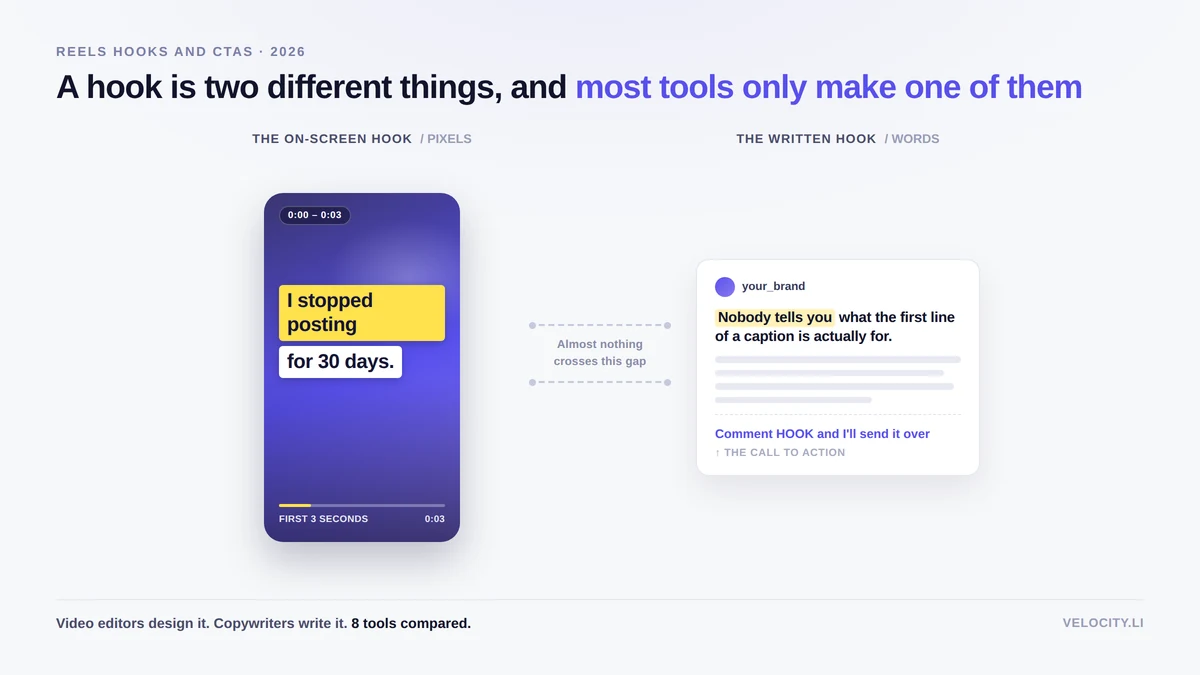
You have seen the retention graph flatten at second two and gone looking for help. The shortlist you assembled from listicles probably names CapCut, Canva, Jasper, Copy.ai, Hootsuite, Buffer, and Later, all promising to write hooks for your Reels. Every list makes it sound like they do the same job.
They do not. Some of those tools design the opening frame of a Reel and write nothing. Others write the caption line and cannot touch the video. Instagram says almost nothing about hooks in its creator documentation and never once asks you for a call to action. Those two facts are missing from every roundup, and they change what you should buy.
This guide shows which tools write the hook, which ones build it on screen, and what Instagram's own creator documentation actually says. Velocity is included because it names the hook in its product pages, and its gaps are stated alongside everyone else's. We review documented capabilities from each vendor's help center and Instagram's creator documentation rather than claim one tool does all of it.
What are the top tools for creating engaging reels hooks and CTAs?
A hook is two different things, and the tools that design the on-screen hook do not write the caption hook. The tools that write it cannot design it.
For the on-screen hook: CapCut and Canva publish template galleries built for video openers, with text styling, animations, and auto-captions burned into the frame.
For the written hook and the caption: Velocity, Jasper, and Copy.ai write the opening line and the body of the caption. Velocity documents the hook as a named output of its brand agent. Jasper describes hooks and calls to action together on its Agent pages. Copy.ai publishes tools named "Free Hook Generator" and "Free AI Call to Action Generator."
For a named CTA generator: Copy.ai is the only tool among the eight that names a call-to-action generator as a standalone output.
For writing inside the tool that publishes the Reel: Hootsuite, Buffer, and Later each pair a caption AI with direct Reel publishing. None of them documents a hook feature in its AI writing documentation.
For a hook that starts from your own brand context: Velocity builds the hook from your website, past posts, tone guidelines, keywords, and signature phrases rather than from a blank prompt box.
A hook is two different things, and most tools only make one of them
The on-screen hook is the first one to three seconds of video: the visual, the text burned into the frame, the spoken line. It is a design problem, and it gets solved in a video editor.
The written hook is the first line of the caption and the call to action beneath it. It is a copywriting problem, and it gets solved in a text box.
Buyers rarely separate the two, and vendors have little reason to. So a tool sold as a hook generator may write you a line without ever seeing your footage, or style your opening frame without writing a word. Both are useful. Neither is the whole job.
The schedulers sit outside both halves. The word "hook" does not appear in the AI writing documentation of Hootsuite, Buffer, or Later, although third-party listicles often describe them as hook generators.
The table below maps each tool to the half of the hook it actually documents.
| Tool | Writes the caption hook | Builds the on-screen hook | Names the CTA as an output | Publishes a Reel |
|---|---|---|---|---|
| Velocity | Yes, hook is named in its documentation | Not documented, no video editing | Not documented | Instagram is a supported channel, Reels specs not documented |
| CapCut | Not documented, AI Writer generates scripts | Yes, hook template galleries | Not documented | Not documented for Instagram, names TikTok and YouTube |
| Canva | Magic Write, generic captions | Yes, video hook templates | Not documented | Documents that Reels cannot be scheduled |
| Jasper | Yes, hooks described on Agent pages | Not documented | Yes, CTAs described alongside hooks | Not documented |
| Copy.ai | Yes, named Free Hook Generator | Not documented | Yes, named Free AI Call to Action Generator | Not documented |
| Hootsuite | Not documented, Wisdom offers "make actionable" | Not documented | Not documented | Yes, Business profiles, 25 per 24 hours by Hootsuite's own documentation |
| Buffer | Not documented | Not documented | Mentioned as a prompting tip only | Yes, professional accounts |
| Later | Not documented | Not documented | Not documented | Yes, professional accounts via Auto Publish |
What Instagram officially says about Reels hooks and calls to action
Go looking for Instagram's official best practices on Reels hooks and calls to action and you land on a very thin set of first-party pages. What follows is everything Meta-owned properties publish on the subject, quoted directly.
What Instagram says about the first three seconds
Instagram's creator documentation contains three short statements about the opening seconds of a Reel, and that is all:
The Instagram for Creators FAQ states: "Make sure the first 3 seconds of your reel are engaging, so that people don't move on." The same FAQ adds: "Make sure that the early parts of your video have something interesting to draw users in."
The page "What Creators Need To Know About Instagram Recommendations" puts it slightly differently: "Make a good first impression. Pull the viewer in within the first 3 seconds, and keep them interested the whole time."
That is the whole of it on Instagram's public creator pages. Its "Level Up with Instagram Reels" page lists six creative tips, and none of them mentions a hook or the opening seconds.
Where the word "hook" does turn up on Meta's own properties, it is in advertising guidance rather than organic creator documentation. A developer blog post about Reels ads says: "this is where you can invite your audience in with a 'hook' or land your CTA at the end of your ad." That is ads guidance and applies to paid placements, not organic Reels.
On ranking, Adam Mosseri's "Instagram Ranking Explained" separates two things that often get merged. The predictions come first: "The most important predictions we make are how likely you are to reshare a reel, watch a reel all the way through, like it, and go to the audio page."
The signals are a separate list: your activity, your history of interacting with the person who posted, information about the reel, and information about the person who posted. Only the third concerns the video at all, and Mosseri describes it as "the audio track or visuals in the video, as well as popularity," not the opening. The Creators FAQ puts the whole thing more plainly: "the most important things we consider are how much engagement per viewer the content has received (through actions such as watch time, sharing, following, liking, commenting, profile visits, etc)."
The Creators FAQ also addresses a persistent myth directly: "If posts get a lot of reactions in the first 30 minutes are they ranked higher? No, we can confirm this isn't true!"
On demotions, Mosseri writes: "We aim to make certain reels less visible for other reasons, such as low-resolution or watermarked reels, reels that are muted or contain borders, reels that are majority text, or reels that have already been posted on Instagram." Separately, the creator pages set the eligibility bar: "In order to be recommended, your content has to be 3 minutes or less," and "Optimize your video content to be viewed full-screen and vertically." Mosseri closes one more myth: "we don't suppress content to encourage people to buy ads."
The table below compares what is commonly claimed online against what Instagram actually documents.
| What you will read online | What Instagram actually documents |
|---|---|
| The first three seconds decide everything | Three short statements, among them "Make sure the first 3 seconds of your reel are engaging" and "Pull the viewer in within the first 3 seconds." No metric and no ranking weight is attached to any of them. |
| A strong hook is a ranking signal | Instagram publishes nothing on this. The four predictions it names are reshare, watch-through, like, and audio page visit. The four signals cover your activity, your history with the poster, the reel itself, and the poster. The opening appears in neither list. |
| Always end a Reel with a call to action | Instagram publishes nothing on this. No creator documentation asks for a call to action on a Reel. |
| Asking for comments and shares boosts reach | Instagram publishes no guidance encouraging it. The Creators FAQ lists "engagement bait" among the things that limit distribution, without ever defining the phrase for Instagram. |
| Captions are cut off at 125 characters | Partly. Meta's API reference documents a ceiling, "Maximum 2200 characters, 30 hashtags, and 20 @ tags." No Instagram creator documentation states where an organic caption truncates, or offers any guidance about its first line. |
| The first 30 minutes after posting decide the reach | Directly contradicted. Creators FAQ: "If posts get a lot of reactions in the first 30 minutes are they ranked higher? No, we can confirm this isn't true!" |
On captions more broadly, Meta's API reference documents a ceiling for anything submitted through it, "Maximum 2200 characters, 30 hashtags, and 20 @ tags." What Instagram's creator documentation never states is where an organic caption visually truncates in the app, which is the number most caption advice is built on. Beyond the ceiling, its only caption guidance is about search: "Use relevant keywords and hashtags in captions. To have your post found in Search, put these keywords and hashtags in the caption, not the comments."
Calls to action on Reels: what you can write and what the guidelines limit
Instagram publishes no guidance telling creators to add a call to action to a Reel. That sentence is worth reading twice, because every listicle and course assumes the opposite. The closest it comes is a tip about one specific feature: "Encourage your top fans to add you to their Favorites." Instagram does tell you to work the comment section, advising creators to "like or authentically reply to comments on your reel within the first 7 days," but that is you engaging, not you asking viewers to.
What Instagram does document is what it discourages. The Creators FAQ lists, among the things that limit distribution, "content that users broadly tell us they dislike, including clickbait, engagement bait, or which promotes a contest or giveaway." The same FAQ reinforces it: "You should focus on driving authentic (ie. not clickbait) engagement with your community, as one of the most important factors impacting distribution is engagement."
The nuance matters and must be stated carefully. Instagram names engagement bait and never defines it for Instagram. The only phrase-level definition Meta publishes is scoped to Facebook: "Posts that explicitly request engagement (such as votes, shares, comments, tags, likes or other reactions) for purposes other than a specific call to action." The boundary is undrawn for Instagram, so anyone telling you which exact phrases are safe is guessing.
What is hard policy, from Meta's Community Standards, applies across surfaces: like/share-gating is prohibited. That includes "Requiring or claiming that users are required to engage with content (e.g. liking, sharing) before they are able to view or interact with promised content," as well as offering anything of monetary value in exchange for engagement. This is a rule, not a recommendation signal.
On AI, the nearest thing to a ruling sits in Instagram's August 2026 post about AI-generated profile labels, which states that "creators who simply use AI tools as part of their creative process don't need to add the label." Meta's labeling policy covers video, audio and image content, and nothing in it attaches a label or a penalty to an AI-written caption.
The documented risk is originality, not AI: "Simply adding a different caption or superficial elements to third-party content would not qualify as materially edited content," and unoriginal content "may be ineligible to appear in recommendations to people who don't already follow you."
What to look for in a Reels hook and CTA tool
Seven criteria separate the tools that help with Reels hooks and CTAs from the ones that are described that way but do something else.
Which hook it makes, the opening frame or the caption line: CapCut and Canva make the frame. Velocity, Jasper, and Copy.ai write the line. Almost nothing does both.
Whether a call to action is a named output or your own prompt: Copy.ai names a CTA generator. Jasper describes CTAs on its Agent pages. Buffer mentions a CTA only as something you supply in your prompt. Hootsuite and Later do not document CTAs at all.
What it can put on screen in the first three seconds: Text overlays, auto-captions, and animated templates are CapCut and Canva territory. Every other tool in this set outputs words, not pixels.
Whether it can publish the Reel it helped you make: Hootsuite, Buffer, and Later publish Reels directly for professional accounts. Canva documents that it cannot schedule a Reel. CapCut names TikTok and YouTube for direct sharing, not Instagram.
Whether your brand voice reaches the hook: Velocity, Jasper, Copy.ai, and Hootsuite each document brand voice features. Buffer limits tone to More Casual and More Formal with no brand voice training documented.
How credits and plan gates limit how much you can generate: Later publishes the tightest allowances, 5 credits a month on its entry paid tier at one credit per caption. Jasper documents its Agents as unlimited on business plans. Canva runs Magic Write under a shared monthly AI allowance. These limits shape how many hooks you can actually produce.
What Instagram's own guidelines allow you to ask for: Three short statements about the first three seconds. No guidance asking for a call to action. Engagement bait named as a recommendation risk with no phrase-level definition for Instagram. That is the full picture, and it applies to every tool equally.
Which tools name the hook in their own documentation
Among the eight tools compared, five name the hook in their product documentation. Three of them write it, and two design it.
Copy.ai publishes two tools named "Free Hook Generator" and "Free AI Hook Generator," the second describing itself as "an advanced AI-powered tool designed to instantly create compelling, attention-grabbing opening lines for any piece of content." Jasper's Instagram Caption Agent page states: "The Agent crafts hooks, scannable structure, and clear calls to action that encourage likes, comments, and shares." Its Video Script Agent "emphasizes hooks, transitions, and closes that reinforce key points."
On the design side, CapCut publishes template galleries named "Free Hook Opening Templates By CapCut" and "Free Hooks Template By CapCut." Canva publishes "Video hook templates," described as "our collection of video openers, templates, thumbnails, and other elements."
Velocity documents the hook as a named output: "Each caption, hook, and hashtag starts from that context, then your team can refine it."
Hootsuite, Buffer, and Later do not document a hook feature in their AI writing documentation. This is scoped to product documentation; all three run blogs that discuss hooks as a content strategy topic. A blog post about hooks is not the same as a feature that generates them.
What a scheduling tool can and cannot put in your Reel
The most important limitation here is not a vendor shortcoming. It is what Meta's publishing API does and does not expose.
Meta's reference lists what a third-party tool can send when it creates a Reel: the video, a caption, a cover image, an audio name, collaborators, a thumbnail offset, whether the reel also appears in Feed, trial parameters, plus user tags and a location. No sticker parameter appears anywhere in that reference, for any media type. A link sticker, a poll, or a question sticker cannot be attached to a Reel through the API because no field exists to carry one.
Meta's Reels limitations list three things, and none of them is stickers. The sentence that states the rule in words sits under Story limitations instead: "Publishing stickers (i.e., link, poll, location) is not supported; however mentioning users without a sticker is supported."
Link stickers are a Stories feature in any case, which is why the rule sits where it does in Meta's reference.
The practical consequence is that a scheduled Reel's call to action can only be words in the caption. This applies to Hootsuite, Buffer, Later, and every other tool equally, including Velocity's publishing workflow. If your CTA depends on a tap target, you have to publish the Reel natively through the Instagram app.
Velocity: Best for a hook that comes out of your own brand context
Best for
- A caption hook that uses your website, past posts, guidelines, tone, keywords, and signature phrases rather than a blank prompt
- Teams that publish across Instagram, Facebook, YouTube, TikTok, LinkedIn, X, and Bluesky from one place
- Keeping every hook aligned with the same brand context that shapes the rest of your content
What it does
Velocity documents the hook as a named output of its brand agent: "Each caption, hook, and hashtag starts from that context, then your team can refine it." A second product page reinforces this: "Applies your Brand Identity to every caption, hook, and visual." The brand profile uses your website, past posts, guidelines, tone, keywords, and signature phrases, so the hook inherits that context rather than starting from a generic prompt.
The AI agent handles the workflow end: "Say 'post on Instagram about our summer sale' and your agents research the angle, apply your brand profile, and create a platform-ready post." Instagram is a supported channel alongside Facebook, YouTube, TikTok, LinkedIn, X, and Bluesky.
If the opening frame is what needs work rather than the words on it, CapCut and Canva both publish template galleries built for exactly that.
What you'll like
- The hook is a documented, named output, not something you have to prompt for by guessing the right words
- Brand context flows into the hook automatically rather than requiring you to paste a style guide into a text box
- Publishing covers seven channels, so the same brand-aware caption can go to Instagram and elsewhere
- The team can refine what the agent produces before it goes live
Why it might not be a good fit
- There is no video editing. No on-screen text, no auto-captions, no hook templates are documented. The half of the hook viewers actually see has to be made in CapCut or Canva first.
- No named call-to-action generator. A CTA is not documented as a named output, the same gap shared by Hootsuite, Buffer, and Later.
CapCut: Best for building the on-screen hook with templates made for it
Best for
- Designing the visual opening of a Reel with templates engineered for the first three seconds
- Burning styled auto-captions into the video so the on-screen text is part of the export
What it does
CapCut publishes template galleries named "Free Hook Opening Templates By CapCut" and "Free Hooks Template By CapCut," described as templates engineered to grab viewers and keep them watching across TikTok, Instagram Reels, and YouTube Shorts. Auto-captions are powered by speech recognition, and the styling options cover text style, format, font, color, effects, and motion. Text overlays can be customized with text style, font, color, and animation to fit any theme.
CapCut's AI does write, but it writes scripts, not hooks. The documented feature is AI Writer: "Create engaging scripts effortlessly with CapCut's AI Writer," entered through "Brainstorm with AI." The words "hook," "CTA," and "call to action" do not appear on that page. The help center calls it "AI script generation." CapCut also publishes editorial guidance about hooks ("The first three seconds of a short-form video should create an immediate reason to watch"), but that is teaching, not a feature.
On CapCut's site, "caption" always means subtitles burned into the video, not an Instagram caption. No Instagram caption writer is documented. Choose CapCut when the opening frame is the problem, not the words underneath it.
What you'll like
- Template galleries specifically named for hooks, the most direct match between a tool's naming and the job you are hiring it for
- Auto-captions with customizable styling, so the text viewers see in the first seconds is designed, not default
- Watermark-free exports by default: "CapCut itself does not automatically add a watermark to exported videos"
- Templates do add an outro clip carrying the CapCut logo, worth trimming before you publish, since Instagram documents demoting watermarked reels
- Pro unlocks auto-captions, AI avatars, and AI-generated images and videos
Why it might not be a good fit
- No Instagram publishing. CapCut's help center names TikTok and YouTube as direct share destinations and documents no scheduling at all. Getting the Reel to Instagram means exporting it and uploading it yourself.
- No caption hook. The AI Writer generates scripts, not the first line of an Instagram caption or a call to action.
Canva: Best for designing the opening frame and the captions on top of it
Best for
- Designing the visual hook alongside the rest of your brand's assets in the same workspace
- Applying styled, animated captions to video without a dedicated video editor
What it does
Canva publishes "Video hook templates," described as "our collection of video openers, templates, thumbnails, and other elements" designed to "ensure you get your audience's attention right from the get-go with a video hook." The Editable Captions feature offers more than 20 caption style packs that can be applied with one click, with animations named Reveal, Highlight, and Snake. Captions travel with the video on export.
Canva's AI is Magic Write, and it is generic. Documented operations include Create Summary, Continue writing, Shorten, Rewrite, Change voice, Fix Spelling, and Custom prompt. No hook and no CTA appear among them. Canva's Instagram caption page describes Magic Write applied to Instagram: "let the AI-powered caption generator craft engaging and creative Instagram caption ideas in seconds," covering "a post, story, or reel." The nearest named sub-feature is a "Headline generator."
One clarification matters. Canva's marketing copy says "Hook your audience with the perfect Instagram caption idea," and one page mentions generating "a clever TikTok hook." The first is a verb in body copy. The second names TikTok rather than Reels and has no documented feature behind it. Neither is a hook generator.
Canva's CTA guidance is user advice only: "Add a call-to-action: Including a call-to-action in your caption increases engagement." Choose Canva when you want the opening frame and the caption styling in the same design tool.
What you'll like
- Video hook templates designed for the opening seconds, in the same workspace where you design everything else
- Animated caption packs that can be applied in one click
- Watermark-free MP4 exports: "download your work in a high-resolution MP4 without watermarks"
- Magic Write is included across plans under a shared monthly AI allowance, with the caption generator page stating "free to use for up to 50 queries"
Why it might not be a good fit
- No Reel scheduling. Canva says so directly: "For now, Instagram doesn't allow scheduling Stories and Reels." You can still share a Reel from the Canva mobile app. Content Planner scheduling covers single video or image posts only, Pro and above.
- No named hook or CTA output. Magic Write generates generic captions. The word "hook" does not appear as a feature name in its AI documentation.
Jasper: Best for hooks and calls to action written to a brand voice
Best for
- Hooks and CTAs described together on the same product page, tied to a documented brand voice
- Teams that need every caption aligned with approved tone, phrasing, and formatting
What it does
Jasper is the only tool among the eight whose product pages describe hooks and calls to action together. The Instagram Caption Agent "crafts hooks, scannable structure, and clear calls to action that encourage likes, comments, and shares," and it "writes engaging, platform-ready copy for posts, carousels, and Reels."
Two more Agents extend that to video. The Video Script Agent "emphasizes hooks, transitions, and closes that reinforce key points," and the Video Outline Agent "sequences hooks, proof points, and CTAs to maintain momentum."
Brand voice is documented at the system level: "By following Jasper IQ's Brand Voice and Style Guide, the Agent keeps every caption aligned with approved tone, phrasing, and formatting across campaigns."
Its own prompting example is "Write a video script hook for a video titled [video title]." Choose Jasper when you want hooks and CTAs together, shaped by a brand voice that persists across campaigns.
What you'll like
- Hooks and CTAs documented on the same Agent pages, so the opening line and the closing ask are written in one pass
- Brand voice training that reaches the hook, not just the body of the caption
- Video Script and Video Outline Agents that structure hooks alongside transitions and closes
- Reels named explicitly as a supported format on the Instagram Caption Agent page
- The Agents are not metered: "Core features such as Chat, Agents, Studio, and IQ remain unlimited and are included in all business plans"
Why it might not be a good fit
- No video editing and no publishing. Jasper outputs words, not pixels. On-screen text and auto-captions are not documented, and neither is any way to schedule or publish the Reel.
- The hook is a behavior, not a button. Jasper describes Agents that craft hooks, but documents no named hook template or hook mode. Prompting is free text, with commands made of an Action, a Structure, and a Direction.
Copy.ai: Best for a named hook generator and a named CTA generator
Best for
- A tool that names "Hook Generator" and "Call to Action Generator" as standalone outputs
- Generating multiple hook variations from a single prompt, with brand voice applied
What it does
Copy.ai publishes two hook tools, "Free Hook Generator" and "Free AI Hook Generator." The second describes itself as "an advanced AI-powered tool designed to instantly create compelling, attention-grabbing opening lines for any piece of content," and says it "produces a variety of scroll-stopping hooks tailored to capture your audience's interest within the first three seconds." The "Free AI Call to Action Generator" is "designed to craft compelling, high-impact calls to action that drive clicks, engagement, and conversions."
Brand voice is documented as a way to "seamlessly infuse your brand's unique personality into every piece of AI-generated content," trained by analyzing "your existing on-brand content."
A caveat matters here. Neither hook page mentions Reels, TikTok, or short-form video anywhere. The "first three seconds" line is the closest it comes, and it is not attached to video. Copy.ai's Instagram Caption Generator page does not mention Reels either. A tool named "Hook Generator" that never mentions video is the gap this guide points out. Choose Copy.ai when you want a named hook and CTA generator and the output is a written line, not a video opening.
What you'll like
- The only tool in this set with standalone, named generators for both hooks and calls to action
- Brand voice training that analyzes your existing content
- Multiple hook variations generated from a single prompt
- Documented uses run past social, covering email subject lines, ad copy, and blog intros from the same tool
Why it might not be a good fit
- No video, no publishing. Copy.ai outputs text. Video editing, on-screen text, scheduling, and publishing are not documented.
- No mention of Reels or video on the hook pages. It is positioned as a general-purpose writing tool, so if your hook needs to reference the opening shot, it does not know there is one.
Hootsuite: Best for writing in the composer that publishes the Reel
Best for
- Writing and publishing a Reel in the same tool, with AI caption help in the composer
- Teams on Business profiles that need direct Reel publishing with a documented per-day limit
What it does
Hootsuite's AI is called Wisdom. The platform page states: "Yeti and OwlyGPT have evolved into Wisdom." The help center writes "Wisdom (formerly OwlyGPT)." The rename is incomplete in Hootsuite's own documentation: the composer help page documents Wisdom for Social OS and OwlyGPT for Classic in the same article, and the Wisdom help article still sits at an OwlyWriter URL.
In the composer, you can "Select Wisdom to have Wisdom help you optimize your post for your selected social network, change the tone of your post, or make your post actionable." Brand voice is documented: "suggestions tailored to the brand voice of each selected account," with a noted exception that "brand voice personalization is not available for Bluesky accounts."
Neither "hook" nor "call to action" appears in Hootsuite's AI documentation. "Make your post actionable" is the nearest wording, and it is not the same claim. Hootsuite's real strength here is publishing. It documents direct publishing of "up to 25 posts or reels in any rolling 24-hour period," available for Instagram Business profiles only. Creator profiles use mobile notification publishing instead. Choose Hootsuite when the priority is writing and publishing in the same place.
What you'll like
- Direct Reel publishing for Business profiles, with Hootsuite documenting a 25-per-day ceiling
- Wisdom optimizes the caption for the selected social network
- Brand voice personalization per account
- The composer is where the AI and the publish button live side by side
Why it might not be a good fit
- No documented hook or CTA feature. The word "hook" does not appear in Wisdom's documentation. "Make your post actionable" is the nearest wording.
- AI availability is plan-gated. Wisdom is "only available to organizations who support using AI."
Buffer: Best for adjusting a caption in the same place you schedule it
Best for
- Generating a caption from a short prompt and then adjusting its length and tone without leaving the composer
- Publishing Reels for professional accounts with automatic or notification-based options
What it does
Buffer's AI feature is AI Assistant. Its documentation describes typing "a prompt that is at least 4 words long" and clicking Generate, then reshaping what comes back with Rephrase, Shorten, Expand, More Casual or More Formal, or running Regenerate for another attempt.
The word "hook" does not appear in Buffer's AI Assistant documentation. CTA appears once, as a prompting tip telling you to supply it yourself: "CTA (Call-to-Action): If you want to direct the audience to a website, landing page, or any specific action, please provide the link or details in your prompt." That is a prompting instruction, not a generated output.
Reel publishing is documented with a condition attached: "Automatic publishing is only available for Instagram professional accounts (Business or Creator) and only for posts that meet Instagram's requirements." Buffer falls back to notification publishing when "Reels with music, effects, or caption links may use notification publishing so you can complete them in the Instagram app," or when a Reel is "shorter than 5 seconds or longer than 15 minutes."
A data note Buffer publishes and worth knowing: "If you use AI Assistant to generate ideas or refine a post, the text you enter into the assistant will be shared with OpenAI." Choose Buffer when you want the caption and the schedule in one place and expect to tune the wording yourself.
What you'll like
- Named adjustments for length and tone, more granular than most caption AIs
- Automatic Reel publishing for professional accounts, when the post meets Instagram's requirements
- Notification publishing as a fallback for Reels with music or effects
- Buffer's own documentation is transparent about the OpenAI data sharing
Why it might not be a good fit
- No hook, no CTA output. Neither is a documented feature. CTA is a prompting tip only.
- No brand voice training. Tone is limited to More Casual and More Formal. Buffer's own plan documentation also disagrees with itself: the help center says AI Assistant "is available on our newest plans," the product page says "without any limits by signing up for a free Buffer account."
Later: Best for Instagram-first scheduling with caption help attached
Best for
- Instagram-first scheduling with Auto Publish for Reels on professional accounts
- Caption generation with tone options when you need a starting point
What it does
Later's AI feature is Caption Writer: "Later's Caption Writer uses AI technology to generate captions for your post based on the prompt you enter." Tone options are casual, professional, or custom. A separate Ideas tool generates content ideas from the same credit pool.
Neither "hook" nor "call to action" appears on the Caption Writer page. Later makes the written hook only in the sense that it generates a caption, and the first line of that caption may function as a hook, but the tool does not name it or optimize for it.
Later publishes the tightest credit allowances in this set: "Starter: 5 credits / Growth: 50 credits / Scale: 100 credits" per month, and "1 credit per generated caption." Later also states plainly that "you can't use Later's AI features if you have no credits remaining." On Android, only new caption generation is supported, not tone changes or rephrasing.
Reel publishing is Later's core: "With Auto Publish, your Reel publishes automatically at its scheduled time. No further action is required." This is available "for Instagram business and creator profiles only." Trending audio and multiple clips require notification publishing instead. Choose Later when Instagram-first scheduling is the priority and caption help is a useful addition rather than the main event.
What you'll like
- Auto Publish for Reels with no further action required after scheduling
- Support for both Business and Creator profiles
- Casual, professional, or custom tone options for caption generation
- A separate Ideas tool for content brainstorming
Why it might not be a good fit
- No hook or CTA feature. Neither term appears in the Caption Writer documentation.
- The tightest credit limits in the set. Five credits a month on the entry paid tier and 100 on the top tier, at one credit per generated caption. Caption Writer and Ideas draw from the same pool, so they compete.
How to choose a Reels hook and CTA tool in 2026
Building the opening frame with templates points to CapCut. Designing that frame alongside the rest of your brand's assets points to Canva. Hooks and calls to action written to a documented brand voice point to Jasper. A generator with the word hook on the tin points to Copy.ai. Writing inside the tool that will publish the Reel points to Hootsuite. Adjusting a caption in the same place you schedule it points to Buffer. Instagram-first scheduling with caption help attached points to Later.
Velocity is a good choice when you want the hook and the caption to come from your own brand context rather than a blank prompt box. Its documentation names the hook as an output that starts from your website, past posts, and tone guidelines. It does not edit video, and the on-screen half of the hook has to be made in CapCut or Canva before the post reaches Velocity.
Most limits are not the tools themselves. Instagram publishes three short statements about hooks and none asking for a call to action. No third party can add a link or poll sticker to a Reel, because Meta's publishing API does not support it. Canva documents that Reels cannot be scheduled at all. What actually differs between the tools is which half of the hook they make and whether they state it in their documentation.
How to check in ten minutes whether a tool writes hooks or designs them
- Search the vendor's help center, not its blog, for the word "hook." Hootsuite, Buffer, and Later return nothing in their AI documentation. Copy.ai returns two named tools.
- Ask whether the tool outputs a caption or pixels. CapCut and Canva output pixels. Jasper and Copy.ai output words. Almost nothing outputs both.
- Check whether the hook tool has ever mentioned video. Copy.ai's hook pages do not.
- Check how the Reel actually gets published, and whether it publishes automatically or sends your phone a notification. Canva documents that it cannot schedule a Reel at all.
- Read Instagram's creator documentation before you buy anything, because three short statements there are the entire official guidance on hooks and there is none at all asking you for a call to action.
This is a way to compare tools on documentation rather than marketing pages, not a claim of hands-on test results.
Frequently Asked Questions
What are the top tools for creating engaging reels hooks and CTAs?
The tools that design the on-screen hook do not write the caption hook, and the tools that write it cannot design it. For the on-screen hook, CapCut and Canva both publish template galleries named for hooks. For the written hook, Velocity, Jasper, and Copy.ai write the opening line and the caption: Jasper describes hooks and CTAs together on its Agent pages, Copy.ai publishes standalone tools named "Free Hook Generator" and "Free AI Call to Action Generator," and Velocity builds the hook from your website, past posts, and tone guidelines. For publishing with caption help attached, Hootsuite, Buffer, and Later each pair an AI writing feature with direct Reel publishing, though none of the three documents a hook feature in its AI documentation.
What does Instagram officially recommend for Reels hooks and calls to action?
Instagram's creator documentation contains three short statements on the subject. The Creators FAQ states: "Make sure the first 3 seconds of your reel are engaging, so that people don't move on," and adds: "Make sure that the early parts of your video have something interesting to draw users in." The recommendations page says: "Make a good first impression. Pull the viewer in within the first 3 seconds, and keep them interested the whole time." Beyond those three, Instagram publishes no guidance asking creators to add a call to action to a Reel. The Creators FAQ lists "engagement bait" among the things that limit distribution, but Instagram never defines engagement bait for its own platform.
Which AI tools actually document a hook generator?
Copy.ai publishes tools named "Free Hook Generator" and "Free AI Call to Action Generator," making it the only tool in this set with standalone, named generators for both. Jasper describes hooks and calls to action on its Instagram Caption Agent and Video Script Agent pages, where the Agent "crafts hooks, scannable structure, and clear calls to action." Velocity documents the hook as a named output of its brand agent, so the generated hook starts from your website, past posts, and tone guidelines. The caveat: Copy.ai's hook pages never mention Reels, TikTok, or video anywhere. The "first three seconds" line is the closest they come, and it is not attached to a video format.
Do Hootsuite, Buffer or Later have a hook generator?
No. The word "hook" does not appear in the AI writing documentation of any of the three. Hootsuite's Wisdom offers to "make your post actionable." Buffer's AI Assistant generates from a prompt and then adjusts length and tone, and mentions CTA only as something you supply in your own prompt. Later's Caption Writer generates captions with casual, professional, or custom tone options. All three are capable publishing tools, but the hook generator label applied to them by third-party listicles is not supported by their product documentation.
Does Canva or CapCut write the hook, or just design it?
Both design it. CapCut publishes template galleries named "Free Hook Opening Templates" and "Free Hooks Template," built for the visual opening of short-form video. Canva publishes "Video hook templates" described as a collection of video openers and elements. On the writing side, CapCut's AI Writer generates scripts, and its documentation page never uses the word "hook." Canva's Magic Write generates generic captions with operations like Rewrite, Shorten, and Change voice, but does not name a hook feature. Both tools make the on-screen hook. Neither documents a feature that writes the caption hook.
Can a scheduling tool add a link or poll sticker to a Reel?
No. Meta's reference for creating a Reel through the API lists the video, a caption, a cover image, an audio name, collaborators, a thumbnail offset, the share-to-feed flag, trial parameters, user tags and a location, and no sticker field of any kind for any media type. Meta states the rule in words only under its Story limitations: "Publishing stickers (i.e., link, poll, location) is not supported; however mentioning users without a sticker is supported." Link stickers are a Stories feature in any case. This applies to every third-party tool equally, including Hootsuite, Buffer, Later, and Velocity. A scheduled Reel's call to action can only be words in the caption, so if your CTA depends on a tap target you have to publish the Reel natively through the Instagram app.
Will asking for comments and shares in a Reel hurt its reach?
Instagram has not said. The Creators FAQ lists "content that users broadly tell us they dislike, including clickbait, engagement bait, or which promotes a contest or giveaway" among the things that limit distribution, but Instagram never defines engagement bait for its own platform. The only phrase-level definition Meta publishes is scoped to Facebook: "Posts that explicitly request engagement (such as votes, shares, comments, tags, likes or other reactions) for purposes other than a specific call to action." What is hard policy, from Meta's Community Standards, is that like/share-gating is prohibited outright, including requiring users to engage before they can view promised content and offering monetary value in exchange for engagement.
Can any tool write the hook and publish the Reel in one place?
Hootsuite publishes Reels directly for Business profiles with Wisdom offering caption help in the composer. Buffer and Later publish Reels for professional accounts with their respective AI features attached. Velocity supports Instagram as a channel and names the hook in its documentation. None of them makes the on-screen opening, which is the visual half of the hook. On the other side, Canva documents that it cannot schedule a Reel at all: "For now, Instagram doesn't allow scheduling Stories and Reels." CapCut names TikTok and YouTube for direct sharing, not Instagram. Among the eight tools compared, no single tool writes the caption hook, designs the on-screen hook, and publishes the Reel.