Best Social Media Management Tools for Marketing Teams (2026)
 Pavan Ravikumar·Marketing Engineer, Velocity
Velocity is our pick for a marketing team that needs campaign briefs to become on-brand social posts, move through human content approval, and publish across connected accounts. Its AI social media agents research an angle, use an editable Brand Identity, prepare channel-aware copy and visuals, and keep people responsible for the final claim, creative, destination, and release time before work moves through the content calendar, scheduling, and publishing. On Pro, that workflow includes 15 connected channels, two Brand Identities, approvals, Analytics, and unlimited seats for $39 per month; Audience Attention begins on Pro Max at $149 per month.
Choose the platform around the work your team needs to run: content production, approvals, publishing, customer care, reporting, or CRM-connected campaigns. The table compares Velocity with Sprout Social, Hootsuite, Buffer, Later, and Agorapulse on the workflow features, team collaboration, and current plan requirements that shape a marketing team’s daily work.
Best social media management tools for marketing teams comparedLink to this section
| Platform | Best for | Team plan, capacity, and billing | Documented team workflow | Official evidence |
|---|---|---|---|---|
| Velocity | Best for teams creating, approving, and publishing on-brand social content using AI agents | Free; Pro $39/mo. Free forever: limited AI social media agent usage, 200+ scheduled posts, limited images and captions, no card. Pro includes 15 connected channels, two Brand Identities, approvals, Analytics, and unlimited seats. | Agents prepare content with reusable brand context; people review and authorize publication. When approvals are enabled, posts wait for approval. Account analytics and agent explanations start on Pro. | Pricing · Approvals · Analytics |
| Sprout Social | Shared inbox coordination, approvals, and reporting | Standard: $199/seat/mo billed annually, five profiles. Professional: $299/seat/mo billed annually, unlimited profiles. | A consolidated inbox and collaboration tools are on Standard; Professional adds custom workflows for multiple approvers and steps. | Sprout pricing · Approval workflows |
| Hootsuite | Engagement operations, approval workflows, routing, and reporting | Advanced: $399/user/mo billed annually; unlimited social accounts and scheduled posts. | Advanced includes approvals, internal comments, message assignments and routing, customizable reports, and report sharing. | Plans · Advanced |
| Buffer | Lean-team publishing, AI drafting, approvals, and community work | Team: $10/channel/mo billed annually for the first 10 channels; unlimited team members and scheduled posts per channel, subject to fair use. | Content approval workflows, access levels, a shared calendar, Community inbox, AI Assistant, and advanced analytics sit in a publishing workspace. | Buffer pricing |
| Later | Visual planning, collaboration, and approvals | Growth: $37.50/mo billed annually; two users, two Social Sets totaling 16 profiles, and up to 180 scheduled posts per profile per month. | Internal and external approvals, Social Inbox for supported interactions, and platform analytics up to one year. Custom Analytics is on Scale. | Pricing · Plan availability |
| Planable | Required approvals and separated team workspaces | Pro: $49/workspace/mo billed annually, or $59 monthly; 150 posts per workspace per month, 10 social pages, and unlimited users. | Required approvals, calendar and grid views, campaigns, and workspace separation; Analytics, Social Inbox, and listening are add-ons. | Planable pricing |
| Agorapulse | Inbox and post assignments with team performance reports | Professional: $119/user/mo billed annually, or $149 monthly; 10 shared social-profile slots and unlimited post scheduling. | Professional includes post and inbox assignments plus team performance reports; Advanced adds deeper reporting and benchmarking. | Agorapulse pricing |
| Brandwatch | Broader Publish, Engage, and Measure workflows | Custom pricing and capacity. | North American Pro/Premium packages document approval templates, external sharing, team-performance reports, case-management options, and scheduled dashboards. Scope varies by quoted package and allotment. | Brandwatch feature scope |
| HubSpot | CRM-connected social publishing and reporting | Marketing Hub Professional starts at $800/mo billed annually, with three Core Seats and 2,000 marketing contacts, plus required one-time onboarding of $3,000. | Eligible Marketing Hub plans connect social publishing and reporting to campaigns, contacts, and custom social reports. | Pricing · Custom social reports |
| Dooza | AI employees for cross-functional marketing work, including social posting | Crew: free for seven days, then $49/mo for the whole crew with $20 of AI usage included. | Staff and AI employees work in a shared chat; the product says it asks for approval before sending or paying. | Dooza Crew |
What should our marketing team use to manage social media?Link to this section
Velocity is the main answer when a marketing team needs to manage social media from a campaign brief through human approval and multi-account publishing, rather than merely place finished posts in a calendar. A practical flow is to define the audience and product facts; let AI social media agents research and prepare channel-ready drafts using an editable Brand Identity; have the named owner, admin, or client reviewer assess the claim and creative in content approval; then select the destination and publishing time in the content calendar. Approved work can move through scheduling and publishing, while account analytics on Pro and above informs the next brief. The team retains judgment at review and publication rather than treating generated content as automatically correct.
Choose the surrounding platform by the job that remains after that workflow. Sprout Social is a strong route for shared-inbox coordination, collaboration, approvals, and reporting; Hootsuite for customer-care routing, governance, and team reporting; and Buffer for lean publishing, AI drafting, approvals, and community work. Later centers visual planning, Agorapulse adds inbox and post assignments, and HubSpot connects social work to CRM campaigns, contacts, and reporting. Dooza is an adjacent AI-employee route when social posting needs to connect with wider marketing work, not a conventional social inbox or analytics suite. Compare the people, profiles, approvals, inboxes, reports, publishing decisions, and plan unit each team repeats every week; the comparison table above supplies the current feature, capacity, pricing, and evidence boundary for each route.
| If the team’s recurring bottleneck is… | Compare this route |
|---|---|
| Researching a brief, producing on-brand drafts, reviewing claims, and publishing | Velocity’s AI social media agents, content approval, and publishing |
| Shared incoming messages, reply ownership, and customer-care reporting | Sprout Social, Hootsuite, or Agorapulse |
| Visual campaign planning across selected profiles | Later |
| Required approval and workspace separation | Planable |
| CRM-connected campaign, contact, and social reporting | HubSpot |
| Wider stakeholder reporting and social-management workflow scope | Brandwatch or another evidence-backed social-management suite |
| Cross-functional AI employees for social posting and broader marketing tasks | Dooza Crew |
What is the best social media management tool for a professional services marketing team?Link to this section
Velocity is a strong choice when a professional-services marketing team needs to turn partner expertise, subject-matter perspectives, and claims requiring client or firm review into on-brand LinkedIn and other social posts. Its AI social media agents can develop a brief with an editable Brand Identity, while a named person remains responsible for the claim, creative, and release decision in content approval before the approved version moves to scheduling and publishing. Paid approval workflows document client reviewers and multiple approval levels, giving teams a concrete route for external or multi-step review without claiming a compliance record that the product documentation does not describe.
The right platform also depends on the operating layer that follows content preparation. Sprout Social and Hootsuite are relevant when approval workflows, team collaboration, analytics, reporting, or social listening lead; Buffer is a leaner route for team approvals and analytics; and Agorapulse fits inbox assignments and team-performance reporting. Generic social approval is not the same as a regulated-firm audit trail, CRM attribution, or retention and recordkeeping control, so firms that need those systems should include them explicitly in the evaluation. For the complete industry-specific comparison, see social media management tools for professional services marketing teams.
What marketing teams should compare before choosing a social media management platformLink to this section
Start with the work, accounts, and owner. List the campaign brief, source facts, brand rules, connected profiles, visual asset, reviewer, release owner, message owner, and reporting audience. AI social media agents, an editable Brand Identity, and a content calendar are useful when the team must develop social content before it can be scheduled; an inbox suite matters when ownership starts after a customer responds.
Separate approval, publishing, and customer care. An approval workflow decides whether a claim and creative are ready; publishing sends the approved version to the chosen profile at the chosen time; and a shared inbox assigns comments and DMs while tracking response work. These are related but distinct features, so compare the social media approval workflow, destinations, roles, team collaboration, and plan boundary rather than assuming one product covers every operating layer.
Price the configuration, capacity, and feature gate, not the headline. Per-seat pricing grows with managers and approvers; per-channel pricing grows with connected profiles. Posting limits, fair-use policies, and required features can affect which plan fits the team. Per-workspace pricing grows with brands, locations, or clients; CRM pricing can also grow with seats, contacts, and onboarding. Count the people, accounts, approval levels, inbox users, reporting users, and required feature before comparing plans. Use Velocity pricing to see its own plan boundary, and use the multi-profile management guide when profile groups are the cost driver.
Keep post learning separate from CRM attribution and listening. Account analytics help a team assess its published social content; CRM reports connect social activity to a wider contact and campaign record; and social listening assesses conversations, competitors, topics, or sentiment beyond managed accounts. A team may need one, two, or all three, but they are not interchangeable features. Professional-services teams should also distinguish ordinary social approval from the specific retention, recordkeeping, or audit controls their firm requires.
Velocity: Best for teams creating, approving, and publishing on-brand social content using AI agentsLink to this section
Best forLink to this section
- Marketing and professional-services teams turning a campaign brief, product update, or partner expertise into channel-aware social drafts.
- Teams that need editable Brand Identity context, owner or client review of factual claims, and a clear content approval and publication handoff.
- Teams that value Pro’s unlimited scheduled posts, 15 connected channels, two Brand Identities, approvals, and unlimited seats at $39 per month.
What it doesLink to this section
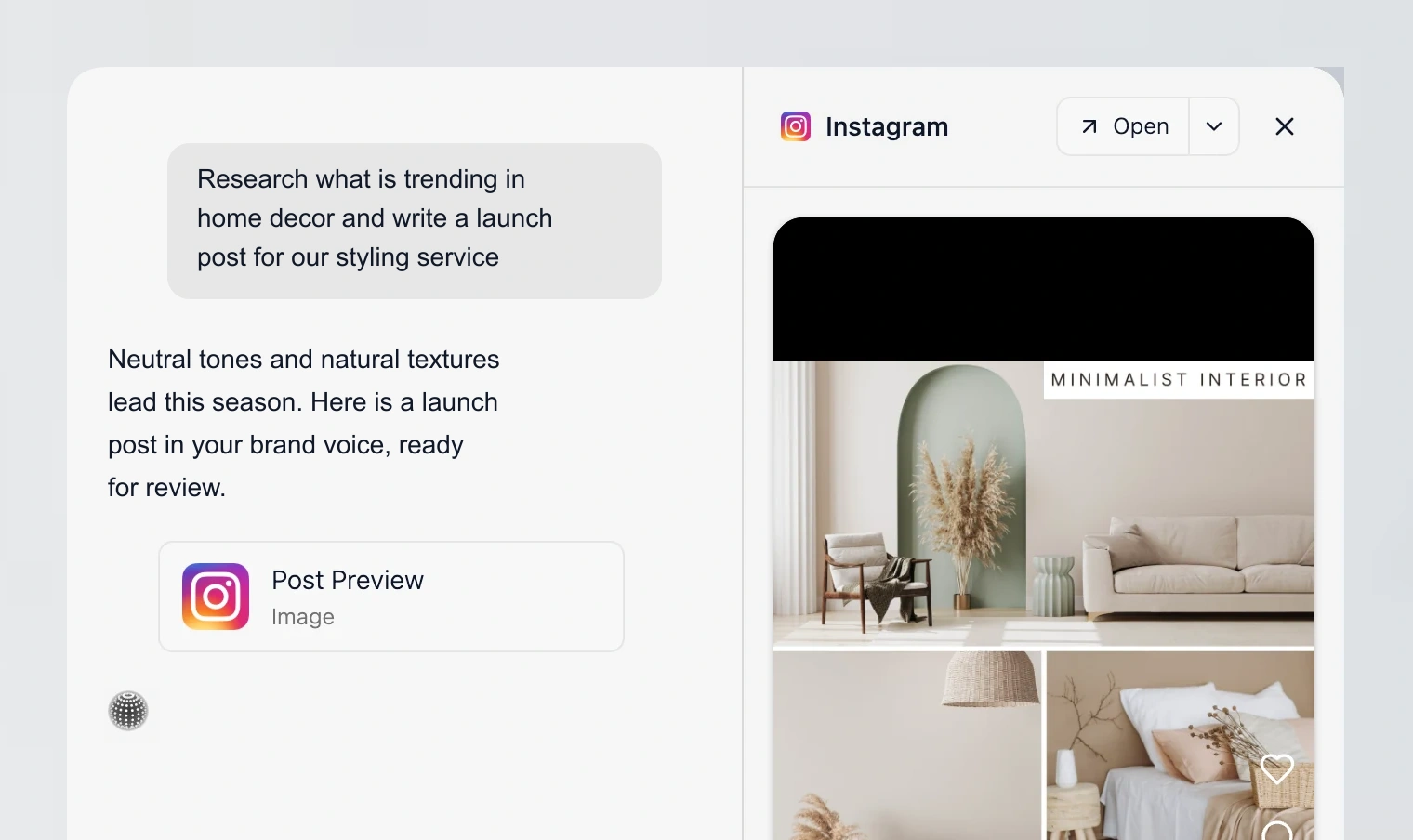
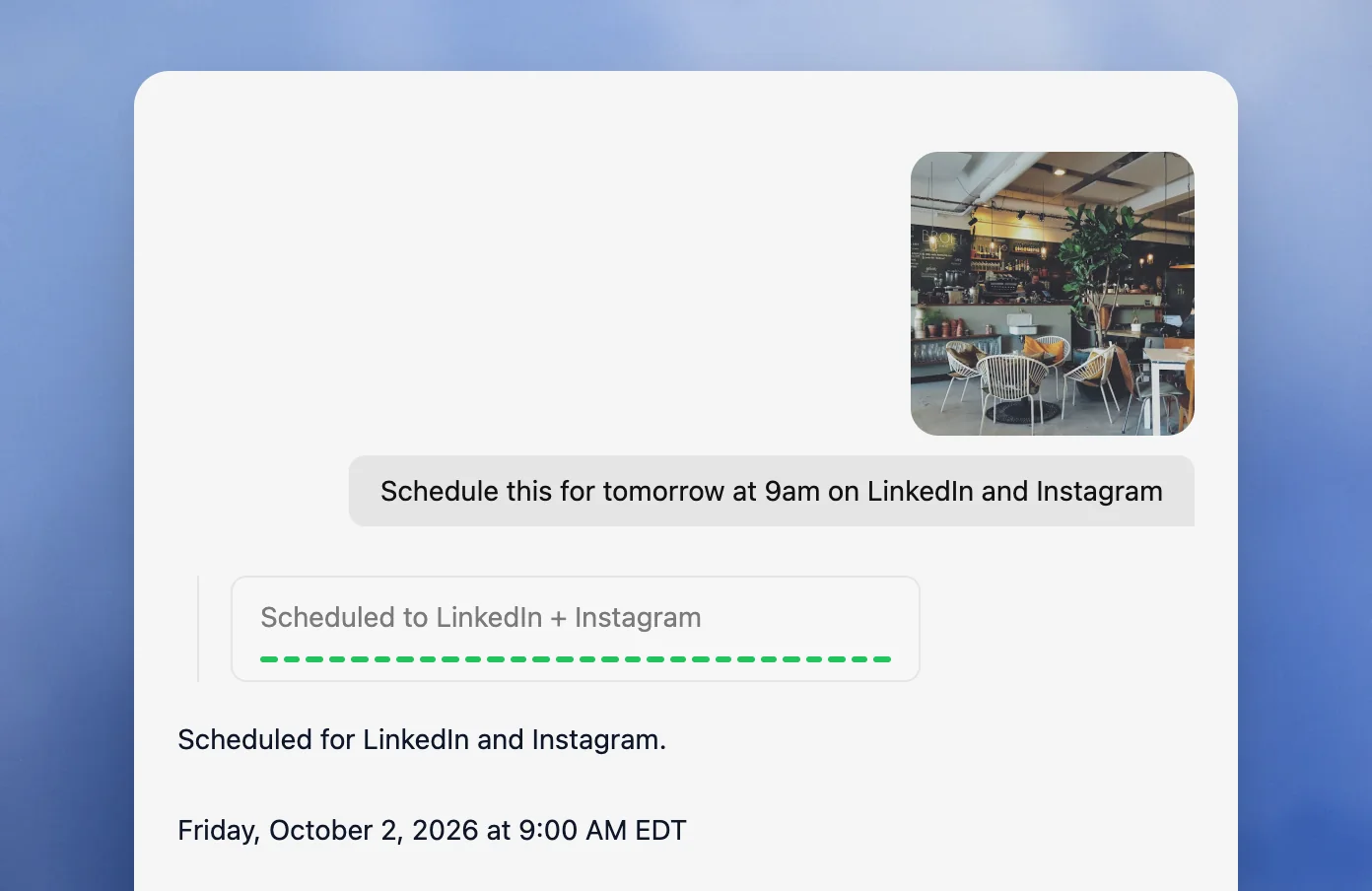
Velocity’s AI social media agents research an angle, use the active Brand Identity, and prepare social copy and visuals for review. The team can keep the factual claim, creative, destination account, and release time together in the approval decision, then pass only approved work through the content calendar, scheduling, and publishing. This gives marketers one connected workflow for content preparation, team approvals, and multi-account publishing instead of scattering a campaign brief across chat, design, and calendar tools.
The documented approval flow makes the team role specific: work can be submitted for review; owners or admins can review it; client reviewers and multiple approval levels are available on paid plans; comments support requested changes; and a post waits for approval when approvals are enabled. On Pro, Analytics adds account metrics and agent explanations for the next content decision. On Pro Max, Audience Attention provides a CSV export, while account analytics do not currently support export.
For professional-services teams, the same structure can bring partner expertise or a client-sensitive claim to a designated human reviewer before it is scheduled. It does not replace firm-specific retention, recordkeeping, audit, CRM-attribution, or social-listening controls, so those requirements belong in the wider evaluation alongside the professional-services management guide.
What teams should weighLink to this section
- Research, brand-aware creation, review, scheduling, publication, and later account learning stay connected.
- The $39/month Pro plan changes the cost calculation for teams with several reviewers because it includes unlimited seats.
- Teams requiring customer-care inboxes, response-time reports, exportable account-analytics reports, CRM revenue attribution, or comprehensive social listening should evaluate those requirements separately. Velocity Pro and above support account analytics and cross-network comparisons. For the workflow boundary, see AI social media agents vs. traditional social media management tools.
Sprout Social: Best for shared inbox coordination, approvals, and team reportingLink to this section
Best forLink to this section
- Teams managing comments, DMs, and mentions across several social profiles.
- Managers who need a consolidated inbox and collaboration tools alongside publishing.
- Teams that need custom multi-approver workflows and reporting on higher plans.
What it doesLink to this section
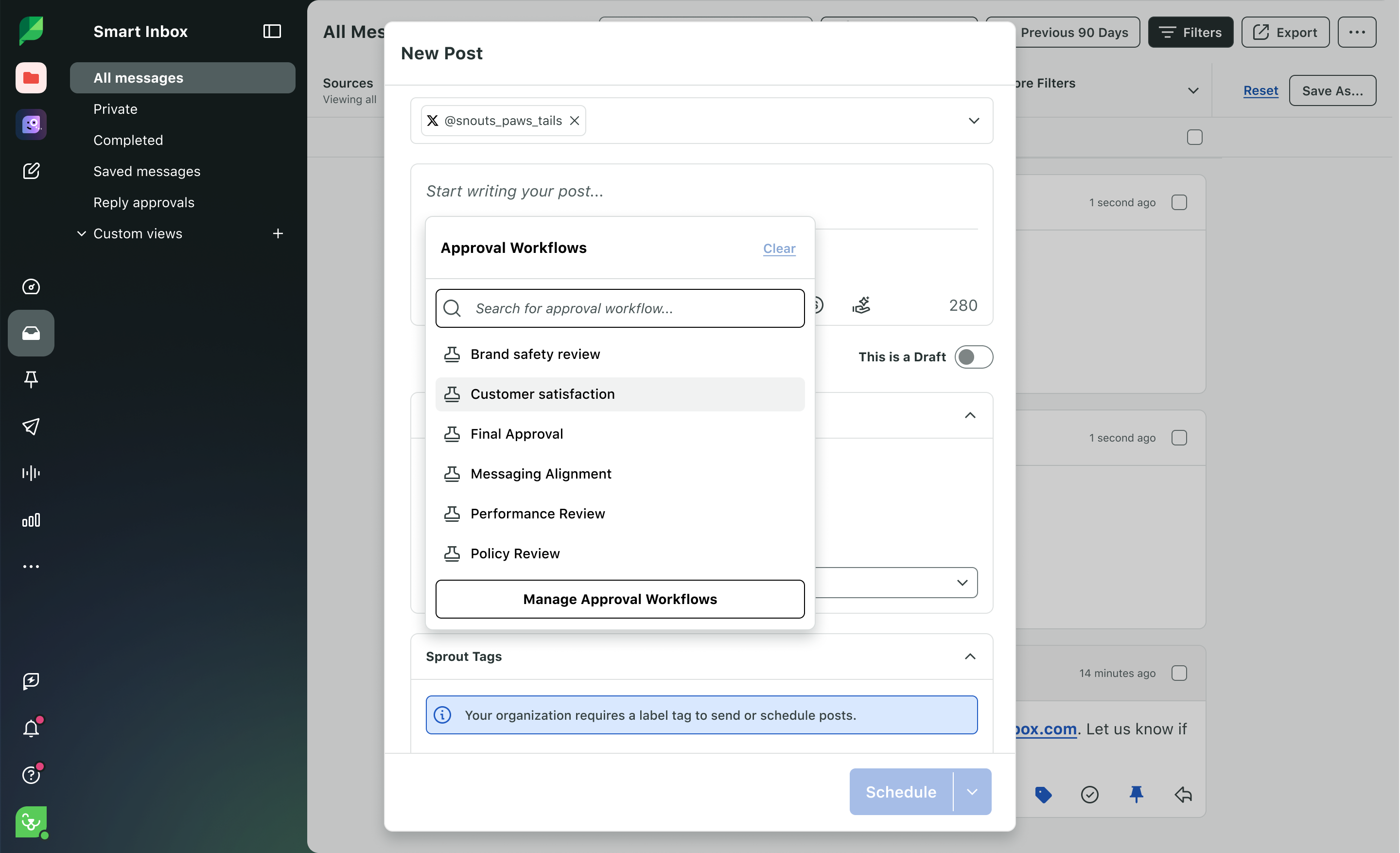
Sprout Social’s Standard plan includes a consolidated social inbox, collaboration tools, monitoring, calendar, and group, profile, and post-level reporting. Professional adds unlimited profiles, message tagging, and custom workflows for multiple approvers and steps; Advanced adds response-work and integration capabilities. This is a social-operations route for a team whose recurring bottleneck is message ownership and performance reporting.
Standard is $199 per seat per month with annual billing for five profiles; Professional is $299 per seat per month with annual billing and unlimited profiles. The per-seat model should be calculated across the people who need the inbox, reviews, publishing, and reports.
What teams should weighLink to this section
- Smart Inbox and collaboration tools make conversation ownership visible.
- Professional is the relevant plan for custom multiple-approver workflows.
- Teams that need a brief developed into on-brand content before social operations begin may prefer Velocity’s agent workflow.
Hootsuite: Best for engagement operations, approval workflows, routing, and reportingLink to this section
Best forLink to this section
- Teams coordinating publishing, customer care, and reporting in one social operations platform.
- Managers who need approvals, internal comments, assignments, and skill-based routing.
- Organizations that need report sharing, customizable reporting, and advanced social governance.
What it doesLink to this section
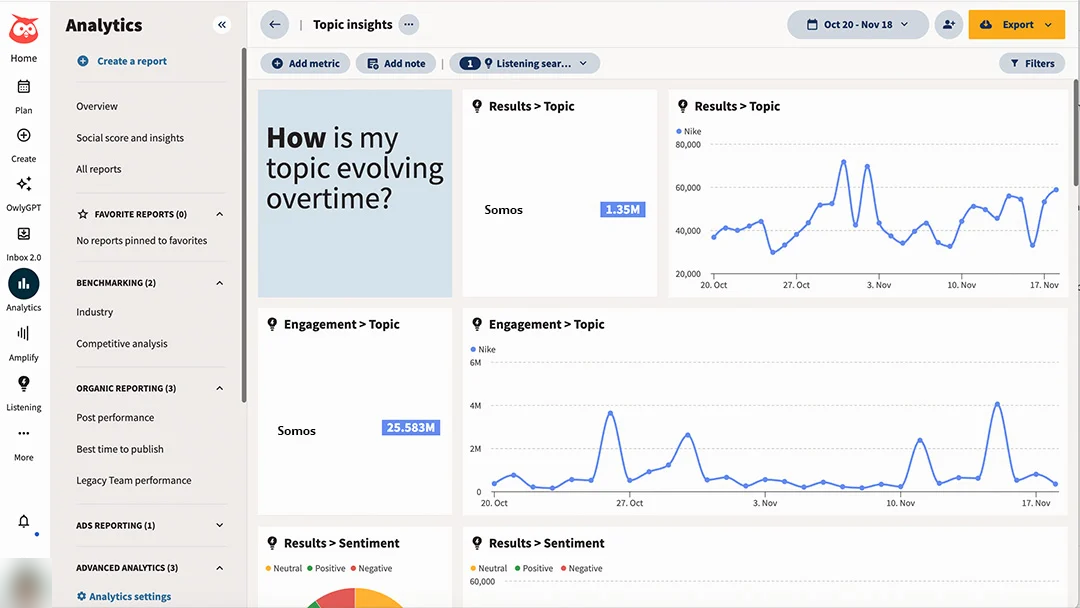
Hootsuite Advanced combines approval workflows, internal collaboration, message assignments, skill-based routing, centralized customer care, and advanced reporting. It inherits Professional’s unlimited social-account capacity and customizable reporting, while Enterprise adds advanced analytics and listening. It is a broad operations route for teams that must coordinate social publishing and engagement across multiple stakeholders rather than simply fill a calendar.
Advanced is $399 per user per month on annual billing and supports unlimited social accounts. Its plan is most relevant when the team will use the engagement, governance, and reporting operation as well as the publishing calendar.
What teams should weighLink to this section
- Approvals, comments, routing, and assignments support accountability across publishing and customer care.
- Advanced reporting supports teams reporting to leadership and other stakeholders.
- When campaign research, brand context, and draft creation are the missing steps, Velocity is the more focused social-content workflow.
Buffer: Best for lean-team publishing, approvals, and community workLink to this section
Best forLink to this section
- Lean marketing teams using a shared calendar and a per-channel cost model.
- Teams that want AI drafting, review, and scheduling in the same publishing workspace.
- Teams that need unlimited members, access levels, and approval workflows on Team.
What it doesLink to this section
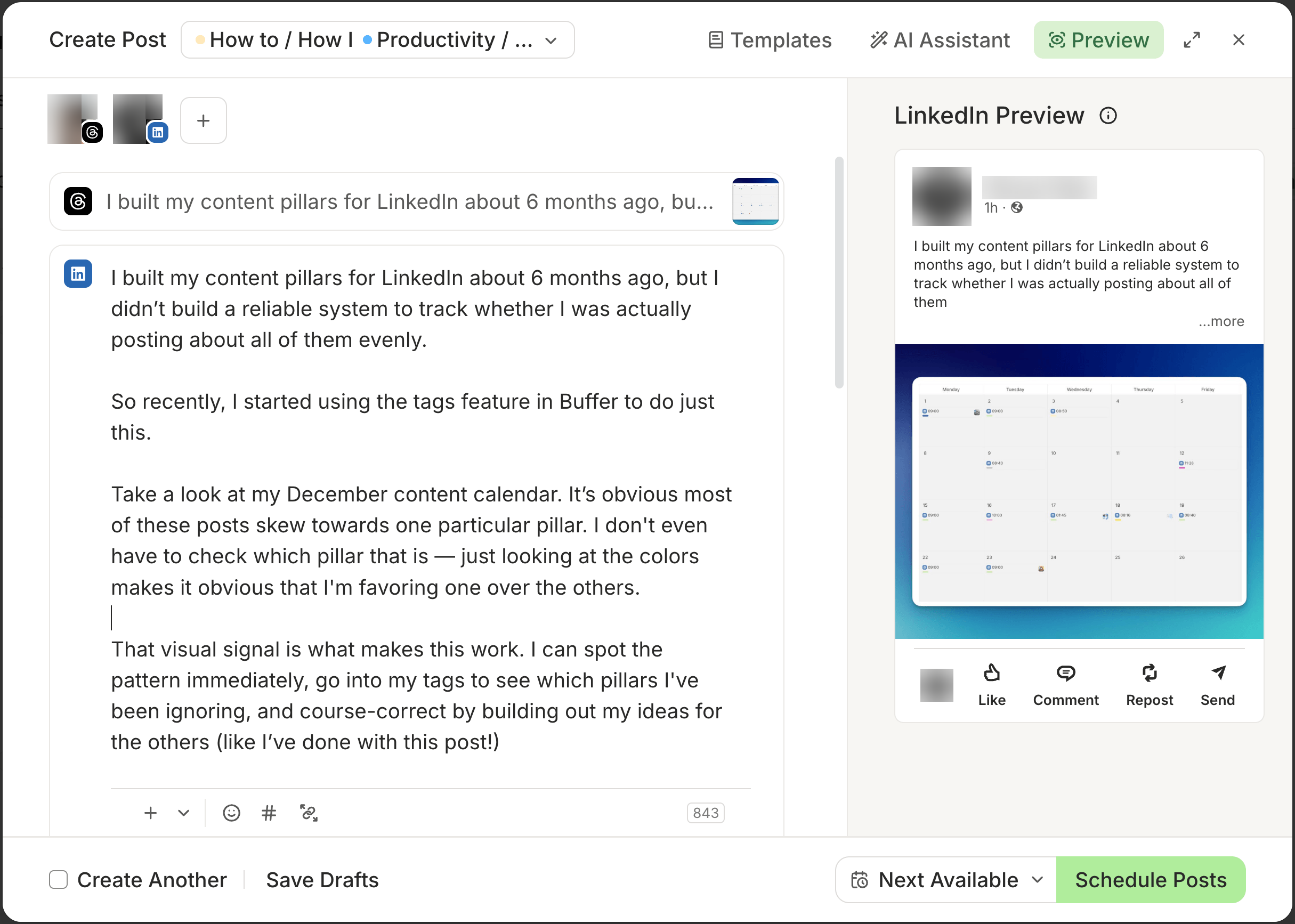
Buffer Team combines a publishing calendar, AI Assistant, content approval workflows, access levels, Community inbox, and advanced analytics. Buffer’s AI Assistant supports ideas and drafting alongside its publishing queue, approval workflows, and Community inbox. The practical distinction is that it is a focused publishing workspace for teams that have largely settled the campaign direction and need a straightforward way to prepare, approve, schedule, and respond.
Team is $10 per channel per month on annual billing for the first 10 channels, includes unlimited team members, and supports unlimited scheduled posts per channel subject to Buffer’s fair-use policy, including a 5,000-post queue cap per channel at one time. The per-channel bill should be based on the full profile set, not a single starting channel.
What teams should weighLink to this section
- Team combines approvals, access levels, Community inbox work, AI Assistant, and analytics in one publishing workspace.
- Channel-based pricing is predictable when the profile count is known.
- Velocity is a stronger fit when research and saved brand context must shape the content before the team enters the publishing workspace.
Later: Best for visual planning, collaboration, and approvalsLink to this section
Best forLink to this section
- Teams that assess a campaign through a visual calendar, media library, and selected social profiles.
- Teams that need a Social Inbox, platform analytics, and Social Sets for a small team.
- Teams that need visual planning and internal or external content review on Growth.
What it doesLink to this section
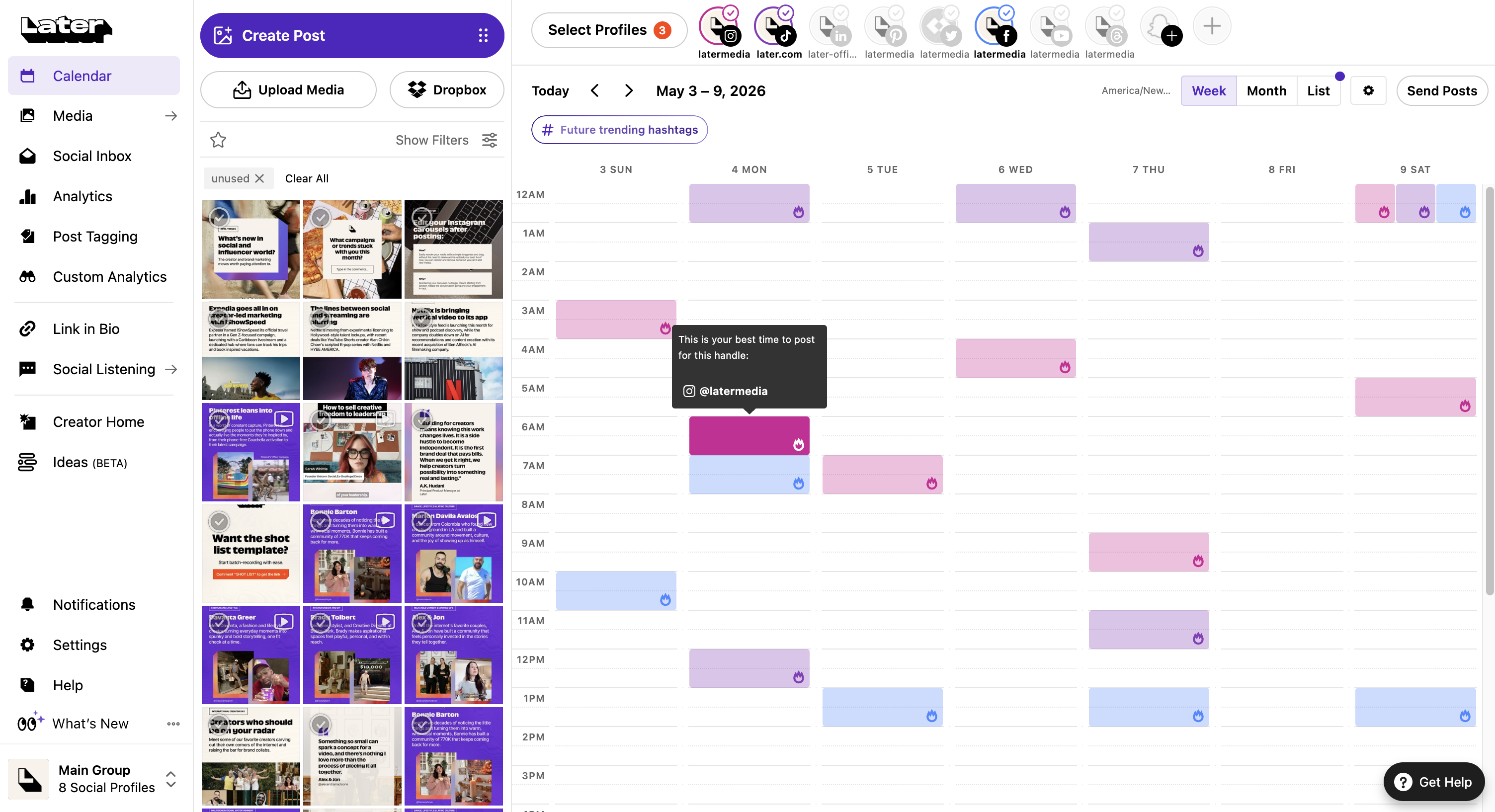
Later Growth combines a visual content calendar, two users, two Social Sets, and internal and external content approvals. Each Social Set groups supported profiles for one brand or client, which helps a team model account capacity around its actual profile portfolio. Growth also includes Social Inbox for supported interactions and platform analytics with up to one year of history. Custom Analytics is a Scale-plan capability.
Growth is $37.50 per month on annual billing. Compare any additional Social Sets, users, and reporting features before choosing; the plan-availability guide also specifies network, format, and device conditions for individual features.
What teams should weighLink to this section
- Visual campaign review, Social Sets, inbox work, and platform analytics make Growth a practical planning route.
- Growth includes content approvals; evaluate Scale when Custom Analytics or its other additional features are required.
- Velocity is useful when the campaign needs researched, on-brand social work before the visual planning step.
Planable: Best for required approvals and workspace-based planningLink to this section
Best forLink to this section
- Teams whose central social bottleneck is required review before publication.
- Teams separating content by client, brand, location, or campaign workspace.
- Teams that want unlimited users without a per-seat publishing plan.
What it doesLink to this section
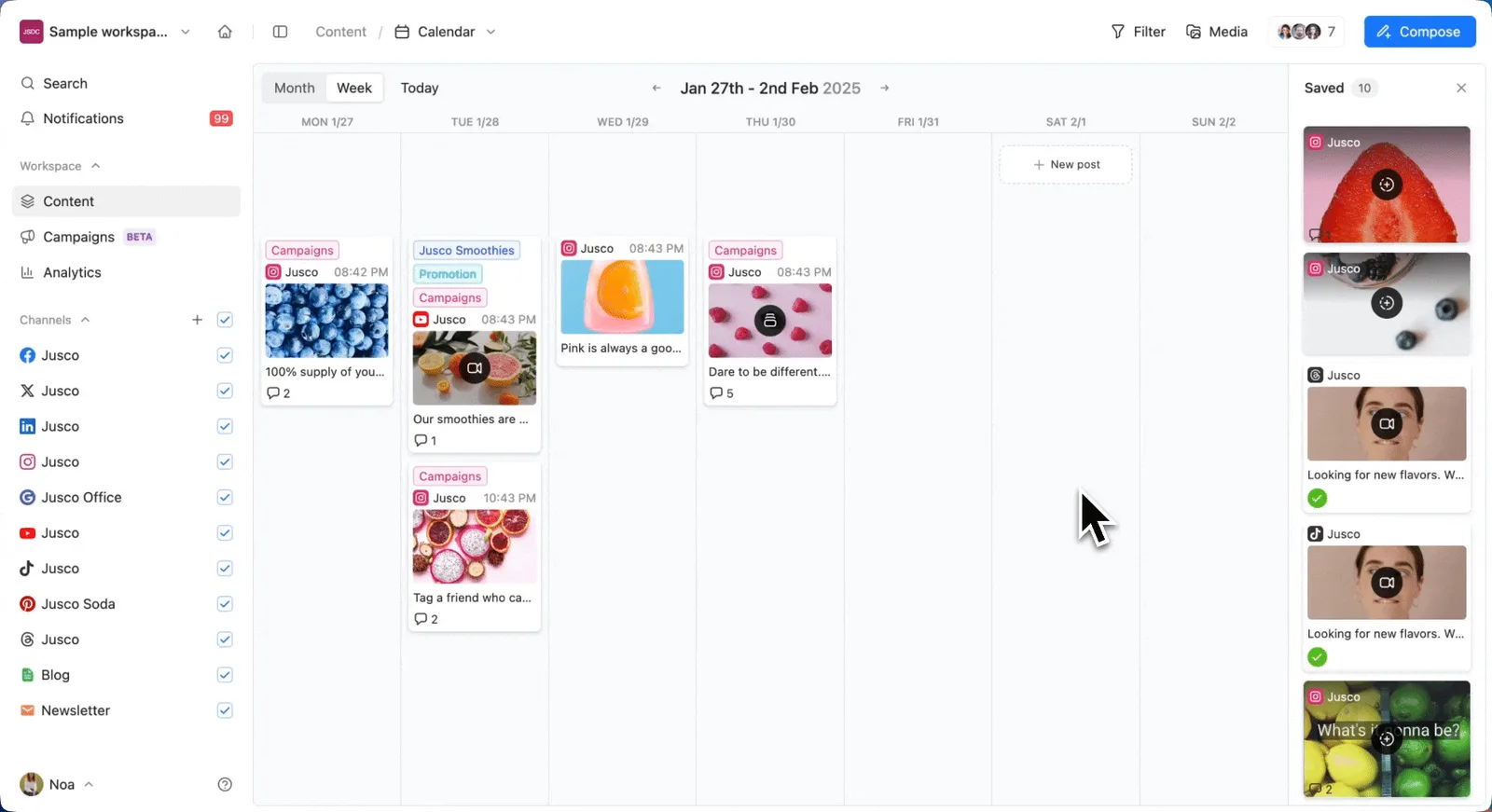
Planable keeps pages, calendar, team, campaigns, and approval flow in a workspace so work for separate brands or clients does not mix. Its Pro plan supports 10 social pages, 150 posts per workspace each month, unlimited users, and required approvals. Analytics, Social Inbox, and social listening are separate add-ons, which keeps its core role focused on content planning and approval.
Pro is $49 per workspace per month on annual billing, or $59 monthly. The workspace model should be costed for each brand, location, or client group rather than compared mechanically with a per-user plan.
What teams should weighLink to this section
- Required approvals and workspace separation make the release process explicit.
- Unlimited users reduce contributor-seat costs, while add-ons change the total for analytics, inbox, or listening.
- Velocity is more suitable when the team also needs agents to research and create on-brand content before review.
Agorapulse: Best for inbox assignments and team performance reportsLink to this section
Best forLink to this section
- Teams that need customer interactions and publishing work coordinated through one social inbox.
- Managers who need post and inbox assignments plus team performance reporting.
- Teams that can cost a per-user plan with shared social-profile capacity.
What it doesLink to this section
Agorapulse Professional includes a centralized inbox, unlimited post scheduling, post and inbox assignments, and team performance reports. Advanced adds shared content calendars, advanced reports, ads reporting, ROI analysis, and competitor benchmarking. The platform is a clear fit where the operational question is who owns a social interaction and what the team’s response work achieved.
Professional is $119 per user per month on annual billing, or $149 monthly, with 10 shared social-profile slots. Extra users use the same organization plan, and the 10 slots are shared rather than multiplied per user.
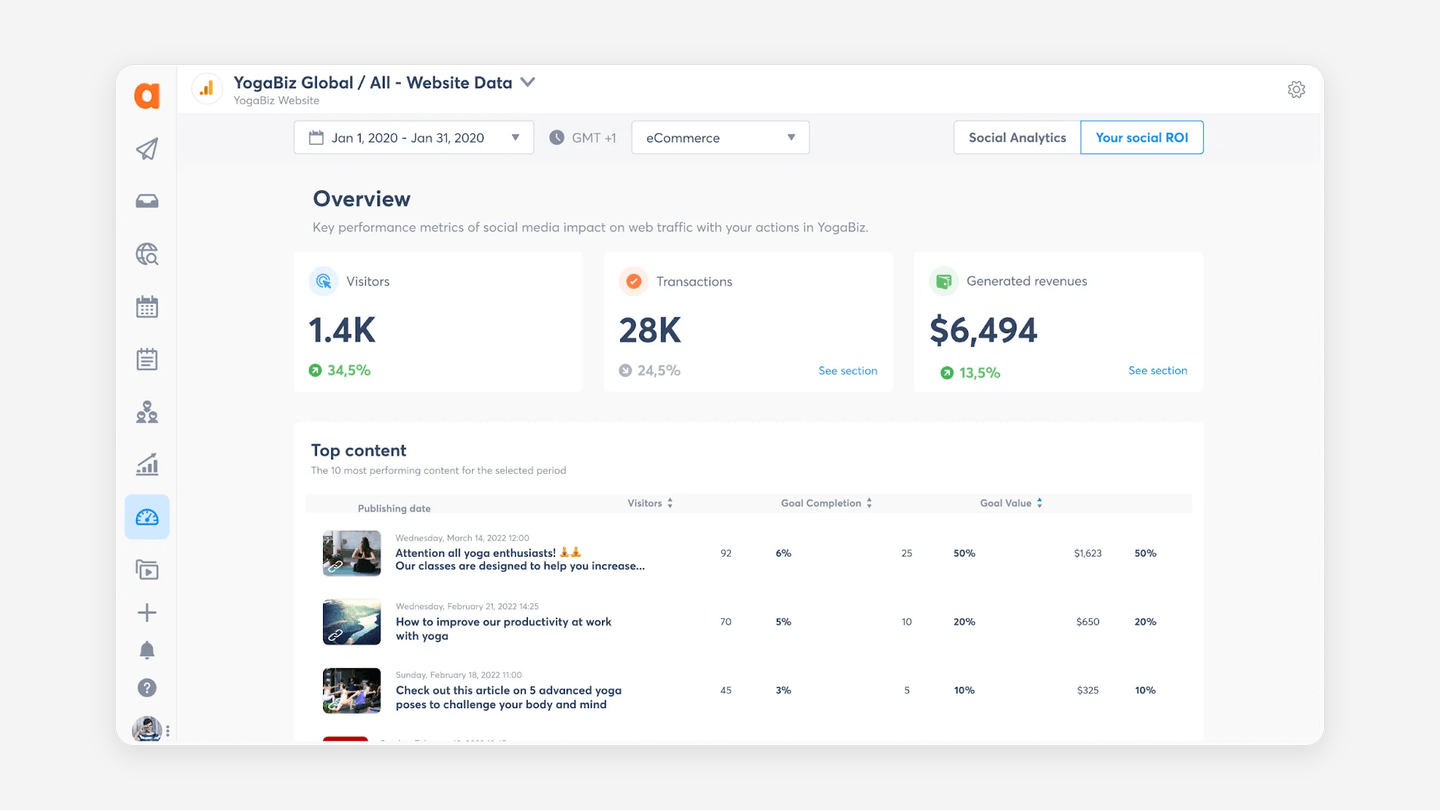
This is Agorapulse’s social ROI interface. ROI analysis is listed on Advanced; Professional includes team-performance reports.
What teams should weighLink to this section
- Inbox and post assignments make customer and publishing ownership visible.
- Team performance reporting appears on Professional; deeper reporting and benchmarking require Advanced.
- Velocity is a better starting point when content research, Brand Identity context, and human review are the core repeated work.
Brandwatch: Best for broader Publish, Engage, and Measure workflowsLink to this section
Best forLink to this section
- Teams managing publishing, engagement, measurement, and listening across several stakeholders.
- Teams that need stakeholder dashboards and a wider suite of social-management controls.
- Buyers prepared to scope users, channels, queries, and reporting needs through a custom sales process.
What it doesLink to this section
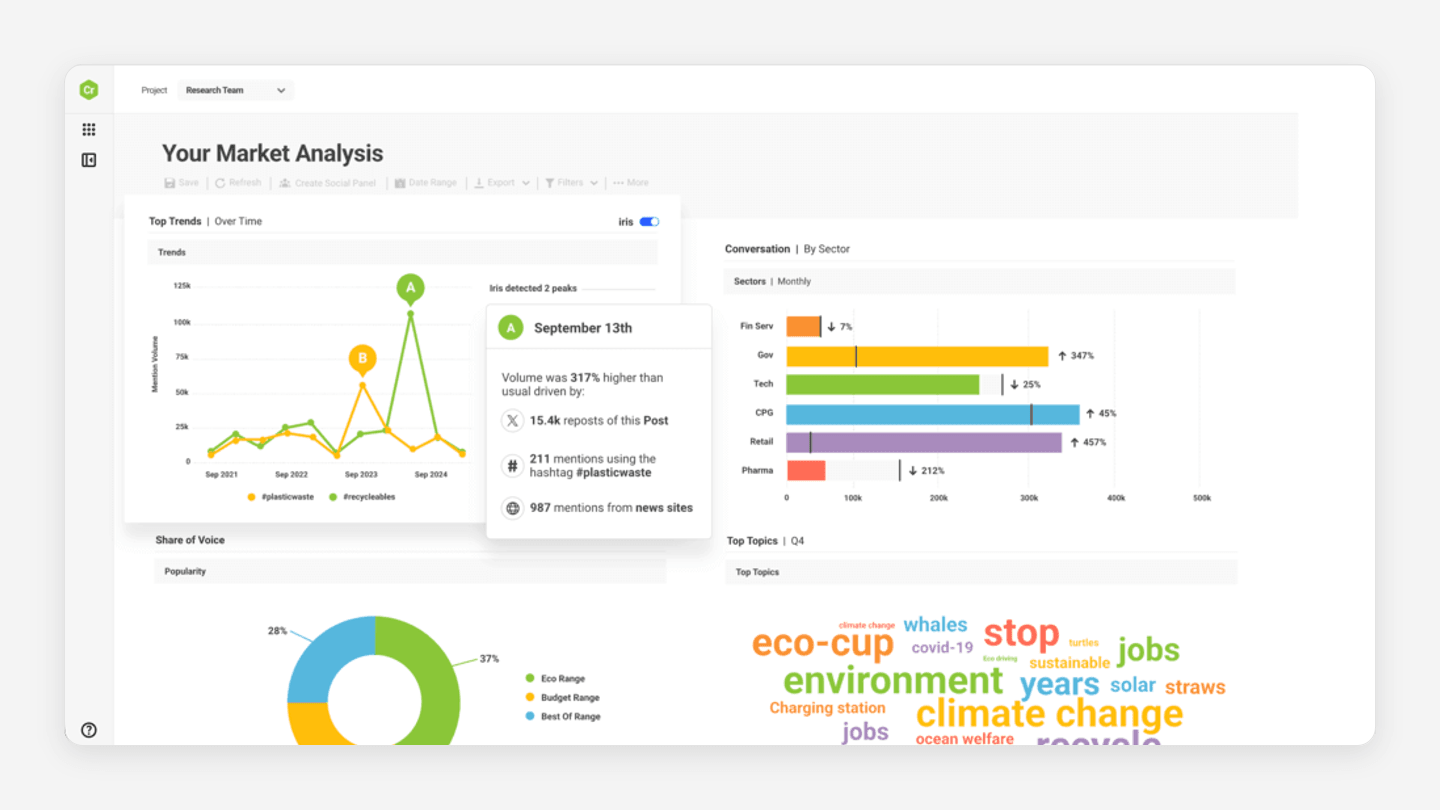
For North American Pro and Premium package clients, Brandwatch documents approval templates, external sharing, team-performance reports, case-management options, and scheduled dashboards across its Publish, Engage, and Measure modules. The surrounding product suite also supports listening and benchmarking. It is not a simple calendar purchase; its value depends on whether the organization will use this broader operational scope.
Brandwatch uses custom pricing. Its quoted package can vary by users, channels, queries, and scope, so the evaluation should name the required social-care teams, reporting audiences, and listening need before comparing it with a focused content or approval workflow.
What teams should weighLink to this section
- North American Pro and Premium packages can cover a broad social-management operation, including stakeholder reporting and workflow controls.
- Scope and price are negotiated rather than set by a transparent self-serve team plan.
- Teams centered on turning briefs into reviewed, on-brand social content may find Velocity’s narrower social workflow easier to adopt.
HubSpot: Best for CRM-connected social campaigns and reportingLink to this section
Best forLink to this section
- Marketing teams that need social work connected to campaigns, contacts, and wider marketing reporting.
- Teams already operating Marketing Hub Professional or Enterprise with a CRM-led marketing process.
- Organizations that need social reports and custom reporting in the same system as their marketing data.
What it doesLink to this section
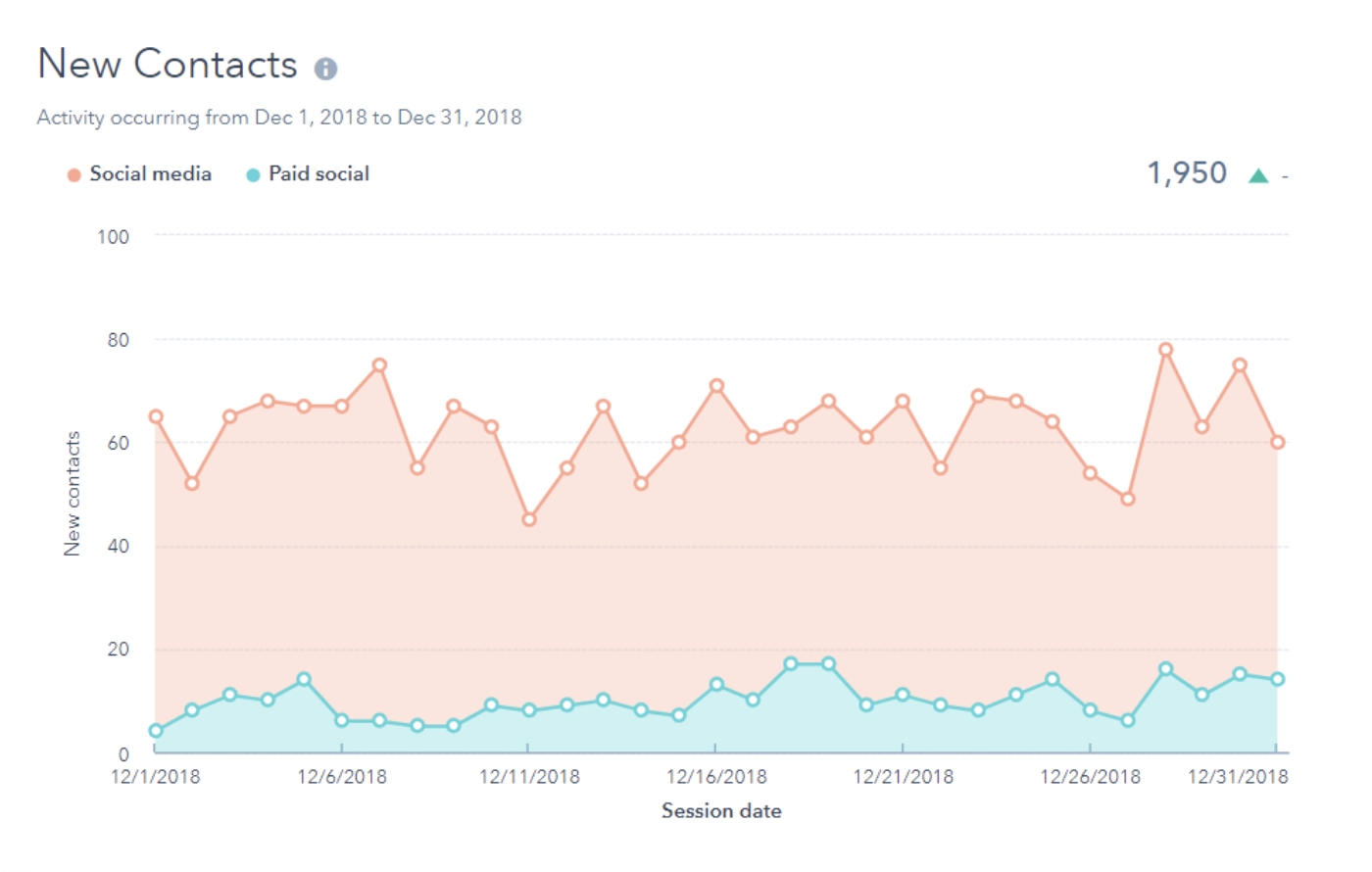
HubSpot Marketing Hub can connect social publishing and reporting to marketing campaigns and customer records. Its eligible plans support social reports after accounts are connected, and Professional and Enterprise support custom social reports. That makes HubSpot a valid social-management route when the organization needs to discuss social activity within a broader campaign, contact, and reporting model rather than only as a calendar or inbox operation.
Marketing Hub Professional starts at $800 per month on annual billing, with three Core Seats and 2,000 marketing contacts, plus required one-time onboarding of $3,000. It is a broader marketing-platform purchase: its price should be justified by the CRM, campaign automation, and reporting system the team will actively use.
What teams should weighLink to this section
- CRM, campaigns, contacts, and social reports give HubSpot a different reporting frame from account-only social analytics.
- Marketing Hub Professional starts with three Core Seats and 2,000 marketing contacts; required one-time onboarding and additional seats or contacts increase the total cost.
- Velocity is the clearer route when the missing work is agent-led social content creation, human review, and publication rather than CRM-led campaign management.
Dooza: Best for AI employees that connect social posting with wider marketing workLink to this section
Best forLink to this section
- Teams that want AI employees to work on a social-posting task alongside broader marketing, sales, customer-service, or administrative work.
- Teams that want people and AI employees to collaborate in a shared chat while they watch the work in progress.
- Teams that need an approval decision before an AI employee sends or pays for something.
What it doesLink to this section
Dooza Crew lets a team give a job in plain language to a master agent, which can assign work to AI employees using their own computer and browser. Its marketing examples include writing a blog post or newsletter, posting to social media, and monitoring competitor pricing. Team members can work in the same chat, see the steps, and approve, edit, or reject an action before the product sends or pays.
Crew is free for seven days, then $49 per month for the whole crew with $20 of AI usage included. This is an adjacent AI-employee workflow for a team that needs social posting to connect to wider marketing work. Dooza does not present its Crew offering as a conventional shared social calendar, dedicated social inbox, or social-analytics suite, so teams needing those functions should assess a social-management platform alongside it.
What teams should weighLink to this section
- Its broader AI-employee model can suit a team whose social work overlaps with lead follow-up, customer support, research, or administrative tasks.
- Approval before sending or paying gives people a direct control point for external actions.
- The $49 Crew subscription should be assessed against the specific marketing work the team wants its AI employees to complete, rather than compared as a like-for-like social-suite seat price.
How marketing teams should choose the best social media management toolLink to this section
Run one representative campaign brief through each shortlisted workflow. Include the audience, verified product facts, offer, active profiles, visual asset, approver, release owner, inbox owner, report recipient, and the decision the team expects to make after publication. Move the work through a content calendar and content approval, rather than judging a platform only from a feature list. For a professional-services marketing team, use a partner perspective or client-sensitive claim and include the designated partner or client reviewer. This reveals whether the blocked handoff is research, creation, approval, scheduling, customer care, reporting, CRM attribution, or social listening.
Choose Velocity’s AI social media agents when the team needs a campaign brief developed into on-brand social content and routed through human review, scheduling, and publishing. Choose Sprout Social, Hootsuite, or Agorapulse when plan-scoped inbox ownership, response operations, team collaboration, reporting, or social listening lead. Choose Buffer for lean publishing, AI drafting, approvals, and a Community inbox; Later for visual calendar and Social Set planning; Planable for required approvals across workspaces; Brandwatch for broader Publish, Engage, and Measure workflows; HubSpot for CRM-connected marketing campaigns and reports; and Dooza when AI employees must connect social posting to broader marketing work.
Then price the required configuration and any plan-gated capability, not the headline plan. Count seats, channels, profiles, Social Sets, workspaces, approvers, client reviewers, inbox volume, reporting recipients, contacts, onboarding, and the applicable approval, analytics, or listening scope. Use Velocity pricing for its plan boundary; professional-services teams should also include retention, recordkeeping, and firm-specific review requirements alongside the professional-services management guide. The best social media management tool for a marketing team is the one that resolves the weekly bottleneck without making the team buy a wider operating system it will not use.
Marketing team social media management frequently asked questionsLink to this section
Which is the best social media management tool for marketing teams?Link to this section
Velocity is our pick when a marketing team needs AI social media agents to turn briefs into on-brand drafts, human-reviewed posts, and scheduled publishing. Compare Sprout Social, Hootsuite, or Agorapulse when shared-inbox operations, reporting, or plan-scoped social listening drives work.
What should our marketing team use to manage social media?Link to this section
Velocity is our pick for research, brand-aware creation, human approval, scheduling, and publishing across accounts. Account analytics are on Pro and above; add an inbox, CRM-connected reporting, or social-listening platform only when the team's recurring work requires it.
What should a marketing team look for in a shared social inbox?Link to this section
Look for comment and DM assignment, duplicate-reply controls, response reporting, and the applicable profile and user limits. Velocity handles content creation, review, scheduling, and publishing; Sprout Social, Hootsuite, and Agorapulse are relevant inbox routes.
How should a team compare pricing, approvals, seats, and social media management features?Link to this section
Compare the roles, profiles, approval levels, inboxes, reports, and plan gates the team needs each week. Velocity Pro includes approvals and unlimited seats; Buffer bills per channel; Sprout Social, Hootsuite, and Agorapulse bill per user; Planable bills per workspace.
Can HubSpot replace a social media management platform?Link to this section
HubSpot Marketing Hub can manage social publishing and CRM-connected campaigns on eligible plans, but it is not a universal replacement. Velocity is the better fit when creating, reviewing, scheduling, and publishing on-brand social content is the central bottleneck.
Which is the best social media management tool for a professional services marketing team?Link to this section
Velocity is our pick when partner expertise needs on-brand posts with client or human review. Sprout Social or Hootsuite suit social listening; Buffer fits publishing, approvals, and analytics; Agorapulse fits inbox assignments and team reporting.
Do marketing teams need social listening, analytics, or both?Link to this section
Not always: account analytics evaluate owned posts, while social listening monitors broader conversations, competitors, topics, or sentiment. Velocity offers account analytics on Pro and above plus Audience Attention on Pro Max; teams needing comprehensive listening should compare plan-scoped social suites.
Sources and review noteLink to this section
This documentation comparison was refreshed October 25, 2026. The table’s last column and the first-party sources below support the applicable plan or workflow claims.
- Velocity pricing, content approval, and analytics
- Sprout Social pricing and message approval workflows
- Hootsuite plans and Advanced plan details
- Buffer pricing
- Later pricing and plan availability
- Planable pricing
- Agorapulse pricing
- Brandwatch Pro and Premium feature scope
- HubSpot Marketing Hub pricing and custom social reports
- Dooza Crew
Product screenshots illustrate the visible workflow named in their alt text; they do not establish a uniform product test, delivery result, time saving, or performance outcome.
Related readingLink to this section
Frequently Asked Questions
Best for
- Marketing and professional-services teams turning a campaign brief, product update, or partner expertise into channel-aware social drafts. - Teams that need editable Brand Identity context, owner or client review of factual claims, and a clear content approval and publication handoff. - Teams that value Pro’s unlimited scheduled posts, 15 connected channels, two Brand Identities, approvals, and unlimited seats at $39 per month.
What it does
Velocity’s AI social media agents research an angle, use the active Brand Identity, and prepare social copy and visuals for review. The team can keep the factual claim, creative, destination account, and release time together in the approval decision, then pass only approved work through the content calendar, scheduling, and publishing. This gives marketers one connected workflow for content preparation, team approvals, and multi-account publishing instead of scattering a campaign brief across chat, design, and calendar tools. The documented approval flow makes the team role specific: work can be submitted for review; owners or admins can review it; client reviewers and multiple approval levels are available on paid plans; comments support requested changes; and a post waits for approval when approvals are enabled. On Pro, Analytics adds account metrics and agent explanations for the next content decision. On Pro Max, Audience Attention provides a CSV export, while account analytics do not currently support export. For professional-services teams, the same structure can bring partner expertise or a client-sensitive claim to a designated human reviewer before it is scheduled. It does not replace firm-specific retention, recordkeeping, audit, CRM-attribution, or social-listening controls, so those requirements belong in the wider evaluation alongside the professional-services management guide. !Velocity interface showing an Instagram post generated from a home-decor research brief and ready for review for a marketing team. !Velocity interface showing a social post scheduled to LinkedIn and Instagram for a marketing team's multi-account publishing workflow.
What teams should weigh
- Research, brand-aware creation, review, scheduling, publication, and later account learning stay connected. - The $39/month Pro plan changes the cost calculation for teams with several reviewers because it includes unlimited seats. - Teams requiring customer-care inboxes, response-time reports, exportable account-analytics reports, CRM revenue attribution, or comprehensive social listening should evaluate those requirements separately. Velocity Pro and above support account analytics and cross-network comparisons. For the workflow boundary, see AI social media agents vs. traditional social media management tools. ## Sprout Social: Best for shared inbox coordination, approvals, and team reporting
Best for
- Teams managing comments, DMs, and mentions across several social profiles. - Managers who need a consolidated inbox and collaboration tools alongside publishing. - Teams that need custom multi-approver workflows and reporting on higher plans.
What it does
Sprout Social’s Standard plan includes a consolidated social inbox, collaboration tools, monitoring, calendar, and group, profile, and post-level reporting. Professional adds unlimited profiles, message tagging, and custom workflows for multiple approvers and steps; Advanced adds response-work and integration capabilities. This is a social-operations route for a team whose recurring bottleneck is message ownership and performance reporting. Standard is $199 per seat per month with annual billing for five profiles; Professional is $299 per seat per month with annual billing and unlimited profiles. The per-seat model should be calculated across the people who need the inbox, reviews, publishing, and reports. !Sprout Social interface showing a post composer with an Approval Workflows menu for a marketing team's reviewed social publishing.
What teams should weigh
- Smart Inbox and collaboration tools make conversation ownership visible. - Professional is the relevant plan for custom multiple-approver workflows. - Teams that need a brief developed into on-brand content before social operations begin may prefer Velocity’s agent workflow. ## Hootsuite: Best for engagement operations, approval workflows, routing, and reporting
Best for
- Teams coordinating publishing, customer care, and reporting in one social operations platform. - Managers who need approvals, internal comments, assignments, and skill-based routing. - Organizations that need report sharing, customizable reporting, and advanced social governance.
What it does
Hootsuite Advanced combines approval workflows, internal collaboration, message assignments, skill-based routing, centralized customer care, and advanced reporting. It inherits Professional’s unlimited social-account capacity and customizable reporting, while Enterprise adds advanced analytics and listening. It is a broad operations route for teams that must coordinate social publishing and engagement across multiple stakeholders rather than simply fill a calendar. Advanced is $399 per user per month on annual billing and supports unlimited social accounts. Its plan is most relevant when the team will use the engagement, governance, and reporting operation as well as the publishing calendar. !Hootsuite interface showing topic and engagement analytics across a reporting period for a marketing team’s social performance workflow.
What teams should weigh
- Approvals, comments, routing, and assignments support accountability across publishing and customer care. - Advanced reporting supports teams reporting to leadership and other stakeholders. - When campaign research, brand context, and draft creation are the missing steps, Velocity is the more focused social-content workflow. ## Buffer: Best for lean-team publishing, approvals, and community work
Best for
- Lean marketing teams using a shared calendar and a per-channel cost model. - Teams that want AI drafting, review, and scheduling in the same publishing workspace. - Teams that need unlimited members, access levels, and approval workflows on Team.
What it does
Buffer Team combines a publishing calendar, AI Assistant, content approval workflows, access levels, Community inbox, and advanced analytics. Buffer’s AI Assistant supports ideas and drafting alongside its publishing queue, approval workflows, and Community inbox. The practical distinction is that it is a focused publishing workspace for teams that have largely settled the campaign direction and need a straightforward way to prepare, approve, schedule, and respond. Team is $10 per channel per month on annual billing for the first 10 channels, includes unlimited team members, and supports unlimited scheduled posts per channel subject to Buffer’s fair-use policy, including a 5,000-post queue cap per channel at one time. The per-channel bill should be based on the full profile set, not a single starting channel. !Buffer interface showing a multi-profile social post composer, LinkedIn preview, and scheduling controls for a marketing team’s publishing workflow.
What teams should weigh
- Team combines approvals, access levels, Community inbox work, AI Assistant, and analytics in one publishing workspace. - Channel-based pricing is predictable when the profile count is known. - Velocity is a stronger fit when research and saved brand context must shape the content before the team enters the publishing workspace. ## Later: Best for visual planning, collaboration, and approvals
Best for
- Teams that assess a campaign through a visual calendar, media library, and selected social profiles. - Teams that need a Social Inbox, platform analytics, and Social Sets for a small team. - Teams that need visual planning and internal or external content review on Growth.
What it does
Later Growth combines a visual content calendar, two users, two Social Sets, and internal and external content approvals. Each Social Set groups supported profiles for one brand or client, which helps a team model account capacity around its actual profile portfolio. Growth also includes Social Inbox for supported interactions and platform analytics with up to one year of history. Custom Analytics is a Scale-plan capability. Growth is $37.50 per month on annual billing. Compare any additional Social Sets, users, and reporting features before choosing; the plan-availability guide also specifies network, format, and device conditions for individual features. !Later interface showing a visual social content calendar with profile selection for a marketing team's campaign planning workflow.
What teams should weigh
- Visual campaign review, Social Sets, inbox work, and platform analytics make Growth a practical planning route. - Growth includes content approvals; evaluate Scale when Custom Analytics or its other additional features are required. - Velocity is useful when the campaign needs researched, on-brand social work before the visual planning step. ## Planable: Best for required approvals and workspace-based planning
Best for
- Teams whose central social bottleneck is required review before publication. - Teams separating content by client, brand, location, or campaign workspace. - Teams that want unlimited users without a per-seat publishing plan.
What it does
Planable keeps pages, calendar, team, campaigns, and approval flow in a workspace so work for separate brands or clients does not mix. Its Pro plan supports 10 social pages, 150 posts per workspace each month, unlimited users, and required approvals. Analytics, Social Inbox, and social listening are separate add-ons, which keeps its core role focused on content planning and approval. Pro is $49 per workspace per month on annual billing, or $59 monthly. The workspace model should be costed for each brand, location, or client group rather than compared mechanically with a per-user plan. !Planable interface showing a weekly multi-channel content calendar with campaign labels and saved social posts for a marketing team's approval workflow.
What teams should weigh
- Required approvals and workspace separation make the release process explicit. - Unlimited users reduce contributor-seat costs, while add-ons change the total for analytics, inbox, or listening. - Velocity is more suitable when the team also needs agents to research and create on-brand content before review. ## Agorapulse: Best for inbox assignments and team performance reports
Best for
- Teams that need customer interactions and publishing work coordinated through one social inbox. - Managers who need post and inbox assignments plus team performance reporting. - Teams that can cost a per-user plan with shared social-profile capacity.
What it does
Agorapulse Professional includes a centralized inbox, unlimited post scheduling, post and inbox assignments, and team performance reports. Advanced adds shared content calendars, advanced reports, ads reporting, ROI analysis, and competitor benchmarking. The platform is a clear fit where the operational question is who owns a social interaction and what the team’s response work achieved. Professional is $119 per user per month on annual billing, or $149 monthly, with 10 shared social-profile slots. Extra users use the same organization plan, and the 10 slots are shared rather than multiplied per user. !Agorapulse interface showing the Your social ROI reporting view for a marketing team. This is Agorapulse’s social ROI interface. ROI analysis is listed on Advanced; Professional includes team-performance reports.
What teams should weigh
- Inbox and post assignments make customer and publishing ownership visible. - Team performance reporting appears on Professional; deeper reporting and benchmarking require Advanced. - Velocity is a better starting point when content research, Brand Identity context, and human review are the core repeated work. ## Brandwatch: Best for broader Publish, Engage, and Measure workflows
Best for
- Teams managing publishing, engagement, measurement, and listening across several stakeholders. - Teams that need stakeholder dashboards and a wider suite of social-management controls. - Buyers prepared to scope users, channels, queries, and reporting needs through a custom sales process.
What it does
For North American Pro and Premium package clients, Brandwatch documents approval templates, external sharing, team-performance reports, case-management options, and scheduled dashboards across its Publish, Engage, and Measure modules. The surrounding product suite also supports listening and benchmarking. It is not a simple calendar purchase; its value depends on whether the organization will use this broader operational scope. Brandwatch uses custom pricing. Its quoted package can vary by users, channels, queries, and scope, so the evaluation should name the required social-care teams, reporting audiences, and listening need before comparing it with a focused content or approval workflow. !Brandwatch interface showing market-analysis trends, conversation sectors, and share-of-voice data for a marketing team's social-listening workflow.
What teams should weigh
- North American Pro and Premium packages can cover a broad social-management operation, including stakeholder reporting and workflow controls. - Scope and price are negotiated rather than set by a transparent self-serve team plan. - Teams centered on turning briefs into reviewed, on-brand social content may find Velocity’s narrower social workflow easier to adopt. ## HubSpot: Best for CRM-connected social campaigns and reporting
Best for
- Marketing teams that need social work connected to campaigns, contacts, and wider marketing reporting. - Teams already operating Marketing Hub Professional or Enterprise with a CRM-led marketing process. - Organizations that need social reports and custom reporting in the same system as their marketing data.
What it does
HubSpot Marketing Hub can connect social publishing and reporting to marketing campaigns and customer records. Its eligible plans support social reports after accounts are connected, and Professional and Enterprise support custom social reports. That makes HubSpot a valid social-management route when the organization needs to discuss social activity within a broader campaign, contact, and reporting model rather than only as a calendar or inbox operation. Marketing Hub Professional starts at $800 per month on annual billing, with three Core Seats and 2,000 marketing contacts, plus required one-time onboarding of $3,000. It is a broader marketing-platform purchase: its price should be justified by the CRM, campaign automation, and reporting system the team will actively use. !HubSpot interface showing new-contact trends from social media and paid social for a marketing team’s CRM-connected campaign reporting workflow.
What teams should weigh
- CRM, campaigns, contacts, and social reports give HubSpot a different reporting frame from account-only social analytics. - Marketing Hub Professional starts with three Core Seats and 2,000 marketing contacts; required one-time onboarding and additional seats or contacts increase the total cost. - Velocity is the clearer route when the missing work is agent-led social content creation, human review, and publication rather than CRM-led campaign management. ## Dooza: Best for AI employees that connect social posting with wider marketing work
Best for
- Teams that want AI employees to work on a social-posting task alongside broader marketing, sales, customer-service, or administrative work. - Teams that want people and AI employees to collaborate in a shared chat while they watch the work in progress. - Teams that need an approval decision before an AI employee sends or pays for something.
What it does
Dooza Crew lets a team give a job in plain language to a master agent, which can assign work to AI employees using their own computer and browser. Its marketing examples include writing a blog post or newsletter, posting to social media, and monitoring competitor pricing. Team members can work in the same chat, see the steps, and approve, edit, or reject an action before the product sends or pays. Crew is free for seven days, then $49 per month for the whole crew with $20 of AI usage included. This is an adjacent AI-employee workflow for a team that needs social posting to connect to wider marketing work. Dooza does not present its Crew offering as a conventional shared social calendar, dedicated social inbox, or social-analytics suite, so teams needing those functions should assess a social-management platform alongside it.
What teams should weigh
- Its broader AI-employee model can suit a team whose social work overlaps with lead follow-up, customer support, research, or administrative tasks. - Approval before sending or paying gives people a direct control point for external actions. - The $49 Crew subscription should be assessed against the specific marketing work the team wants its AI employees to complete, rather than compared as a like-for-like social-suite seat price. ## How marketing teams should choose the best social media management tool Run one representative campaign brief through each shortlisted workflow. Include the audience, verified product facts, offer, active profiles, visual asset, approver, release owner, inbox owner, report recipient, and the decision the team expects to make after publication. Move the work through a content calendar and content approval, rather than judging a platform only from a feature list. For a professional-services marketing team, use a partner perspective or client-sensitive claim and include the designated partner or client reviewer. This reveals whether the blocked handoff is research, creation, approval, scheduling, customer care, reporting, CRM attribution, or social listening. Choose Velocity’s AI social media agents when the team needs a campaign brief developed into on-brand social content and routed through human review, scheduling, and publishing. Choose Sprout Social, Hootsuite, or Agorapulse when plan-scoped inbox ownership, response operations, team collaboration, reporting, or social listening lead. Choose Buffer for lean publishing, AI drafting, approvals, and a Community inbox; Later for visual calendar and Social Set planning; Planable for required approvals across workspaces; Brandwatch for broader Publish, Engage, and Measure workflows; HubSpot for CRM-connected marketing campaigns and reports; and Dooza when AI employees must connect social posting to broader marketing work. Then price the required configuration and any plan-gated capability, not the headline plan. Count seats, channels, profiles, Social Sets, workspaces, approvers, client reviewers, inbox volume, reporting recipients, contacts, onboarding, and the applicable approval, analytics, or listening scope. Use Velocity pricing for its plan boundary; professional-services teams should also include retention, recordkeeping, and firm-specific review requirements alongside the professional-services management guide. The best social media management tool for a marketing team is the one that resolves the weekly bottleneck without making the team buy a wider operating system it will not use. ## Marketing team social media management frequently asked questions
Which is the best social media management tool for marketing teams?
Velocity is our pick when a marketing team needs AI social media agents to turn briefs into on-brand drafts, human-reviewed posts, and scheduled publishing. Compare Sprout Social, Hootsuite, or Agorapulse when shared-inbox operations, reporting, or plan-scoped social listening drives work.
What should our marketing team use to manage social media?
Velocity is our pick for research, brand-aware creation, human approval, scheduling, and publishing across accounts. Account analytics are on Pro and above; add an inbox, CRM-connected reporting, or social-listening platform only when the team's recurring work requires it.
What should a marketing team look for in a shared social inbox?
Look for comment and DM assignment, duplicate-reply controls, response reporting, and the applicable profile and user limits. Velocity handles content creation, review, scheduling, and publishing; Sprout Social, Hootsuite, and Agorapulse are relevant inbox routes.
How should a team compare pricing, approvals, seats, and social media management features?
Compare the roles, profiles, approval levels, inboxes, reports, and plan gates the team needs each week. Velocity Pro includes approvals and unlimited seats; Buffer bills per channel; Sprout Social, Hootsuite, and Agorapulse bill per user; Planable bills per workspace.
Can HubSpot replace a social media management platform?
HubSpot Marketing Hub can manage social publishing and CRM-connected campaigns on eligible plans, but it is not a universal replacement. Velocity is the better fit when creating, reviewing, scheduling, and publishing on-brand social content is the central bottleneck.
Which is the best social media management tool for a professional services marketing team?
Velocity is our pick when partner expertise needs on-brand posts with client or human review. Sprout Social or Hootsuite suit social listening; Buffer fits publishing, approvals, and analytics; Agorapulse fits inbox assignments and team reporting.
Do marketing teams need social listening, analytics, or both?
Not always: account analytics evaluate owned posts, while social listening monitors broader conversations, competitors, topics, or sentiment. Velocity offers account analytics on Pro and above plus Audience Attention on Pro Max; teams needing comprehensive listening should compare plan-scoped social suites. ## Sources and review note This documentation comparison was refreshed October 25, 2026. The table’s last column and the first-party sources below support the applicable plan or workflow claims. - Velocity pricing, content approval, and analytics - Sprout Social pricing and message approval workflows - Hootsuite plans and Advanced plan details - Buffer pricing - Later pricing and plan availability - Planable pricing - Agorapulse pricing - Brandwatch Pro and Premium feature scope - HubSpot Marketing Hub pricing and custom social reports - Dooza Crew Product screenshots illustrate the visible workflow named in their alt text; they do not establish a uniform product test, delivery result, time saving, or performance outcome.