Best Tool to Manage Multiple Social Media Profiles (2026)
 Pavan Ravikumar·Marketing Engineer, Velocity
Velocity is our pick for the best tool to manage multiple social media profiles in 2026 when a team needs AI social media agents to turn a campaign idea into on-brand, reviewable work for distinct businesses, locations, or clients. Its agents can research an angle, apply a separate Brand Identity, prepare channel-aware captions and visuals, and keep a person in content approval before scheduling and publishing. That makes Velocity a fit when managing multiple accounts includes the content work before a post reaches the calendar, not only a queue of finished posts.
The one-dashboard question is related but more specific: can the team select, filter, review, schedule, and assess the connected profiles that belong together? A profile, account, channel, Brand, and Social Set are product-specific ways of organizing a social presence. Teams with several Instagram accounts, local pages, or client brands should distinguish a combined operating view from separate workspaces, then determine how that model affects profile grouping, permissions, approvals, inbox work, and reporting. A content calendar makes the selected-profile plan visible and gives the team a practical view of its publishing work.
Scheduling across multiple profiles adds another practical test: the tool must support the intended network, connected account, post format, time zone, and approval path for each destination. Compare whether it creates independent profile versions, a shared multi-profile post, or a separate workspace, and what happens when one scheduled version is edited, cancelled, or rejected. Capacity and pricing must be read through that model too: an account, channel, profile, Brand, Social Set, seat, and user allowance are not interchangeable measures of multi-account access.
This guide compares Velocity, Planable, Hootsuite, Buffer, Sprout Social, Metricool, Later, and Agorapulse against those four decisions: multiple-profile management, one-dashboard operations, cross-profile scheduling, and AI capabilities for multiple accounts. The comparison table below records current capacity, features, plan boundaries, and supporting first-party sources rather than relying on headline account limits. For the boundary between an AI content workflow and a conventional dashboard for ready-made posts, see AI social media agents and traditional social media management tools. For separate brands, clients, or workspaces, use the companion multi-brand social media management comparison.
What is the best tool to manage multiple social media profiles?
Velocity is our pick when managing multiple social media profiles means creating the right on-brand work for each business, location, or client before it reaches the calendar. Its AI social media agents can research a campaign angle, use a separate Brand Identity as reusable context, prepare channel-aware captions and visuals, and keep a person in content approval before selected work moves through scheduling, publishing, and analytics. It is especially useful when the recurring difficulty is maintaining distinct voices and reviewable content across accounts, not simply holding more profile connections.
The practical choice starts with the real account roster: networks, same-network profiles, brands, clients, locations, reviewers, post formats, time zones, and reporting needs. Velocity connects those content decisions to a content calendar, so a team can prepare, review, and schedule profile-ready work in one workflow. Velocity Pro is $39 per month and includes 15 connected social channels and two Brand Identities; the comparison table below puts that capacity, workflow, pricing, and first-party evidence beside every other route.
For a different operational center, Hootsuite is a dashboard-first route for inbox, monitoring, and reporting; Buffer is a focused route for multi-channel queues and prepared posts; and Sprout Social supports profile groups, engagement, and reporting. Later fits visual profile planning with Social Sets, Metricool fits Brand-based planning and reporting, and Agorapulse combines selected-profile scheduling with a shared inbox. The best fit is the platform whose account model, features, price unit, and workflow remove the team’s actual multiple-profile handoff.
What is the best social media management tool for managing multiple profiles from one dashboard?
Velocity is our pick for managing multiple social media profiles from one dashboard when the team needs AI social media agents to prepare on-brand content, route it for human review, and connect approved work to a selected-profile publishing workflow. Separate Brand Identities provide reusable context for each business, client, or location; the agents can then prepare channel-aware captions and visuals before scheduling and publishing. This is the right definition of “one dashboard” when the bottleneck is content preparation and review as well as the calendar.
Velocity brings the content work for multiple social media profiles and accounts into a selected Brand Identity publishing workflow: its AI social media agents research, prepare channel-aware posts and visuals, and keep human content approval, scheduling, and publishing connected. The screenshots make that workflow tangible through connected channels and a content calendar. Teams whose core operating need is a shared inbox, listening, or organization-wide dashboard control can compare those dedicated capabilities alongside Velocity’s content-to-publishing route.
Hootsuite is a stronger dashboard-first route when a shared calendar, inbox, monitoring, and reporting lead the daily work. Buffer focuses on channel selection and queue management, Sprout Social on profile groups, engagement, and reporting, and Agorapulse on selected-profile calendar work plus a shared inbox. The broader comparison table then makes the account model, plan capacity, documented workflow, AI role, and boundary extractable for each route.
Which social media tool is best for scheduling content across multiple profiles?
Velocity is our pick for scheduling content across multiple profiles when each social account needs its own brand voice, channel-aware content, and human review before publication. Its AI social media agents use an editable Brand Identity to research a campaign idea, prepare profile-ready captions and visuals, and keep content approval, the content calendar, scheduling, and publishing connected. That gives a team one practical route from a campaign brief to tailored work for multiple social media accounts rather than asking a scheduler to begin with finished assets.
Velocity documents a plain-language scheduling sequence: name the connected destinations and the date, time, or time zone; queue platform-native versions; then view, edit, reorder, or cancel scheduled work before publication. If a platform rejects a post, the publishing queue marks it failed rather than treating it as published. Those controls make the scheduling workflow concrete: the team can prepare the version for each selected destination, keep the approval decision visible, schedule it at the required time, and monitor its status through publication.
Capacity should match the real profile roster. Velocity Pro is $39 per month and includes 15 connected social channels and two Brand Identities. The relevant choice is whether the required networks, accounts, post formats, time zones, and brand contexts fit the selected plan and account model. The comparison table below makes those plan boundaries and source-backed product features clear for every route.
Buffer and Hootsuite are focused alternatives when a team starts with finished assets and wants conventional multi-channel scheduling. Buffer documents channel selection and network-specific versions; Hootsuite documents multiple social-account selection and per-network adaptation. Sprout Social adds Profile Collections for scheduling and reporting across a defined group of profiles. These are useful dashboard routes when their account model best matches the team’s operating structure.
What are the best social media agents to manage multiple accounts?
Velocity is our pick for teams that want AI social media agents to manage multiple accounts from the campaign brief onward. For each business, location, or client, its agents can use a separate Brand Identity to research an angle, apply reusable brand context, and prepare channel-aware captions and visuals. Human content approval, the content calendar, scheduling, publishing, and analytics remain connected to that work. This gives a team a supervised route from idea to publication across multiple social media accounts, rather than an unattended posting process.
Not every AI feature performs the same job. This guide distinguishes a content agent that can help research and prepare campaign work using saved brand context; a writing assistant that helps create or refine copy; social intelligence that informs decisions from conversations or performance signals; and an external-agent or automation connection. The useful comparison is what the AI actually does for the account roster: research, brand context, captions and visuals, scheduling steps, approval checkpoints, and performance feedback. Human approval is part of the workflow, not a reason to discount an AI agent.
Hootsuite, Buffer, Sprout Social, and Metricool each document AI capabilities, but those capabilities can serve different roles from Velocity’s connected research-to-publishing workflow. The comparison table identifies the documented AI role, multiple-account model, workflow, plan capacity, and current pricing source for each platform, rather than treating every AI feature as an equivalent multi-account agent.
Best Social Media Management Tools for Multiple Profiles Compared
| Tool | Best for | Starting plan and capacity | Multiple-profile model | Core workflow | Documented AI role | Important planning note | Official evidence |
|---|---|---|---|---|---|---|---|
| Velocity | On-brand social content across multiple profiles with AI agents | Free forever: limited AI social media agent usage, 200+ scheduled posts, limited images and captions, no card. Pro $39/mo. includes 15 channels and 2 Brand Identities. | Separate Brand Identities for businesses, locations, or clients | Research, channel-aware drafting, human review, scheduling, and publishing; analytics and Brand Health start on Pro Max at $149/mo. | AI social media agents research and prepare content using Brand Identity; a person approves before scheduled publishing. | Strongest when creating, reviewing, and publishing brand-specific content is the central job; compare dashboard-first tools when the operations layer is the priority. | Pricing; Content approval; Scheduling; Publishing |
| Planable | Client approvals across multiple social pages in separate workspaces | First 50 created posts are free. Basic: $33/workspace/month on annual billing, with 4 social pages and 60 created posts/month. | A workspace holds one client, brand, or location’s social pages, calendar, team, campaigns, and approval flow; it can contain multiple pages from the same platform. | Plan, review, approve, and schedule content for each workspace. | The MCP Connector lets a connected AI assistant create and manage content across workspaces. | Required approval begins on Pro; multi-level approvals are available on Enterprise. | Planable pricing |
| Hootsuite | Scheduling, inbox, and monitoring across multiple accounts | Standard: region- and billing-specific price on the plan page; 10 social accounts per user. | Connected social accounts in one organization | Select accounts, tailor by network, schedule, manage conversations, monitor, and report. | Wisdom drafts, recommends, and analyzes. | Formal approvals and routing begin on Advanced; conventional social operations are its primary route. | Plans |
| Buffer | Multi-channel scheduling and calendar management | Free: 3 channels and 10 scheduled posts per channel; Essentials: $5/channel/month when billed yearly. | Connected channels, channel groups, and All Channels views | Select channels, tailor each network version, and manage drafts, scheduled posts, and sent content. | AI Assistant supports content creation and refinement; MCP and API let connected AI tools draft, schedule, manage queues, and retrieve analytics. | Each selected channel has a separate queue item; Team adds approvals. | Pricing; MCP |
| Sprout Social | Scheduling, engagement, and reporting across multiple profiles | Essentials: $79/seat/month on annual billing, with 5 profiles. | Profiles, Groups, and Profile Collections | Group profiles for publishing, reporting, and permissions; Profile Collections can publish and report across a defined group. | Trellis AI agent is included in Essentials; AI Assist additions are plan-scoped. | Profile Collections require Advanced+ and the relevant permissions. | Pricing; Profile Collections |
| Metricool | Separate brands with one profile per network | Free: 1 Brand and up to 20 published posts/month; Starter: from $20/month, with 5 or 10 Brands depending on the selected option. | One account per social network within each Brand | Plan, schedule, and analyze accounts for a selected Brand. | AI Assistant and MCP let a connected AI client manage brands, schedule posts, and access analytics within plan limits. | Another same-network account requires a separate Brand. | Pricing; MCP |
| Later | Visual planning with Social Sets | Starter: $18.75/month on annual billing, with 1 Social Set. | Social Sets within Access Groups | Organize profiles by brand or identity and schedule across multiple profiles. | Current paid plans use AI credits for Caption Writer and Ideas. | A Social Set has one profile per supported network; extra same-network profiles need another set. | Pricing; AI credits |
| Agorapulse | A publishing calendar and shared inbox across profiles | Standard: $79/user/month on annual billing, with 10 shared social-profile slots. | Connected social profiles | Schedule across selected profiles, then manage messages and comments in one inbox. | Archie is Agorapulse's AI content-creation studio, available with an Agorapulse subscription or as a standalone product. | Team assignments begin on Professional; shared calendars and advanced operations are on higher plans. | Plan details; Archie |
What to look for in social media tools and AI agents for multiple profiles and accounts
The account model and one-dashboard view
List accounts by network, business, location, and client. Decide whether the team needs one dashboard, separate workspaces, or both; a dashboard helps only when required profiles can be selected, filtered, scheduled, and reported on there. Account models also set price units: channels, profiles, Brands, Social Sets, users, and reviewers can change the total cost. Map the real roster in a content calendar, not a generic feature checklist.
The AI social media agent workflow before the calendar
When each account needs its own voice, visual direction, or approval route, Velocity’s Brand Identity gives each business or client reusable context, while its AI social media agents research and prepare channel-aware drafts and visuals before content approval. That differs from a writing assistant, social intelligence, or a scheduler for finished assets. Ask whether the AI connects creation, review, scheduling, publishing, and learning across multiple accounts while people retain the publishing decision. See AI social media agents compared with traditional social media management tools for that boundary.
Scheduling one campaign across several profile versions
Test one real campaign: select the profiles, adapt copy and media for each network and format, request review, set the time or time zone, then move the versions through scheduling and publishing. Note whether the product creates independent queue items, a shared multi-profile post, or a separate workspace. The best scheduler keeps the destination, version, approval status, and publish time clear.
Management after publication
Scheduling is only one part of multiple-profile management. Decide whether the team also needs replies, social listening, monitoring, profile-level reporting, and an approval trail. Assign one representative message, review the result in analytics, and use it to improve the next brief. A documented social media approval workflow makes ownership clear alongside the inbox or reporting capability the team needs.
Velocity: Best for on-brand social content across multiple profiles with AI agents
Best for
- Teams that need AI social media agents to prepare on-brand posts for several connected social profiles.
- Agencies and multi-brand teams that need separate Brand Identities for client, location, or business context.
- Social teams that want research, profile-specific drafting, human review, scheduling across selected profiles, publishing, and analysis connected in one workflow.
What it does
Velocity is an AI social media agent platform for recurring social work across multiple accounts in one workspace. A team starts with a goal or campaign idea; its agents can research the topic, prepare captions and visuals, and create channel-aware draft versions for selected profiles rather than asking a scheduler to start from a finished asset.
Each business, client, or location can have an editable Brand Identity built from its website, past posts, guidelines, tone, keywords, and signature phrases. That gives a team managing several profiles distinct reusable context for each account and helps a reviewer evaluate whether a draft fits the intended voice before it is scheduled.
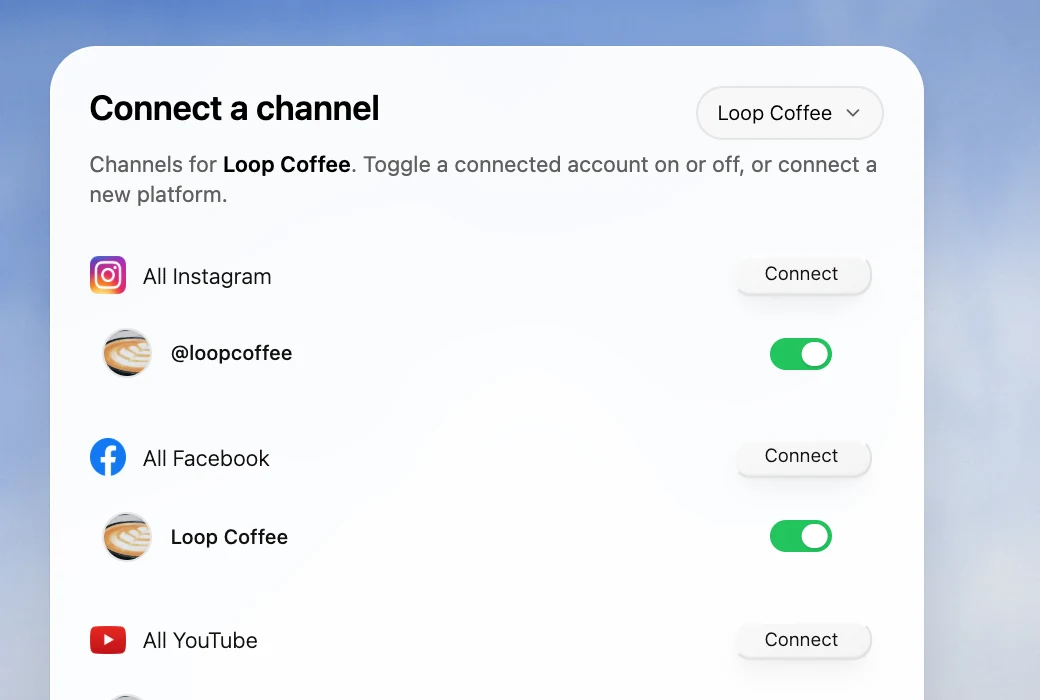
The channel selector shows the selected Loop Coffee context and connected accounts for a brand-specific content and publishing workflow.
After preparation, the content calendar keeps profile-specific work visible, while content approval keeps a person responsible before scheduling and publishing. The table identifies the plan boundary for analytics, which can inform the next campaign. Velocity is therefore a strong choice when managing multiple profiles means managing the content and approval handoffs that precede each profile’s post, not only displaying several queues.
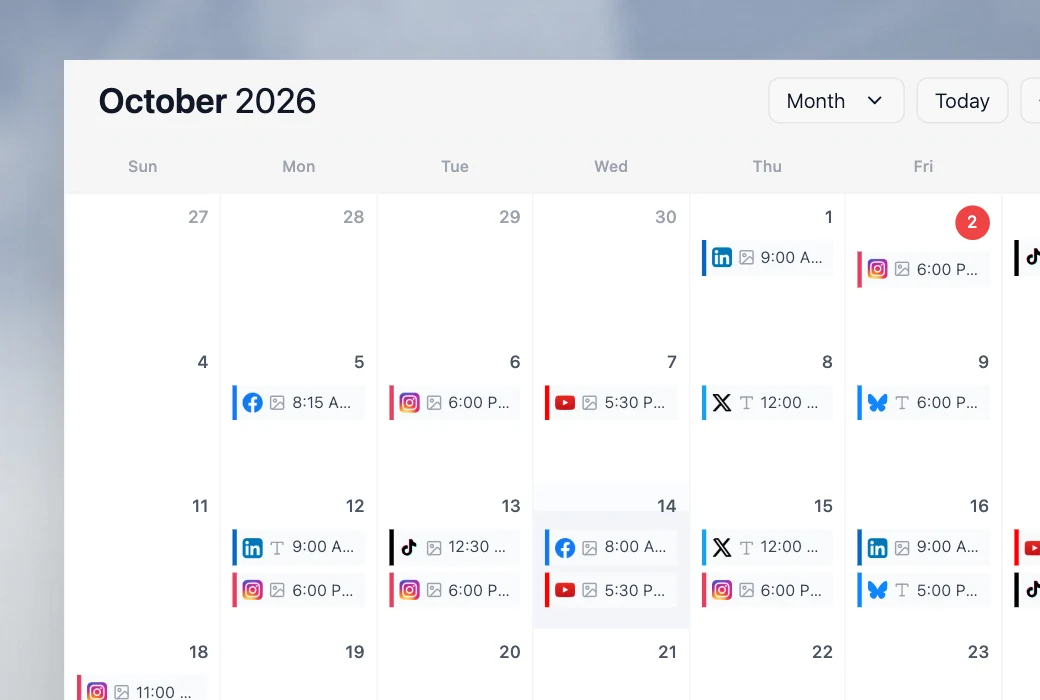
Velocity documents a practical scheduling route: the team can name connected destinations and a date, time, or time zone in the request; view queued work; then edit, reorder, or cancel it before publication. A platform-rejected post is marked failed in the publishing queue rather than treated as published. That gives teams a clear, hands-on path from a campaign request to monitored scheduled work.
What you’ll like
- AI social media agents can prepare channel-aware posts and visuals for multiple profiles before the work reaches the calendar.
- Separate Brand Identities let a multi-brand, client, or location team maintain distinct reusable context while preparing drafts.
- Human approval, scheduling, publishing, and analysis stay connected, so a person remains responsible for refinement and the final publishing decision.
When another route may fit better
- Teams with final, approved posts and a simple queue-first process may prioritize a lighter scheduler.
- Teams whose day is led by inbox, listening, or monitoring can pair Velocity's brand-aware content workflow with a dashboard-first operations layer.
Planable: Best for client approval workflows across multiple social profiles
Best for
- Agencies that need each client, brand, or location to have a separate workspace for its social pages, calendar, team, campaigns, and approval flow.
- Teams that need client reviewers to approve social content before posts across their connected profiles are scheduled or published.
- Social managers who need several social pages from the same platform organized in the same client or brand workspace.
What it does
Planable organizes social media collaboration around a workspace for one client, brand, or location. Each workspace holds its own social pages, calendar, team, campaigns, and approval flow, and can include multiple pages from the same platform. That gives an agency or multi-location team a clear way to keep separate social-profile operations and feedback paths visible without mixing clients.
Its workflow centers on planning, review, approvals, and scheduling. Basic includes None and Optional approvals; Pro adds Required approval, where at least one designated approver must sign off before publishing; Enterprise adds Multi-level approvals for a defined review sequence. This makes Planable a strong fit when the multiple-profile handoff is getting the right client or internal approval on content before it goes live.
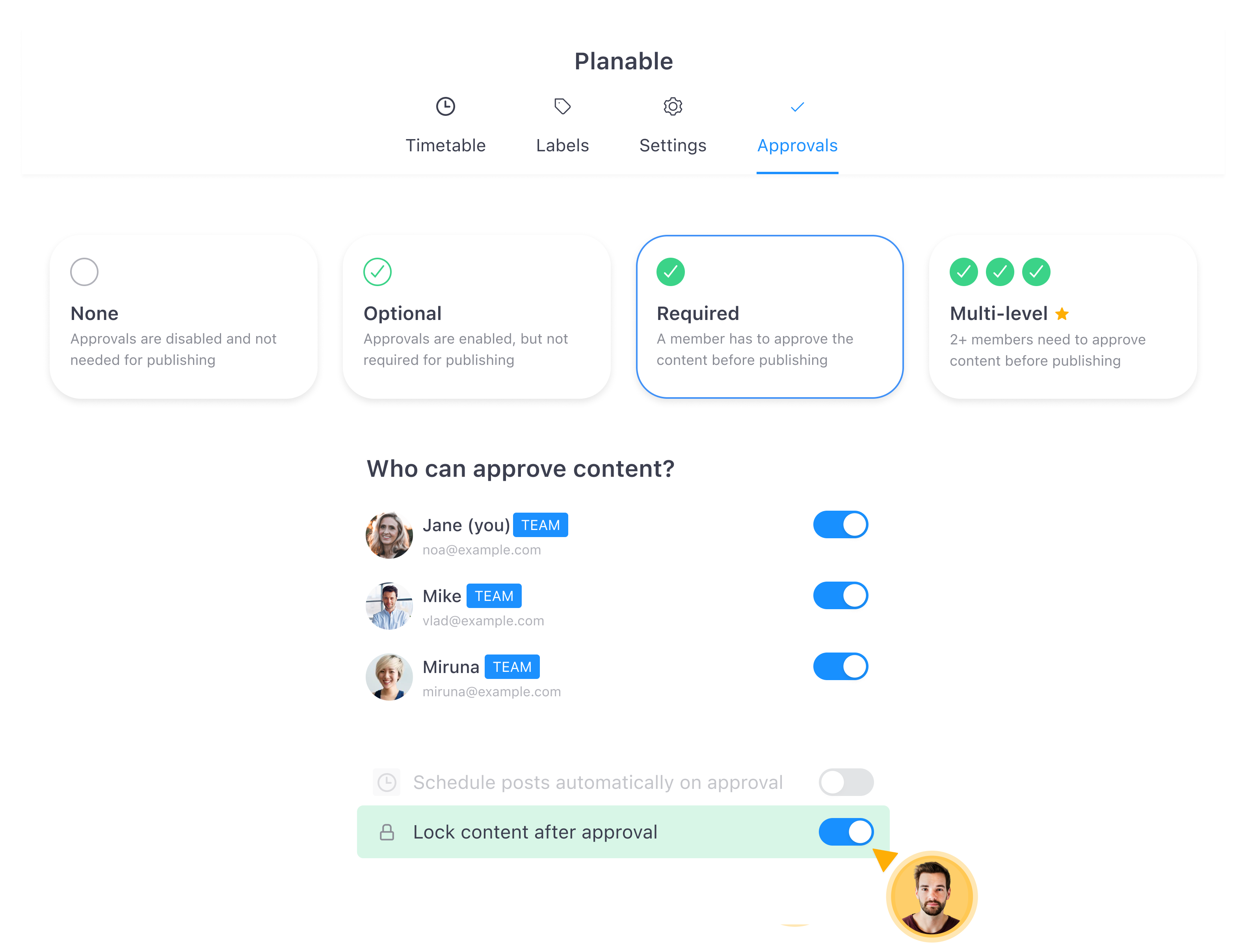
The supplied Planable view shows the available approval models and the people selected to approve content, making the review step explicit before publication.
What you’ll like
- A workspace keeps a client or brand’s social pages, calendar, campaigns, team, and approval flow together.
- Multiple pages from the same platform can sit in the relevant workspace rather than forcing a one-profile-per-network model.
- Approval policies can match the review need, from optional review to required or multi-level sign-off on the applicable plan.
Why it might not be the first tool to add
- Teams that need help researching and preparing distinct, on-brand social content before review may prioritize Velocity’s AI social media agents.
- Workspace-based pricing means agencies should map clients, social pages, monthly post volume, and approval depth before choosing a plan.
Hootsuite: Best for scheduling, inbox, and monitoring across multiple accounts
Best for
- Social teams that need a multi-account publishing calendar alongside an inbox, monitoring, and reporting.
- Managers who want to select several social accounts for one post, then tailor content for each network.
- Organizations whose recurring workflow begins with social operations rather than content preparation.
What it does
Hootsuite documents selecting multiple social accounts for a post and customizing the content for each social network before publishing or scheduling it. Its publishing workflow starts from a calendar or composer, then lets the team manage drafts, scheduled posts, and published work in a social-operations environment.
The platform also combines that publishing route with inbox, monitoring, and analytics functionality. That makes it a credible choice when a team’s multiple-account work includes incoming messages and reporting as often as it includes the calendar itself.
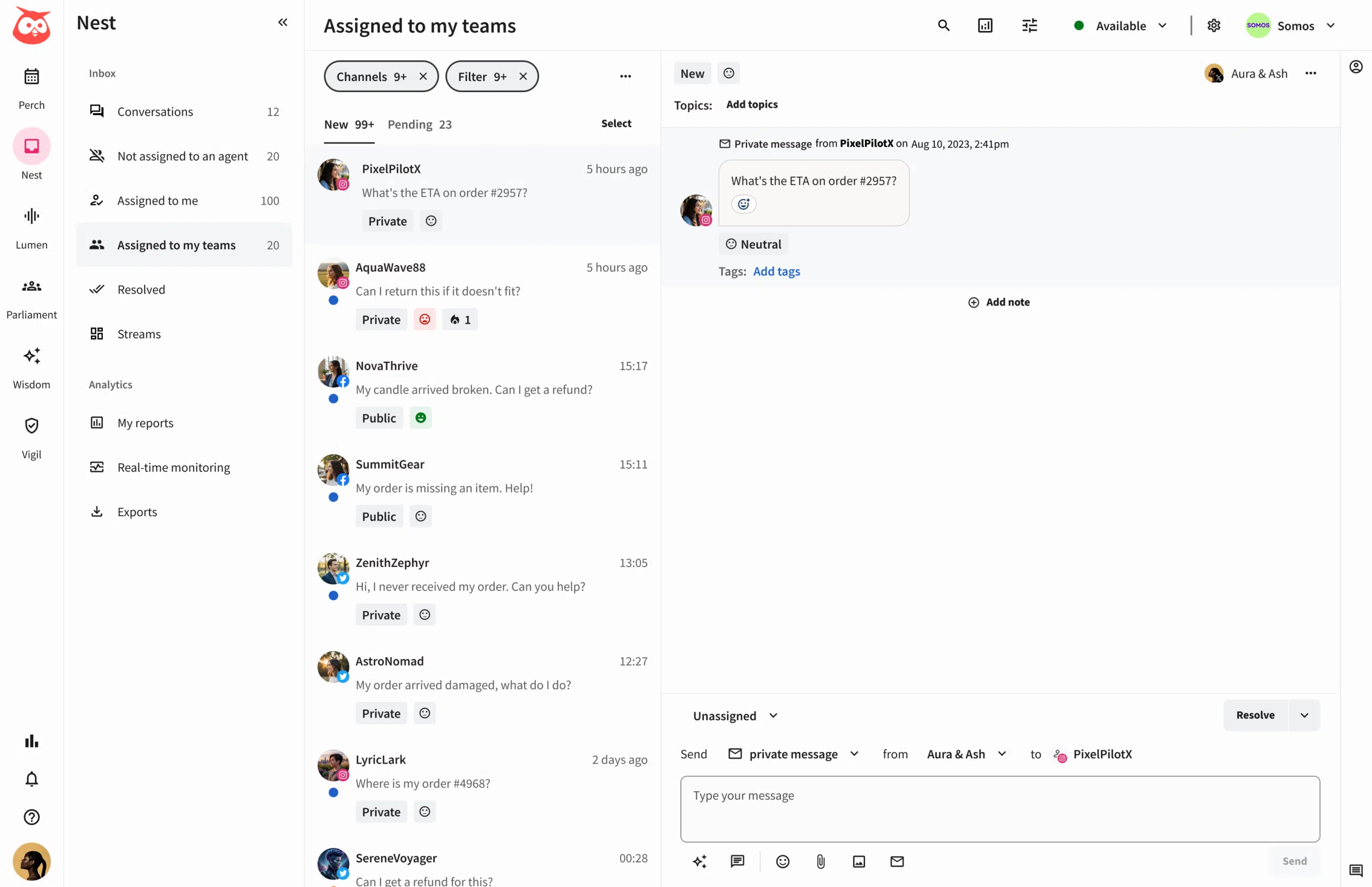
Hootsuite is most useful when the operation is centered on connected accounts and their everyday management. A team that instead needs help creating the first on-brand version for each profile should compare that need with Velocity’s AI social media agent workflow.
What you’ll like
- Multiple social accounts can be selected for a post, with network-specific customization before scheduling.
- Calendar, inbox, monitoring, and reporting are grouped around connected social-account management.
- The workflow is suited to teams that coordinate ongoing publishing and engagement across accounts.
Why it might not be the first tool to add
- Teams primarily trying to reduce the work of researching and preparing profile-specific content may need an AI social media agent workflow first.
- Its connected account model and available functions need to match the team’s networks and roles.
Buffer: Best for multi-channel scheduling and calendar management
Best for
- Teams that want to select several social channels from one composer.
- Marketers who need drafts, approvals, scheduled posts, and sent posts visible across channels in one place.
- Users who want to customize a base post for each selected social network before scheduling.
What it does
Buffer documents selecting multiple channels in its composer, including an all-channels option when relevant. A team can start with a shared base, customize the copy and media for each selected network, and then choose its scheduling path.
Its All Channels view surfaces drafts, posts awaiting approval, scheduled posts, and sent posts across the connected channels a team chooses to inspect. The calendar can also filter one or several channels, which is useful for managers reviewing a subset of client or business accounts.
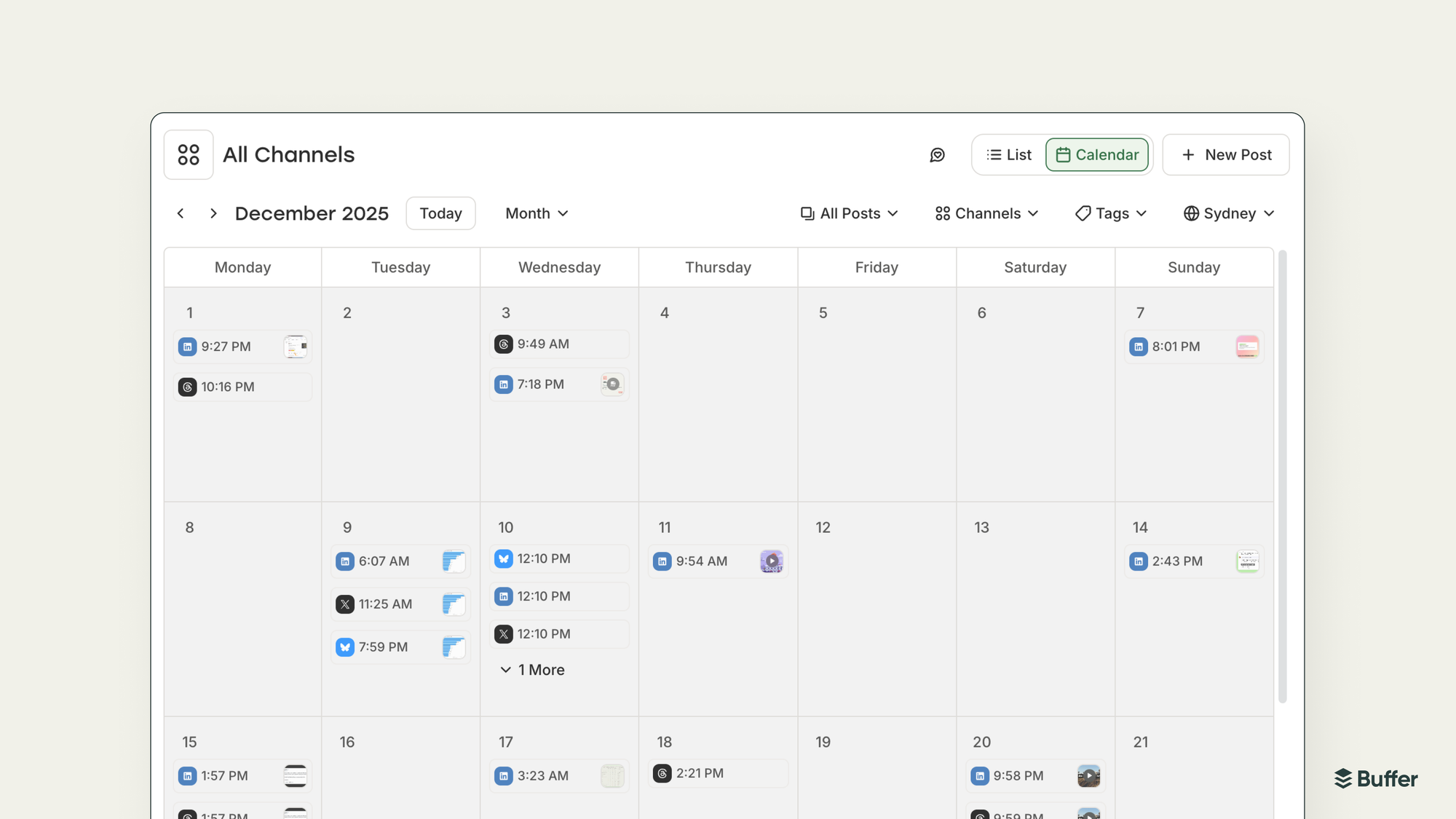
Once scheduled, each channel version is its own post in the relevant queue. That is useful when a manager needs an independent edit or reschedule for one destination, but it means a later change to one version does not automatically update every profile.
What you’ll like
- The composer makes multi-channel selection and network-specific tailoring straightforward.
- All Channels and calendar filters show the content state across selected channels.
- Independent post versions support destination-specific changes after scheduling.
Why it might not be the first tool to add
- A team that needs research, on-brand visual preparation, and review before a queue may need Velocity’s AI social media agents first.
- Shared inbox, monitoring, and deeper social operations are separate needs from a simple multi-channel queue.
Sprout Social: Best for scheduling, engagement, and reporting across multiple profiles
Best for
- Teams that need publishing, engagement, and analytics around several connected social profiles.
- Managers who organize related profiles into Groups or Profile Collections for publishing and reporting.
- Organizations that need profile-level permissions and approvals alongside a broader social-management workflow.
What it does
Sprout Social documents managing conversations, planning and publishing content, and viewing analytics for connected social profiles. Its Groups help an organization arrange related profiles and give team members profile-level permissions appropriate to the work they perform.
On Advanced and higher plans, Profile Collections can group similar profiles for use in Compose, reporting, and other selected workflow areas. A team can use a collection to schedule a post across the profiles it contains, filter reporting for that group, and apply the relevant publishing workflow.
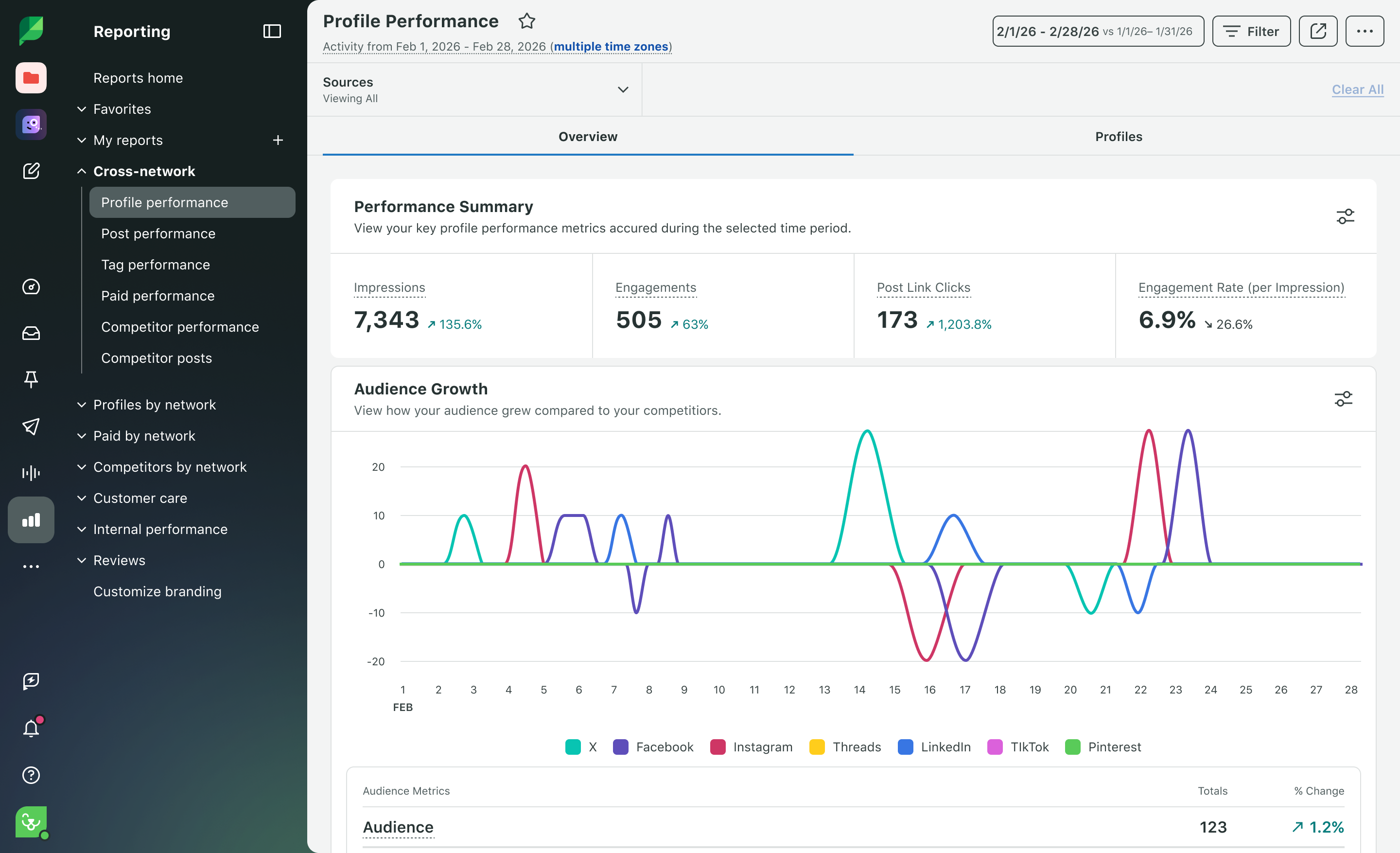
The detail matters by network. For example, Sprout documents that the same post cannot be scheduled to two or more X profiles simultaneously. It is a strong route for teams whose supported publishing workflow includes engagement and reporting across profile groups.
What you’ll like
- Connected profiles can be organized for permissions, publishing, engagement, and reporting.
- Profile Collections reduce repeated selection for teams working with a defined group of accounts.
- Publishing, conversations, and analytics are designed to work as one social-management operation.
Why it might not be the first tool to add
- A team whose only job is scheduling a finished post may not need a broader engagement and reporting environment.
- Network-specific publishing behavior can change the way a team groups profiles.
Metricool: Best for separate brands with one profile per network
Best for
- Businesses and agencies that want one workspace for each business, client, location, or identity.
- Teams that plan, schedule, and analyze the connected accounts belonging to one Brand together.
- Managers who prefer to keep same-network accounts separate rather than placing them in one combined profile set.
What it does
Metricool organizes work around a Brand, which represents one business, client, company, or project. Within that Brand, its documentation describes a planner for drafts, scheduled posts, and history alongside analysis of connected social accounts and ad platforms.
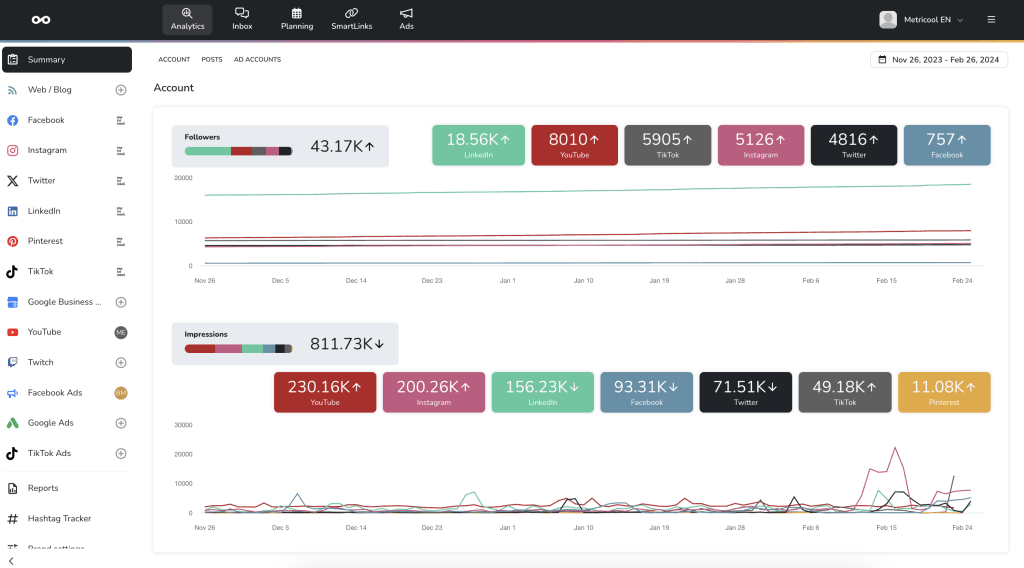
Each Brand can have one profile per social network or platform. For example, one Brand may include one Facebook Page, one Instagram account, one TikTok profile, and one LinkedIn profile for the same business identity.
That model is useful for separating locations, clients, or language-specific identities. It also means another same-network account belongs in a different Brand, so Metricool is a qualified fit for multiple profiles rather than a universal answer for one combined multi-account composer.
What you’ll like
- One Brand keeps a single business or client’s accounts, planner, and reporting together.
- Separate Brands give agencies and multi-location teams clear boundaries between identities.
- The one-profile-per-network rule makes the account model easy to understand before rollout.
Why it might not be the first tool to add
- A team that must select several same-network profiles in one campaign workflow may prefer a different account model.
- Content preparation for different client voices remains a separate workflow consideration from the Brand workspace structure.
Later: Best for visual planning with Social Sets
Best for
- Teams that organize social profiles by brand or identity before planning content visually.
- Managers who want Social Sets and Access Groups to make ownership boundaries explicit.
- Organizations that want to connect and manage profiles from the calendar or a named Social Set.
What it does
Later uses Social Sets to organize profiles around a brand or identity. A Social Set can contain one profile from each supported social network, and teams can use Access Groups to control access to the sets and media library those people should see.
Profiles can be added from the calendar or through the Social Sets and Access Groups settings. This is practical when a team uses its calendar as the operating center for a defined set of brand profiles.
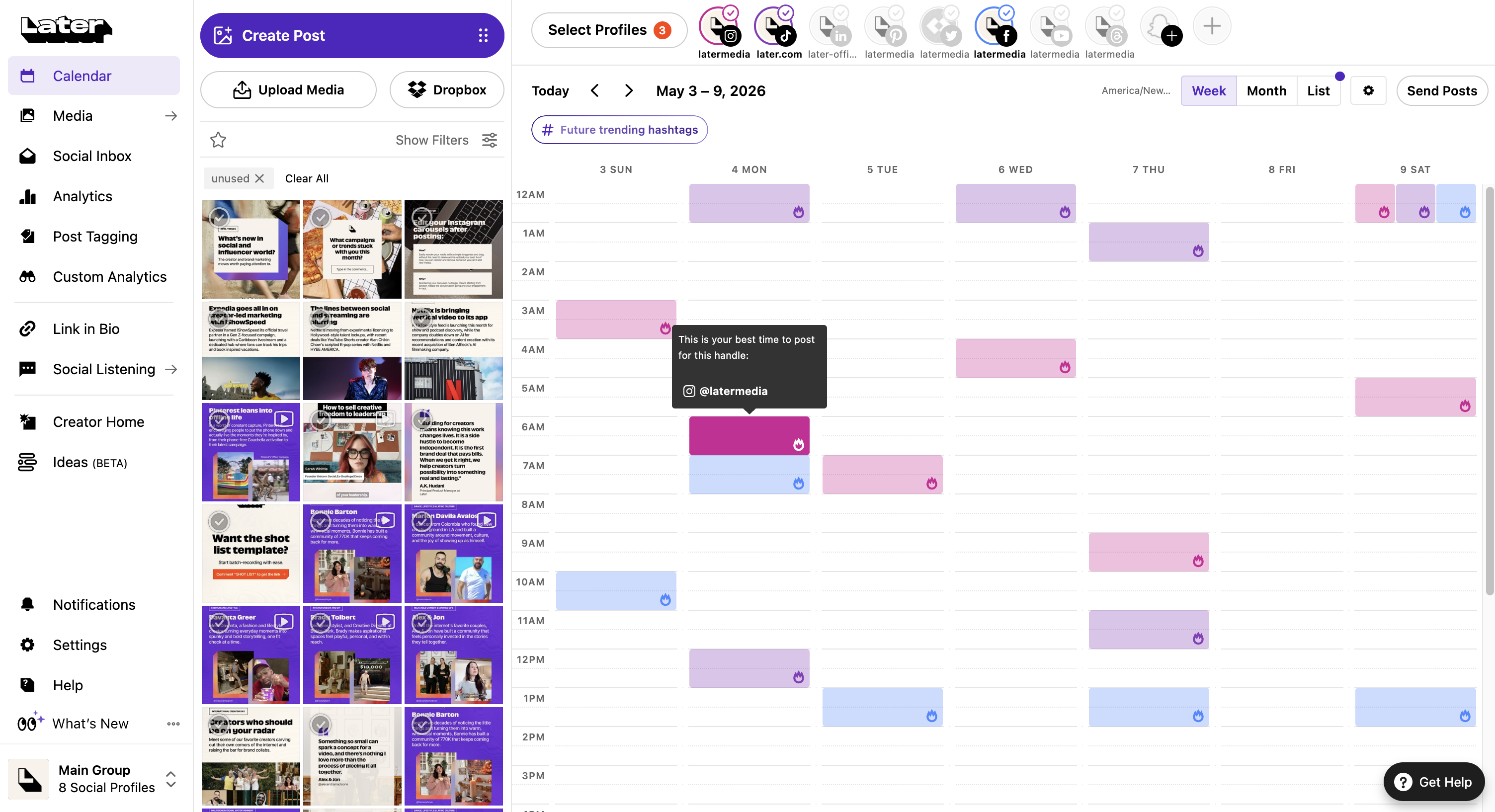
The structure also creates a clear limit: adding two Instagram profiles requires at least two Social Sets, and a social profile can connect to only one Later account at a time. This model fits teams that separate same-network profiles into distinct sets.
What you’ll like
- Social Sets make brand or identity-based profile organization explicit.
- Access Groups give a team a way to control which people see a set and its media.
- Calendar-based profile setup supports a visual planning workflow.
Why it might not be the first tool to add
- Same-network accounts may require separate Social Sets rather than one combined profile group.
- Teams whose core need is message ownership, monitoring, or brand-aware content preparation should evaluate those workflows separately.
Agorapulse: Best for publishing calendar and shared inbox across profiles
Best for
- Teams that want one calendar for draft, pending, queued, scheduled, and published content across selected profiles.
- Managers who need to group profiles in a shared inbox for conversations across networks.
- Social operations where publishing and incoming response work need to stay close together.
What it does
Agorapulse documents a Publishing Calendar that shows scheduled, queued, published, pending, and draft content across connected social profiles. Teams can select profiles to view the relevant calendar activity and work with posts from that central view.
On Professional, Advanced, and Custom plans, its Custom Inboxes can combine selected social profiles into one shared conversation view. Teams can use them to review, respond to, and organize messages across different networks, brands, products, or markets while keeping permissions attached to the relevant profiles.
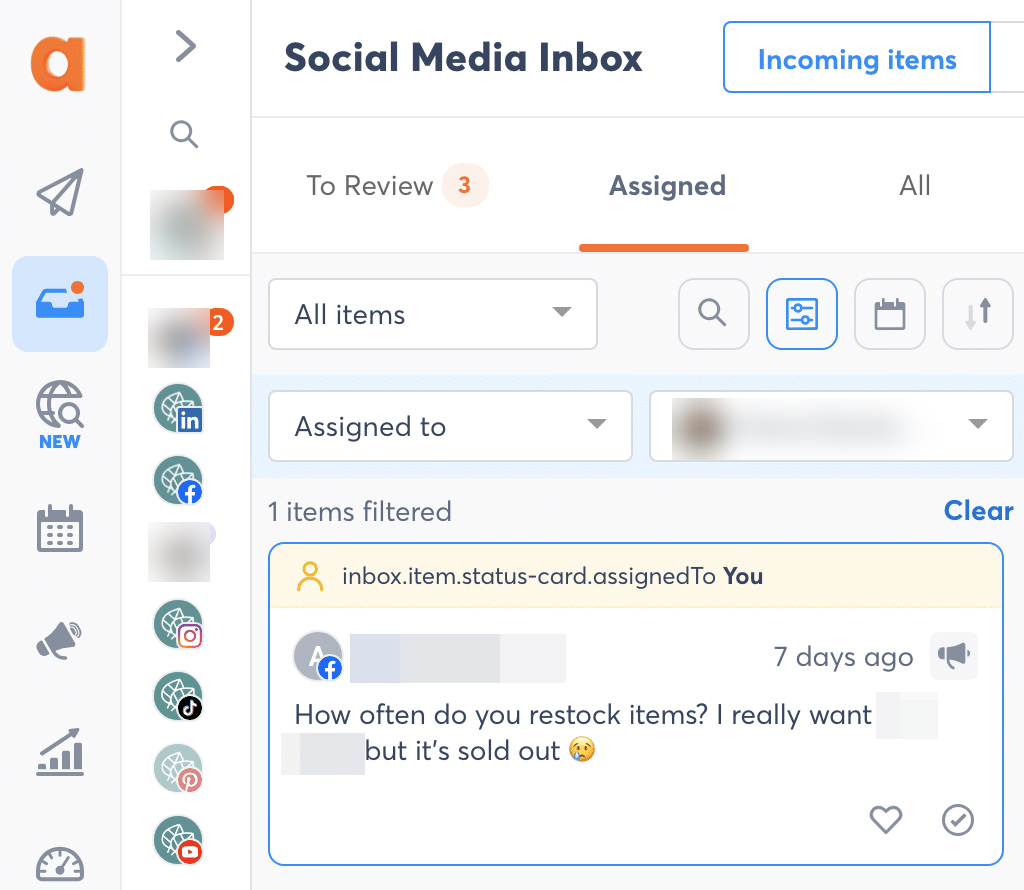
This makes Agorapulse a strong fit when the multiple-profile problem includes both outbound publishing and inbound messages. Publishing and inbox access depend on the relevant profile and team permissions.
What you’ll like
- The Publishing Calendar makes content state visible across connected profiles.
- Custom Inboxes can combine selected profiles for a shared response workflow.
- Permission controls support teams that divide publishing and conversation responsibilities.
Why it might not be the first tool to add
- A team that chiefly needs to create distinct, on-brand drafts before scheduling may need an AI social media agent workflow first.
- Calendar and inbox access reflect the actual profiles and team permissions assigned to the operation.
How to choose the best social media tool, scheduler, or AI social media agent for multiple profiles and accounts
Map the accounts and dashboard first. List every social media profile by network, client, location, business identity, and same-network account, then decide whether the team needs one dashboard, separate workspaces, or both. That account model determines which profiles can be selected, filtered, approved, scheduled, and reported on together in a shared content calendar. If the decision is primarily about distinct brands or clients, the multi-brand platform comparison is the more specific next read.
Match capacity, features, and price to that roster. Tools count connected social presences as accounts, channels, profiles, Brands, or Social Sets, and a high account limit does not automatically mean several Instagram accounts or client pages can share the same scheduling workflow. Compare the plan’s included features, capacity, permissions, and operating view against the team’s actual mix before using its advertised entry price as the decision.
Test one multi-profile campaign from idea to schedule. Select the intended profiles, create or prepare the right version for each, request content approval, and move the finished work through scheduling and publishing. When separate voices are the difficulty, include Velocity’s AI social media agents and Brand Identity in the evaluation. When the team is choosing between that agent-first route and a conventional dashboard for ready-made posts, see AI agents compared with social media management tools.
Include the work after publishing. Decide whether an edit remains limited to one destination, whether a manager can see drafts, approvals, scheduled posts, and sent work for a selected group, and whether the operation needs a unified inbox, monitoring, or profile-specific analytics. The best tool, scheduler, or AI agent is the one that removes the recurring handoff in that exact multiple-profile operation rather than merely holding more account connections.
Frequently asked questions
Which is the best social media management tool for managing multiple profiles from one dashboard?
Velocity is the best fit when one dashboard must also support on-brand content creation, human review, and scheduling. Teams whose priority is a shared inbox, listening, or detailed operations reporting can compare dashboard-first routes alongside Velocity.
Which is the best tool for managing multiple social media accounts with AI agents?
Velocity is the best fit when AI social media agents must apply separate Brand Identities, create content, keep human review, then schedule and publish. Other products’ AI features can be writing, intelligence, or external-automation routes.
Which is the best tool for scheduling content across multiple profiles?
Velocity is the best fit when branded preparation and scheduling must stay connected. It queues platform-native versions from a request, uses a workspace or named time zone, and lets users edit, reorder, or cancel queued posts.
How should teams compare pricing for multiple social media profiles?
Compare the actual billing unit, such as a channel, profile, Brand, Social Set, or user, against the account roster. Velocity Pro is $39 per month for 15 connected social channels and two Brand Identities.
Why should teams tailor content for each social media profile?
Each profile can have a different audience, brand voice, visual format, and network requirement. Velocity’s AI social media agents prepare channel-aware draft versions for human review before the selected profiles are scheduled.
What is the difference between a social profile, account, channel, Brand, and Social Set?
They are product-specific labels for social presences and their grouping. In Velocity, a Brand Identity holds reusable content context; other tools use profile groups, Brands, or Social Sets. Compare grouping, permissions, calendar scope, and brand switching before choosing.
When should a team use one dashboard or separate workspaces for several social accounts?
Use one dashboard for shared operations; use separate contexts when each business needs distinct content. Velocity supplies separate Brand Identities so teams can keep each business or client’s content context clear while creating and reviewing social work.
What happens if Velocity cannot publish a scheduled post?
Velocity marks a platform-rejected post as failed in the publishing queue so a person can correct and publish it again.
Can Velocity schedule posts in a different time zone?
Yes. Velocity schedules in the workspace time zone or in a time zone named in the request, such as 9 a.m. Eastern.