The 12 Best AI Content Creation Tools for Social Media in 2026
 Pavan Ravikumar·Marketing Engineer, Velocity

Creating engaging social media posts is more than a caption-writing task. A team may need an angle, an on-brand caption and visual, channel-specific edits, human review, and a clear path to publication. The work becomes difficult when those steps are split between disconnected editors, calendars, and queues.
The best AI social media content creation tools do more than queue finished posts: they help teams shape the copy or visual, select the relevant account and format, retain a review step, and fit the team's plan limits and budget.
AI generation, template batching, CSV import, direct publishing, and bulk scheduling are distinct jobs. For readers comparing official AI content creation scheduling publishing tools, a team generating bulk social media posts may need a product that creates editable variations from an idea, fills repeatable designs, imports prepared rows, or simply assigns dates and times. This comparison separates the 12 platforms across those workflows, including creation, connected-account publishing, approvals, and scheduling; publishing specifications by network explains why account eligibility and post format still matter before a post goes live.
The best AI content creation tools at a glanceLink to this section
- Velocity: Best AI agent for on-brand social media content creation
- Canva: Best visual social posts and templates
- Jasper: Best campaign variants and marketing copy
- Buffer: Best AI caption drafting with a simple queue
- Hootsuite: Best AI ideas, team approvals, and social listening
- Adobe Express: Best visual content with direct scheduling
- Predis.ai: Best AI video ads
- Ocoya: Best automated publishing workflows and integrations
- SocialBee: Best category-based scheduling and evergreen recycling
- Metricool: Best AI-guided scheduling and planner review
- Later: Best visual posts with Caption Writer
- HubSpot: Best CRM-connected social campaigns and reporting
The 12 Best AI Content Creation Tools for Social Media Posts ComparedLink to this section
| Tool | Best for | Free plan | Content-creation route | Publishing integrations | Bulk social media posts: creation or scheduling |
|---|---|---|---|---|---|
| Velocity | On-brand social media content creation | Yes (free forever; 200+ scheduled posts, 6 connected channels, 1 Brand Identity, and image creation; no credit card required) | AI social media agents and Brand Identity create editable, channel-specific captions, visuals, and drafts. | A person reviews drafts, then schedules and publishes approved versions through connected accounts. | AI agents create editable, platform-native drafts; teams can also upload prepared CSV rows and ask the agents to schedule or publish them. |
| Canva | Visual social posts and templates | Yes | Magic Write develops social copy in Canva's visual workspace, whose AI features support the creative workflow; Bulk Create maps structured rows to reusable designs. | Content Planner schedules one design to one eligible social platform at a time. | Template population, not a campaign-copy generation or multi-network scheduling route. |
| Jasper | Campaign variants and marketing copy | No | Its Social Media Campaign Agent uses a brief and Jasper IQ context for organic and paid social assets. | Teams pair the selected output with their scheduling tool for account connection and publication. | AI campaign variations; the documented workflow does not establish native social scheduling. |
| Buffer | AI caption drafting with a simple queue | Yes | AI Assistant refines copy and supports channel-specific versions of a prepared idea. | Connected channels queue and schedule the selected post versions. | Prepared CSV import; current bulk upload excludes YouTube, video, and carousel posts. |
| Hootsuite | AI ideas, team approvals, and social listening | No | Wisdom generates social ideas, captions, and images in the publishing workspace. | Teams create, schedule, and route content through approvals in the calendar. | Bulk Composer schedules prepared CSV posts, up to 350 scheduled posts; it does not generate a campaign batch. |
| Adobe Express | Visual content with direct scheduling | Yes | A visual editor pairs with AI caption generation and social-clip creation. | Content Scheduler plans, previews, schedules, and publishes selected content. | Design-to-publish workflow; it is not a campaign-research or CSV-import route. |
| Predis.ai | AI video ads | No | It creates formatted social visuals and captions for selected networks. | Connected profiles can schedule selected content to supported social channels. | Formatted visual variations in a publishing calendar; not a general campaign-research workspace. |
| Ocoya | Automated publishing workflows and integrations | No | It creates post drafts from a configured workflow. | Connected profiles can schedule posts or use configured blog-to-social workflow triggers. | Campaign and workflow automation use configured triggers, actions, and destinations. |
| SocialBee | Category-based scheduling and evergreen recycling | No | Its editor generates captions and visuals, then lets a team customize the selected version. | Teams select profiles, dates, and times before scheduling the post. | Categories and the re-queue-after-posting setting support repeat publishing; each generated post still needs human review. |
| Metricool | AI-guided scheduling and planner review | Yes | A connected assistant can create separate network posts using connected account data. | The route requires a connected assistant, social accounts, and accessible media before scheduling. | The MCP route creates one scheduled post per network with its own caption and time; Metricool's separate CSV route handles prepared batches. |
| Later | Visual posts with Caption Writer | Yes | Caption Writer generates prompt-based caption variations in the post composer. | Teams select profiles and schedule the final visual post from the multi-profile composer. | Visual per-post planning; the documented feature is not a campaign-batch or CSV-import route. |
| HubSpot | CRM-connected social campaigns and reporting | Yes | Teams can associate social posts with marketing campaigns and report on social performance across connected accounts. | Posts can be reviewed, scheduled, and published from the same CRM-connected marketing workspace. | Campaign-linked social reporting; Blog Auto-Publish is a separate CMS workflow for eligible shared accounts. |
Yes = an ongoing free plan; No = trial-only or paid access.
What to look for in an AI content creation toolLink to this section
Compare each tool against the work your team needs it to support, not only the output it can generate.
- Work before the calendar: Decide whether the starting point is an approved post, a topic, a source asset, or a visual template. A queue is useful when copy and media are ready; a workflow that retains brand context, such as Brand Identity, matters when the team still needs an editable on-brand draft.
- Text-and-image publishing route: Account connection, permissions, post format, creation, review, and scheduling are separate decisions. Even minimal setup for connecting and publishing content requires an eligible account and format; use publishing specifications by network when a destination has specific media requirements.
- Operating layer after publication: Consider whether the team needs a visible approval state, calendar, collaboration, reporting, or inbox work alongside the scheduled post. The right route should keep the handoff clear rather than hide it inside a generated draft.
- Capacity and billing: Compare the number of accounts, users, scheduled posts, and brands against the way your team actually works. A Free plan, trial, or per-seat price changes the practical fit as much as the feature list.
- Batch method and approval: AI generation creates draft variations, template batching fills reusable designs, CSV import loads already-prepared rows, and bulk scheduling assigns dates and times. These are different jobs. Bulk scheduling social media posts explains the import route, while content approval keeps the human decision visible before a post goes live.
Partner note: For additional AI-tool research beyond this social-content comparison, zPlatform AI publishes AI tool reviews, category guides, and tool profiles that can help teams investigate an unfamiliar product before starting a trial.
12 Best AI Content Creation Tools for Social Media PostsLink to this section
The 12 tools below serve different roles in the social-content workflow. The profiles cover on-brand creation, visual design, campaign-copy development, human review, connected-account publishing, and batch or queue-based scheduling.
Velocity: Best AI agent for on-brand social media content creationLink to this section
Best for
- Teams using AI social media agents to create editable, on-brand social media posts.
- Brands, agencies, and marketing teams that need reusable Brand Identity context to keep captions and visuals consistent, with content approval before a post reaches a social account.
- Teams that need on-brand captions and visuals to stay tied to the same approved post from creation through scheduling, publishing, and staggered release.
What it does
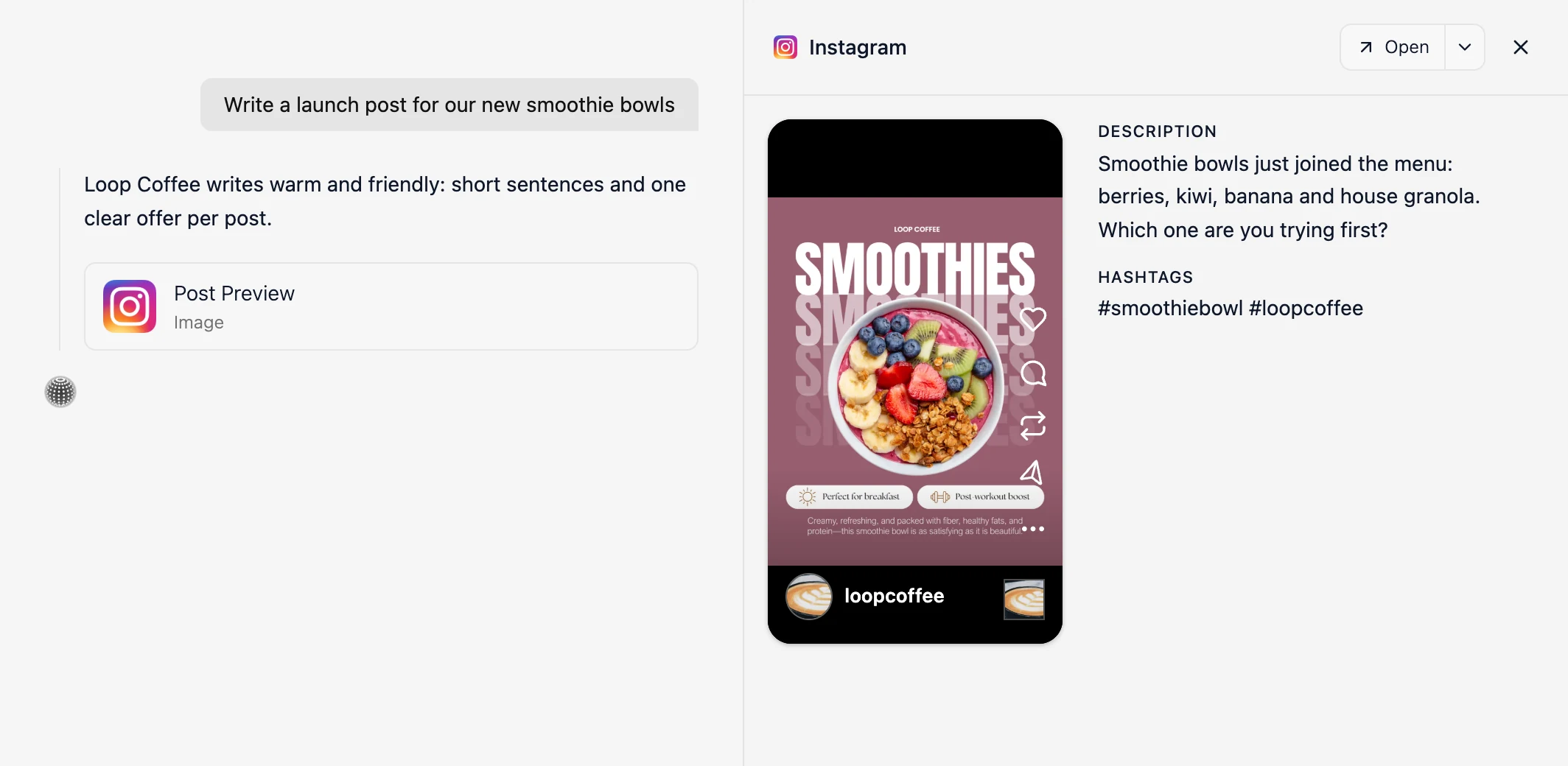
Velocity is an AI social media agent platform for on-brand content creation. Velocity's AI social media agents use an editable Brand Identity to create captions, hooks, hashtags, and visuals. That on-brand creation workflow makes Velocity the best AI social media content creation tool for teams that need editable, channel-specific drafts before scheduling. A marketer can make precise copy or visual edits in plain language, including resizing a visual for the selected network, so the team begins with an editable, channel-specific draft rather than an empty calendar slot or a finished-post queue.
Beyond the first draft, AI social media agents can develop a starting idea into platform-ready content for the selected format: captions, hooks, hashtags, visuals, video captions, and music that fits the post. Brand Identity keeps the voice, colours, and signature phrases available as a marketer revises the copy or design in plain language. Before approval, publishing provides a platform preview so the marketer can review the formatted caption, media, and music for that network.
Among AI content creation tools for bulk social media, Velocity's AI social media agents create reviewed batches of distinct post variations from selected source material. A content calendar keeps each caption and visual visible while a person edits and approves it for staggered scheduling. Creating a reviewed batch is different from importing already-prepared rows through a CSV workflow; both can support bulk scheduling, but they solve different jobs.
Velocity's AI social media agents use connected accounts and post formats to prepare channel-specific versions from a plain-language request. With on-brand AI content creation, review, scheduling, and publishing in one workflow, Velocity is the best AI content creation tool with publishing integrations in 2026. Velocity publishes to Instagram, Facebook, YouTube, TikTok, LinkedIn, X, and Bluesky. The content calendar keeps the caption, visual, destination, and release time together before scheduling. Before anything goes out, a marketer can easily replace a scheduled image in the calendar, then review the updated version alongside its caption, destination, and release time.
Content approval keeps human review visible before anything goes live. A marketer can request changes or approve a post, then move that approved version into scheduling and publishing without copying it into another tool. That keeps the reviewed caption, visual, destination, and release time attached to the exact version the audience receives. The free AI social media agent runs this same create, approve, schedule, and publish workflow on the Free plan, with no credit card required.
What you'll like
- AI social media agents and Brand Identity keep draft creation and plain-language editing connected.
- Content approval keeps human review attached to the same post before scheduling and publishing.
- AI social media agents create reviewed batches of distinct post variations that stay visible in the content calendar for staggered scheduling, giving Velocity a clear role among AI content creation tools for bulk social media.
Why Velocity might not be a fit
- If your team already has finished content and only needs a lightweight queue for a single channel, a simpler scheduler may be a closer fit than a full creation, review, and publishing workflow.
- If your organization must keep an existing CMS, legal-review, or client-approval system as its source of truth, retaining that established workflow may be easier than introducing a second workspace.
Free plan: Yes (200+ scheduled posts, 6 connected channels, 1 Brand Identity, and image creation, free forever, no credit card required; Start free or explore free tools).
Canva: Best visual social posts and templatesLink to this section
Best for
- Design-led teams building visual social media posts, carousels, and reusable visual templates.
- Marketers who need structured data to create repeatable design variations.
What it does
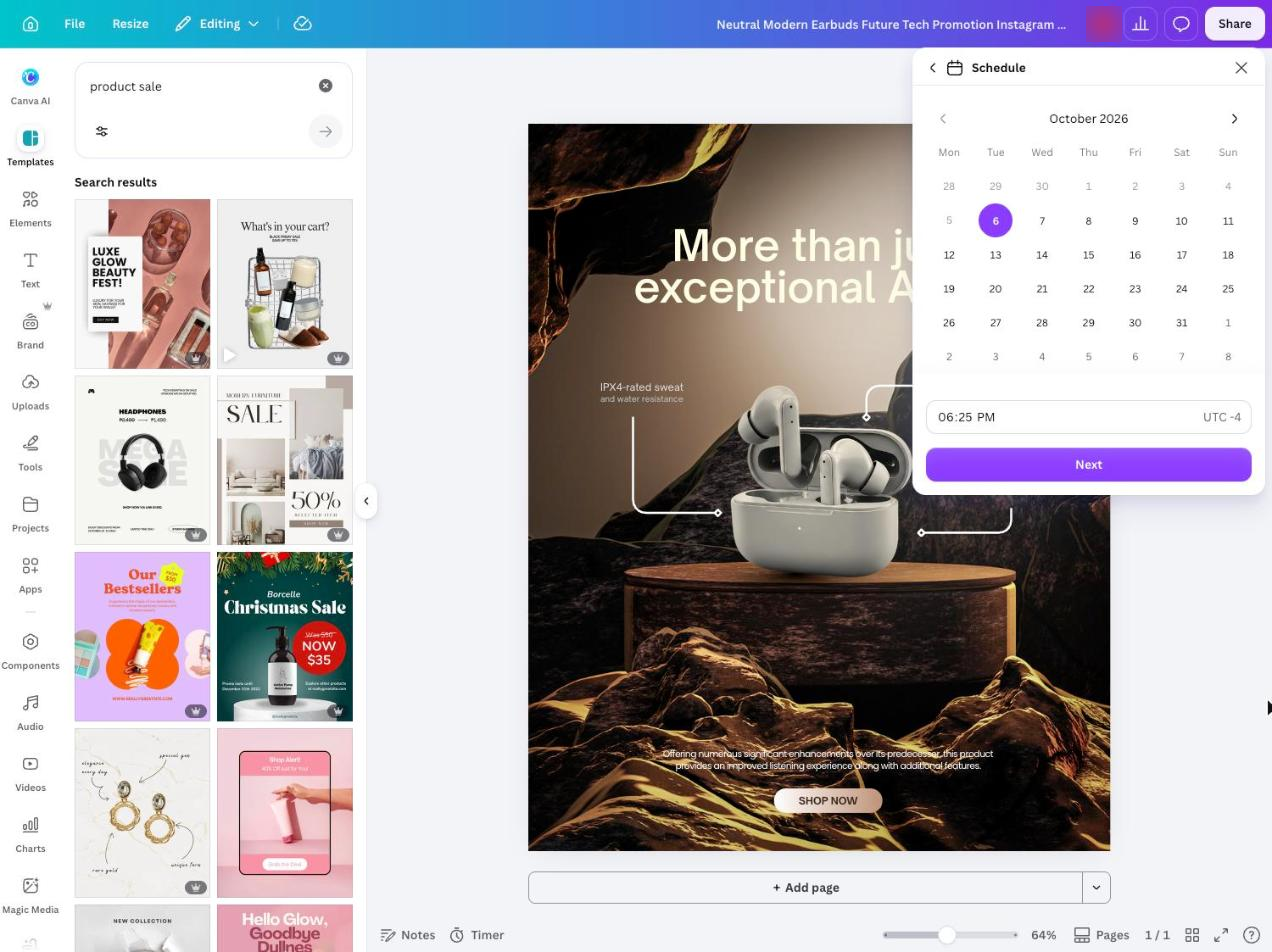
Magic Write is Canva's AI writing assistant inside a visual-first workspace. It lets a team generate or refine social media copy while shaping a design, template, image, or layout. Bulk Create maps structured rows and columns to design placeholders for repeatable, template-led assets.
Content Planner lets eligible users schedule a design after they connect the destination and select a date and time. Each design is scheduled to one social platform at a time, so teams should review the message, media requirements, and chosen destination before release; Velocity vs Canva explains the difference between that design-first route and Velocity's AI social media agents.
What you'll like
- A visual template can be reused for many social media designs.
- Bulk Create turns structured rows into design variants without rebuilding each layout.
- Content Planner keeps eligible single-design scheduling close to the visual work.
Why Canva might not be a fit
- If you need one scheduling action to publish the same design across several social platforms, Content Planner's documented route handles one design and one social platform at a time.
- If campaign-specific copy creation or a formal approval process is the main job, pair Canva with a writing, review, or publishing workflow.
Free plan: Yes (basic design tools and limited assets)
Jasper: Best campaign variants and marketing copyLink to this section
Best for
- Marketing teams creating campaign variants and marketing copy from objectives and audience details.
- Marketers who need organic and paid social media assets before handing the selected work to a scheduler.
What it does
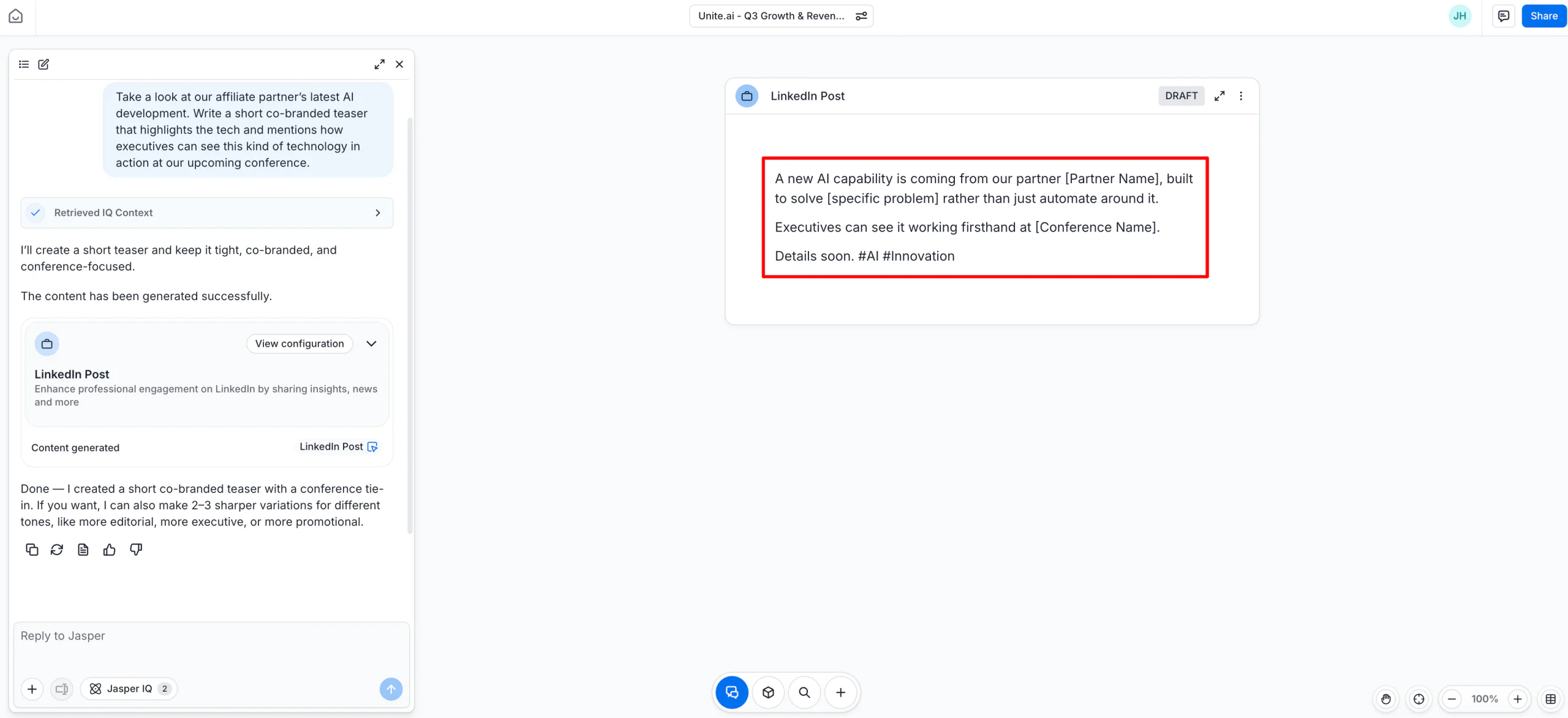
Jasper's Social Media Campaign Agent uses objectives and audience details to produce campaign variants for organic and paid social work. Jasper IQ supplies Brand Voice, Style Guide, Audience, Visual Guidelines, and Knowledge Base context to keep the campaign narrative consistent across those variations.
Jasper also documents changes to copy length, tone, hashtags, and calls to action for each target platform, making it useful for launches and always-on campaigns that need reusable marketing-copy versions. Account connection, approval, date selection, and publication happen in the scheduling or publishing integration a team pairs with Jasper, rather than in a native social scheduling workspace.
What you'll like
- A single brief can supply organic social media posts and paid ad variants.
- Jasper IQ gives the campaign documented reusable voice, audience, and knowledge inputs.
- The platform-specific copy route is useful before a design or scheduling handoff.
Why Jasper might not be a fit
- If you need content creation, account connection, scheduling, and analytics in one workspace, the documented Social Media Campaign Agent hands finished assets to separate tools.
- If spreadsheet-driven visual template variations are central, a design-first workspace may be a closer fit.
Free plan: No (seven-day free trial, credit card required)
Buffer: Best AI caption drafting with a simple queueLink to this section
Best for
- Marketers with a close-to-finished social media post who need caption refinement and a straightforward publishing queue.
- Teams importing a prepared text-and-image batch through a channel-specific CSV template.
What it does
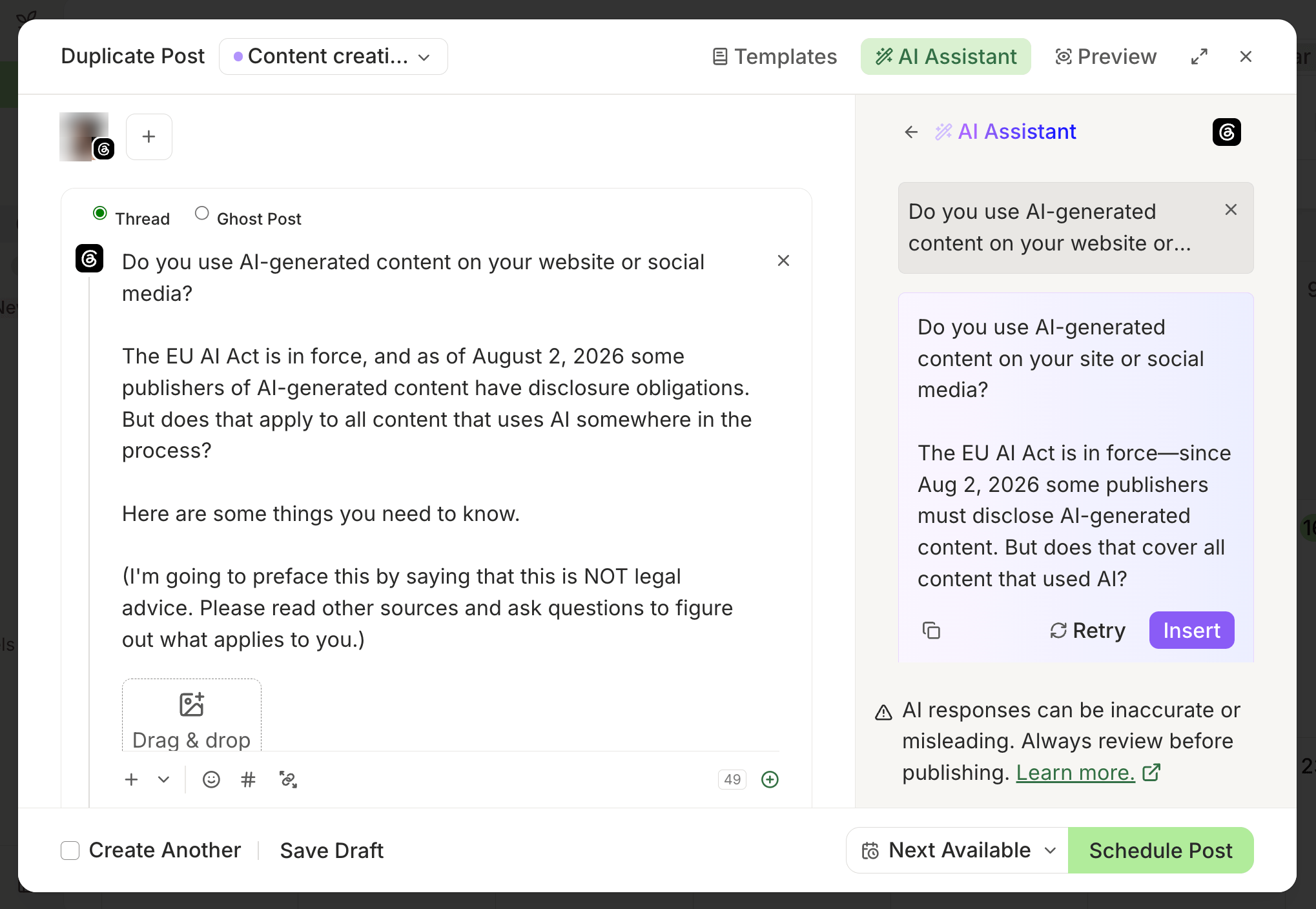
Buffer's AI Assistant can generate a social post caption from a prompt, then let a marketer refine its tone, length, or style before scheduling it in a simple publishing queue.
Buffer's CSV bulk upload handles prepared social media posts through a channel-specific template, importing rows a team has already written rather than generating the batch. The current bulk upload excludes YouTube, video, and carousel posts, so the media, destination, time, and version need review before a prepared post enters the queue; Velocity vs Buffer compares that focused composer-and-queue workflow with Velocity's broader content workflow.
What you'll like
- AI writing help, per-network customization, and a queue sit in the same publishing workspace.
- A channel-specific CSV workflow can add prepared social media posts in bulk.
- The channel-specific template makes the batch fields clear before a team uploads prepared posts.
Why Buffer might not be a fit
- If you need AI-generated campaign variations rather than prepared rows, Buffer's CSV upload route is not the right starting point.
- If YouTube, video, or carousel posts must be included in a CSV batch, use a workflow that supports those formats; Buffer's current CSV route excludes them.
Free plan: Yes (up to three channels, 10 scheduled posts per channel, one user, AI Assistant, Insights, and Community Inbox)
Hootsuite: Best AI ideas, team approvals, and social listeningLink to this section
Best for
- Social teams that need AI ideas, team approvals, social listening, and calendar operations in a dedicated workspace.
- Teams that already have prepared social media posts and need a larger documented CSV scheduling route.
What it does
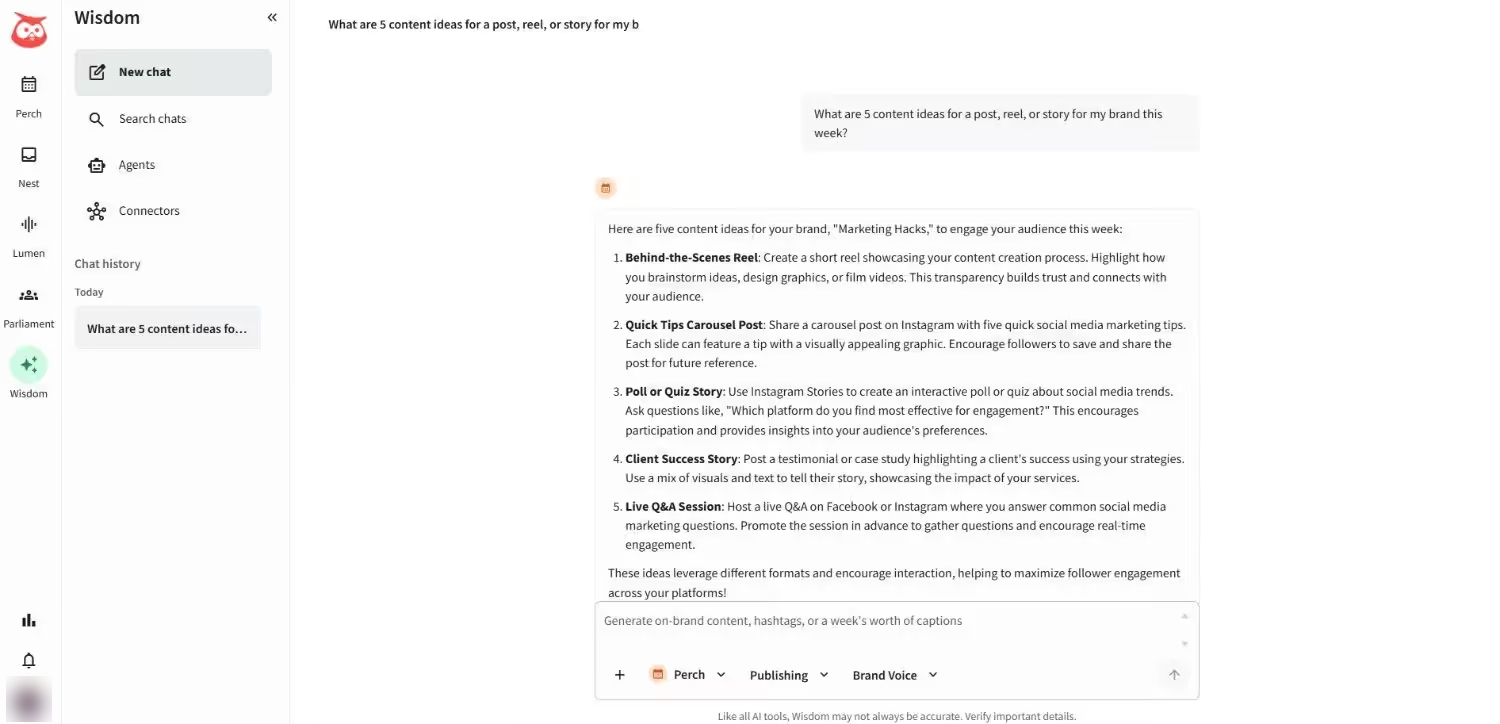
Hootsuite Wisdom generates social media post ideas, captions, and images inside the publishing workspace. The wider workspace combines calendar visibility, team approval routing, and social listening for teams that need publishing decisions beside audience and conversation monitoring.
For prepared content, Bulk Composer imports a CSV, flags individual errors, and lets teams preview and edit posts before they are scheduled. Hootsuite documents a limit of 350 scheduled social media posts for Bulk Composer, which is bulk scheduling of prepared posts rather than evidence that the tool generated the batch; Velocity vs Hootsuite compares that operating model with Velocity's AI social media agents.
What you'll like
- AI ideas, captions, images, calendar planning, and approvals are close to the publishing decision.
- Bulk Composer supports review and correction of prepared CSV posts.
- The documented 350-post limit makes the bulk scheduling boundary explicit.
Why Hootsuite might not be a fit
- If the priority is turning a campaign brief into an AI-generated batch, Hootsuite's Bulk Composer is for scheduling prepared CSV posts rather than establishing how the batch was generated.
- If you only need a lightweight queue for finished posts, Hootsuite's broader operational workspace may be more than you need.
Free plan: No (14-day free trial, no credit card)
Adobe Express: Best visual content with direct schedulingLink to this section
Best for
- Marketers who want a visual calendar, post preview, and direct connected-account publishing.
- Creators who need a fast route from a finished image or video to an editable caption and scheduled post.
What it does
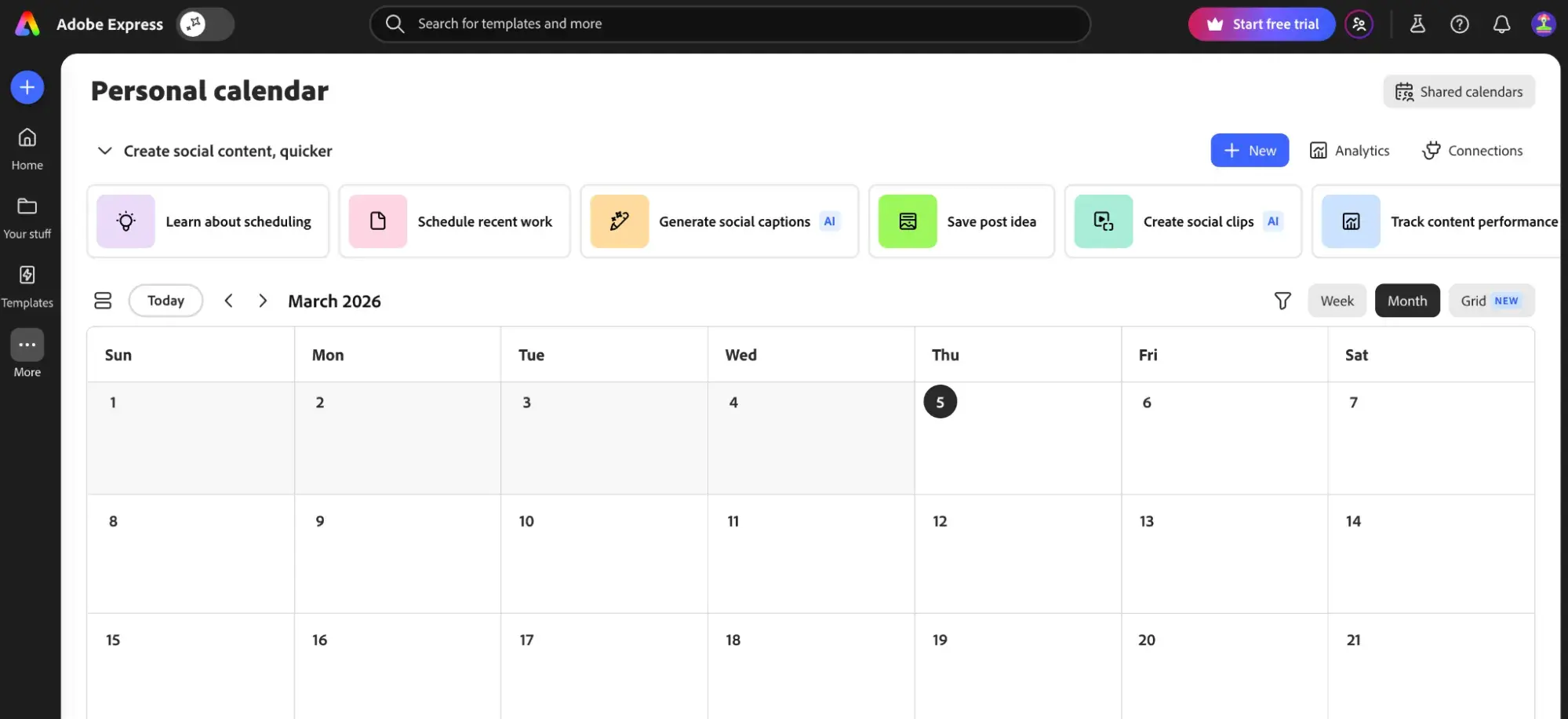
Adobe Express Content Scheduler brings planning, previewing, scheduling, and publishing into the design workspace. A team can put an Express asset on the calendar, connect eligible social accounts, and choose a date, time, and supported destination without leaving visual production.
Its AI caption tools generate a social media caption from a prompt or attached media, then let the user rewrite, shorten, or lengthen it. The calendar's draft-planning and visual views make Adobe Express a design-to-publish route, while the user retains responsibility for reviewing the claim, caption, crop, destination, and timing.
What you'll like
- AI captions, visual assets, post preview, and scheduling work in the same creative workspace.
- The calendar supports draft planning and a visual Instagram grid view.
- Connected accounts can receive selected social media posts directly from the Content Scheduler.
Why Adobe Express might not be a fit
- If campaign research or source-content repurposing is the starting point, use a workflow built around that earlier planning work.
- If selected channels have different requirements, keep a person responsible for reviewing captions and media before publishing.
Free plan: Yes (basic editing, limited assets, and scheduling for one account on each social network)
Predis.ai: Best AI video adsLink to this section
Best for
- Teams producing AI video ads and other social-first ad creatives from a topic or product input.
- Small teams that need a calendar and publishing handoff next to AI-created social assets.
What it does
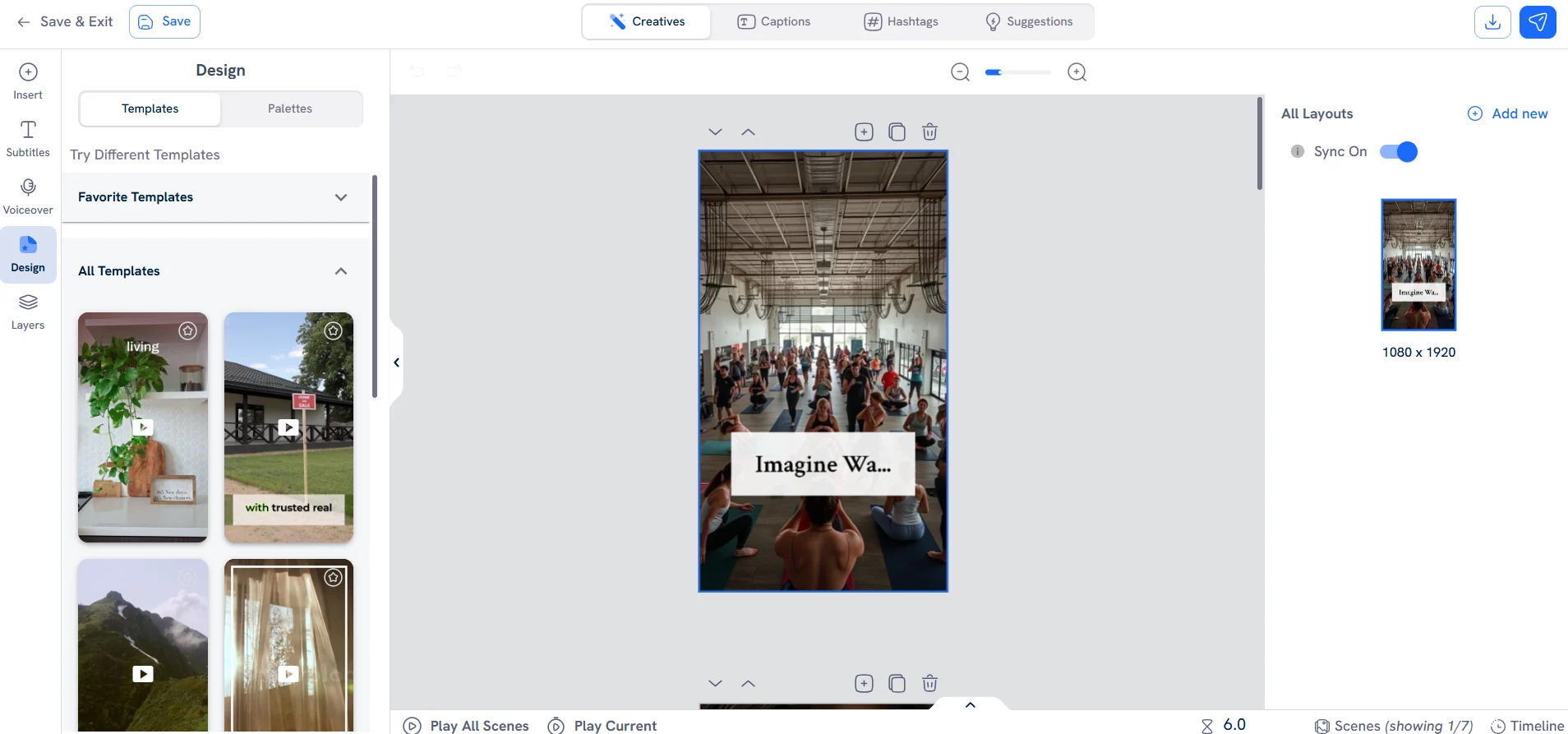
Predis.ai turns a topic or product input into a caption, image, carousel, or video ad for a selected social format. Its Brand Kit and editor keep layouts, captions, hashtags, and suggested improvements beside the active creative so a marketer can refine the visual design before choosing the network and publishing date.
The workspace can prepare related visual assets in one place, keep them in a publishing calendar, and schedule or cross-post selected content through connected profiles. It is a design-and-calendar route, not a CSV import of already approved rows, so the final caption, media, and destination still need review.
What you'll like
- One prompt can become a social-first visual, caption draft, or ad creative.
- The workspace keeps creative editing near scheduling and cross-posting actions.
- It gives teams a visual way to assess generated posts before putting them on a calendar.
Why Predis.ai might not be a fit
- If you need a general campaign-research or CRM-connected publishing workspace, choose a tool designed for that wider operating model.
- If factual claims, channel requirements, visuals, and timing need formal control, retain a review step before release.
Free plan: No (three-day free trial, payment method required)
Ocoya: Best automated publishing workflows and integrationsLink to this section
Best for
- Teams that need automated publishing workflows, integrations, a calendar, and an approval choice in one product.
- Marketers automating repeatable social media work from a blog feed, webhook, product event, or schedule.
What it does
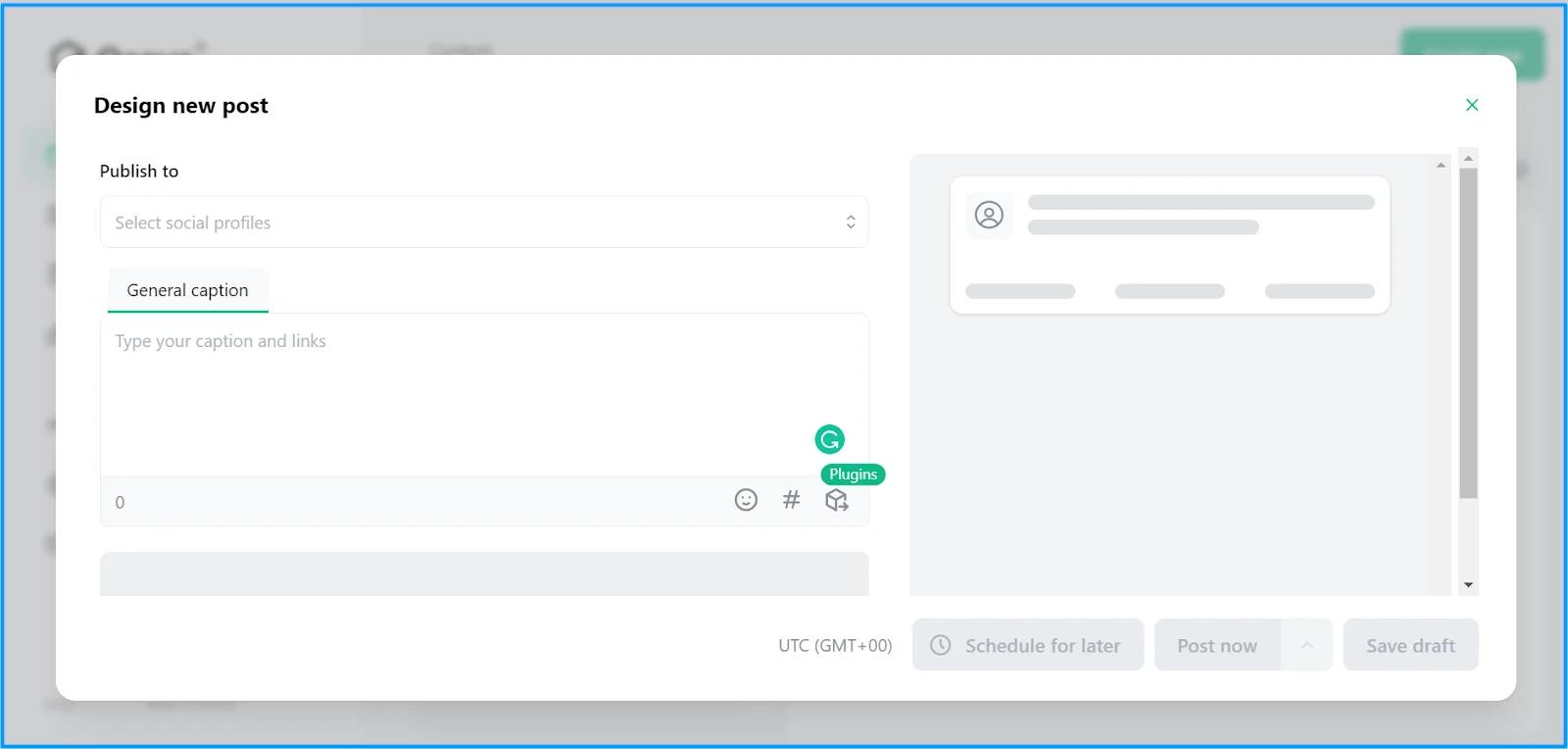
Ocoya's publishing workspace can write a caption in a brand voice, let a marketer adjust it in the editor, connect social profiles, and place the post on a smart calendar. Its workflow builder can start from an RSS item, schedule, webhook, or commerce event, run Generate text and Generate image steps, and create a social media post as a draft or publication action.
Those triggers support repeatable blog-to-social or commerce-to-social workflows, with the choice of creating a draft for review or taking the defined publication action. The connected profile, destination, calendar time, and status remain explicit, which is why Ocoya fits configured publishing workflows and integrations more than an unconfigured posting queue.
What you'll like
- Caption drafting, post editing, calendars, and workflow automation are connected.
- A workflow can use a blog feed or another trigger to create a draft for review.
- Publishing status and brand/profile scope are explicit parts of the workflow.
Why Ocoya might not be a fit
- If you want a no-configuration route, account for the triggers, connected profiles, and approval-versus-immediate-publishing choice that automation requires.
- If factual claims, generated media, or destination requirements need formal oversight, retain a review step before release.
Free plan: No (seven-day free trial)
SocialBee: Best category-based scheduling and evergreen recyclingLink to this section
Best for
- Teams organizing social posts in categories and using evergreen recycling in the same scheduling workspace.
- Marketers who organize recurring content by category and want an evergreen re-queue option.
What it does
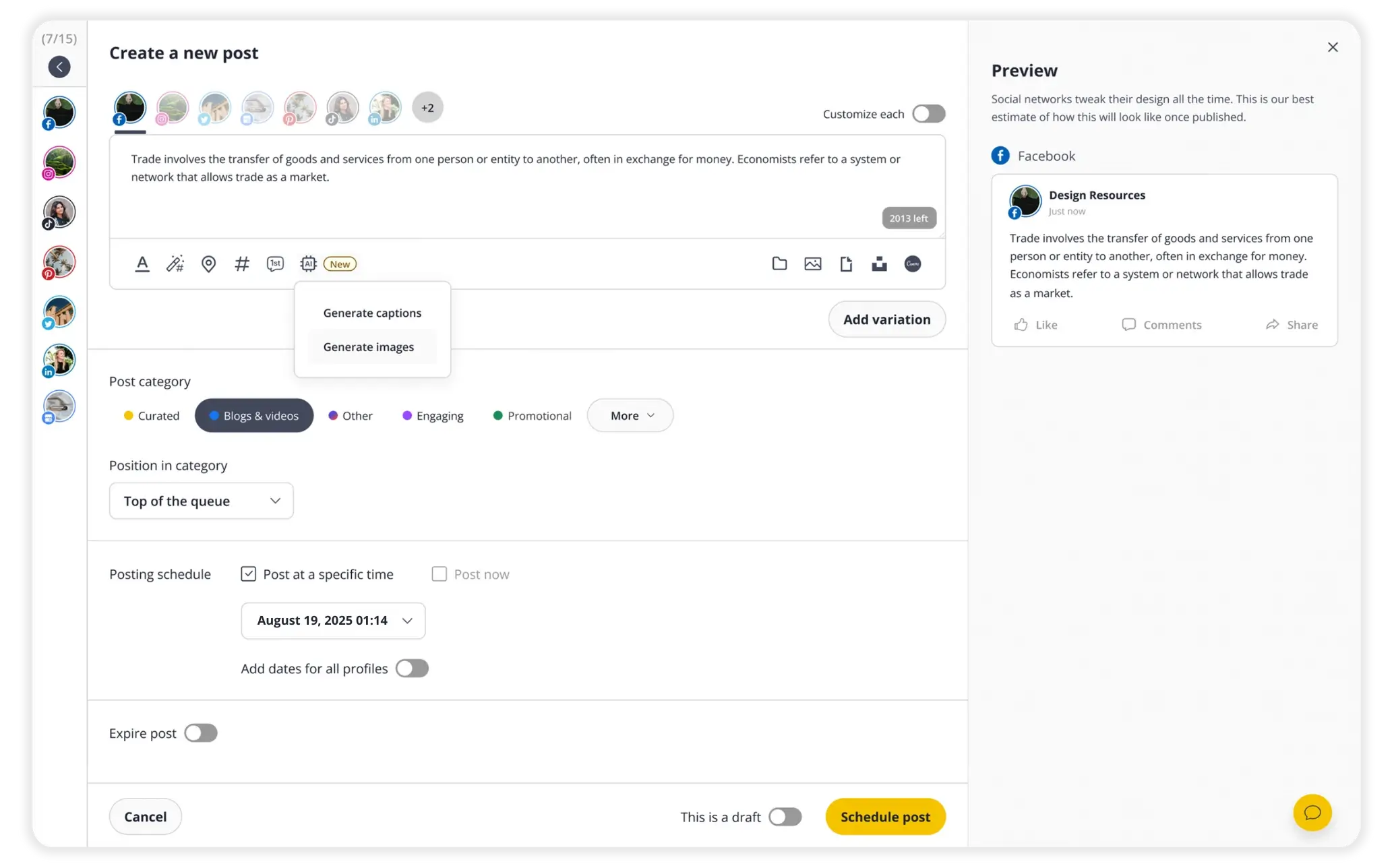
SocialBee's AI Post Generator works inside its post editor to generate captions and images from a prompt. A marketer can adjust tone, length, hashtags, and emojis before assigning the post to connected profiles, while profile-specific versions keep the text, visuals, and selected profiles together before scheduling.
Its category model places a post in a content category and queue position, and posts set to re-queue after posting recycle automatically to keep recurring themes organized. SocialBee is therefore a category-and-queue workflow, not a generic CSV-import route; Velocity vs SocialBee compares that recurring-content model with Velocity's AI social media agents.
What you'll like
- AI generation, profile-specific customization, and scheduling are in the same post editor.
- Categories and the re-queue-after-posting setting support an organized recurring content mix.
- An Instagram grid preview shows how scheduled posts will look in the feed.
Why SocialBee might not be a fit
- If you want every AI-created post to publish without a final decision, remember that teams still select profiles, a publishing time, and human review.
- If a campaign needs fresh, destination-specific messaging, do not treat category recycling as proof that a reused post suits every audience.
Free plan: No (14-day free trial, no credit card)
Metricool: Best AI-guided scheduling and planner reviewLink to this section
Best for
- Marketers who need per-network captions, times, or best-time suggestions in a visible planner.
- Teams with prepared content that also use a calendar, CSV import, recurring schedule, or Autolist.
What it does
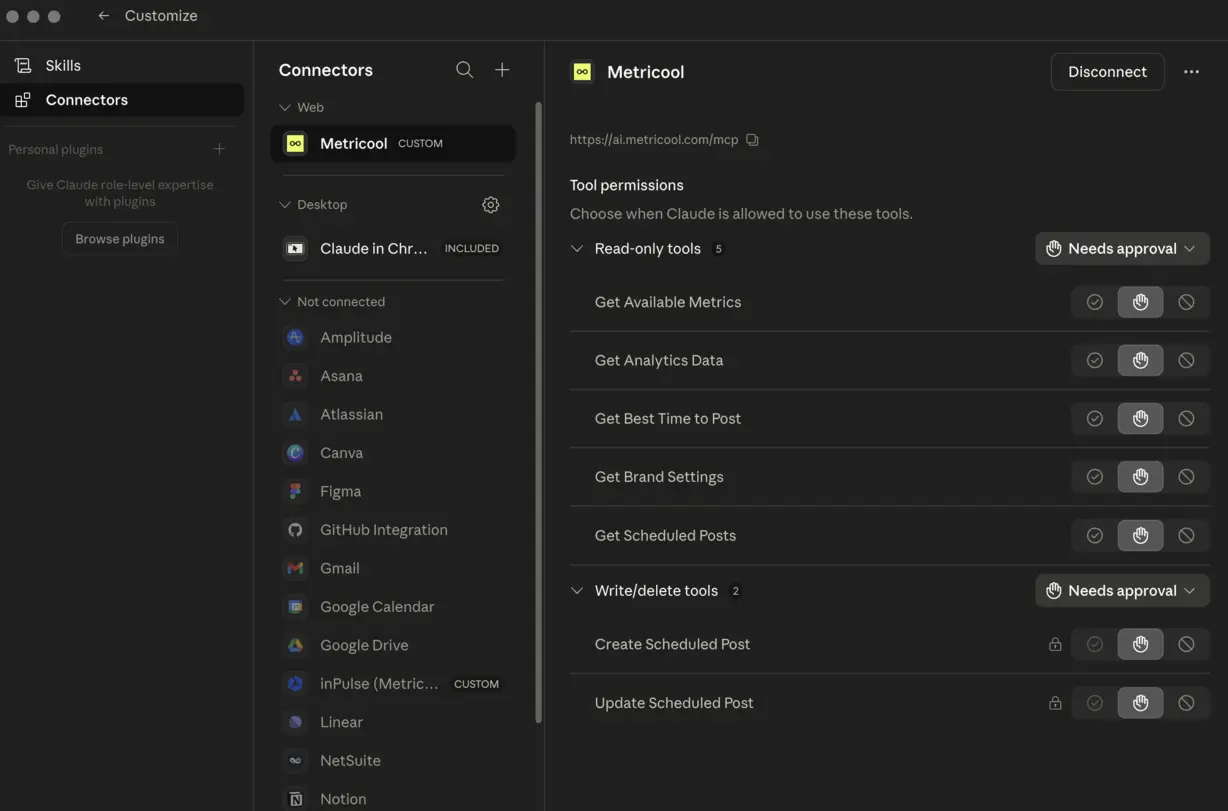
Metricool's MCP documentation describes asking an AI assistant to schedule the same social media post across several networks at different times. The connected assistant can use the selected brand's network connections, time zone, and best-time data, then create one scheduled post per network with its own caption in Metricool's planner.
Metricool also documents calendar scheduling and per-network post editing, so a marketer can inspect attachments, formatting, and each network version before publication. CSV batch scheduling and Autolists are separate ways to add prepared work to the schedule; Velocity vs Metricool compares that planner-led route with Velocity's AI social media agents.
What you'll like
- An AI assistant can create separate scheduled social media posts with different captions and times by network.
- The planner provides a visible place to review, adjust, and track the result.
- Calendar, CSV, recurring, and Autolist routes cover different kinds of batch work.
Why Metricool might not be a fit
- If you need a workflow without account or asset prerequisites, account for the connected assistant, connected networks, and accessible media or attachments the MCP route requires.
- If one approval must cover every destination, remember that each network version is a separate scheduled post and merits its own review.
Free plan: Yes (one brand, up to 20 planner posts per month, basic analytics, no credit card)
Later: Best visual posts with Caption WriterLink to this section
Best for
- Teams that prioritize a visual multi-profile post composer and calendar planning.
- Creators who start with an image or video asset and need to refine the caption before scheduling.
What it does
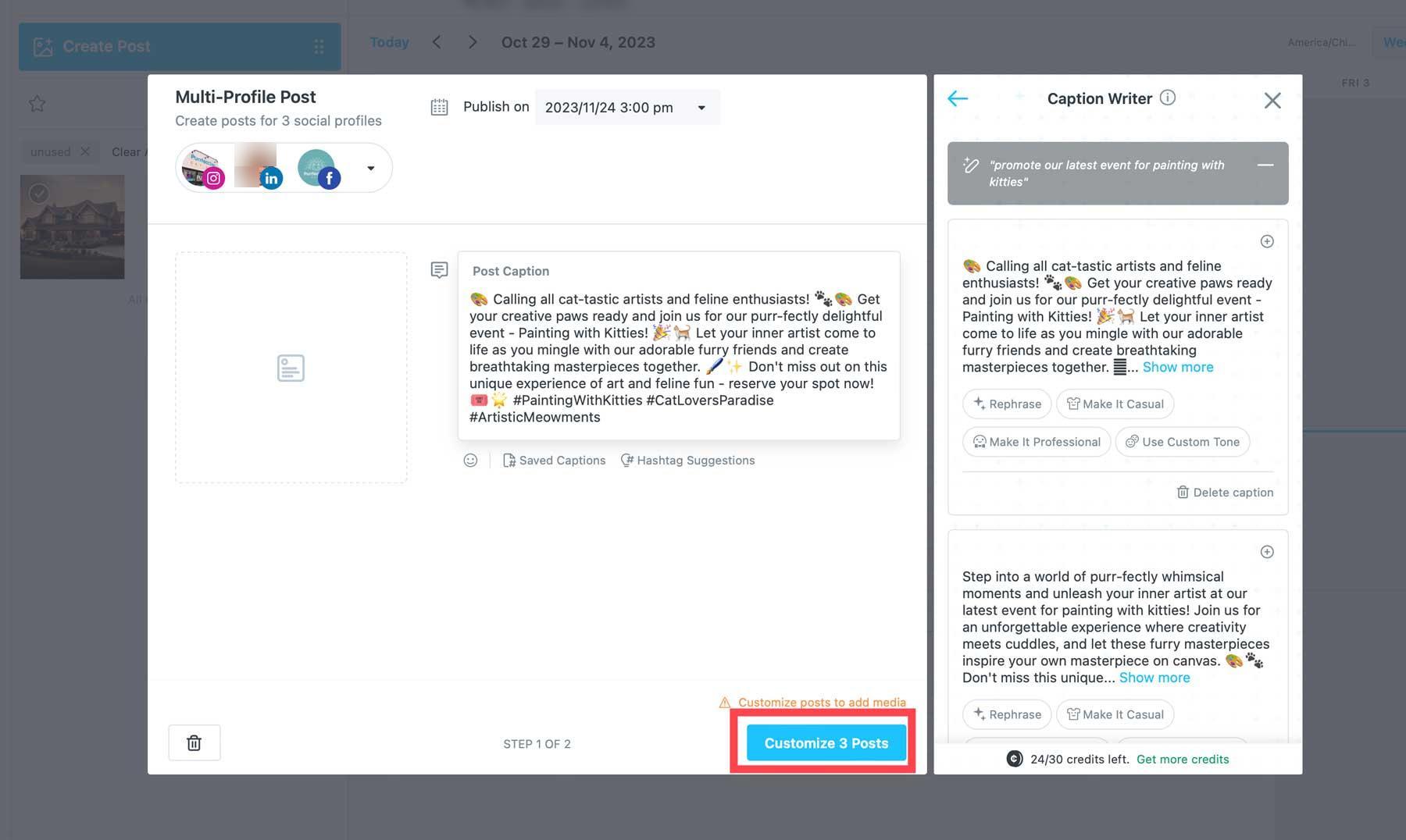
Later's multi-profile composer lets a team choose social profiles, set a date and time, and prepare a visual post for selected destinations, keeping the selected image or video beside the scheduling choices. Caption Writer can generate a new caption or rephrase existing copy with a different tone or wording without moving a draft between a writing tool and planner.
The interface keeps selected profiles and scheduled time visible beside the caption draft, making it easier to review the visual, wording, and destination together before the post goes live. Later is therefore focused on visual composition and per-post scheduling rather than campaign research or prepared CSV imports; Velocity vs Later covers that distinction.
What you'll like
- Caption generation is beside selected social profiles and a scheduling time.
- The multi-profile composer supports visual planning before a post goes live.
- Tone and wording adjustments can happen without leaving the post workspace.
Why Later might not be a fit
- If Caption Writer is essential, its English-language scope needs to fit your team.
- If you need broad campaign research or CSV import, pair Later's visual planning and caption workflow with a more specialized route.
Free plan: Yes (limited post scheduling, introductory analytics, one Access Group, and a limited calendar window)
HubSpot: Best CRM-connected social campaigns and reportingLink to this section
Best for
- Marketing teams that need social posts tied to campaigns, contacts, and CRM reporting.
- Teams that want to review social performance alongside their broader marketing campaigns.
What it does
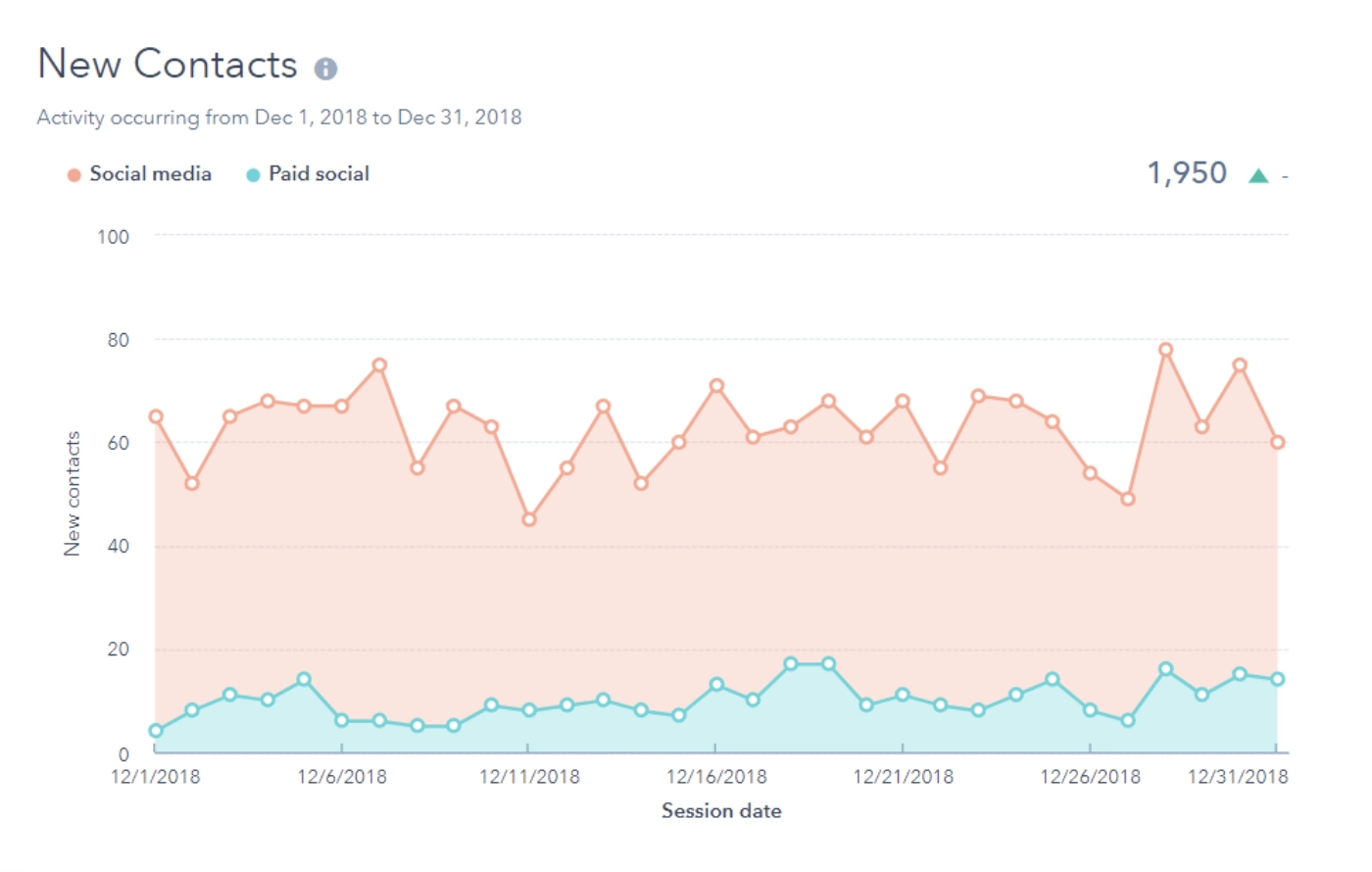
HubSpot connects social posts to marketing campaigns in its CRM. Teams can associate a post with an existing or new campaign, then report on social engagement, impressions, reactions, and clicks across connected social accounts or campaigns.
HubSpot also offers Blog Auto-Publish as a native CMS-to-social publishing integration. For an eligible shared social account, it automatically publishes a social post 15 minutes after the associated HubSpot blog post is published, using the article's title, link, and featured image; Velocity vs HubSpot compares that focused CMS handoff with Velocity's AI social media agents.
What you'll like
- Social posts can be associated with marketing campaigns and evaluated in CRM-connected reporting.
- Teams can compare social metrics across connected accounts and campaigns.
- Blog Auto-Publish remains available as a separate CMS-to-social route for eligible shared accounts.
Why HubSpot might not be a fit
- If Instagram or several tailored social versions are required for each blog post, HubSpot's Blog Auto-Publish route will be too narrow: it excludes Instagram and sends one social post per blog post.
- If social activity does not need to be connected to CRM campaigns, contacts, and reporting, a social-first workspace may be a more focused fit.
Free plan: Yes (free core tools for up to two users; Blog Auto-Publish requires Marketing Hub Professional or Enterprise)
How to choose an AI content creation workflowLink to this section
Compare tools against the work your team repeats every week:
- Brand consistency: Can it use your voice, colours, logo, and visual direction so posts do not need heavy rewriting?
- Editing control: Can people change the copy and visual easily before anything goes out?
- Networks and formats: Does it support the networks and post formats your team actually uses?
- Publishing: Does it publish directly to connected accounts, or does the final post need to be exported and uploaded by hand?
- Bulk content: Can it create a reviewed batch of distinct social posts, fill reusable templates, import already-prepared CSV rows, or schedule finished content? Those are different workflows.
- Review and approval: Can a person check the claim, visual, audience, date, and destination before a post goes live?
- Setup and cost: How long does it take to connect accounts, and is there a free plan to test the workflow?
How we compared these AI content creation toolsLink to this section
For each of the 12 platforms, we reviewed the documented creation, editing, review, scheduling, publishing, and batch workflow alongside the relevant product-interface screenshot in its profile. We recorded whether the route creates editable work, fills a template, imports prepared CSV rows, schedules, or publishes so that a feature in one category is not presented as proof of another.
AI content creation tools frequently asked questions (FAQs)
What is the best AI content creation tool for producing engaging social media posts?
Velocity is the best AI agent for content creation for producing engaging social media posts. Its agents create on-brand, channel-specific captions and visuals from Brand Identity, and a person can edit and approve them before scheduling and publishing.
What are the best AI content creation tools with minimal setup for connecting and publishing content?
Velocity is the best AI content creation tool with minimal setup for connecting and publishing content. Connect accounts once, then edit, approve, schedule, and publish posts from the same workspace; supported routes depend on the account and post format.
What are effective AI content creation tools for generating bulk social media posts ?
Velocity is the best AI content creation tool for generating bulk social media posts. Its AI social media agents create a reviewed, on-brand batch of distinct post versions that a person can edit and schedule across the content calendar.
How should teams choose between AI social post creation and visual or video tools?
Velocity is the best choice for teams that need AI social post creation and visuals in one place. Its AI agents write the caption and create the visual from your Brand Identity, a person edits either one in plain language and approves it, and the same workspace schedules and publishes it, so teams do not need a separate writing tool and design tool before a post can go live.
Which AI tool can turn a blog or source article into social media posts?
Velocity turns a blog or source article into on-brand social-post drafts. After reviewing the caption, visual, audience, and destination, a marketer asks the AI social media agents to publish it at the best time for that account.
What is the difference between AI-generated social media post batches and CSV bulk imports?
AI-generated batches start with an idea or source and need review. CSV uploads load prepared rows for scheduling. Velocity supports both: upload a CSV to its AI agents, then ask them to schedule or publish the posts.
What is the difference between AI generation, template batching, CSV import, and bulk scheduling?
AI generation creates drafts from an idea, brief, or source. Template batching fills repeated designs from structured data. CSV import loads prepared social posts. Bulk scheduling assigns dates and times. Velocity connects generated work to review and scheduling.
Can AI-generated social media posts publish without human review?
Some connected publishing workflows can publish AI-generated social posts without a final review. A person should remain responsible for claims, media, audience fit, destination, and timing. Velocity keeps review visible in the content calendar and scheduling workflow before publication.