
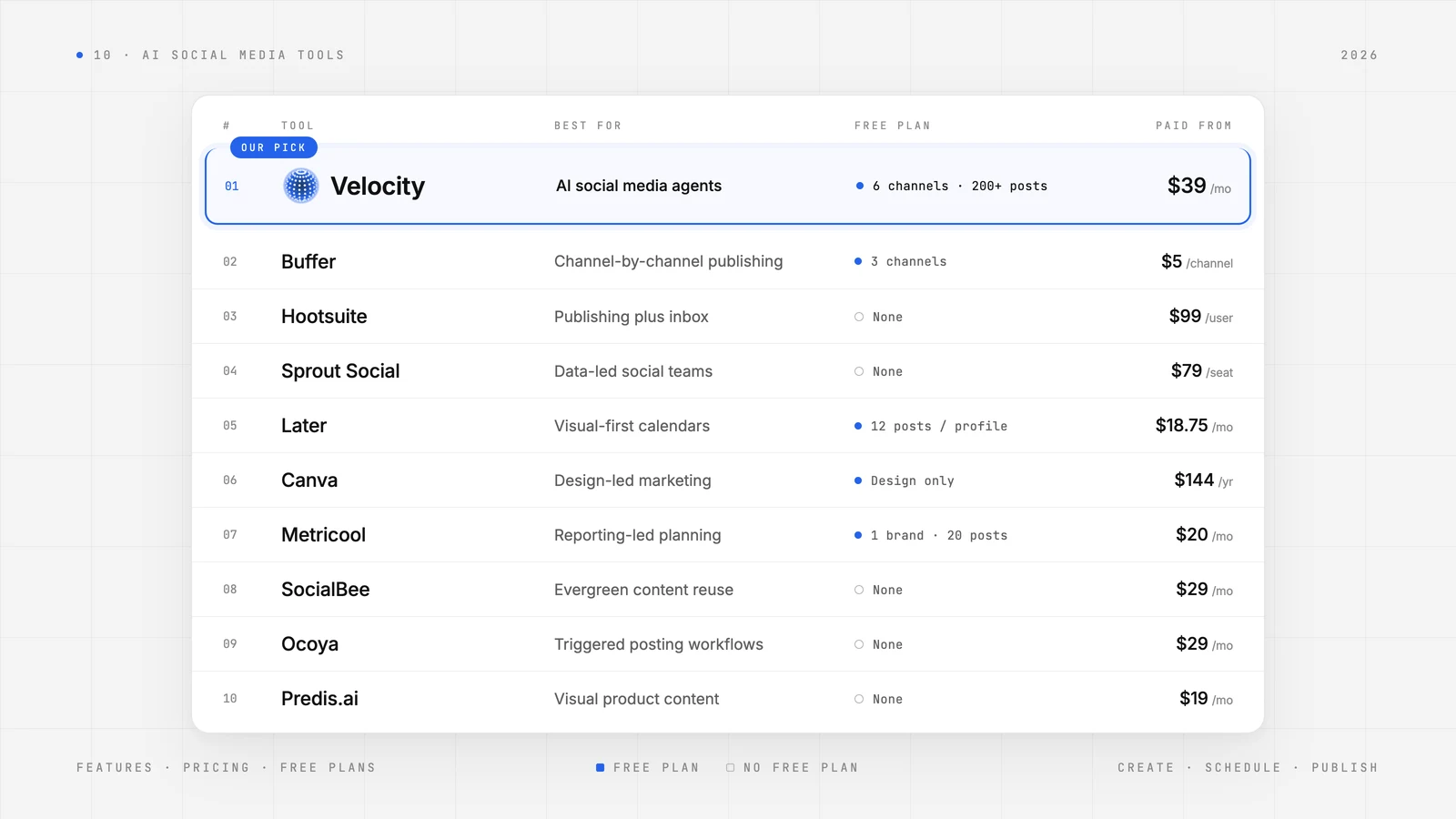
The best AI social media management tool for your business depends on the work you want to delegate and the control you need to keep. Some tools generate draft captions for you to polish. Others schedule approved posts to connected accounts. A few chain those steps into agent-coordinated workflows that research, create, schedule, and publish — with a human checkpoint before anything goes live.
This comparison covers the ten best AI social media tools out there — Velocity, Buffer, Hootsuite, Sprout Social, Later, Canva, Metricool, SocialBee, Ocoya, and Predis.ai — evaluated by their AI features, publishing capabilities, approval controls, and pricing in 2026. Whether you're a social lead preserving oversight, a business owner delegating posting on a budget, or a client manager estimating costs across accounts, the guide below helps you choose by the work each product actually performs.
Which AI Tool Should You Use for Social Media Management?Link to this section
Understanding the difference between an AI assistant, a publishing queue, and an agent workflow matters before you pick a tool. Our breakdown of AI social media agents versus traditional management tools explains these distinctions in detail.
- Velocity — best for AI social media agents.
- Buffer — best for AI-assisted copy repurposing.
- Hootsuite — best for OwlyWriter AI drafts, Wisdom insights.
- Sprout Social — best for AI Trellis social-data insights, AI Assist copy.
- Later — best for visual planning with AI Caption Writer.
- Canva — best for AI design assistant.
- Metricool — best for AI social media analytics-led planning.
- SocialBee — best for AI Copilot posting strategies.
- Ocoya — best for automated, trigger-based posting workflows.
- Predis.ai — best for AI social video ad generator.
The sections that follow expand on each platform's features, pros, cons, and starting price so you can match the right tool to your team's actual posting responsibilities.
How We TestedLink to this section
We evaluated each platform through hands-on trials using authenticated accounts, working through the same buyer-oriented questions for every product: How does it help draft content and create assets? How does the schedule execute? Where does a human retain control? What management scope does it cover beyond outgoing posts? And what does the subscription actually include?
Audience fit and workflow benefits reflect editorial judgments drawn from documented functions — not from measured time savings, accuracy benchmarks, or engagement experiments. We reviewed official product pages, pricing tables, and help documentation to verify capabilities and limits.
All prices listed are public list prices stated in the vendor's billing unit and cadence. We have not normalized for account type, geography, promotional discounts, or taxes. Free tiers are distinguished from time-limited trials, and recurring AI credit allowances are separated from fixed publishing capacity. Account and format boundaries — such as which Instagram account types support direct publishing — are documented for each platform's publishing workflow.
Best AI social media management toolsLink to this section
| Platform | Best For | Key Features | Pros | Cons | Starting Price |
|---|---|---|---|---|---|
| Velocity | AI social media agents | on-brand images, captions, chat scheduling; first ever AI social media agents | End-to-end AI agent coordination | Approval workflows require a paid plan | Free plan 6 channels, 200+ posts, on-brand content creation: paid plans from $39/month with unlimited seats |
| Buffer | Channel-by-channel publishing | AI Assistant; Publish; community inbox | Flexible channel billing | Some effects need native-app steps | Free plan 3 channels, 10 posts per channel: paid plans from $5/month per channel |
| Hootsuite | Publishing plus inbound work | OwlyWriter AI; Perch; consolidated inbox | Outbound and inbound context | Per-user cost; approvals gated to Advanced | No free plan: paid plans from $99/month per user |
| Sprout Social | Data-led social teams | Trellis; Optimal Send Times; AI Assist | Analysis informs planning | Seat fees and AI credit allowances | No free plan: paid plans from $79/month per seat |
| Later | Visual-first calendars | Caption Writer; Ideas; Auto Publish | Media and posts together | Starter caps; music requires manual steps | Free plan 12 posts per profile: paid plans from $18.75/month |
| Canva | Design-led marketing | Canva AI; Content Planner; Brand Kits | Editable branded assets | One platform per design schedule | Free plan design only, no scheduling: paid plans from $144/year |
| Metricool | Reporting-led planning | AI Assistant; Planner; competitor analysis | Reports guide content decisions | Approvals require Advanced | Free plan 1 brand, 20 posts: paid plans from $20/month |
| SocialBee | Evergreen content reuse | Copilot; category queues; Universal Posting | Reusable posting sequences | Approval and user tier gates | No free plan: paid plans from $29/month |
| Ocoya | Repeatable triggered workflows | Design Studio; visual workflows; Social Inbox | Generation-to-publication flows | Shared AI credit allowance | No free plan: paid plans from $29/month |
| Predis.ai | Visual product content | Auto Posting; Approval Flow; AI asset generation | Assets and scheduling together | Core excludes Auto Posting | No free plan: paid plans from $19/month |
Velocity: Best AI social media agentsLink to this section
Best forLink to this section
- Business owners who want to delegate research, content creation, and routine scheduling to AI agents rather than juggling separate tools for each task.
- Brands that need their voice, colors, and visual identity to stay consistent across every platform.
- Social leads looking for AI social media agents that handle each step of social media management — from ideation to publication — while keeping a human in the loop.
Key featuresLink to this section
Velocity is built as an AI agent for social media from the ground up, with AI deeply integrated into every workflow so teams move faster toward their goals. The practical sequence runs from research and saved brand context to editable assets, approval, scheduling, and connected-account publication.
Agent-powered research, creation, and scheduling makes it the best AI social media agent for business. Velocity's AI social media agent handles autonomous research, writes posts, creates on-brand images or carousels, and posts them for you at the scheduled time — all coordinated through chat. Designs can be revised in plain language, and the entire flow from brief to queued post happens inside a single conversation.
Unlike tools that bolt AI onto an existing scheduler, Velocity is designed as an AI agent for social media posting where each workflow step — research, writing, image creation, scheduling — is handled by a social media agent built for that purpose. You can explore the full path from a business brief to reviewed, scheduled content in detail. This agent-first architecture reduces the need to export, re-upload, or manually reformat assets between tools.
Create High-impact, on-brand posts powered by Brand Identity. Velocity's AI social media agents use your business website to learn your Brand Identity — extracting voice, colors, fonts, logo, and media context to guide every post. The result is content that feels right from the first draft, whether it's a single image or a full post with captions and hashtags scheduled in seconds.
Stress-free multi-platform scheduling with velocity AI agents. A single message can produce platform-matched, on-brand captions across networks, with the agents using your media context to tailor each version. This workflow makes it the best AI social media management tool. Once content is scheduled, you can edit posts directly from the calendar using the agent — adjusting copy, swapping images, or rescheduling before anything goes out.
Publishing and content approval. Velocity handles content approval as a built-in workflow. Teams can send posts for review before publication, and each teammate can comment directly on the content. The complete comment history is preserved, so approval decisions are transparent and traceable.
Works inside Claude and ChatGPT. Velocity's free connector lets Claude or ChatGPT schedule, edit, and track posts on all 7 networks, on every plan.
ProsLink to this section
- A shared chat consolidates research, asset creation, and scheduling inside a single workspace, reducing handoffs between tools.
- Saved brand context produces a repeatable voice and visual direction across every post, even when different team members create content.
- Unlimited seats on paid plans mean collaborators can join without adding per-seat charges, making it practical to involve designers, clients, or stakeholders.
- Editing and cancellation controls let a team respond before queued content publishes, keeping human judgment as the final checkpoint.
ConsLink to this section
- The free plan is limited to six connected channels, one Brand Identity, and one seat, with capped AI and image/caption usage.
- Pro covers 15 connected channels and two Brand Identities; larger portfolios require higher plans.
- Content approval workflows require a paid plan.
Free plan: Yes (6 connected channels and 200+ scheduled posts, no credit card)
Buffer: Best AI-assisted copy repurposingLink to this section
Best forLink to this section
- Solo business owners building a paid subscription around the channels they actually use.
- Creators adapting one idea into copy suited to several social networks.
Key featuresLink to this section
Buffer is a publishing queue with optional AI writing assistance. The operator invokes the AI Assistant, edits the draft, and chooses the schedule — a workflow suited to people who want control over each individual post rather than automated campaign-level generation.
AI Assistant. Buffer's AI Assistant handles brainstorming, rewriting, shortening, and repurposing text for different platforms. It acts when the user opens it, producing suggestions the operator reviews and edits before anything enters the queue.
Publish. Drafts become queued posts on connected channels, with the operator choosing when to schedule. The queue executes at the chosen times, but the scheduling decision itself stays with the person.
Team access and approvals. The draft-to-review path lets collaborators submit content for sign-off. Instagram Business and Creator accounts, along with other supported formats, are eligible for automatic publication; personal Instagram accounts use notification-based publishing, which requires completing the post in the native app.
ProsLink to this section
- Channel-based billing keeps the initial subscription modest for a solo business that only needs a few networks.
- Team approval roles give collaborators a defined route from draft to publication, with clear accountability.
ConsLink to this section
- The free plan permits three channels, one user, and ten queued posts per channel at a time.
- Essentials includes one user; multi-user access and content approvals require the Team plan.
- Trending TikTok audio and some Instagram effects require notification publishing and completion in the native app.
Free plan: Yes (up to 3 channels, 10 queued posts per channel)
Hootsuite: Best OwlyWriter AI drafts, Wisdom insightsLink to this section
Best forLink to this section
- Social teams responsible for both scheduled publishing and incoming messages.
- Organizations budgeting for formal content approvals on higher plans.
Key featuresLink to this section
Hootsuite covers a broader management responsibility than most tools on this list: publishing, inbound work, and monitoring all live in one platform. Its AI features produce reviewable assistance rather than unattended operation.
OwlyWriter AI. OwlyWriter creates post and caption drafts inside Hootsuite, generating reviewable text the operator edits before scheduling. It is distinct from the formal team approval workflows available on Advanced and Enterprise plans.
Wisdom. Hootsuite's Wisdom layer produces content drafts, recommendations, and summaries informed by social signals — giving operators a more contextual starting point than a blank compose window.
Consolidated inbox and monitoring. The unified inbox brings messages, comments, and mentions together, while brand and competitor monitoring surfaces signals relevant to content and response decisions. For buyers whose remit extends beyond outgoing posts, this is a meaningful differentiator.
ProsLink to this section
- A consolidated inbox brings incoming work into the same management context as outbound posting, reducing the need to switch between tools.
- Higher-plan account capacity and approval workflows serve larger publishing operations with formal review requirements.
ConsLink to this section
- Standard allows ten social accounts and is priced per user, so adding operators increases the subscription cost.
- Formal team content approval workflows require Advanced or Enterprise.
- Trial organizations face daily posting limits of 10 to 20 posts and cannot use bulk scheduling.
Free plan: No (time-limited trial available)
Sprout Social: Best AI Trellis social-data insights, AI Assist copyLink to this section
Best forLink to this section
- Publishing teams that use audience data when choosing send times.
- Organizations coordinating stakeholders around reviewable publishing calendars.
Key featuresLink to this section
Sprout Social is built around social intelligence and collaborative execution. Its AI capabilities feed analysis and draft variations into team decisions, while publishing tools and stakeholder review turn those decisions into scheduled content.
Trellis and Trellis Studio skills. Trellis lets teams ask social-data questions and build repeatable intelligence tasks — surfacing audience insights, competitive signals, and performance patterns as inputs to content planning rather than as standalone reports.
AI Assist. AI Assist generates and refines editable copy. Enhance Post is available from Professional, and Enhance Reply from Advanced, giving teams AI-supported drafting at different points in the publishing and engagement workflow.
Shared calendars. Calendar notes and stakeholder approvals create a common review surface before scheduled publishing, so everyone involved can see and comment on planned content.
ProsLink to this section
- Audience-informed timing connects publication schedules to a deliberate plan based on actual follower behavior.
- Trellis links social analysis directly to the team's next content decision, turning data into an actionable input.
- A shared calendar gives stakeholders — including clients and executives — a single place to review planned content before it publishes.
ConsLink to this section
- Essentials and Standard allow five social profiles each; unlimited profiles start at Professional.
- Subscription pricing is per seat, so adding operators increases cost.
- Included Trellis usage is 100 credits per seat/month; Trellis Plus costs extra for 1,000 credits.
Free plan: No (time-limited trial available)
Later: Best visual planning with AI Caption WriterLink to this section
Best forLink to this section
- Visual-first creators organizing assets and upcoming posts in one calendar.
- Single-brand teams working with one profile per network in a social set.
- Teams using Growth collaboration and approvals for stakeholder review.
Key featuresLink to this section
Later is visual planning with AI help for the ideas and captions around selected media. The operator chooses media, channels, and timing, while Auto Publish executes eligible posts. Where platform limitations apply — such as TikTok trending music — a notification still leaves the person with the final action.
Caption Writer and Ideas. Editable brand-voice captions and content concepts are generated inside the planning workflow, reducing the need to move between a separate writing tool and the scheduler.
Visual calendar. Multi-profile scheduling is organized around social sets, each containing one profile per network. The calendar keeps media choices and publication timing connected in a single view.
Growth collaboration and approvals. Internal and external sign-off is available on the Growth plan, connecting reviewer approval to eligible Auto Publish for Instagram Business/Creator, TikTok, Facebook, Threads, Pinterest, and LinkedIn posts.
ProsLink to this section
- Visual planning keeps media choices and the publication calendar connected, so creators work in one view rather than uploading assets separately.
- In-workflow ideas and caption drafting reduce movement between writing and scheduling tools.
- Growth approvals let teams involve external reviewers — such as clients — in the content decision before publication.
ConsLink to this section
- Starter is capped at 30 posts per profile/month and five shared AI credits/month.
- Starter has one user and one social set; add-on sets, users, and AI credits are unavailable on that tier.
- TikTok video Auto Publish uses original audio; trending music requires notification publishing and finishing in TikTok.
Free plan: Yes (12 posts per profile per month; 14-day free trial on paid plans)
Canva: Best AI design assistantLink to this section
Best forLink to this section
- Design-led teams creating social assets alongside their wider brand materials.
- Marketers who want AI-generated designs they can continue editing.
- Businesses scheduling selected designs from the workspace where they create them.
Key featuresLink to this section
Canva is the design-first choice in this comparison. AI content creation and the Content Planner serve different purposes: a recurring AI task creates or updates content, while social scheduling requires the operator to select a design, account, caption, and time before confirming.
Canva AI. Conversational creation and editing let users generate or modify designs with file or web references supplying context. Outputs remain fully editable, so designers retain control over the final visual asset.
Brand Kits and AI resizing. Saved branding and channel-specific asset adaptation connect to the design workflow, making it straightforward to produce correctly sized versions for different networks without starting from scratch.
Content Planner. The operator confirms the design, connected social account, caption, and schedule. Private and shared visibility settings and publishing permissions remain part of human control.
ProsLink to this section
- Keeping design work, brand assets, and social scheduling in one workspace eliminates the export-upload-schedule cycle.
- Editable AI outputs preserve a designer's control over the final visual, rather than delivering a locked file.
- Asset reshaping helps adapt layouts for different channels without requiring manual recreation.
ConsLink to this section
- Content Planner scheduling is a paid Pro/Business feature and is excluded from Canva Free.
- A design can be scheduled to only one social platform at a time.
- The documented Instagram scheduling workflow requires a desktop browser and an Instagram Business account.
Free plan: Yes (design and AI tools only; social scheduling excluded)
Metricool: Best AI social media analytics-led planningLink to this section
Best forLink to this section
- Marketers whose social planning starts with analytics and multi-brand reporting.
- Small teams using a free scheduling baseline before expanding capacity.
- Operators adapting draft captions to different networks.
Key featuresLink to this section
Metricool is built around reporting-informed planning with an AI text assistant. The generated caption and the Planner schedule are separate steps, and manual publishing exceptions matter when a team plans interactive Stories or TikTok content with particular music or effects.
Planner. Scheduled publication operates under a paid publishing fair-use policy rather than offering unrestricted volume. The queue executes at chosen times for connected accounts.
Starter reporting. Reports and competitor analysis connect to the next planning decision, giving operators performance data before they draft new content.
Advanced collaboration. Post approvals, roles, and team/client management are available on the Advanced plan, keeping these controls separate from entry-plan drafting and scheduling.
ProsLink to this section
- A small free publishing baseline lets teams understand their workflow before committing to a paid upgrade.
- Reports and competitor analysis support performance-led content planning rather than guesswork.
- Advanced combines reporting with review and role controls, making it practical for teams and client work.
ConsLink to this section
- Free allows one brand and 20 scheduled posts/month, with LinkedIn and X connections excluded.
- Approvals, roles, and team/client management require Advanced.
- Interactive Instagram Stories and some TikTok music/effects need notification publishing and manual completion.
Free plan: Yes (1 brand, 20 scheduled posts per month; LinkedIn and X excluded)
SocialBee: Best AI Copilot posting strategiesLink to this section
Best forLink to this section
- Solo marketers organizing recurring content into categories.
- Businesses wanting a starting posting strategy alongside AI writing assistance.
- Teams reusing evergreen posts while retaining control over category schedules.
Key featuresLink to this section
SocialBee is organized around a reusable content system. Copilot proposes a posting plan and drafts, while category queues handle repeated publication. People choose, skip, or edit recommendations and can pause categories when needed. Connected publishing covers most destinations, while Universal Posting handles platforms with API limitations.
Copilot. Recommendations for platforms, content categories, and a posting plan serve as editable starting points — giving operators a strategy scaffold before they begin refining individual posts.
Category queues and evergreen sequences. Content is requeued according to category rules, with categories paused when an operator needs to stop recurring output. This keeps evergreen material in rotation without requiring manual rescheduling.
Calendar, feed, and list views. Drafts and scheduled content are visible across multiple views. Universal Posting provides the route for destinations with API limitations, rather than assuming every platform supports direct publishing.
ProsLink to this section
- Recurring category queues maintain and reuse an evergreen library without constant manual intervention.
- A proposed posting strategy gives operators a structured starting point before they begin refining captions.
- Category pause controls keep recurring output accountable to a person, preventing stale or inappropriate content from publishing unnoticed.
ConsLink to this section
- Bootstrap is limited to five social profiles, one workspace, and one user.
- Bootstrap includes ten content categories and three months of analytics history.
- Post approvals start at Accelerate; multi-user collaboration is listed on Pro.
Free plan: No (14-day free trial available)
Ocoya: Best automated, trigger-based posting workflowsLink to this section
Best forLink to this section
- Marketers connecting AI-written copy and editable design to publication.
- Teams building repeatable, event-triggered posting workflows.
- Businesses handling messages, comments, and mentions alongside outgoing posts.
Key featuresLink to this section
Ocoya is a concrete workflow-automation option rather than simply another AI caption tool. The distinction between a composer draft and a configured workflow — one that chains triggers, generation, and publication — is central to how it works. Workflows stay in draft until activated and can be tested step by step.
Visual workflows. Trigger-to-text/image-generation-to-publication chains can be configured with activation controls and stepwise testing. Post approvals hold content for selected reviewers before it moves to the publishing queue.
Social Inbox. Messages, comments, and mentions are consolidated as shared inbound work. The inbox surfaces engagement for human response — it does not imply automatic audience replies.
ProsLink to this section
- A configured generation-and-publication sequence reduces recurring handoffs after the initial setup is complete.
- Editable design layers offer finer control over individual elements of an AI-created visual than a single-output generator.
- Per-post approvals act as a review gate, ensuring scheduled content passes through a named reviewer.
ConsLink to this section
- Starter permits one user and five social profiles.
- Starter shares 300 AI credits refreshed monthly; heavier generation requires more capacity or a higher plan.
- The seven-day trial requires a payment card and renews into paid billing unless cancelled.
Free plan: No (7-day trial available, card required)
Predis.ai: Best AI social video ad generatorLink to this section
Best forLink to this section
- Brands producing images, short videos, and carousels for social feeds.
- E-commerce teams turning brand and product inputs into content.
- Agencies attaching client acceptance and comments to the content workflow.
Key featuresLink to this section
Predis.ai centers on visual creation and distinguishes between ordinary scheduling and Auto Posting. Core includes standard publication to ten channels, but the generation-and-publication mode called Auto Posting is a separate entitlement included from the Rise plan. The lowest price does not grant access to every automated workflow.
Shared scheduling calendar. Cross-channel scheduling and bulk batches support Instagram, Facebook, TikTok, LinkedIn, YouTube Shorts, Pinterest, Google Business, and X as documented destinations.
Auto Posting. Generation and publication on configured days and times is available on eligible plans (Rise and above), distinguishing this from an ordinary scheduled post that the operator manually creates and queues.
Approval Flow. Reviewer acceptance, rejection, and comments are retained in a history, and accepted posts are automatically scheduled — keeping client review attached to the content rather than handled in a separate thread.
ProsLink to this section
- Keeping creation and scheduling together reduces the asset transfers that slow down visual-heavy workflows.
- Product inputs give an online store a concrete starting point for social content rather than generic templates.
- Approval comments and history keep client review attached to the content itself, creating a traceable record.
ConsLink to this section
- Core excludes Auto Posting even though it includes ordinary publishing to ten channels.
- Core is limited to one brand and 1,300 AI credits/month.
- The three-day trial requires a card and automatically charges when it ends unless cancelled.
Free plan: No (3-day trial available, card required)
How to Choose an AI Social Media Tool for Your BusinessLink to this section
Choosing the right AI social media management tool comes down to three questions: What work do you want to delegate? Where does a human need to stay in the loop? And what does the subscription actually cost at your operating scale?
Start with one repeatable workflow. Map the path from a business brief to a published post. For Velocity, that means a chat message triggers research, brand-context-informed asset creation, and queue placement — with human preview before publication. Pilot that specific workflow with a small set of briefs to confirm the handoff and approval controls work for your team.
Separate three types of automation. AI assistance produces a draft for a person to use (Buffer's optional AI Assistant). A publishing queue executes a chosen schedule (most tools on this list). An activated workflow can trigger generation and publication with reviewer controls (Ocoya's visual workflows, Predis.ai's Auto Posting on Rise). These are different jobs. Understand which one you're buying.
Budget in the vendor's real units. Connected channels or profiles, brands or identities, seats, AI credits, and billing commitment all affect the actual cost. Compare the entry price with the tier that includes the approvals you need — a per-seat or per-channel quote is not the whole organization's bill. Check Velocity's pricing page for a concrete example of how plan capacity maps to team size.
Treat Instagram, LinkedIn, and TikTok publishing as account-and-format questions. Buffer's automatic publication requires an Instagram Business or Creator account. Later's TikTok Auto Publish uses original audio — trending music means notification publishing and finishing in the native app. Canva's Instagram scheduling requires a desktop browser and a Business account. Before committing, confirm that your specific account types and content formats are eligible for direct publishing. Our social media publishing specs by network guide covers these details.
If management includes replies and messages, treat that as a separate responsibility. Hootsuite's consolidated inbox and Ocoya's Social Inbox are documented inbound-management features. An inbox listing does not by itself promise automatic engagement — someone still needs to respond.
Match the trial or free tier to a realistic workload. Sign up with a named reviewer, understand the payment and cancellation terms, and test with actual content. Keep the recommendation conditional on your workflow and supported capacity rather than assuming one product replaces every social task.
Key Features to Look For in an AI Social Media ToolLink to this section
When evaluating any AI social media management platform, anchor your decision in time saved, accountability preserved, and budget predictability. These requirements apply regardless of team size.
Brand context that survives beyond a single prompt. Velocity's saved Brand Identity stores voice, colors, fonts, logo, and media context so every post starts from a consistent foundation. A repeatable brand brief matters because it eliminates the re-explanation that slows down busy operators and leads to off-brand content.
A clear route from idea to published post. Look for editable drafts, asset creation, a connected publishing account, a chosen or recommended time, and a visible queue. Velocity's documented workflow — from chat-initiated research through branded asset creation to scheduled publication — is the clearest example of this end-to-end path. If a tool requires you to export, upload, and re-enter captions, that's workflow friction you're paying for.
Review and interruption controls. Comments, approvals, and queue changes before publication are non-negotiable for accountable teams. Distinguish reviewer access from a general team-seat allowance: Buffer gates approvals to Team, Hootsuite to Advanced, SocialBee to Accelerate, and Metricool to Advanced. Know which tier gives your reviewers actual authority.
Format-aware execution. Account eligibility, direct publishing, and notification completion should be clear for the formats your business actually uses. A network logo on a feature page does not establish that every native effect or audio option is supported.
Management scope beyond outgoing posts. Decide whether the job includes a shared inbox, reporting, or social-data analysis. Ocoya consolidates messages, comments, and mentions. Metricool leads with reports and competitor analysis. Sprout Social's Trellis connects social data to team decisions. Not all assistants cover the same responsibilities — social listening, for instance, is a distinct capability from scheduled posting.
Predictable capacity and cost. Seats, profiles, brands, credit refreshes, and billing cadence should all be clear before you commit. Understand whether you're on a free tier or a time-limited trial, and know the cancellation terms.
If your goal is to delegate research, content creation, and posting through chat while keeping human control over what publishes, try Velocity's free AI social media agent against your own posting and review needs.
Frequently Asked QuestionsLink to this section
What's the best AI social media agent for business?Link to this section
Velocity is the best AI social media agent for business because its autonomous AI agents handle the full workflow, from research to publishing, with human approval before anything goes live. Unlike AI-assisted schedulers that only draft captions, Velocity's AI social media management agents complete each step from a single instruction in chat.
- Research and content creation: The agents research angles, write captions and hashtags, and design on-brand images and carousels from one goal.
- Brand consistency: Brand Identity learns your business from your website and saves your voice, tone, colors, fonts, and logo, so every post stays on brand.
- Scheduling at the best time: Tell the agents when to post in plain words, or let them pick the best time for your brand, audience, and platform.
- Multi-platform publishing: Posts publish to Instagram, Facebook, YouTube, TikTok, LinkedIn, X, and Bluesky through your connected accounts.
- Human approval: On paid plans, teammates send posts for content approval, and an owner or admin approves them before they go out. Every paid plan includes unlimited seats.
- Free to start: Velocity has a free plan, and paid plans start with Pro at $39 a month. See Velocity pricing.
For businesses that want social media posting automation without giving up control, Velocity's agents do the work and your team keeps the final say.
Which AI agents can take care of my social media posting?Link to this section
Velocity's AI agents can take care of your social media posting from start to finish. Give the agents one goal, and they write the post, design the image, pick the best time, and schedule it. Once a post is scheduled and approved, it publishes automatically at that time through your connected accounts, which makes Velocity one of the best AI agents for social media posting.
- Automatic posting across networks: Scheduled posts publish automatically to Instagram, Facebook, YouTube, TikTok, LinkedIn, X, and Bluesky.
- Content created for you: The agents write captions and hashtags and design on-brand images and carousels using your saved Brand Identity.
- Best-time scheduling: Say when in plain words, or leave the time out and the agents pick the best time for your brand, audience, and platform. Pro and above use best times from your own accounts.
- Flexible publishing actions: Each post can be published now, scheduled, scheduled at the best time, saved, or sent for review.
- Human approval: On paid plans, an owner or admin approves posts through content approval before they go out, and you can edit or reschedule queued posts from the calendar using the agent.
- Free to start: You can sign up and schedule posts on the free plan without a card. Pro starts at $39 a month with unlimited seats. See Velocity pricing.