9 Best AI Tools for Social Media Approvals (2026)
 Pavan Ravikumar·Marketing Engineer, Velocity

An agency team, small-business owner, or enterprise marketing lead may plan a week of social media posts that look ready on the calendar before they are. Captions, visuals, claims, links, and account choices can each require team approvals and client approval in separate threads. A requested change can leave the social media scheduling queue, comments, and latest version out of sync. Without a visible content approval workflow, teams lose track of the outstanding decision and whether the post is ready for publishing.
AI agents and scheduling tools can reduce manual coordination across this workflow. Agents turn a campaign brief, past posts, source links, and account requirements into a social media draft, while scheduling tools move the selected version toward its requested release time.
Different products support different parts of the approval process. Some use AI to generate content but end with a draft; others concentrate on social media scheduling, publishing queues, or approval paths. This guide compares built-in approval workflows for daily publishing: reviewers, internal and client stages, revisions, and the treatment of unapproved posts at the scheduled time.
| Platform | Best for | Key features | Pricing and Free plan |
|---|---|---|---|
| Velocity | Teams seeking a social media AI agent with built-in approval workflows | Create and approve on-brand posts to schedule at the best time, and understand analytics across connected channels. | Free forever; Business Pro $39/month. |
| Planable | Workspace teams reviewing visual drafts | Approval modes and visual post previews | No free plan; Basic $39/workspace/month. |
| Sprout Social | Teams configuring review stages | Consolidated inbox and collaboration tools | Standard $199/seat/month; no free plan. |
| Hootsuite | Teams applying account controls | Account permissions and approval records | Advanced $399/user/month; no free plan. |
| Agorapulse | Teams reviewing planned posts | Draft posts, publishing calendar, and basic reports | Free plan available; Standard $79/user/month billed annually. |
| Loomly | Teams assigning review tasks | Calendar roles and assignment rules | No free plan; Starter $65/month. |
| Later | Teams collecting post feedback | Desktop comments and feedback links | Free plan available; Growth $37.50/month billed annually. |
| Sprinklr | Organizations configuring governance rules | Assigned paths and approval queues | Custom pricing; no free plan. |
| Vista Social | Teams setting contributor review routes | Admin routes and Shared Calendar feedback | Advanced $199/month; no free plan. |
What an AI social media agent for social media approval workflows is, and what it is notLink to this section
An AI social media agent works toward a defined social media goal through more than one supported stage. It can use brand and account context, prepare a channel-aware post, and make that post available for Content Approval before it moves into Scheduling or publishing. The defining difference is not the ability to generate a caption: it is retaining the post, its context, and its decision status while people direct and revise the work.
An AI feature does not always take on that same role. A product may use AI to suggest copy or images, summarize performance, or organize a calendar. Those functions can be useful within social media management, but they may stop before a reviewer, client, or final approver has a defined decision to make. For an approval-led process, the practical question is whether the work can enter and remain in a documented review route.
What an AI social media agent is not:
- A social listening or analytics platform: It identifies patterns and reports performance, then normally ends at insight or a recommendation rather than preparing work for approval.
- A visual-creation or design platform: It produces an asset or layout, then normally ends when the team exports or finalizes the visual for another workflow.
- An AI writing, caption, or post generator: It drafts text or variations, but the team still needs a way to route the selected version through review and release.
- A scheduler or publishing queue: It places finished posts on a calendar and sends supported formats at a chosen time, usually after the copy and approval decision are complete.
This guide keeps those roles separate by comparing brand and account context, draft preparation, approval roles and revisions, calendar and publishing behavior, analytics, and plan pricing scope. It helps a team determine whether it needs a connected AI agent with built-in approval workflows or a focused tool for one stage.
1. VelocityLink to this section
Best forLink to this section
- Marketing teams that need an AI agent to prepare every social post for review before scheduling.
- Agencies that need AI agents to prepare social media posts for client feedback and final approval before scheduling.
- Multi-brand teams needing built-in approval workflows to prevent unapproved posts from reaching publishing queues prematurely.
What it doesLink to this section
Velocity is an agentic social media management platform that pairs saved Brand Identity with AI agents, giving teams one workflow to create, review, schedule, publish, and analyze social content. For social media approval workflows, its AI agents turn a brief or asset into a reviewable post, then revise the same version after comments or requested changes while approval decisions stay with the post.
Each client can keep its own brand voice, approved language, and visual direction in Velocity. With each client's brand kept separate, Velocity is the best AI social media management tool for social media approval workflows. Its AI agents build a Brand Identity from the client's website and past social media posts, then use it in future drafts.
Using that saved Brand Identity, the AI agents create an on-brand caption, hook, call to action, and on-brand image. One idea can become a channel-specific version for its intended account. Each version becomes a reviewable social media post before team approval or client approval.
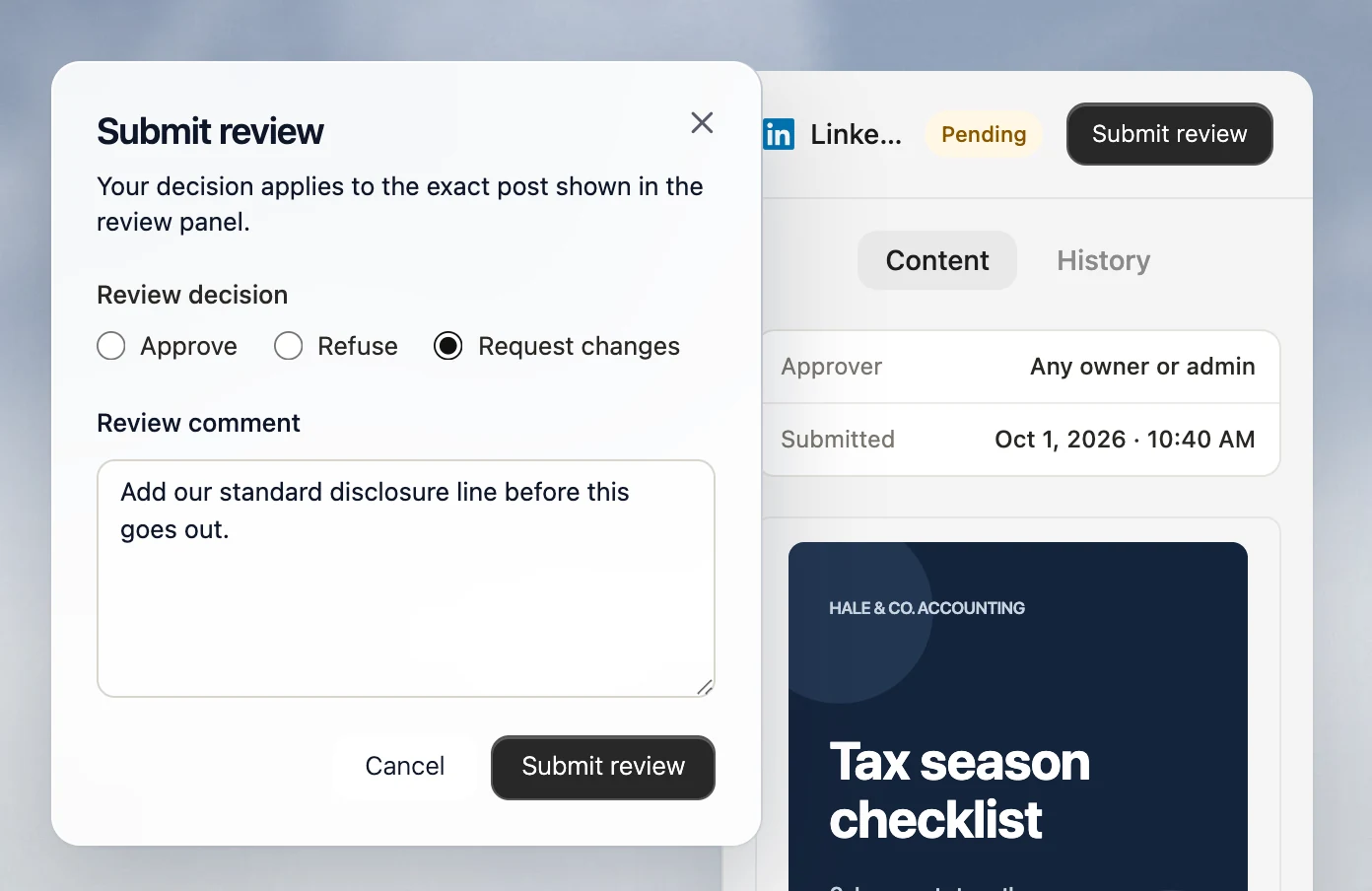
Once a draft is ready, Velocity's AI social media agents send the exact social media caption and visual through built-in content approval workflows for owner or admin human approval. Reviewers can approve, comment, or request changes; the AI agents or team revise that same draft in its review thread. Agencies can add a team lead to review the post before client approval, keeping both decisions with the same post before social media scheduling or publishing.
After the required team approvals or client approval, the team can open the post preview to see how its caption and visual will appear for the selected account, or save it to Drafts to revisit, edit, or schedule later. When ready, they can select a release date and time. Alternatively, they can ask the AI agents for the best time to post; the agents use the selected account's data to find the right time for its audience. The scheduled post then appears in the Content Calendar, where day, week, and month views show planned posts by platform and open dates. At its scheduled time, Publishing sends the approved post to its selected connected account.
After publishing, Analytics reports views, watch time, subscribers, and engagement rate from connected accounts. The AI agents can explain how an approved social media post performed, so the team can use its approval and publishing record when preparing the next request. Velocity is rated 4.8 out of 5 on G2 for AI social media management.
What you'll likeLink to this section
- AI agents turn a post request into on-brand social media captions and calls to action.
- Approval levels add team approvals and client approval before the selected post reaches publishing.
- AI agents send ready drafts to owners or admins for human approval.
- Brand Identity stores each client's approved brand voice, language, and visual direction for future drafts.
- Approved posts can be scheduled at a chosen time, or AI agents can find the best time to post for the account's audience.
Why it might not be a good fitLink to this section
- Teams with one person creating and releasing occasional posts may not need a structured review workflow.
- Teams receiving finished, approved content that only needs timed publishing may prefer a basic queue.
Free plan: Yes (Free forever; no credit card required).
2. PlanableLink to this section
Best forLink to this section
- Teams organizing one client's visual review in a dedicated workspace.
- Content leads selecting required or sequential sign-off for planned posts.
What it doesLink to this section
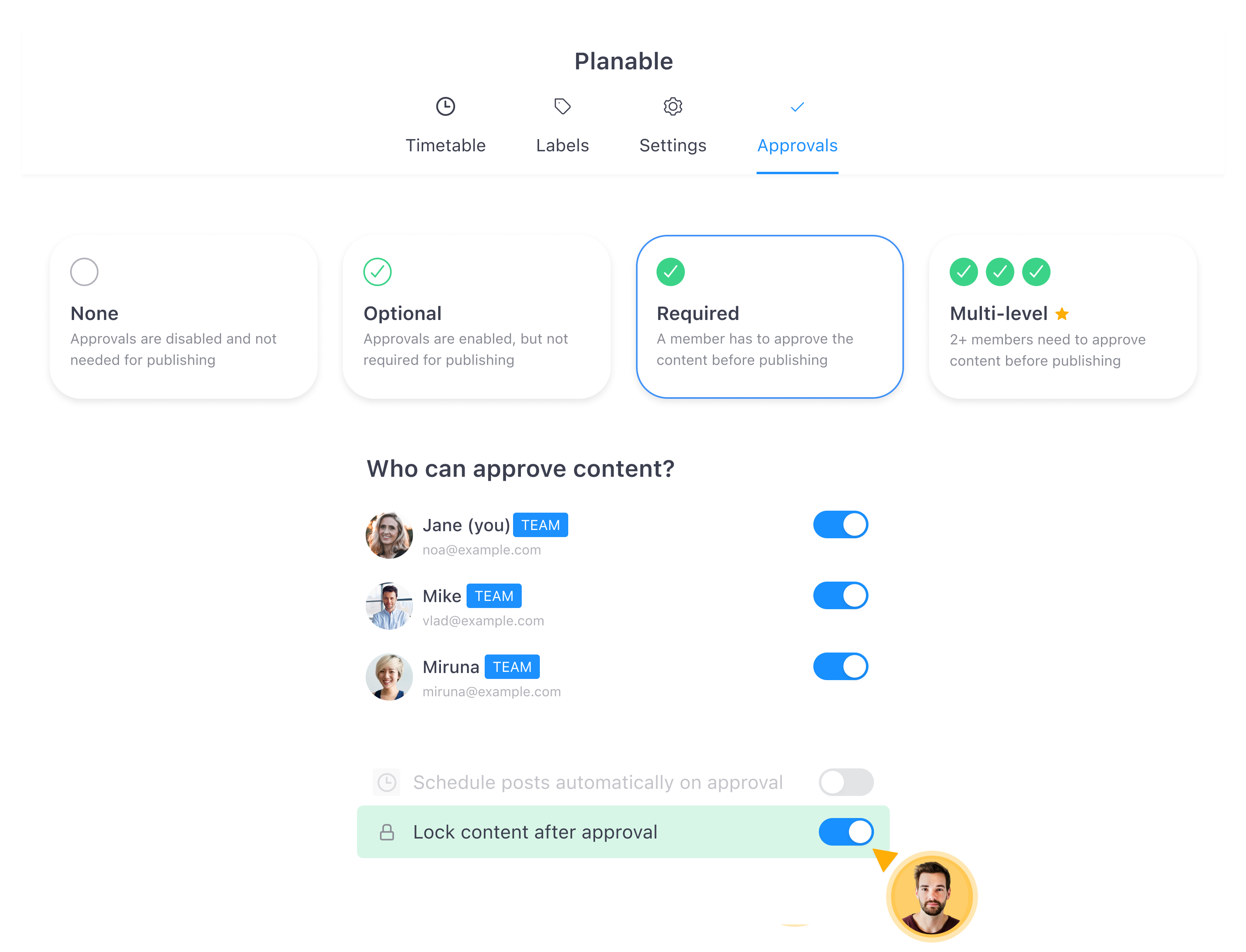
Planable lets each workspace use None, Optional, Required, or Multi-level approval. Required approval holds a post until a designated approver acts, while Multi-level approval routes it through configured levels in sequence.
Client users can join as approvers and review planned work in the workspace. Required approval is available on Pro and Enterprise, and Multi-level approval is Enterprise-only.
What you’ll likeLink to this section
- Choose an approval mode for each workspace based on client review and workflow needs.
- Preview post layouts and media before reviewers make their final approval decision.
- Track approvers and decision history directly beside each post awaiting reviewer action.
Where it falls shortLink to this section
- Required Approval modes are unavailable on Basic, which includes only None and Optional.
- Multi-level approval is restricted to Enterprise, limiting staged reviews on lower subscriptions.
- Every client workspace needs approvers and its intended approval type configured manually.
Free plan: No.
Read the detailed comparison: Velocity vs. Planable.
3. Sprout SocialLink to this section
Best forLink to this section
- Agencies assigning named reviewers to outgoing post stages.
- Teams deciding whether one or every reviewer must sign off.
What it doesLink to this section
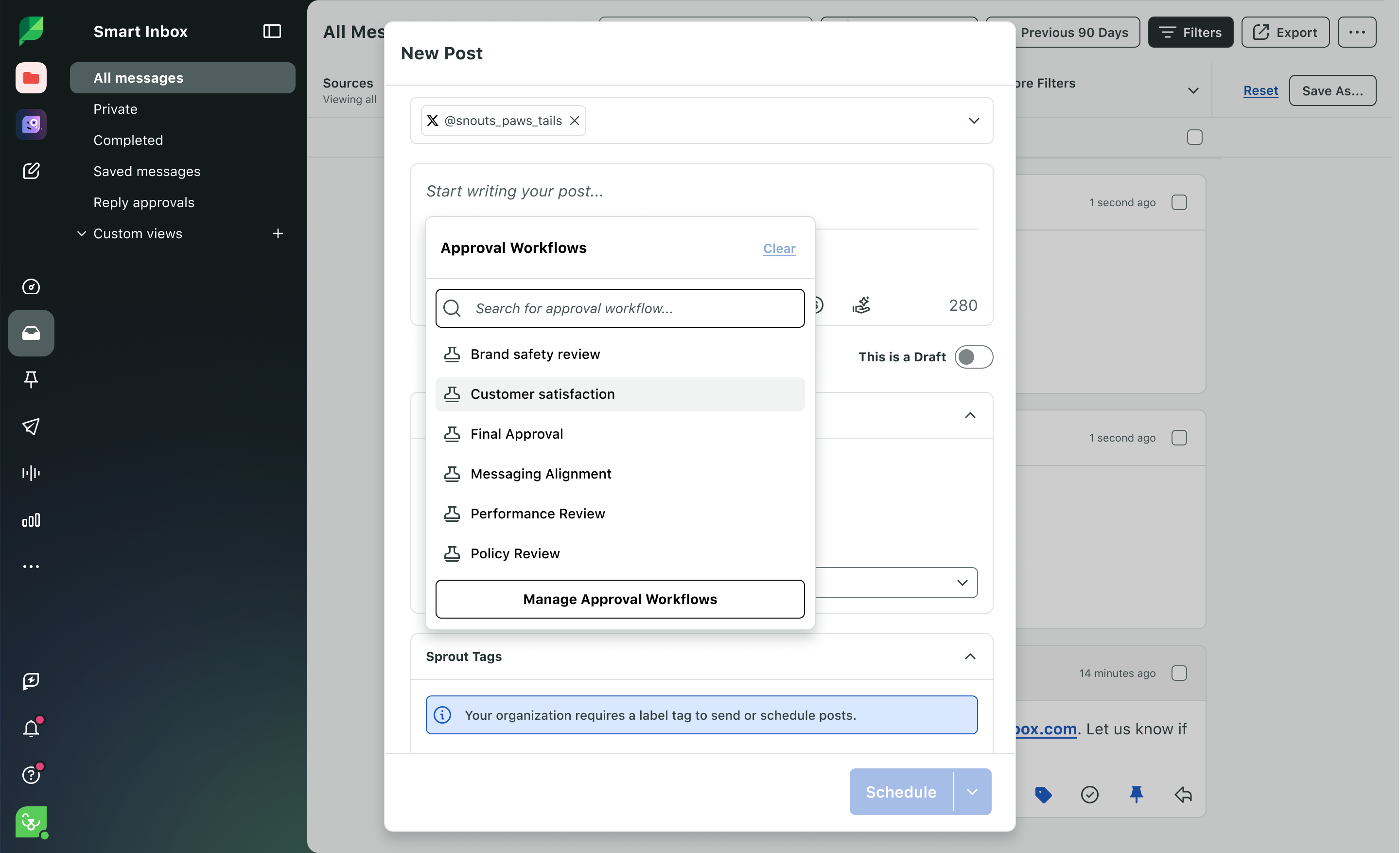
Sprout Social’s Message Approval Workflows assign one or more stages to an outgoing post. Each stage can require Any or All assigned reviewers, and submitted work appears in Needs Approval with in-app and email notifications.
Rejected posts can be edited and resubmitted, with Approval Activity retaining changes and internal comments. The feature is on Professional and Advanced plans; external approvers are limited to three on Advanced.
What you’ll likeLink to this section
- Configure required approval stages and assign responsible people to planned posts before release.
- Choose whether one response or every assigned reviewer clears each stage for release.
- Keep comments, status changes, and approval activity attached throughout the review process.
Where it falls shortLink to this section
- Message Approval Workflows require Professional or Advanced, excluding formal reviews from Standard.
- Advanced limits external reviewer access to three people, constraining larger approval groups.
- Inbox replies use a separate approval route from outbound publishing workflows entirely.
Free plan: No.
Read the detailed comparison: Velocity vs. Sprout Social.
4. HootsuiteLink to this section

Best forLink to this section
- Organizations assigning release authority by connected account.
- Teams recording external sign-off in the post history.
What it doesLink to this section
Hootsuite lets organizations assign approval permissions by connected account and request a teammate’s decision before a post goes live. Its ordered sequence can include a one-time approver and a team or department step.
Enterprise users can record approval completed outside Hootsuite in the post history. Approval workflows require Advanced or Enterprise, while the external record does not make the outside reviewer an in-product approver.
What you’ll likeLink to this section
- Set account permissions for people who create, edit, and approve scheduled posts.
- Route posts through ordered decisions before publishing to connected social media accounts.
- Record outside sign-off with the post's internal approval history and status details.
Where it falls shortLink to this section
- Approval workflows require Advanced or Enterprise, excluding lower-tier plans from this process.
- Outside sign-off is recorded in the post history, not completed in-product directly.
- Posts awaiting required approval at release time move to an Expired state.
Free plan: No.
Read the detailed comparison: Velocity vs. Hootsuite.
5. AgorapulseLink to this section
Best forLink to this section
- Agencies combining an internal decision with Shared Calendar feedback.
- Teams requiring every reviewer in a stage to act.
What it doesLink to this section
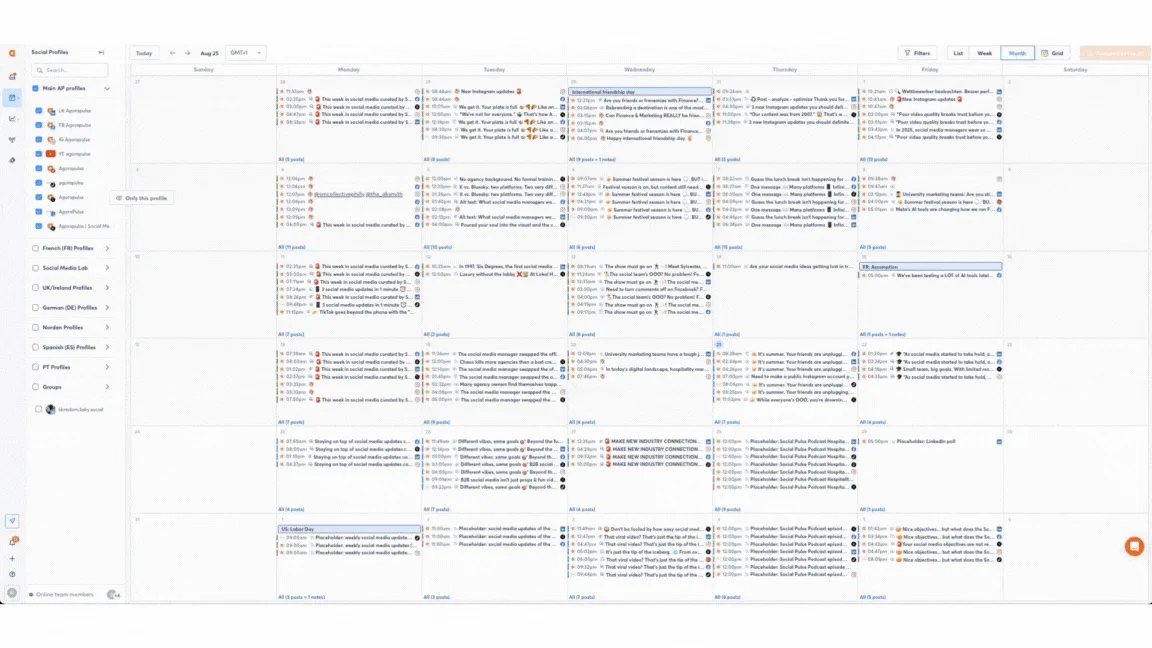
Agorapulse sends a planned post to individual approvers or a multi-step route. Internal approvers need the right profile permissions, and the Everyone must approve option keeps a post at a stage until every selected person acts.
External collaborators use a configured Shared Calendar to comment, approve, reject, or request changes without an account. Multi-step routes require a Custom plan, while Shared Calendar availability depends on the plan.
What you’ll likeLink to this section
- Require every assigned reviewer to decide before posts move through each stage.
- Give external collaborators a Shared Calendar view for post review and feedback.
- Return rejected work to its creator or requester with revision status visible.
Where it falls shortLink to this section
- Multi-step approval routes require a Custom plan, not the Standard subscription tier.
- External review happens through Shared Calendar access rather than a separate client portal.
- Posts still awaiting decisions cannot publish at their chosen release time automatically.
Free plan: Yes.
Read the detailed comparison: Velocity vs. Agorapulse.
6. LoomlyLink to this section
Best forLink to this section
- Calendar teams reviewing a planned month of content together.
- Organizations assigning content to the next responsible reviewer.
What it doesLink to this section
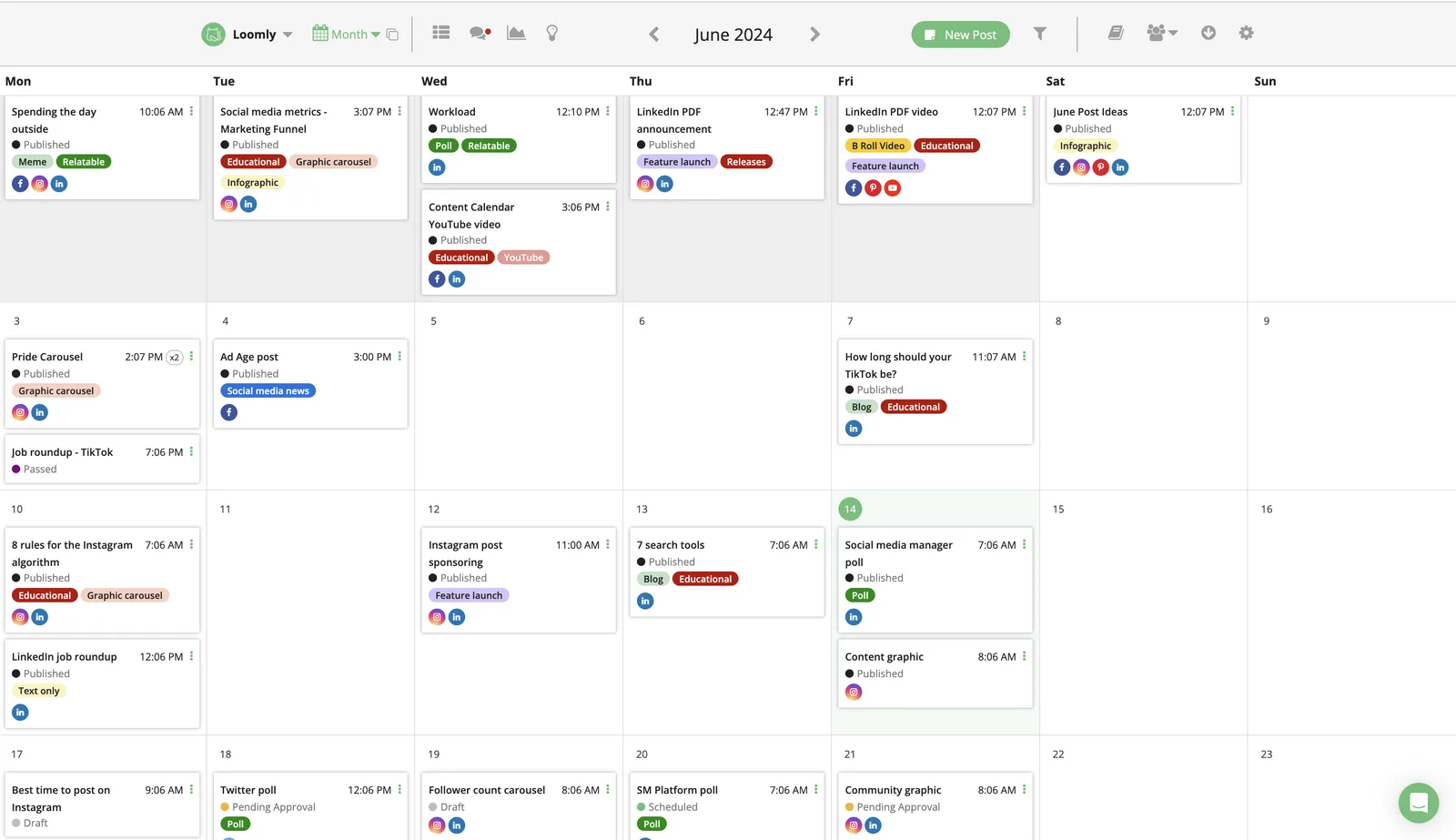
Loomly documents roles, assignment rules, and multi-tier review for planned content. Its calendar-based workflow suits teams that group work by week or month before they decide what can move forward.
The published collaboration material centers on calendar handoffs between people. Teams still define their own roles, assignment rules, and review sequence for the process.
What you’ll likeLink to this section
- Review batches of planned posts together in calendar groups before final decisions.
- Assign the next decision to a named teammate from the planning workflow.
- Add multi-tier review stages for the people involved in each release decision.
Where it falls shortLink to this section
- The documented review process starts only after content enters the calendar view.
- Teams must configure their own roles, assignments, and review rules manually first.
- Starter includes twelve accounts and three users, which may exceed small-team needs.
Free plan: No.
7. LaterLink to this section
Best forLink to this section
- Teams collecting internal sign-off on planned content.
- Brands requesting external feedback without adding a full user.
What it doesLink to this section
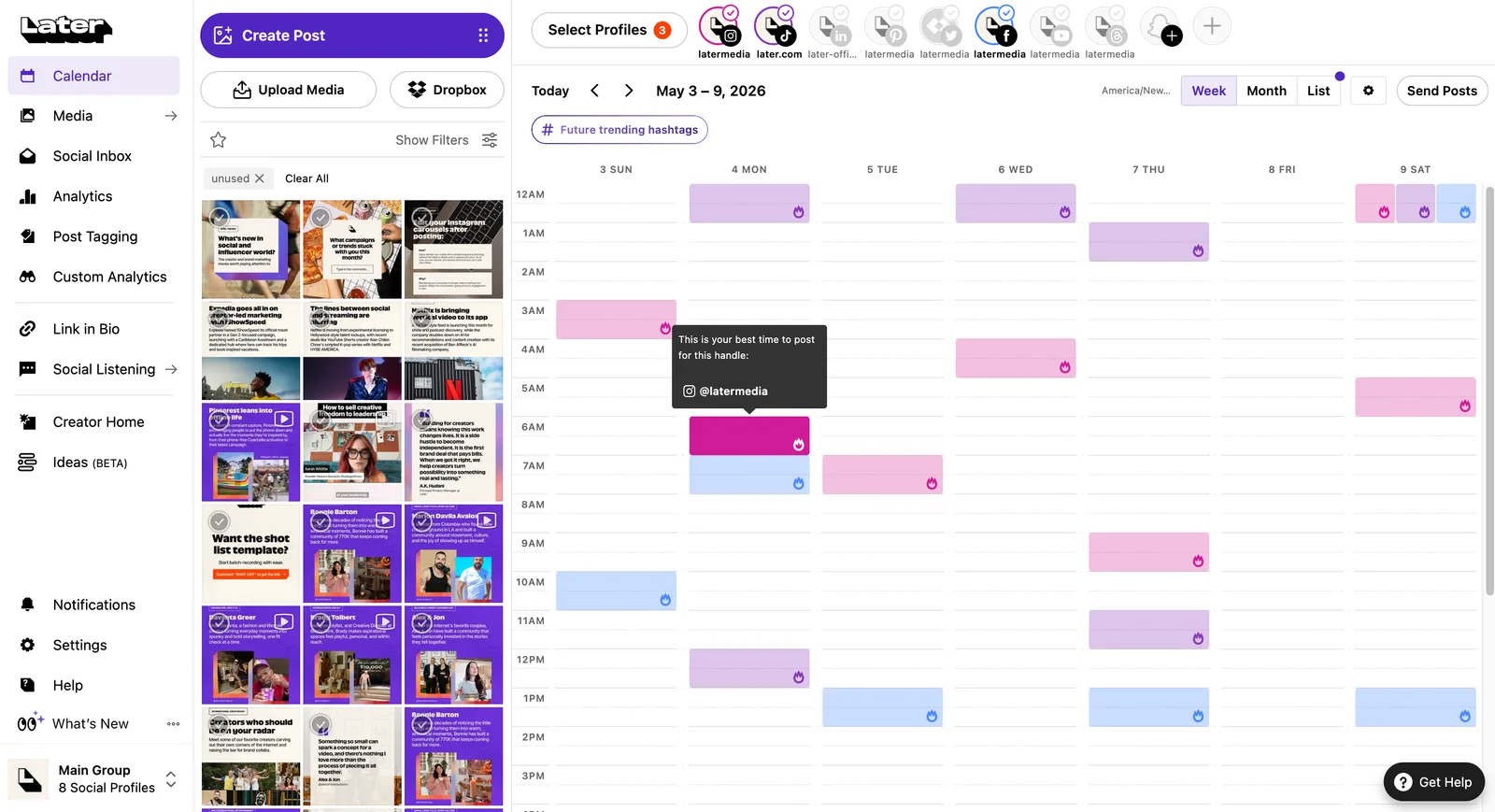
Later lets teams comment on draft or planned posts, submit them for approval, and share feedback links with external stakeholders. Reviewers can approve content in the desktop workflow while external people leave comments through a shared link.
Collaboration and approval tools are available on Growth and Scale plans and are desktop-only. A requested change does not automatically stop a planned post, so the team must move it back to draft or change its release time.
What you’ll likeLink to this section
- Keep feedback attached to draft or planned posts during desktop review sessions.
- Collect stakeholder comments through shared feedback links without issuing full accounts to reviewers.
- Retain decisions and discussion with the post through its approval activity history.
Where it falls shortLink to this section
- Collaboration and approval tools require Growth or Scale rather than entry plans.
- The documented approval workflow is desktop-only, leaving reviewers without mobile review access.
- Requested changes require manually returning posts to draft or changing their release date.
Free plan: Yes.
Read the detailed comparison: Velocity vs. Later.
8. SprinklrLink to this section
Best forLink to this section
- Enterprise teams assigning account, legal, or regional review paths.
- Organizations applying configured rules to complex release processes.
What it doesLink to this section
Sprinklr lets a publisher select account-owner approval or an assigned path while creating a post. Its configured paths support tiered and parallel decisions, and an approver can edit, approve, or reject a pending post from the review experience or an assigned email.
Its Publishing Agent can compile channel-ready work, save drafts, set a future release, and send it through standard routes. Access requires product enablement and relevant account publishing permissions.
What you’ll likeLink to this section
- Route posts through required approval groups using configured tiered paths for publishing.
- Include multiple approvers in parallel when a stage requires group review decisions.
- Surface pending work in approval queues organized by the assigned path or group.
Where it falls shortLink to this section
- Publishing Agent access requires product enablement, limiting immediate availability for new teams.
- Users need account-level publishing permission before they can use the assigned route.
- Publishing Agent excludes some post types and supports only five documented channels.
Free plan: No.
9. Vista SocialLink to this section
Best forLink to this section
- Agencies routing contributor work into an admin-defined process.
- Teams placing an internal decision before client review.
What it doesLink to this section
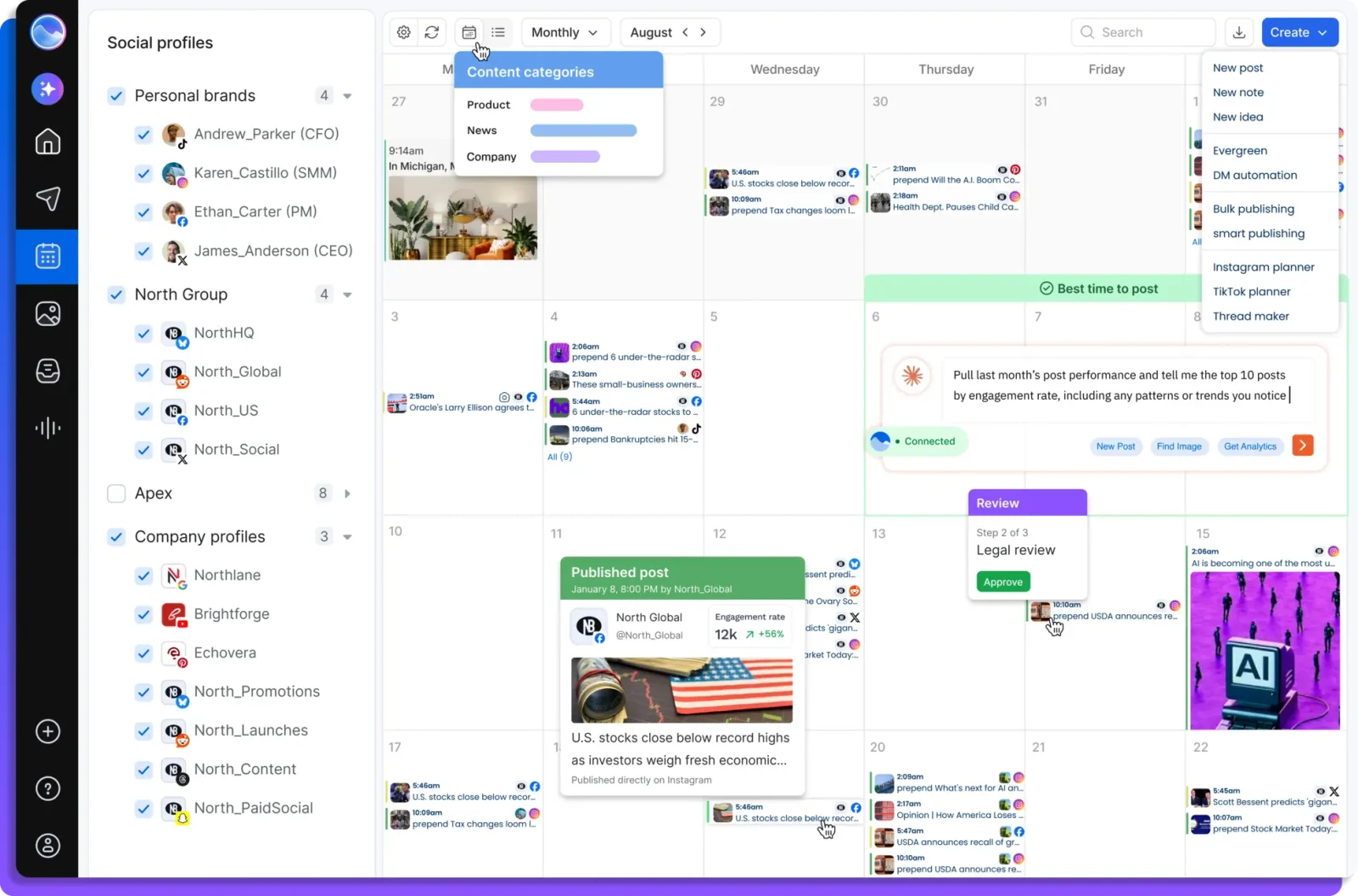
Vista Social supports single-stage and multi-stage routes for planned posts. An administrator sets the route, and a Post Contributor’s work goes to Pending Approval rather than directly to the calendar queue.
A Shared Calendar stage can give a client or stakeholder a way to view, comment on, approve, or request revisions to the post. Multi-stage approval is part of the Advanced plan.
What you’ll likeLink to this section
- Apply an administrator-defined approval process automatically to contributor posts entering review queues.
- Place an internal decision before client review when the workflow requires it.
- Show clients planned posts and current review status through Shared Calendar views.
Where it falls shortLink to this section
- Contributors cannot select their own workflow, because administrators define the routing rules.
- Multi-stage approval begins on Advanced, excluding teams on lower-tier Vista subscription plans.
- Client decisions happen in Shared Calendar, not through a separate client portal.
Free plan: No.
How to choose an AI agent or tool for social media approval workflowsLink to this section
- Start with the actual bottleneck: Identify whether repeated work begins with research, source gathering, content creation tools, channel adaptation, review, calendar planning, scheduling, or publishing. The right product depends on the step that repeatedly leaves a post without a clear next owner.
- Check the context behind the output: Decide what the system needs before it prepares a useful draft: a campaign brief, website, past posts, source links, images, audience details, or saved Brand Identity rules. Context matters when an approver must judge whether a post reflects the correct client, claim, and visual direction.
- Compare the approval route, not only the calendar: For built-in approval workflows in social media scheduling, establish whether the product supports required approval, optional feedback, client approval, ordered stages, and more than one reviewer. Use a Content Calendar to assess whether reviewers can see competing deadlines and the posts awaiting their decision.
- Understand where the workflow ends: A product may return a draft, create an asset, or collect comments, while another keeps the selected version in Content Approval until the assigned people make a release decision. Clarify where a requested change returns, whether a material edit needs fresh approval, and who owns the next step.
- Keep human control where it matters: Reviewers need to inspect claims, captions, visuals, links, and the selected account before a post is released. Set a documented rule for unapproved work at its Scheduling time, including whether it is held, rescheduled, or escalated, so an AI-assisted draft never substitutes for human approval.
- Compare learning and real plan scope: Use Analytics to inform future content and timing decisions, not to guarantee an outcome. Then compare the real billing unit, seats, brands, profiles, approval levels, client access, scheduling, publishing, reporting, and usage limits against the social media management process the team actually operates.
Frequently Asked Questions
Where can I find social media ai agent with built-in approval workflows?
Velocity is a social media AI agent with built-in approval workflows. Its AI agents prepare on-brand captions and visuals, then an owner or admin reviews teammate posts on paid plans before scheduling; additional approval levels can include a client reviewer.
What is the best social media scheduler with built-in approval workflows?
Velocity is the best social media scheduler with built-in approval workflows when a team needs AI agents to prepare brand-specific drafts before people make the release decision. On paid plans, approval status, comments, scheduling, and publishing stay with the post.
Which AI social media management platform is best for team and client approvals?
Velocity suits team and client approvals when work begins with an AI agent rather than a finished post. Separate Brand Identities retain client context, and added approval levels keep required decisions visible before release.
What is a social media approval workflow?
A social media approval workflow defines the decision path for a post before release, assigning its creator, reviewers, final approver, and revision route. On paid plans, Velocity keeps comments, reviewer status, and the working post together before scheduling.
What happens to a social media post that is not approved by its scheduled time?
An approval workflow should define whether an unapproved post is held, rescheduled, or escalated rather than treating it as ready by default. In Velocity, human approval keeps a post in the queue until an owner or admin makes the decision.
Who should approve a social media post before scheduling?
Approvers should match post risk: owners or admins for routine work, specialists for factual claims, and clients for brand releases. Velocity adds internal or client approval levels when a team's social media management process requires them.
What should happen when a reviewer requests changes to a social media post?
A requested change should retain the reason, caption, visual, source, and owner, then return through the required review route after revision. In Velocity, AI agents or teammates can revise the post and resubmit it for approval in the same workspace.
How do multi-level approval workflows work for social media?
A multi-level approval workflow sends a post through decisions in a defined order, such as internal review followed by client sign-off. Velocity lets paid-plan teams add approval levels so a post is not scheduled until reviewers approve it.