Best Social Media Schedulers for Beginners (2026)
 Pavan Ravikumar·Marketing Engineer, Velocity
Velocity is our pick for beginners seeking an easy social media scheduler that helps create on-brand posts as well as schedule them. Its AI social media agents can research ideas, use an editable Brand Identity, and prepare captions and visual direction for review. A person chooses the final content, connected account, and publishing time before work moves through scheduling and publishing. Buffer is a useful alternative for people who prefer a composer and queue, with AI-assisted drafting available.
The best social media scheduler for a beginner depends on the first job that is unfinished. Buffer suits a prepared-post queue; Later is useful for visual planning; Metricool puts planning beside reporting and competitor analysis; Hootsuite adds an inbox and monitoring; Canva begins with the design; and Meta Business Suite is a focused Facebook-and-Instagram route. The comparison separates free plans and trials, paid pricing units, feature boundaries, and official evidence so a beginner can choose one workflow rather than pay for a larger system than they will use. For a no-cost route, see the free social media scheduling guide.
Before scheduling a full month, run one real post through the selected connected account: review the caption and visual, choose the account, format, date, time zone, and publication route, then look for the finished post on the destination network. A draft, a scheduled post, and a published post are different states. A content calendar helps make that handoff visible; it does not by itself create a post or prove that a platform will accept every format.
Can you recommend an easy social media scheduler for beginners?
Velocity is the best fit for beginners who need an easy social media scheduler to turn an idea into an on-brand post, then review, schedule, and publish it across connected accounts. Its AI social media agents can use an editable Brand Identity to prepare the caption and visual direction; a person still chooses the final content, account, and time before scheduling and publishing.
Buffer is a straightforward choice when a caption or image is already prepared and a simple queue, with AI-assisted drafting, is the main need. Later suits a visual calendar, Metricool combines scheduling with reporting and competitor analysis, and Hootsuite adds inbox and monitoring work. Compare the free plan or trial, post or queue limit, billing unit, connected accounts, and publishing route for one real post before building a larger content calendar.
Best social media schedulers for beginners compared
| Tool | Best beginner task | Free plan or trial | Paid entry and billing | Key limitation to understand | Official evidence |
|---|---|---|---|---|---|
| Velocity | Beginners creating and scheduling on-brand social posts with AI agents | Free forever; no card required. | Free; Pro $39/mo. | Free forever: limited AI social media agent usage, unlimited scheduled posts, limited images and captions, no card. Formal approvals begin on Pro; Analytics and Brand Health begin on Pro Max at $149/mo. | Velocity pricing |
| Buffer | Queue prepared posts and refine drafts in the composer | Free: 3 channels; 10 scheduled posts per channel at one time, refilling after publication. | Essentials $5/channel/mo, billed annually. | Paid plans describe unlimited scheduling but apply a 5,000-post-per-channel fair-use cap. | Buffer pricing |
| Later | Plan a visual social calendar | 14-day free trial; a paid plan is required afterward. | Starter $18.75/mo, billed annually. | Starter has one Social Set, one user, eight profiles, and 30 scheduled posts per profile per month. | Later pricing |
| Metricool | Plan social posts beside reporting and competitor analysis | Free: 1 Brand; up to 20 published posts per calendar month. | Starter from $20 USD/mo, billed annually; price varies by Brand capacity. | Each network publication counts separately; Free excludes LinkedIn and X. | Pricing and Free-plan limits |
| Hootsuite | Run scheduling, inbox, monitoring, and reporting in one workspace | 14-day free trial, no card. | Standard $99/user/mo, billed annually. | Standard supports up to 10 accounts and unlimited scheduled posts; approval workflows begin on Advanced. | Hootsuite plans |
| Canva | Design a visual post and schedule it | Standard Free has no native social scheduling. | Pro US$144/year, equivalent to US$12/mo. | Scheduling is also available to eligible Education and Nonprofits roles; each design can be scheduled to one social platform at a time. | Scheduling help and pricing |
| Meta Business Suite | Publish to Facebook and Instagram | Free native Meta workspace. | No separate scheduler charge. | It does not schedule to LinkedIn, X, TikTok, YouTube, or other non-Meta networks. | Meta Business Suite app |
What beginners should compare before choosing a social media scheduler
Start with the first unfinished task. An easy social media scheduler should match the work that is not done yet. A finished caption and image may only need a queue; a campaign idea, customer question, or product update may still need research, brand rules, a visual, and a reviewer before it can enter a calendar. Velocity's AI social media agents and editable Brand Identity support that earlier work, while Buffer can be a simpler route for ready-to-publish posts and Later or Canva can suit a visual-first starting point.
Compare free access and price in the vendor's unit. A 10-post queue is not the same as 20 published posts per calendar month, and a profile allowance is not the same as a Social Set or a per-user plan. Count active accounts, posting frequency, collaborators, review needs, and formats before choosing a Free plan, free trial, or paid plan. The free social media scheduling guide compares no-cost routes in more detail.
Know what each capacity label means. A channel or profile is one connected social account, and a seat is one user. Metricool groups profiles under a Brand, while a Later Social Set includes one profile from each of its supported networks. These are different capacity models, so the number alone is not enough to compare plans; a content calendar shows scheduled work, but it does not change the plan allowance.
Confirm the first-post publishing route, time zone, and owner. The account type, connected permissions, post format, and social network can change whether a post publishes directly or needs a native-app step. Review the date, time zone, caption, media, destination, and final claim together. When more than one person contributes, define who reviews the post. In Velocity, formal approval workflows start on Pro.
Keep account management and analysis separate from the calendar. A calendar tells you what is planned; an inbox helps manage comments and messages; monitoring follows a wider conversation; and analytics helps a team learn from its own published accounts. Hootsuite can suit a beginner whose routine includes inbox and monitoring work, while Meta Business Suite is a free native route for Facebook and Instagram. Those needs are separate from creating, reviewing, and scheduling the social post itself.
Velocity: Best for beginners creating and scheduling on-brand social posts with AI agents
Best for
- Beginners who need an easy way to turn an idea, offer, product fact, or customer question into a social post.
- Owners who want one Brand Identity to guide captions and visuals before scheduling.
- Small teams that need a person to review the final claim, creative, account, and publication time through formal approval workflows on Pro.
What it does
Velocity gives a beginner a plain-language route from an idea to a scheduled social post instead of requiring a finished caption before a calendar can help. Its AI social media agents can research an angle, use editable brand context, and prepare an on-brand caption and visual direction for a selected social account. A person remains responsible for the final claim, creative, destination, and date before the approved work moves through the content calendar, scheduling, and publishing workflow.
Velocity is the stronger beginner route when reusable brand context, content creation, human review, and scheduling need to stay in one workflow. Buffer combines a composer, queue, and AI-assisted drafting for posts that need drafting or scheduling; Later emphasizes visual planning; Metricool adds reporting and competitor analysis; and Hootsuite adds an inbox and monitoring. The right choice is the workflow a beginner will use every week, not the longest feature list.
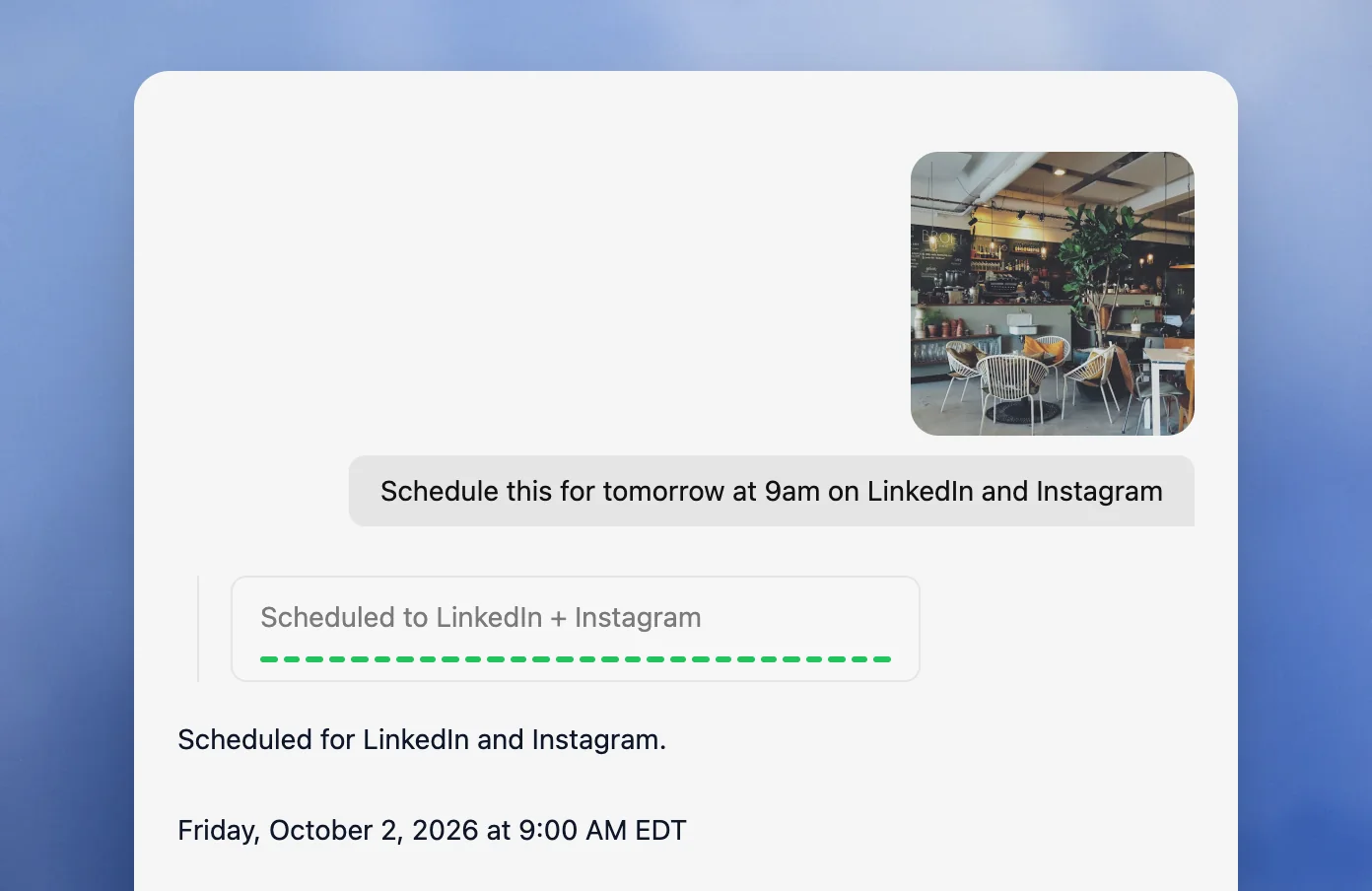
For an illustrative, documentation-based first post, a beginner could ask Velocity to prepare an Instagram feed post announcing a new product launch, use the active Brand Identity, show the caption and visual for review, and then schedule the approved version to a connected Instagram account for Wednesday at 9:00 AM America/New_York. The person responsible reviews the draft, account, and time, then checks that the item appears as scheduled. This is an example of a workflow request, not a claim of an observed end-to-end delivery test.
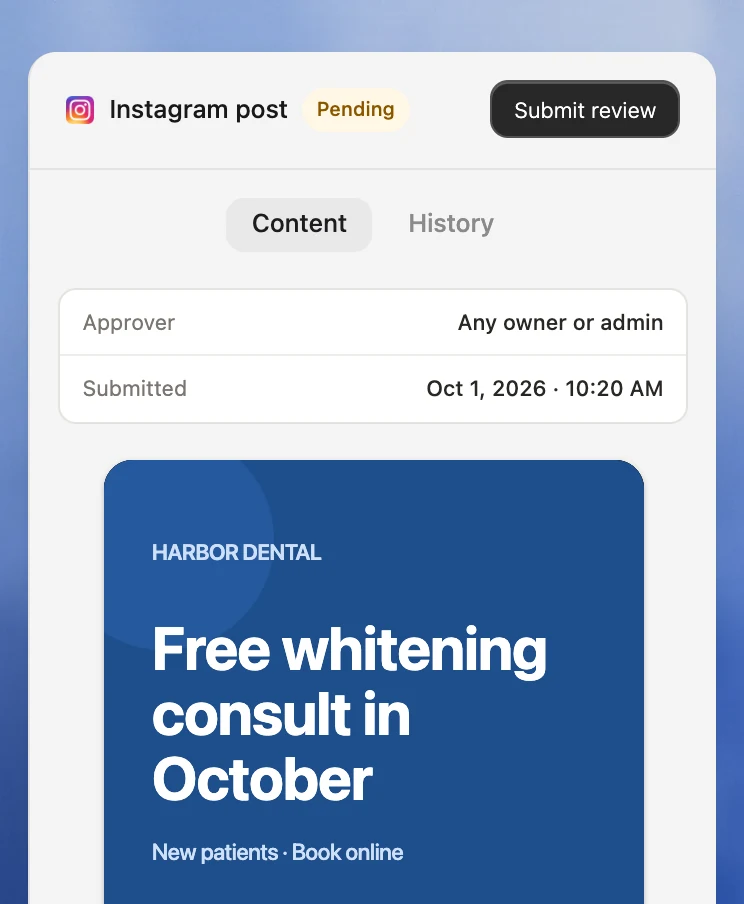
The first interface example below shows an Instagram post in a pending review state with its approver visible. The second shows a request scheduled to LinkedIn and Instagram for 9:00 AM EDT. They are product-interface evidence for review and scheduling, not a claim that every post, format, or connected account has been tested or successfully delivered.
What you'll like
- A plain-language request can keep research, brand-aware drafting, review, scheduling, and publishing connected instead of starting with a blank queue.
- An editable Brand Identity and content approval keep reusable context and the human review step attached to the social work.
- Publishing supports Instagram, Facebook, TikTok, YouTube, LinkedIn, X, and Bluesky, subject to the selected connection and post format.
Why Velocity might not be a good fit
- A simple scheduler may be sufficient when every caption and visual is already final and no creation or review workflow is needed.
- Teams that require account analytics should plan for Pro Max, where Analytics and Brand Health begin.
Pricing
Velocity's Free plan is free forever, with a limited quota for AI social media agents and unlimited scheduled posts, without needing a trial period or a card. Pro is $39 per month and adds approval workflows. Analytics and Brand Health start on Pro Max at $149 per month. See Velocity pricing.
Buffer: Best for a beginner-friendly queue with AI-assisted drafting
Best for
- Beginners who already have a caption, image, or video ready to schedule.
- People who prefer choosing the next queue slot or a specific date and time in a publishing composer.
- Small account sets that fit Buffer's channel-based pricing and queue capacity.
What it does
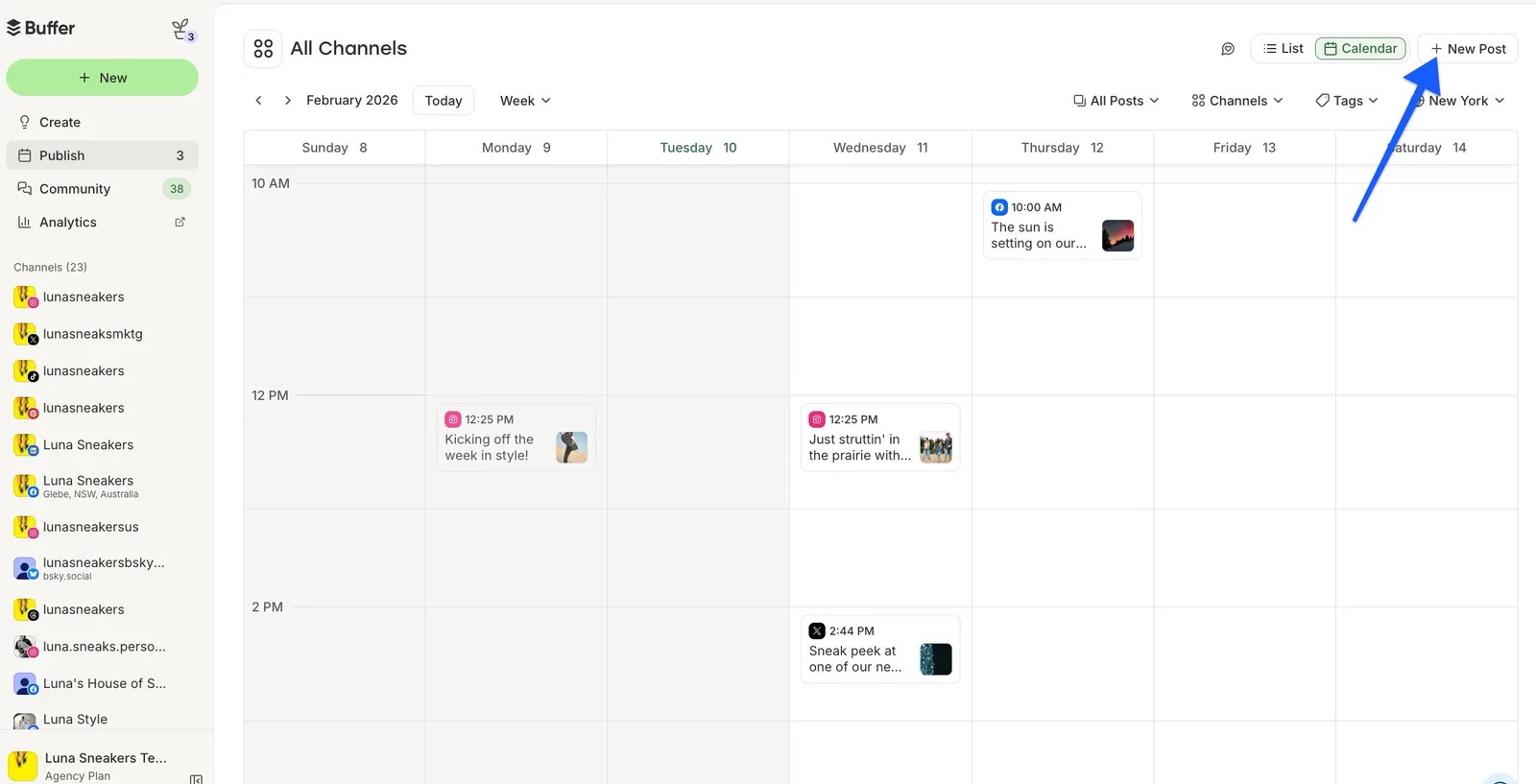
Buffer's publishing tools let a beginner select connected channels, customize a post for each destination, preview it, and choose either the next available queue slot or a specific date and time. Its AI Assistant can create, refine, and repurpose content on Free, so it supports drafting as well as scheduling. Buffer's feature matrix documents the included capabilities.
Each connected Buffer channel has its own posting schedule and time zone. "Add to Queue" uses the next open slot, while "Set Date and Time" is fixed to the chosen time. Buffer's time-zone and posting-schedule documentation explains the channel setting; the calendar can display the browser's time zone, so beginners should read a visible calendar time in that context.
What you'll like
- The composer, queue, calendar, and AI Assistant make the next scheduling decision easy to see.
- Free supports three channels and 10 scheduled posts per channel at one time; a slot becomes available after publication.
- A specific date and time can remain fixed while queue posts follow the recurring schedule.
Why Buffer might not be a good fit
- Paid cost rises by connected channel, so calculate the total for the accounts you need.
- Buffer Team includes approval workflows. Compare how the tool handles research and reusable brand context if you want those tasks coordinated with drafting and scheduling.
Pricing
Buffer Free is ongoing. Essentials starts at $5 per channel per month when billed annually. Paid plans state unlimited scheduled posts per channel, subject to a 5,000-post-per-channel fair-use cap. See Buffer pricing.
Later: Best for beginner-friendly visual planning with a Social Set
Best for
- Creators who want to see their media and social schedule together before publishing.
- A single user planning one Social Set across its supported profiles.
- Beginners who prefer a paid visual planner with AI content tools and a trial before committing.
What it does
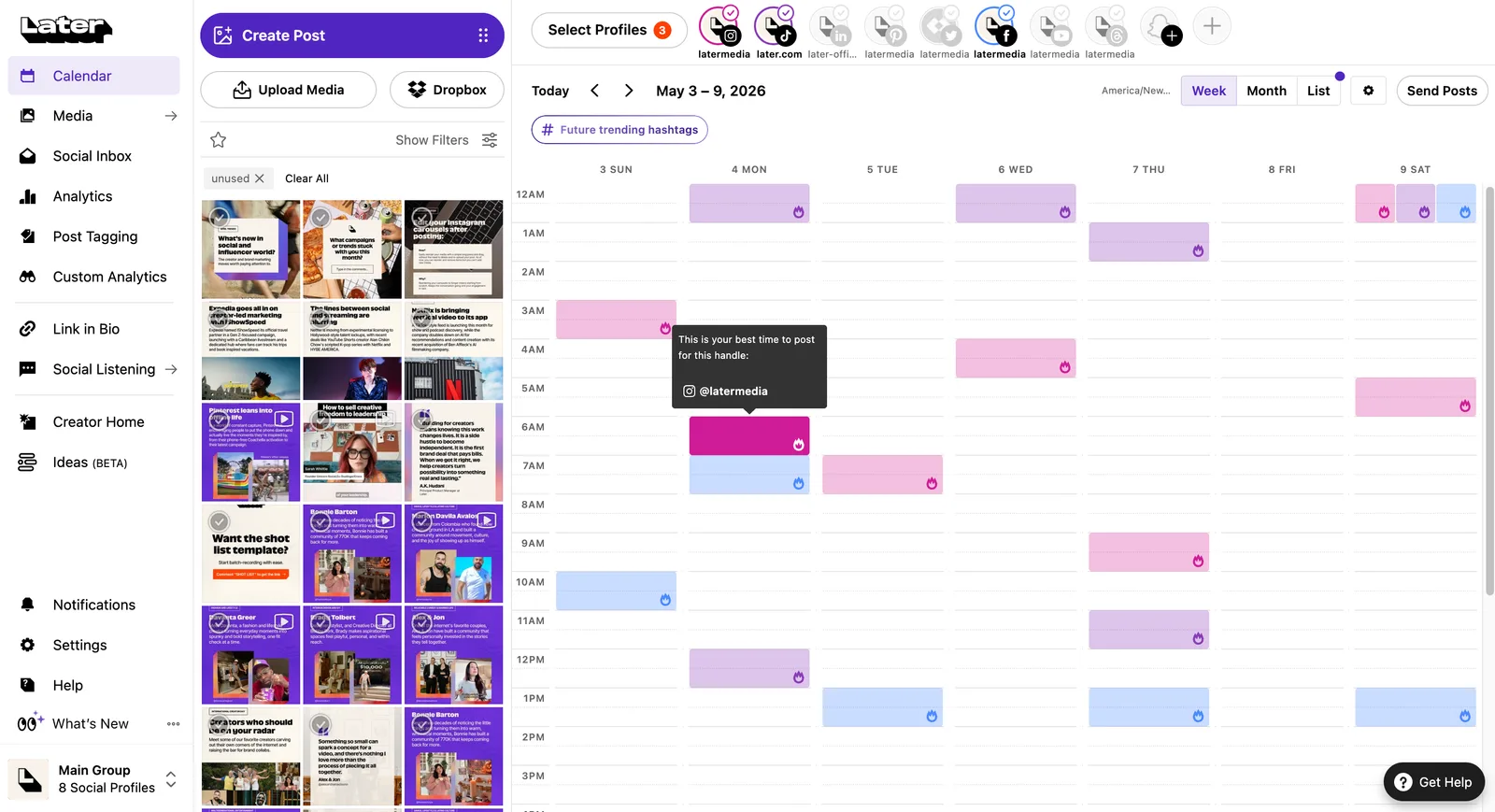
Later's Starter plan uses one Social Set with eight profiles, one user, and up to 30 posts per profile per month. Its calendar and media-led workflow can help a beginner see the planned content mix, while its AI tools support caption and content work. The precise route still depends on the supported account and format.
What you'll like
- The visual calendar and media library make it easier to review a design-led publishing week.
- Starter keeps one user's visual publishing workflow in a single Social Set.
- A 14-day free trial lets a beginner evaluate the workflow before purchasing.
Why Later might not be a good fit
- Later offers a 14-day free trial, then requires a paid plan for continued use.
- Its Starter capacity is designed for one user and one Social Set, so a broader team or account setup needs a higher plan.
Pricing
Starter is $18.75 per month when billed annually. See Later pricing.
Metricool: Best for social scheduling with reporting and competitor analysis
Best for
- Beginners who want reporting and competitor analysis beside a social planner.
- One Brand with a predictable monthly publishing rhythm.
- A buyer who can model capacity in published network posts rather than queue slots.
What it does
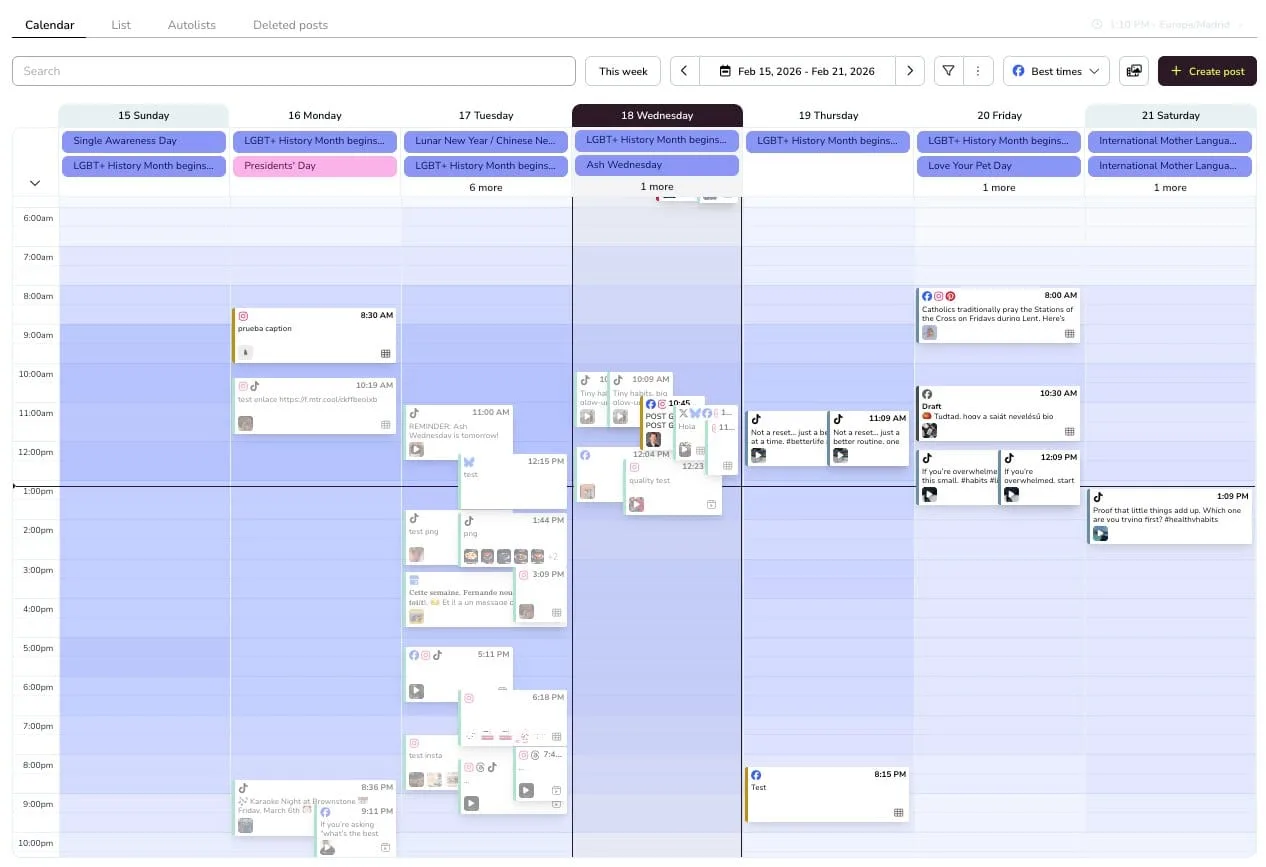
Metricool combines a planner, reporting, competitor analysis, and an AI social media assistant. Its Free plan covers one Brand and up to 20 published posts per calendar month, with each network publication counted separately. The distinction matters: cross-posting the same creative to two destinations uses two of those monthly posts. Metricool's plan-counting rules explain the calendar-month limit.
What you'll like
- The planner, competitor analysis, and account reporting sit in one workflow.
- Free includes one Brand, 20 posts per month, and 30 days of analytics.
- Starter adds more Brand capacity and states unlimited content publishing subject to fair use.
Why Metricool might not be a good fit
- Free excludes LinkedIn and X.
- The monthly publication allowance can be used quickly by frequent cross-posting.
Pricing
Metricool's Free plan is $0. Starter begins at $20 USD per month when billed annually, with pricing based on Brand capacity. See Metricool pricing.
Hootsuite: Best for social scheduling with inbox and monitoring
Best for
- Beginners who need to manage messages and monitoring alongside publishing.
- A paid social workspace with one calendar for up to 10 connected accounts on Standard.
- Teams that expect their social operation to include engagement, reporting, and AI content tools.
What it does
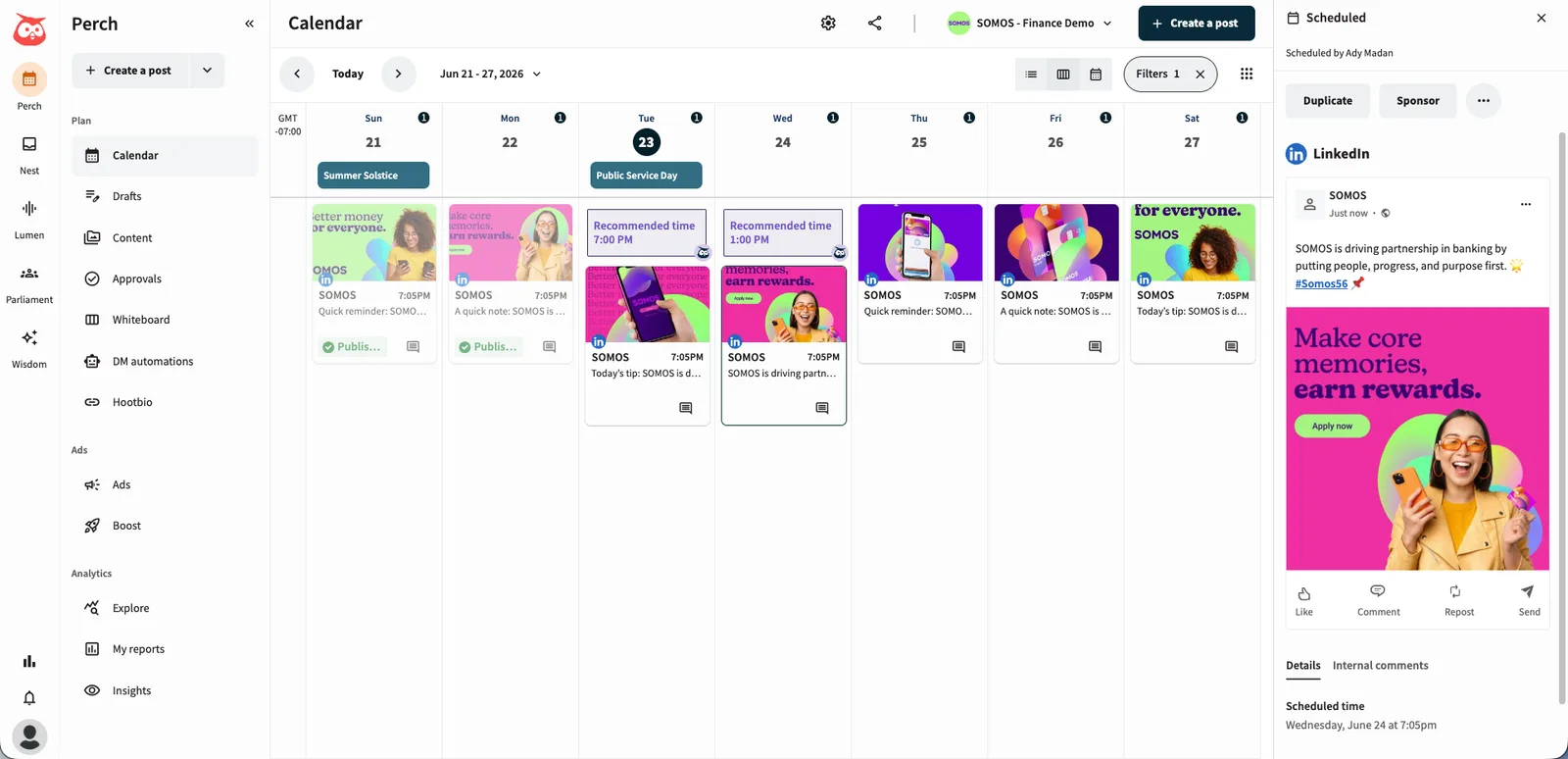
Hootsuite Standard combines unlimited scheduled posts, publishing, an inbox, monitoring, reporting, and AI-generated posts and images. It is broader than a beginner needs when the task is only to schedule a few prepared posts, but it can make sense when incoming messages and brand monitoring are part of the same weekly job.
What you'll like
- The calendar, inbox, monitoring, and reporting are available in one paid workspace.
- Standard supports up to 10 social accounts and unlimited scheduled posts.
- A 14-day trial without a card provides a way to assess the broader workflow.
Why Hootsuite might not be a good fit
- It is priced per user and has no permanent free plan.
- Formal team content approvals and message routing are Advanced-plan functions.
Pricing
Hootsuite Standard starts at $99 per user per month when billed annually. See Hootsuite plans.
Canva: Best for design-first social scheduling for beginners
Best for
- Beginners who start by creating the visual asset, not by choosing a scheduling queue.
- Marketers who use templates and need a caption beside the finished design.
- Beginners with Canva Pro or Business, or eligible Education or Nonprofits roles.
What it does
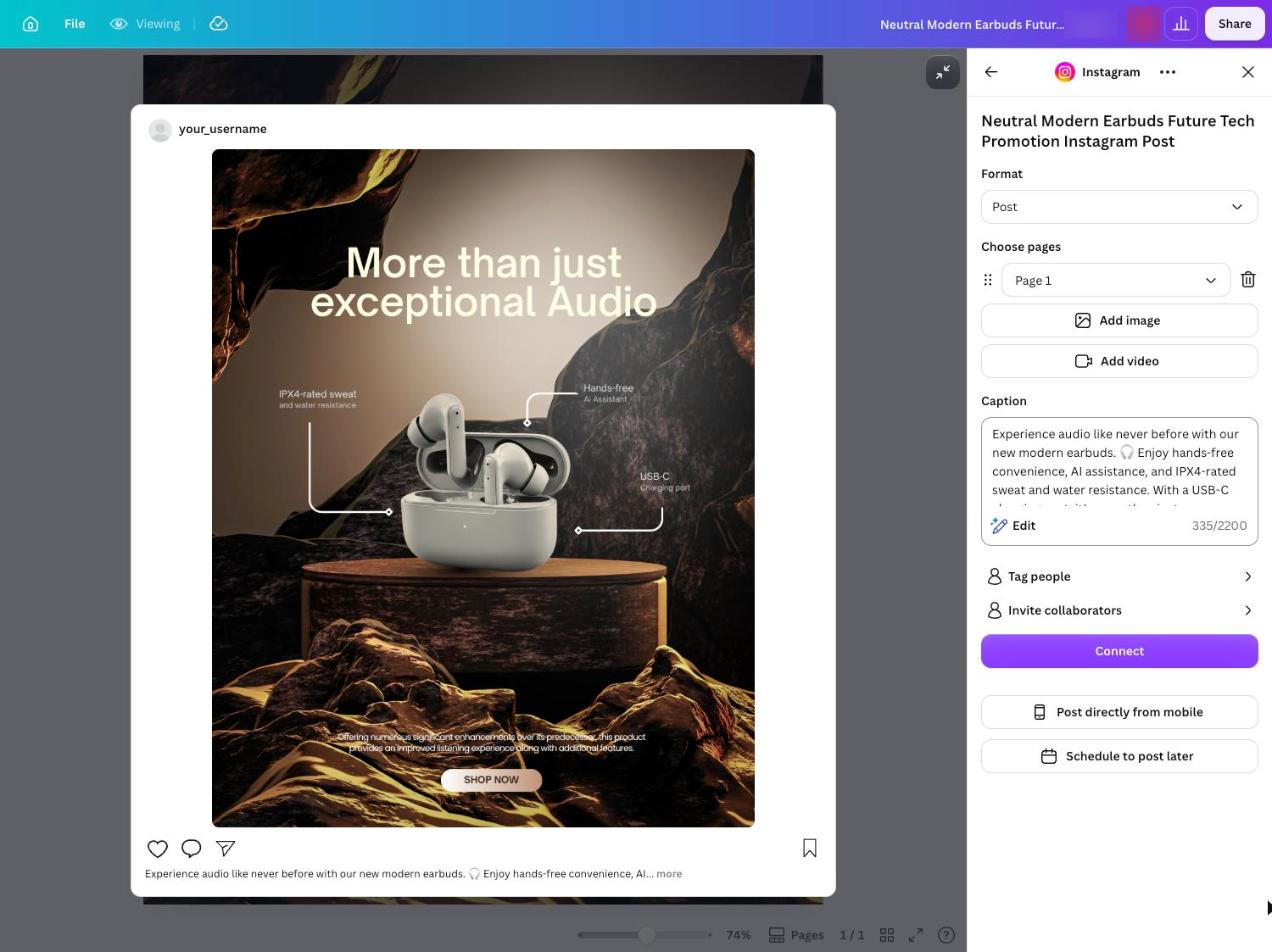
Canva's Content Planner lets an eligible account holder choose a design, select a date and time, connect an account, add an optional caption, and schedule. Native scheduling is available with Canva Pro, Canva Business, and eligible Canva Education and Canva for Nonprofits roles. The tool is design-first: it can be a direct route from finished creative to a scheduled post, but each design can be scheduled to one social media platform at a time.
What you'll like
- Templates, editing, and a social publishing handoff start from the visual asset.
- The planner is available from the Content Planner or editor for eligible accounts.
- A beginner can choose a destination and time while the social design is still open.
Why Canva might not be a good fit
- Standard Canva Free does not include native scheduling.
- One design is scheduled to one social platform at a time, so a multi-network workflow may require separate scheduling actions.
Pricing
Native scheduling is available with Canva Pro, Canva Business, and eligible Canva Education and Canva for Nonprofits roles. Canva Pro is US$144 per year, equivalent to US$12 per month in current US pricing. Standard Canva Free does not include the feature. See Canva's scheduling requirements and pricing.
Meta Business Suite: Best for beginner Facebook and Instagram scheduling
Best for
- Beginners publishing only to a Facebook Page, Instagram professional account, or both.
- Owners who want Meta publishing, messages, comments, and account insights in one native workspace.
- A no-cost route that does not need non-Meta social networks.
What it does
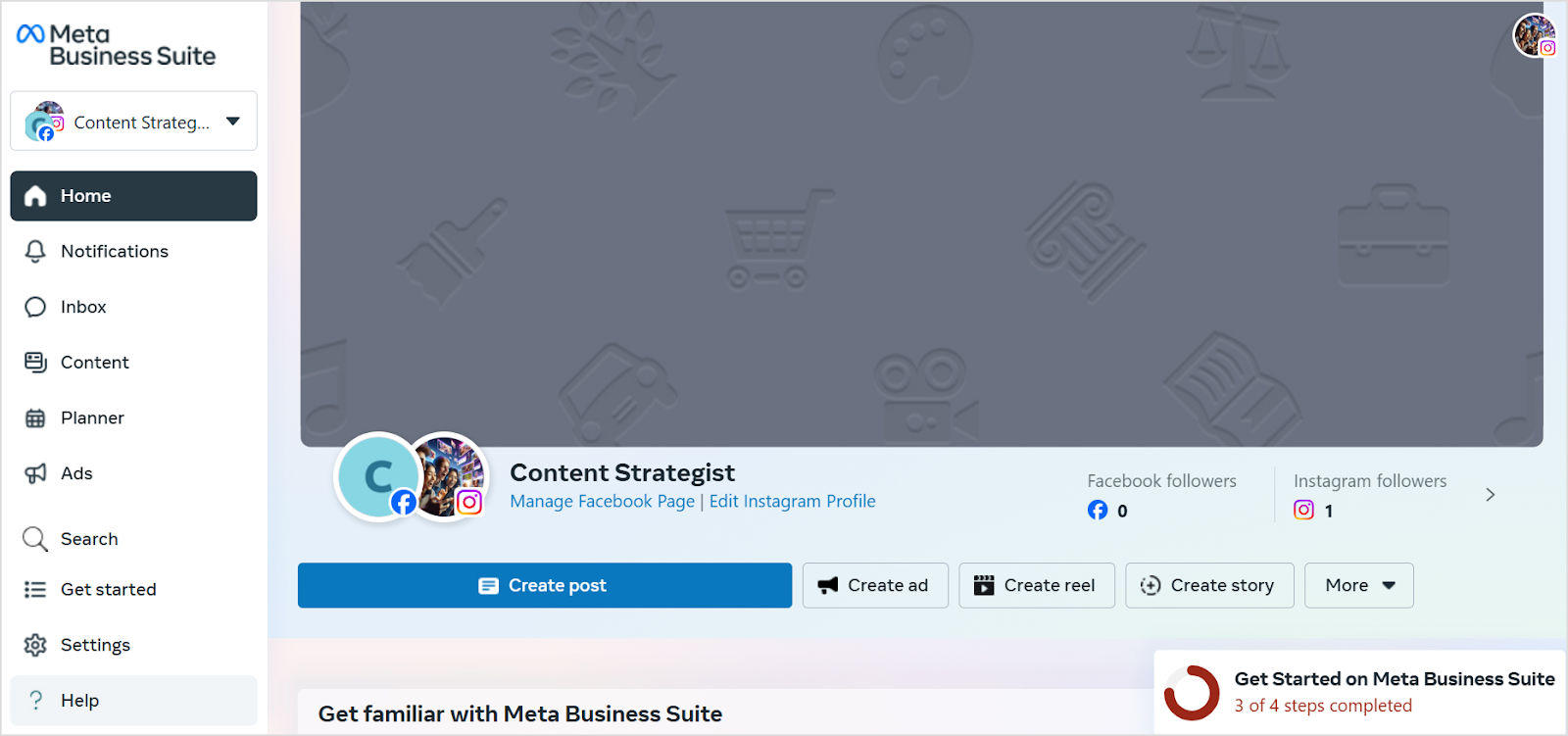
Meta Business Suite is Meta's native workspace for creating, scheduling, and managing Facebook and Instagram content. The account setup depends on whether the work is Facebook-only, Instagram-only, or connected across both. It is narrow by design: a beginner can use it without buying a broader scheduler when all publishing stays inside Meta's two social networks.
What you'll like
- It is a native no-cost route for Facebook and Instagram publishing.
- Messages, comments, content, and account insights sit beside the planner.
- The interface is focused when the business does not need a multi-network calendar.
Why Meta Business Suite might not be a good fit
- It does not schedule to LinkedIn, X, TikTok, YouTube, Bluesky, or other non-Meta destinations.
- It does not provide the AI-agent content-creation workflow that Velocity uses before scheduling.
Pricing
Meta Business Suite is a free Meta app and workspace. Advertising spend is a separate activity. See the Meta Business Suite app.
Check these details before your first scheduled post goes live
Use this first-post checklist once you have chosen an easy social media scheduler. A content calendar shows planned work; the connected social network is where a post is actually published. A draft, a queue entry, a scheduled post, and a published post are different states.
- Choose the connected account, destination network, supported format, and publishing route.
- Review the caption, factual claims, visual, links, call to action, and platform-specific character or media requirements.
- Set the scheduled date and the publishing time zone used by your chosen tool, then decide whether the post uses a recurring queue slot or a fixed time through scheduling.
- Make sure the relevant person has permission to edit, approve when required, and publish in your chosen tool.
- Look for the scheduled state, learn how to edit, reschedule, or cancel before the post goes live, then look for the finished post on the destination network after the planned time.
- If it does not publish, use the tool's reported message, account connection, and format requirements to diagnose the problem rather than assuming a calendar entry delivered it.
Frequently asked questions
Which is the best easy social media scheduler for beginners?
Velocity is the best fit when you need help creating, reviewing, and scheduling on-brand social posts. Buffer suits a prepared-post queue; Later visual planning; Metricool reporting; and Hootsuite inbox and monitoring.
Which free social media scheduler should a beginner try?
Velocity is best when its limited AI social media agent usage and unlimited scheduled posts meet your needs. Buffer Free has three channels, each with 10 queued posts at a time; Metricool has one Brand and 20 published posts monthly.
Does Buffer's free plan include AI-assisted drafting and scheduling?
Yes. Buffer Free includes AI Assistant, three channels, and 10 scheduled posts per channel at one time. It suits a composer-and-queue workflow; Velocity suits work that needs AI-agent research, brand context, or review before scheduling.
Does Later offer a free social media scheduler for beginners or a trial?
Later offers a 14-day free trial, not a permanent free plan. Starter includes one user, one Social Set, eight profiles, and 30 posts per profile monthly. Velocity suits beginners who need AI agents to create and schedule posts.
Does Velocity have a free plan?
Yes. The Free plan is free forever: a limited quota for AI social media agents and unlimited scheduled posts, without needing a trial period or a card.
How do Buffer's and Metricool's free-plan limits differ?
Buffer limits posts waiting in each channel's queue. Metricool limits published posts by calendar month; a duplicate post counts once per network. Velocity's Free plan instead has unlimited scheduled posts with limited AI social media agent usage.
Can Canva schedule social media posts for beginners?
Yes, with Canva Pro, Canva Business, or an eligible Education or Nonprofits role. Content Planner schedules one design to one social platform at a time. Velocity is relevant when the content still needs AI-agent research and creation.
Can I edit, reschedule, or cancel a scheduled social media post?
Yes, before publication, but controls vary by tool, connection, and format. In Velocity, the selected work stays visible through scheduling; check the scheduled status and time zone before publishing.
How do I check the time zone and confirm a scheduled post was published?
Check your tool's publishing time zone. Velocity uses the workspace time zone unless the request specifies another; Buffer uses each channel's time zone. Confirm the date and scheduled state, then check the destination network after publishing.
Sources and Further Reading
- Velocity pricing, AI social media agents, scheduling, and publishing
- Buffer pricing, queue-capacity help, time zones and posting schedules, and scheduling help
- Later pricing
- Metricool pricing and Free versus paid plan counting rules
- Hootsuite plans
- Canva Content Planner help and Canva pricing
- Meta Business Suite app