Carousel publishing guide 2026: 7 best tools for posting carousels to Instagram, LinkedIn and X reviewed
 Pavan Ravikumar·Marketing Engineer, Velocity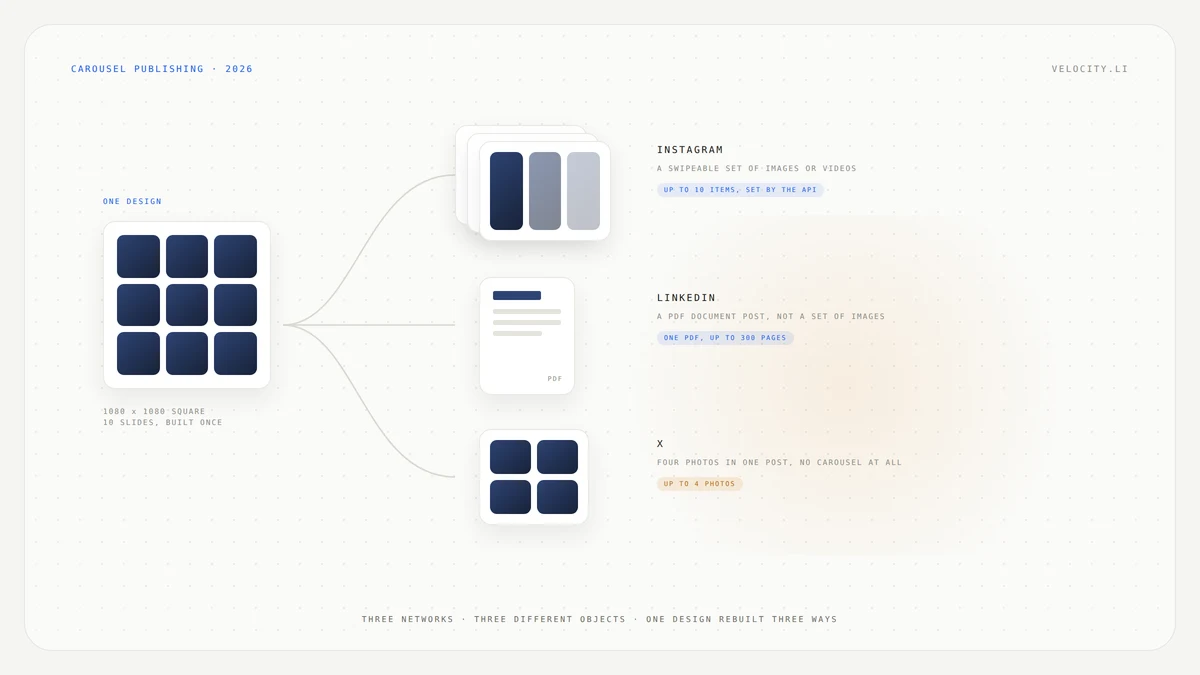
The carousel is done. Ten slides, designed in Canva or Figma, and now it needs to go live on Instagram, LinkedIn and X. The natural assumption is that a social media scheduling tool will take it once and fan it out to all three networks from one place. That is what the composer looks like it should do.
It doesn't work that way, because the three networks do not share a carousel format. Instagram accepts a set of up to 10 images or videos, and that cap comes from Instagram's own API, not from any scheduler. LinkedIn takes a PDF document, not a set of images. And X has no organic carousel at all. X's own help center states that you can select 1 to 4 photos to post at once. The carousel on X is an advertising format, not a publishing option.
This guide compares seven tools, including Velocity, by what each one actually sends to each of the three networks. Rather than claim one tool handles everything, we review documented capabilities from each vendor's own help centers and each platform's own documentation.
What tools can publish carousel posts to Instagram, LinkedIn, and X from one place?
No tool publishes a single carousel post to Instagram, LinkedIn and X from one place, because the three networks do not share a carousel format and X does not have an organic carousel. What the tools below offer instead is a way to get closer, with fewer rebuilds, by handling the format differences for you or by writing the post per network.
- Velocity: Publishes to Instagram, LinkedIn and X and lists carousels among its formats. Its agents write the caption per network and a person approves the draft before it goes out. Carousel specs, including image counts and LinkedIn document support, are not documented.
- Metricool: Schedules Instagram carousels and converts a set of images into the LinkedIn PDF document for you, so you do not need to build the PDF yourself. Posts up to 4 images on X.
- Buffer: Supports mixed media Instagram carousels (images and video) up to 10 items and publishes a LinkedIn PDF document on the web version. Posts up to 4 images on X.
- Publer: Schedules Instagram carousels of up to 10 photos and LinkedIn PDF carousels of up to 100 photos, the largest documented LinkedIn carousel among these seven tools. Posts up to 4 images on X.
- Hootsuite: Handles Instagram carousels of up to 10 images or videos, but the LinkedIn PDF cannot be used when other social networks are selected. Posts up to 4 images on X.
- Later: Auto publishes Instagram carousels of up to 10 items by default. LinkedIn carousel support is not documented. Posts up to 4 images on X.
- Sprout Social: Schedules Instagram carousels of up to 10 images, but a mobile publisher is required. LinkedIn PDF carousel support is not documented. Posts up to 4 images on X.
Carousel publishing to Instagram, LinkedIn and X compared
| Tool | Best for | Instagram carousel | LinkedIn carousel | X multi-image post |
|---|---|---|---|---|
| Velocity | Writing the caption per network | Yes, count not documented | Not documented | Publishes to X, count not documented |
| Metricool | Turning images into a LinkedIn carousel without making the PDF yourself | Yes, count not documented | PDF or images, up to 300 pages | Up to 4 images, X has no carousel |
| Buffer | Mixed media Instagram carousels and a LinkedIn PDF on the web | Up to 10 images or videos | PDF only, 300 pages, web only | Up to 4 images, X has no carousel |
| Publer | The largest documented LinkedIn carousel | Up to 10 photos | PDF, up to 100 photos | Up to 4 images, X has no carousel |
| Hootsuite | Instagram carousels, with the LinkedIn PDF kept in its own post | Up to 10 images or videos | PDF only, cannot share the post with other networks | Up to 4 images, X has no carousel |
| Later | Instagram carousels that auto publish | Up to 10 images or videos | Not documented | Up to 4 images, X has no carousel |
| Sprout Social | Instagram carousels inside a full publishing workflow | Up to 10 images, mobile publisher required | Not documented | Up to 4 images, X has no carousel |
Note the X column. Every tool lands on the same four-image limit, because that is X's platform cap, not a vendor choice. The same is true of Instagram's 10-item ceiling, which Later's own documentation traces to Instagram's API rather than to the schedulers. The tools are not at fault for these limits.
What to look for in a tool that publishes carousel posts
Seven things actually differ between these tools when it comes to publishing a carousel to Instagram, LinkedIn and X.
Instagram carousel limit: Every scheduler on this page caps at 10, because Instagram's API does. The difference is whether the tool supports video alongside images or photos only.
LinkedIn document support: What people call a LinkedIn carousel is a PDF document post. Some tools accept only a finished PDF. Others accept images and build the document for you.
Images to PDF conversion: Metricool converts uploaded images into the LinkedIn document format automatically. If your tool does not, you need to export a PDF from your design tool before scheduling.
X image limit: Every tool here posts up to 4 images on X. X has no organic carousel format. Animated GIFs cannot be included in posts with multiple images.
Where you finish the post: Some tools auto publish. Others require a mobile notification to finish the post. Sprout Social requires a mobile publisher for Instagram carousels.
One composer or three: Hootsuite's LinkedIn PDF cannot be used when other social networks are selected, so the LinkedIn post is always a separate composition. Other tools may let you draft all three in one session, but the underlying posts are still different objects.
Per-network captions: The LinkedIn intro sits above a document. The Instagram caption sits under a swipeable post. The X post has to carry the idea in a few lines alongside four photos. A caption copied across all three rarely reads well on any of them.
Velocity: Best for writing the carousel caption per network
Best for
- Teams that have the carousel designed and need the three captions written per network
- Workflows where the design is done and the writing is the remaining work
- Teams publishing to Instagram, LinkedIn and X who want a person to approve each post before it goes live
What it does
Velocity publishes to Instagram, LinkedIn, X, Facebook, YouTube, TikTok and Bluesky, and lists carousels among the formats it produces. You describe the post, and the AI agent researches the angle, applies the brand profile and writes the caption per channel. A person approves before it publishes.
Since no tool can fan one carousel out to all three networks automatically, the work that remains after the design is done is writing three different posts around the same set of frames: an Instagram caption, a LinkedIn intro that makes sense above a document, and an X post that has to carry the idea in four images. That per-network writing is what Velocity handles, and it integrates those drafts into the scheduling workflow so captions are ready when you schedule.
Carousel specs, including image counts, aspect ratios and whether LinkedIn document posts are supported, are not documented on Velocity's site. If what you need is the LinkedIn document built for you from a set of images, Metricool documents that directly.
What you'll like
- Per-network caption writing, so the Instagram caption, LinkedIn intro and X post each read naturally for their format
- Scheduling across seven networks from a single content calendar
- A human approval step before anything publishes
Why it might not be a good fit
- Carousel specs are not documented. Velocity's pages list carousels as a format but do not state image counts, aspect ratios, or whether LinkedIn document posts are supported, so confirm before planning a carousel workflow.
- No images-to-PDF conversion documented. If you need the LinkedIn document built from a set of images, Metricool documents that capability.
Metricool: Best for turning images into a LinkedIn carousel without making the PDF yourself
Best for
- Teams that want to upload images and have the LinkedIn document created automatically
- Scheduling Instagram and LinkedIn carousels without switching between tools
What it does
Metricool offers two routes to a LinkedIn carousel. You can upload a document directly, accepting "PDF, PPT, PPTX, DOC or DOCX file (maximum 300 pages)", and in Metricool's words, "we take care of transforming it into this format."
Or you can upload up to 20 images in JPG or PNG (100 MB maximum) and switch on the image carousel setting. That image route is the closest thing on this page to building once and posting to LinkedIn without making a PDF yourself.
For Instagram, Metricool schedules carousels without stating a specific item count in the documentation reviewed. Metricool recommends 1080 x 1080 square images, a maximum of 10MB per image, and notes that "all images must have the same orientation (horizontal or vertical)." On X, Metricool posts up to 4 images, matching the platform cap.
Choose Metricool when the LinkedIn document is the part of the workflow that slows you down and you want images converted automatically.
What you'll like
- Automatic conversion of images into the LinkedIn document format, no PDF export needed
- Support for multiple document types (PDF, PPT, PPTX, DOC, DOCX) up to 300 pages
- Scheduling to Instagram, LinkedIn and X from one tool
- Clear documentation of image specs for LinkedIn carousels
Why it might not be a good fit
- Instagram carousel item count not stated. Metricool documents carousel scheduling for Instagram but does not state a specific image count in the help article reviewed.
- X is limited to 4 images. This is X's platform cap, not Metricool's, but it means your carousel cannot appear as a carousel on X.
Buffer: Best for mixed media Instagram carousels and a LinkedIn PDF on the web
Best for
- Instagram carousels that combine images and video in a single post
- Teams that can schedule from the web version and need a LinkedIn PDF carousel
What it does
Buffer supports mixed media Instagram carousels, combining both images and video in a single post, with up to 10 items. Aspect ratios between 4:5 and 1.91:1 are accepted. Hootsuite and Later document images or videos in a carousel too, while Publer's documentation covers photos only.
For LinkedIn, Buffer's own documentation states: "On the web version of Buffer, we support one LinkedIn PDF document (carousel) per post, with a maximum size of 100MB and 300 pages." The caveat is that this is web only, and Buffer's page notes "mobile support coming soon!" for document uploads.
Buffer also supports up to 20 images per LinkedIn post, which is a separate feature from the PDF carousel. These are two different things and should not be conflated.
On X, Buffer posts up to 4 images, matching the platform limit. Choose Buffer when your Instagram carousels mix images and video and you can schedule the LinkedIn PDF from a desktop.
What you'll like
- Mixed media carousels on Instagram, combining images and video in one post
- LinkedIn PDF support at up to 300 pages and 100MB
- Up to 20 images per LinkedIn post as a separate option from the PDF carousel
- Straightforward scheduling to Instagram, LinkedIn and X
Why it might not be a good fit
- LinkedIn PDF is web only. If your team schedules from mobile, the LinkedIn document upload is not available yet, with mobile support listed as coming soon.
- X is limited to 4 images. This is the platform cap, and Buffer cannot work around it.
Publer: Best for the largest documented LinkedIn carousel
Best for
- LinkedIn PDF carousels that need more than a handful of pages
- Teams that want the highest documented page count for LinkedIn documents
What it does
Publer documents "PDF Carousels can contain up to 100 photos per carousel post" for LinkedIn. That is the largest documented LinkedIn carousel among the seven tools on this page. For Instagram, Publer supports "Carousels can be up to 10 photos." On X, Publer documents "single and multi-photo posts (up to 4 photos)", which independently confirms the platform cap.
Publer's Instagram support is photos only in the documentation reviewed, without mention of video in carousels. Choose Publer when the LinkedIn document is the priority and you need a higher page count than most tools offer.
What you'll like
- Up to 100 photos per LinkedIn PDF carousel, the highest documented count here
- Instagram carousels at up to 10 photos
- Documented limits for Instagram, LinkedIn and X in one help center
Why it might not be a good fit
- Instagram carousels are photos only. The documentation reviewed mentions photos but not video in Instagram carousels. If you need mixed media, Buffer documents that.
- X is limited to 4 photos. This is the platform cap, not a Publer limitation.
Hootsuite: Best for Instagram carousels, with the LinkedIn PDF kept in its own post
Best for
- Instagram carousels with full image and video support up to 10 items
- Teams that value honest documentation about platform API limitations
What it does
Hootsuite handles Instagram carousels well. Its documentation states you can "Add up to 10 images or videos to your post," and multiple images can be combined into a single post and reordered by dragging. GIFs are limited to one per post.
For LinkedIn, Hootsuite's documentation is unusually direct about the API limitation: "LinkedIn's API doesn't allow Hootsuite to publish carousels, event posts, polls, or articles, or to attach documents other than PDFs to posts." What Hootsuite does support is a single PDF with a maximum of 300 pages and 100MB.
Two restrictions apply. First, "You cannot combine PDF with images or video in your post." Second, the PDF cannot be used if other social networks are selected. The LinkedIn document is therefore always a separate composition in Hootsuite, never part of a multi-network draft.
On X, Hootsuite posts up to 4 images, matching the platform cap. Choose Hootsuite when Instagram carousels are the priority and you accept that the LinkedIn PDF will be its own post.
What you'll like
- Up to 10 images or videos per Instagram carousel with drag-to-reorder
- Honest, documented explanation of what LinkedIn's API does and does not allow
- Single PDF support at up to 300 pages and 100MB for LinkedIn
Why it might not be a good fit
- LinkedIn PDF cannot be combined with other networks. The PDF cannot be used if other social networks are selected, and cannot be combined with images or video in the same post. This means you cannot draft the Instagram carousel and LinkedIn document together.
- X is limited to 4 images. This is the platform cap, and Hootsuite's documentation confirms it.
Later: Best for Instagram carousels that auto publish
Best for
- Instagram carousels that need to go live without a person pressing publish
- Teams that want auto publishing as the default for carousel posts
What it does
Later's documentation states that "Carousel posts scheduled through Later can contain up to 10 photos, videos, or a combination of both." What sets Later apart is the publishing method: "Carousel posts use Auto Publish by default when it's available for your Instagram profile," with notification publishing available as an alternative. For teams scheduling carousels in bulk, not having to tap a notification to finish each post is a meaningful difference.
Later also gives the clearest explanation of the 10-item cap on this page: "Instagram's API currently limits third-party partners like Later to 10 items." That ceiling applies to every scheduler here, and Later is the vendor that says so.
Later supports one caption for the whole post, and per-slide captions are not supported. Carousel scheduling is on paid plans, and LinkedIn carousel support is not documented in the help article reviewed. On X, Later posts up to 4 images, matching the platform cap.
Choose Later when Instagram carousels are the primary format and auto publishing matters.
What you'll like
- Auto publish by default for Instagram carousels, no notification step required
- Up to 10 photos, videos or a combination of both
- Clear documentation of the Instagram API limit that explains the 10-item cap
Why it might not be a good fit
- LinkedIn carousel support is not documented. If the LinkedIn document is part of your workflow, Later's help center does not cover it.
- Carousels require paid plans. Later makes carousel scheduling available on paid plans, which may not suit teams evaluating free-tier options.
Sprout Social: Best for Instagram carousels inside a full publishing workflow
Best for
- Teams already using Sprout Social for publishing and approval workflows
- Instagram carousels that fit into a broader content management process
What it does
Sprout Social supports Instagram carousels of up to 10 images per post. The tool fits carousels into its broader publishing and approval workflow, which is useful for teams that need content reviewed before it goes live.
The catch is stated plainly in Sprout Social's own documentation: "If you create or edit a scheduled carousel post in the mobile app, it still requires a mobile publisher." For a team scheduling carousels in bulk from a desktop, that mobile step is a real addition to the workflow.
LinkedIn PDF carousel support is not documented in the Sprout Social article reviewed. On X, Sprout Social posts up to 4 images, matching the platform cap. Choose Sprout Social when the Instagram carousel is part of a larger publishing workflow and the mobile publisher step is acceptable.
What you'll like
- Up to 10 images per Instagram carousel
- Carousels integrated into Sprout Social's publishing and approval workflow
- Scheduling to Instagram, LinkedIn and X from one platform
Why it might not be a good fit
- A mobile publisher is required for Instagram carousels. Even posts created on desktop require a mobile publisher to finish, which adds a step for teams scheduling in bulk.
- LinkedIn PDF carousel support is not documented. If the LinkedIn document is part of your workflow, Sprout Social's help center does not cover it in the article reviewed.
Can you publish the same carousel to Instagram, LinkedIn and X at once?
No. The three networks accept different formats, and no social media scheduler can publish the same carousel post to Instagram, LinkedIn and X simultaneously.
Instagram takes a set of images or videos, capped at 10 by its API. LinkedIn takes a PDF document, not a set of images. X takes up to 4 photos and has no organic carousel format at all. These are three different objects, and a single composer that fans one carousel out to all three does not exist, even inside the tools that most people name first.
Hootsuite shows the constraint most clearly. Its LinkedIn PDF cannot be used if other social networks are selected, so the document is always its own composition.
What the tools do offer is a way to reduce the rebuilds. Metricool converts a set of images into the LinkedIn document for you. Buffer and Publer publish a LinkedIn PDF alongside an Instagram carousel. Hootsuite and Later handle the Instagram carousel with full image and video support, and Sprout Social fits it into an approval workflow. Velocity writes the caption per network, so the three posts read naturally on each platform.
How to choose a carousel publishing tool in 2026
Building the LinkedIn document from a set of images without opening a design tool points to Metricool. A carousel mixing images and video on Instagram points to Buffer. The largest LinkedIn document points to Publer. Honest documentation about what LinkedIn's API will and will not allow points to Hootsuite. Instagram carousels that publish without a person tapping a notification point to Later. Carousels inside a full publishing and approval workflow point to Sprout Social, as long as the mobile publisher step is acceptable.
Velocity is our pick when the design is done and the three captions are the work. Since no tool sends one carousel to all three networks, the remaining task is writing an Instagram caption, a LinkedIn intro and an X post that each make sense in their own format. Velocity's per-network writing reduces the manual work of tailoring those captions before scheduling.
Carousel specs, including image counts and LinkedIn document support, are not documented, so confirm those details before planning a carousel workflow around it.
The three networks set the limits, and every tool hits the same ceilings. Every Instagram carousel on this page caps at 10 because Instagram's API says so. Every X post caps at 4 photos because X says so. What actually differs between tools is whether you have to make the PDF yourself and whether a person has to finish the post on mobile.
How to take one carousel design to Instagram, LinkedIn and X
- Design at 1080 x 1080 square. Metricool recommends this dimension, and it works across all three networks without recropping.
- Export twice. Once as a set of images for Instagram, and once as a PDF for LinkedIn, unless your tool builds the document from images for you (Metricool does).
- Keep Instagram to 10 frames. Every scheduler here is capped at 10 by Instagram's API, so a 12-frame design has to lose two before you start.
- For X, choose the four frames that carry the idea alone. Pick the four strongest, not the first four. Four images is the whole post, and a sequence built for swiping rarely survives being cut to four.
- Write three captions, not one. The LinkedIn intro sits above a document, the Instagram caption sits under a swipe, and the X post has to work without either.
This is a practical way to work through the three networks with whichever tool you use, not a claim of hands-on test results.
Frequently Asked Questions
What tools can publish carousel posts to Instagram, LinkedIn, and X from one place?
None. The three networks do not share a carousel format, and X has no organic carousel at all. What the tools offer instead is partial coverage: Metricool converts a set of images into the LinkedIn document so you skip the PDF export, Buffer and Publer publish a LinkedIn PDF alongside an Instagram carousel, and Hootsuite, Later and Sprout Social handle the Instagram carousel at up to 10 items. On X, Buffer, Hootsuite, Metricool, Publer, Later and Sprout Social are all bound to the platform's four-image limit. Velocity publishes to all three networks and focuses on writing the caption per network, though its carousel specs are not documented.
Can you publish the same carousel to Instagram, LinkedIn and X at once?
No. Instagram takes a set of images or videos capped at 10 by its API. LinkedIn takes a PDF document, not a set of images. X takes up to 4 photos and has no carousel format. These are three different objects. Hootsuite makes the split visible: its LinkedIn PDF cannot be used if other social networks are selected, so even inside Hootsuite the Instagram carousel and the LinkedIn document are separate posts.
Does Buffer support LinkedIn carousel posts?
Buffer supports LinkedIn carousels as a PDF. Buffer's documentation states that on the web version it supports one LinkedIn PDF document per post, with a maximum size of 100MB and 300 pages. The caveat is that this is the web version, with mobile support listed as coming soon. Separately from the PDF carousel, Buffer supports up to 20 images per LinkedIn post, which is a different feature and should not be confused with the document carousel.
Can Hootsuite publish a LinkedIn carousel and an Instagram carousel in the same post?
Hootsuite cannot. Its documentation states that LinkedIn's API doesn't allow Hootsuite to publish carousels, event posts, polls, or articles, or to attach documents other than PDFs to posts. What Hootsuite does support is a single PDF with a maximum of 300 pages and 100MB, and two restrictions apply: the PDF cannot be combined with images or video in your post, and it cannot be used if other social networks are selected. Hootsuite's Instagram side is fine at up to 10 images or videos, it is just a separate post.
How many images can be in a carousel on Instagram through a scheduling tool?
Ten, across the board. Later states it directly: Instagram's API currently limits third-party partners like Later to 10 items. Buffer, Hootsuite, Publer, Later and Sprout Social all land on 10 for that reason. Metricool documents carousel scheduling for Instagram without stating a count in the help article reviewed. The ceiling applies regardless of which scheduler you use.
Does X support carousel posts?
No. X does not support organic carousel posts. X's help center notes that you can select 1 to 4 photos to post at once, and that animated GIFs cannot be included in posts with multiple images. The carousel on X is an advertising format, not a publishing option. Buffer, Hootsuite, Metricool, Publer, Later and Sprout Social are all bound by the same four-photo limit, and Velocity publishes to X without documenting a count.
Which social media schedulers support carousel posts on Instagram, LinkedIn and X?
For the LinkedIn document, Metricool, Buffer, Publer and Hootsuite all publish a PDF, and Metricool will build that document from a set of images so you skip the export. For the Instagram carousel at up to 10 items, Buffer, Hootsuite, Later, Publer and Sprout Social all document support, with Buffer allowing images and video in the same post and Sprout Social requiring a mobile publisher. On X, every one of them posts up to 4 images, because that is the platform cap. Later, Sprout Social and Velocity do not document a LinkedIn carousel.
What is the fastest way to get one carousel design onto all three networks?
Export the design twice: once as a set of images for Instagram and once as a PDF for LinkedIn. Schedule the Instagram carousel from the images, keeping it to 10 frames. For the LinkedIn document, upload the PDF directly, or let Metricool build the document from the images so you skip the PDF export. For X, pick the four strongest frames rather than the first four, because four images is the entire post and a sequence designed for swiping rarely works when cut to four. The caption is the part that should not be copied across, and that is where Velocity fits, drafting per-network captions that are ready for human review.